0:38

Introducing Copilot Pro: Supercharge your Creativity and Productivity
Microsoft · AI · Jan 2024
RealPact · Aug 2026 · 0:54 · AI-annotated
RealPact’s 0:54 launch film runs 24 scenes, about 2.3 s each. The product shows up at 0:11 and 7 features are revealed. There is no explicit call to action; a voiceover carries the film. Opens with a live-action toast, then alternates cream title cards with tilted 3D interface mockups on deep blue, each feature announced by a centered serif headline. Signature moves are count-up dashboard stats, aerial map zoom-ins, and a one-word-per-second crossfade on the AI agent card.
Is this your launch? to your site or press kit.
Microsoft · AI · Jan 2024
Windsurf · Developer tools · Aug 2025
Pulse · Oct 2026
An elderly man in a cream suit and white fedora sits in a teal outdoor chair against a blurred house. He tips the hat, lifts it off, then raises a glass of amber whiskey toward the camera in a toast.
Camera: Static
An elderly man in a cream suit reclines in a teal chair by a pool, sipping a drink and toasting the camera. Two white serif captions fade in and out over the center of the frame, the camera held still.
On-screen text: “The biggest purchase of your life.”, “In one click.”
Camera: Pull out
The RealPact wordmark, a white script “Real” joined to a light sans-serif “Pact.”, sits centered on a black field. It brightens from a dim gray to full white over the first third of the clip, then holds still.
On-screen text: “RealPact.”
Camera: Static
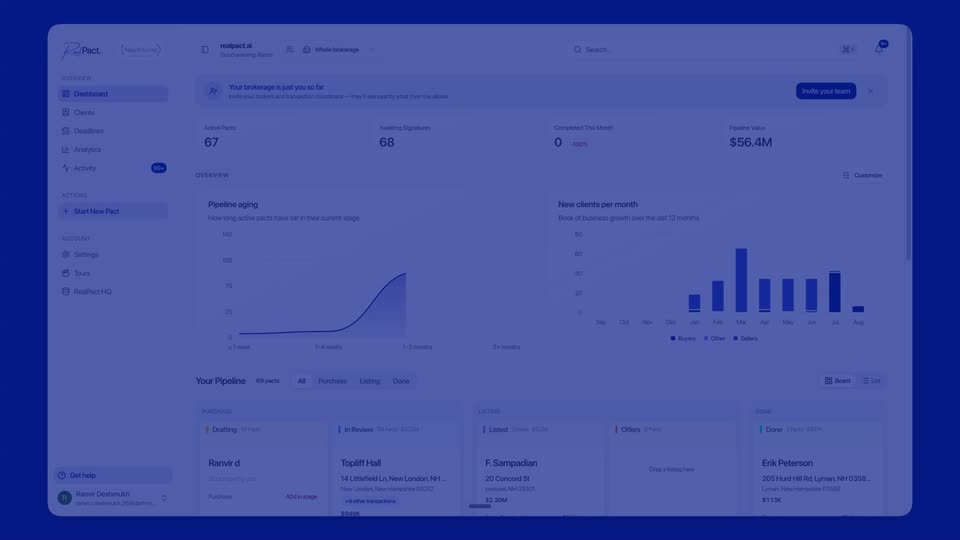
A real estate brokerage dashboard loads: the stat figures count up, the bar chart bars rise into place, and the background shifts from white to dark blue. A small Next scene tag slides in beside the logo.
On-screen text: “Next scene”
Camera: Static
A real estate dashboard mockup sits tilted in 3D on a deep blue field. A large white serif headline scales up and fades in across the center of the interface, settling over the charts and pipeline cards.
On-screen text: “Every deal, in one place.”
Techniques: Kinetic type, 3D mockup
Camera: Static
On a cream background, a black serif headline fades in above a white rounded input bar with a blue mic icon and a navy waveform button. A light green address chip with a house icon fades in below the bar. Locked-off frame, slow pace.
On-screen text: “You describe the deal.”
Camera: Static
A flat white interface card is centered on a solid blue field, held locked-off. Inside, a Google Maps aerial view of a wooded neighborhood slowly sweeps and settles while a parcel card for 3 Lewin Rd rises into view along the bottom edge.
On-screen text: “You describe the deal.”, “Draft the Purchase & Sale...”
Camera: Static
A property-management screen sits on a blue field. The satellite map in the center zooms in toward a green-outlined parcel, while a small 3 Lewin Rd card with a progress bar rests at the bottom edge.
Techniques: UI zoom
Camera: Push in
A property app screen with an aerial map zooms into a residential neighborhood, parcels outlined in green, as the view brightens from a blue tint. A serif headline fades in centered over the map.
On-screen text: “Every parcel, mapped.”
Techniques: UI zoom
Camera: Push in
On a dark brown background, the serif line “AI agent for” holds left of center while the trailing word crossfades through closings, deadlines, MLS data and property records, then settles on “every deal.” at a steady one-word-per-second pace.
On-screen text: “AI agent for closings”, “AI agent for deadlines”, “AI agent for MLS data”, “AI agent for property records”, “AI agent for every deal.”
Techniques: Kinetic type
Camera: Static
A property detail screen shows a tax map with a highlighted parcel and a photo of a blue house, while a cursor moves onto the parcel. The interface then dims as the tagline fades in at the bottom center.
On-screen text: “AI agent for every deal.”
Techniques: Cursor demo
Camera: Static
A real estate client portal, tilted in 3D perspective on a dark blue field, shows a tax map and a property photo. A large serif headline reads “Every record, pulled.” across the center, and a cursor hovers over the photo's right arrow.
On-screen text: “Every record, pulled.”
Techniques: 3D mockup, Cursor demo
Camera: Static
A property interface floats in 3D perspective on a blue field, paired with a static headline, “Every record, pulled.” The view scrolls down past the tax map and photo cards into a grid of ownership, deed and listing cards, a cursor drifting across.
On-screen text: “Every record, pulled.”
Techniques: 3D mockup, Cursor demo, UI zoom
Camera: Pan
A dimmed real-estate data interface fills the frame, showing an ownership timeline and record cards. A large cream serif headline overlays the center, listing the data types. The shot is locked-off and static throughout the scene.
On-screen text: “Deed, Tax, MLS, Property card, Listing info.”
Camera: Static
A flat property dashboard fills the frame as a grid of data cards scrolls upward, bringing a deed document and a yellow property card table into view at the bottom. A mouse cursor hovers over the listing card. The motion is a quick vertical pan.
Camera: Static
A white interface panel on a blue field holds two documents side by side, a scanned deed on the left and a property card table on the right. A cursor slides in and rests on the next-page arrow of the right panel. The frame stays locked off.
Techniques: Cursor demo
Camera: Static
A dimmed two-pane document viewer, deed on the left and property map on the right, sits behind a centered headline. The interface then brightens and switches to a purchase agreement view with a section progress bar across the top.
On-screen text: “All of it, aligned.”
Camera: Static
A contract editor shows two panes on a blue background. The left inspection form fills in with a checklist of property checks, while the right document pane scrolls up to a standard form header. A step bar across the top marks the Inspections stage in blue.
Camera: Static
A real estate contract screen opens on the Inspections section. A cursor travels down the left panel, pressing the Yes button on each inspection row from General Building to Lead Paint, while the right panel keeps the static association form.
Techniques: Cursor demo
Camera: Static
A tilted 3D view of a real estate purchase agreement form on a dark blue background. The form auto-fills its inspection rows with the value 14 days while a cursor hovers near a dropdown, all under a static white serif headline.
On-screen text: “Fill the Purchase & Sale in 5 minutes”
Techniques: 3D mockup, Cursor demo
Camera: Static
A cream field holds one centered line of serif type. The words fade in from left to right, each carrying a faint offset shadow as it lands, until the full sentence reads in two tones, dark brown and pale taupe.
On-screen text: “Built in New Hampshire, for the world.”
Techniques: Kinetic type
Camera: Static
On a cream field, the dark serif tagline holds centered, then the RealPact logo takes its place, the blue handwritten Real next to the black sans Pact.
On-screen text: “Built in New Hampshire, for the world.”
Camera: Static
A centered RealPact. wordmark holds on a flat cream background. The blue handwritten Real overlaps the black sans-serif Pact. The frame stays locked and still for the entire shot.
On-screen text: “RealPact.”
Camera: Static
A black screen holds, then a faint dark-blue glow rises along the bottom edge before fading back to full black.
Camera: Static