1:58

Introducing Marker Manager
Marker · B2B · Nov 2026
Cal.com · May 2022 · 1:54 · Full motion · AI-annotated
Cal.com’s 1:54 launch film runs 8 scenes, about 14 s each. The product is on screen from the first frame and 1 feature is revealed. There is no explicit call to action; a voiceover carries the film. A single continuous screen recording with slow, deliberate cursor moves and a steady narrated walkthrough that moves from a dashboard tour to the signup flow. Light gray interface with purple accents and plain sans-serif type keep the focus on the product, and the near absence of cuts lets each page breathe.
Is this your launch? to your site or press kit.
Marker · B2B · Nov 2026
Alara · B2B · Aug 2025
PARES AI · Real Estate and Construction · Jul 2025
A browser window holds the Cal.com Event Types page, listing meeting rows under the Sydney and Cal.com, Inc. sections. A cursor wanders over the list, then the view scrolls down to expose additional rows.
Techniques: Cursor demo
Camera: Static
A full-screen browser view of the Cal.com dashboard. A cursor clicks the Bookings tabs in turn, swapping the list between upcoming, past and cancelled entries. The cursor then selects Availability in the left sidebar, switching the page to two schedule rows.
Techniques: Cursor demo
Camera: Static
A Chrome window shows the Cal.com app store. The cursor rests on the Apps menu, the category illustrations load in, then the page scrolls through trending and all apps before the cursor clicks Settings, switching to the profile form.
Techniques: Cursor demo
Camera: Static
A Chrome window shows the Cal.com profile settings page with username, email and timezone fields. The page scrolls down to reveal theme options, then returns to the top while the cursor drifts across the form and rests over the Username field.
Techniques: Cursor demo
Camera: Static
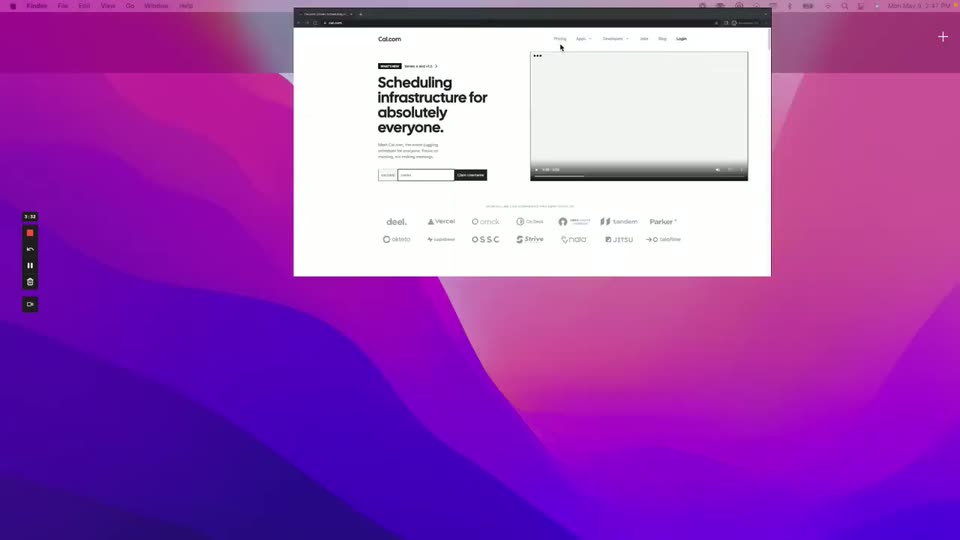
A desktop overview bar at the top shows three window thumbnails over a purple gradient wallpaper. The view then reframes into the Cal.com homepage in a browser, showing the hero headline, a username field, and a row of company logos.
Techniques: UI zoom
Camera: Static
A browser window shows the Cal.com homepage, headline on the left and a video player on the right. A cursor travels along the top navigation and rests on the Login link, which gains a focus outline as the tab starts reloading.
Techniques: Cursor demo
Camera: Static
A browser window holds the Cal.com login card, centered on a white page. A cursor drifts down to the Create an account link, hovers, and clicks it; the tab spinner and a loading bar appear as the page reloads.
Techniques: Cursor demo
Camera: Static
A browser window shows the Cal.com sign-up page, headline and testimonial on the left, trial form card on the right. A cursor clicks the username, email and password fields, popping up a password autofill suggestion, then hovers over the Sign up for free and Google buttons.
Techniques: Cursor demo
Camera: Static