0:50

Munito AI: open models in the EU for every use-case
Munito AI · B2B · Nov 2026
Briefer’s 1:43 launch film runs 8 scenes, about 13 s each. The product is on screen from the first frame and 1 feature is revealed. The call to action lands at 1:32 (90% in), over a voiceover. The video alternates between a static talking-head shot and long screen recordings, with the presenter shrinking into a circular inset pinned to the left for every UI segment. Pacing is slow and deliberate: single-purpose zooms into buttons, charts and code blocks, then a final zoom back to the face to land the call to action.
Is this your launch? to your site or press kit.
Munito AI · B2B · Nov 2026
Glasskube · B2B · May 2025
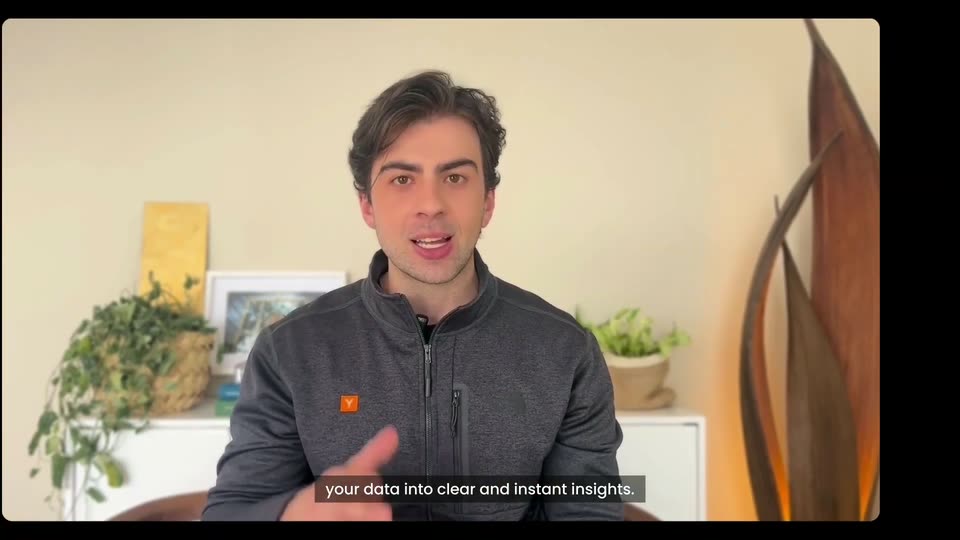
A man in a dark gray zip-up sits in a sunlit room with plants and a wooden sculpture, speaking to camera and gesturing. A white lower-third card slides in at the upper left with his name and title, then exits left as subtitles roll at the bottom.
On-screen text: “Hi, I'm Lucas from Briefer.”, “Lucas da Costa”, “Founder & CEO at Briefer”, “Today you will see how anyone on your”, “team can use our AI agent to turn”, “your data into clear and instant insights.”
Camera: Static
A man in a gray fleece speaks to camera in a bright home, then his footage shrinks into a rounded card on the left while a dark product interface with a document editor fades in behind it on the right.
On-screen text: “your data into clear and instant insights.”, “Meet your new AI analyst.”
Camera: Pull out
Screen recording of the briefer notebook with a circular presenter inset left. The view zooms to the Ask Agent button, then to the chat box where a question is typed and sent, then pulls back as a SQL query and table appear. Captions swap at the bottom.
On-screen text: “Meet your new AI analyst.”, “It writes, queries, plots, graphs and runs Python.”, “No fuss.”, “In this example, we're asking it for a sales per month graph with a category breakdown.”, “It thinks through the schema and understands any business context that you upload.”, “It then writes a query and plots a graph with exactly what we wanted.”
Techniques: Cursor demo, UI zoom
Camera: Pull out
A screen recording of the Briefer notebook shows a stacked bar chart, SQL and Python blocks, with a circular presenter video at left. A cursor hovers the chart for tooltips, then the view zooms into the chat box as a prompt is typed and sent.
On-screen text: “another text-to-SQL interface.”, “It's an intelligent agent that's”, “driving our powerful data workspace.”, “You can look through the graph, see the tooltips,”, “change the sections, colors, axes or anything else.”, “advanced analysis or anything that requires Python.”, “Now we'll ask it to compare our”, “top three selling products to all others.”, “The agent will figure out it needs both SQL”, “to fetch data and some code to analyze it and then seamlessly transition from SQL to Python. Every query in Briefer automatically That's a feature our technical”
Techniques: Cursor demo, UI zoom
Camera: Pull out
A screen recording of the Briefer app shows a code editor, an agent chat panel, and a circular presenter video at left. A cursor hides the code to reveal a blue and orange donut chart that updates to separate the top products, as captions roll along the bottom.
On-screen text: “That's a feature our technical users love.”, “We've built the best data tool for these people and”, “now we taught the agent how to use it so”, “that everyone on your team can benefit from it.”
Techniques: Cursor demo
Camera: Static
A dashboard editor fills the frame as a hand cursor drags a table block from the right panel onto the grid, then points at the green Save button in a zoomed close-up. A circular presenter video sits at lower left; the layout switches to a sidebar view at the end.
On-screen text: “that everyone on your team can benefit from it.”, “Once your work is done, you can display it as”, “an exploratory report or drag and drop your blocks into”, “a neat dashboard that all stakeholders can see and understand.”
Techniques: Cursor demo, UI zoom
Camera: Push in
A light dashboard titled My AI report shows a donut chart, a stacked bar chart and a data table. The circular presenter video on the left zooms in, the man's face growing to fill the frame.
Techniques: UI zoom
Camera: Static
A man in a gray zip-up jacket sits centered against a cream wall with plants and a white cabinet, speaking to the camera and gesturing with his hands. The shot opens in a rounded-corner card that expands to fill the frame, then holds static.
On-screen text: “Now, if you want to try the AI agent, click the”, “link on this post, book a call and I'll personally help”, “you deploy and get the most out of Briefer.”
Techniques: Masking
Camera: Push in