1:58

Introducing Marker Manager
Marker · B2B · Nov 2026
Glasskube’s 3:19 launch film runs 19 scenes, about 10 s each. The product is on screen from the first frame and 4 features are revealed. The call to action lands at 2:53 (87% in), over a voiceover. A single founder-led screen recording that walks from the vendor dashboard through customer invite, white labeling, and the customer install wizard, closing on a GitHub sign-up. The style is a flat light UI with a dark navy portal variant, a constant blue-ringed facecam in the corner, rolling subtitle chips, and slow zooms into the active card at a steady ~96 bpm.
Is this your launch? to your site or press kit.
Marker · B2B · Nov 2026
PARES AI · Real Estate and Construction · Jul 2025
Google · AI · Apr 2011
The Distr vendor dashboard, with its Agents and Artifacts cards, sits static as the backdrop. A circular webcam bubble with a blue ring holds a man in a white shirt talking to camera, while white subtitle lines on dark chips roll across the bottom.
On-screen text: “Distr an open source control plane for software and AI”, “companies. Our customers plug us in into”, “the existing CICD infrastructure to offer”, “Bring Your Own Cloud and customer managed”, “installations in hours, not months.”, “My name is Philip, one of the co-founders”, “and co-creators of Distr. In this demo,”, “we'll show you the basic functionality of Distr and how”, “easy it is to onboard a new customer. As you see,”
Camera: Static
Screen recording of the Distr vendor portal dashboard, with Agents and Artifacts cards showing OK, Error, and Stale statuses. A circular presenter video sits bottom-right and subtitles roll at the bottom. The view zooms into the agent cards, an error log table, and the artifacts list.
On-screen text: “easy the dashboard of the vendor portal. As you see”, “this is the dashboard of the vendor portal. As you see”, “portal, you see all your existing installations. You”, “see the assisted self-managed installations, which are”, “agent-based and the fully self-managed installations”, “where Distr provides container images”, “via the built-in container registry. You”, “can easily spot if all installations are green”, “or if they are stale, or if they have an error, you can easily debug”, “or if they have an error, you can easily debug them and see why they have an error. For the fully self-managed installations via the artifact registry, you can”
Techniques: UI zoom
Camera: Push in
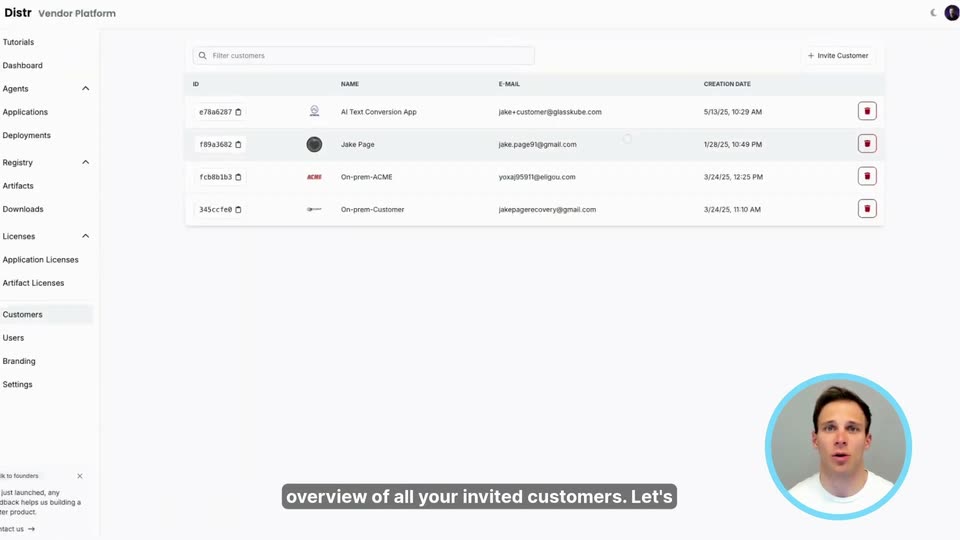
Screen recording of a vendor dashboard: a left sidebar beside a customer table. The view zooms into the table, then back out, and an Invite customer dialog pops up over the list. A circular webcam of the presenter sits in the bottom right.
On-screen text: “easy it is to move between customer lists navigate”, “to customer view. As you see, this is an”, “overview of all your invited customers. Let's”
Techniques: UI zoom
Camera: Static
A product UI screen shows a customer list with an Invite customer modal centered; a presenter headshot in a blue circle sits bottom right. The modal's name and email fields fill with typed text, then switch to a success message, as the view zooms out to reveal the sidebar.
On-screen text: “overview of all your DISTR customers. Here,”, “invite a new customer. Give the customer a name,”, “add the person in charge. Your”, “champion at this company. This customer now”, “receives an email with all the necessary”
Techniques: UI zoom
Camera: Static
A light admin dashboard shows a customer list table beside a left navigation menu. A circular webcam of a man in a white shirt sits in the bottom right. Around the 6 second mark the view cuts to an Organization Settings page with custom domain fields. Subtitle bars run along the bottom.
On-screen text: “receives an email with all the necessary”, “steps to onboard into Distr. Distr”, “can be completely white labeled, can even use your own”
Camera: Push in
A settings screen shows the Custom Domains section with three empty fields and a blue Save button. A circular video of a presenter sits in the lower right while subtitles roll below. The view pulls back at the end to reveal the full page and left sidebar.
On-screen text: “CNAMEs so that your customer doesn't even”, “know anything about Distr. They just see your”, “deployment and customer portal. Once”
Techniques: UI zoom
Camera: Pull out
A light vendor-platform settings page fills the frame, sidebar on the left, a circular presenter video in the bottom right. A Distr sign-in card with email and password fields appears centered over the form. White subtitles run along the bottom.
On-screen text: “deployment and customer portal. Once”, “a customer opens the customer portal, he has an”
Camera: Static
A centered Distr sign-in card on a light background fills in: the email field shows a typed address and the password field gains dots as a text cursor blinks. A circular talking-head video sits in the bottom right while caption subtitles update along the bottom.
On-screen text: “a customer opens the customer portal, he has an”, “intuitive wizard to install his first applications.”
Techniques: Cursor demo
Camera: Static
A dark customer portal shows a release-notes page with version entries; the page scrolls up, then zooms in on the header before cutting to the empty Deployments list. A circular presenter video sits bottom right, with white captions along the bottom.
On-screen text: “intuitive wizard to install his first applications.”, “In this case, the customer uses the assisted”, “self-managed use case, so he creates a new agent,”
Techniques: UI zoom
Camera: Push in
A dark portal shows an Install a new Agent modal; the view zooms in, a cursor types ACME-Prod into the Agent Name field and clicks Continue, advancing to the Installation Agent step. A circular presenter video overlays the lower right, captions at the bottom.
On-screen text: “installs the agent in his local VM or Kubernetes”, “cluster, and then he can select which version”, “of your application he wants to install. And”
Techniques: UI zoom, Cursor demo
Camera: Push in
A dark “Install a new Agent” dialog fills the frame as the Application dropdown opens and highlights nginx, then version and license fields populate and an environment variables box appears. A circular presenter headshot sits bottom right while subtitles roll below. The view reframes tighter on the modal.
On-screen text: “of your application he wants to install. And”, “he only can see the version he has the license for,”, “because you can restrict application versions to customers”
Techniques: UI zoom, Cursor demo
Camera: Pull out
A dark portal screen zooms in on the nginx deployment row as its status flips from gray to green OK, then pulls back; a user menu opens top right and the view cuts to a vendor sign-in page. A circular webcam sits bottom right, with subtitles below.
On-screen text: “because you can restrict application versions to customers”, “based on tags and licenses”, “to enforce your rules. Perfect. The setup”, “by customer went smooth because the Distr agent did”, “all the heavy lifting. If we now navigate back”, “to the vendor portal, we see”
Techniques: UI zoom
Camera: Pull out
A dark navy login screen holds a centered Distr sign-in card with email, password fields and a blue button. A circular talking-head video sits in the lower right, and a white caption is locked at the bottom center. The frame stays still.
On-screen text: “to the vendor portal, we see”
Camera: Static
The Distr vendor dashboard shows Agents and Artifacts card grids with green OK dots. The view zooms into the center cards and back out. A circular face cam of a man in a white shirt sits bottom right; white captions on a dark bar run along the bottom.
On-screen text: “to the vendor portal, we see”, “also the customer is already green and up and”, “running. So we onboarded customer in hours,”
Techniques: UI zoom
Camera: Static
A light vendor dashboard displays an Agents and Artifacts grid of cards. A status history modal with a log table opens over it, then closes to reveal the full grid. A circular presenter feed with a blue ring sits bottom right while caption lines update along the bottom.
On-screen text: “running. So we onboarded customer in hours,”, “not months. You can not only restrict which tags of”, “an artifact your customer is able to download and see, but you also”
Camera: Static
The Distr Vendor Platform interface fills the frame, listing artifacts with download counts and customer avatars beneath a code block. A presenter in a blue-ringed circle speaks in the lower right, and a dark caption bar at the bottom carries the subtitle.
On-screen text: “have the download history to keep track of which”
Camera: Static
A product interface shows a download history table; the view reframes onto the list as rows scroll up, then cuts to a dashboard of Agents and Artifacts cards. A circular inset video of a man sits bottom right, with white captions on a dark bar below.
On-screen text: “have the download history to keep track of which”, “artifact your customer is actually using. You”, “can now see the self-managed customer base is already”
Techniques: UI zoom
Camera: Push in
A product dashboard titled Agents and Artifacts fills the frame, its card grid reflowing as new entries appear. A circular facecam of a man speaking sits in the bottom right corner, with white subtitles on a dark bar along the bottom.
On-screen text: “can now see the self-managed customer base is already”, “growing. As we don't have time in this short demo to”
Camera: Push in
The Distr vendor dashboard fills the frame, its sidebar and Agents and Artifacts cards static. A circular cutout of a talking man sits lower right. White subtitle lines on a dark pill roll across the bottom, and the view scrolls up at the end to reveal the Agents header.
On-screen text: “show you all the features of Distr, we would happily invite-”, “you to a demo with one of our founders,”, “or feel free to check out Distr by yourself. You”, “can sign up now by checking out our source code on”, “GitHub and start exploring how to distribute”, “software with Distr, because Distr is an open source”, “control plane for software and AI companies”, “to offer self-managed and bring your own cloud installations for your application.”
Camera: Static