
0:32
Explore
Last week, we showed our AI running Accounts Payable and many were skeptical 👀 "What if the AI misses a duplicate invoice, or pays a scammer?" So we made this video to show the guardrails we
Billow AI Labs · 0:46 · Full motion · AI-annotated
- Length
- 0:46
- Scenes
- 18 · 2.6 s avg
- Product on screen
- 0:00
- Features shown
- 5
- Call to action
- 0:41 · 90%
- Voiceover
- Yes
00:00:00 / 00:46:08
- Length
- 0:46
- Scenes
- 18 · 2.6 s avg
- Product on screen
- 0:00
- Features shown
- 5
- Call to action
- 0:41 · 90%
- Voiceover
- Yes
Billow AI Labs’s 0:46 launch film runs 18 scenes, about 2.6 s each. The product is on screen from the first frame and 5 features are revealed. The call to action lands at 0:41 (90% in), over a voiceover. The video is built as a clean UI tour on a cream and grey palette, opening on a frosted title pill over a blurred field of invoice papers and then cutting through four short feature demos that use colored outlines, comparison badges and a REJECTED stamp to mark each catch. Pacing is slow and deliberate, with one idea per cut, a recurring frosted pill and wave logo tile, and a closing card that types the URL and resolves into the wordmark with a Book a Demo button.
No filming indicatedEstimated needs: 7 capture groups — your screens or recordings · 1 official logo — reused across the film · 1 graphic passage — draw or supply · 2 3D passages — build or supply
Is this your launch? to your site or press kit.
More like this

Last week, we showed our AI running Accounts Payable and many were skeptical 👀 "What if the AI misses a duplicate invoice, or pays a scammer?" So we made this video to show the guardrails we, scene by scene
· 18 scenes as text
01 · Product intro · 0:00–0:02
A frosted glass pill with a black logo tile and white headline sits centered over a top-down field of scattered white invoice papers, softly blurred at the edges. The frame is locked-off and static, with a small subtitle line at the bottom.
On-screen text: “AI for Invoice Processing.”, “Today, we're introducing AI for invoice processing.”
Camera: Static
02 · Product intro · 0:02–0:03
A frosted glass pill with a black wave logo and the white headline AI for Invoice Processing floats over a blurred field of invoice papers. The pill fades as the background resolves into a sharp email client window showing an invoice message.
On-screen text: “AI for Invoice Processing.”, “Today, we're introducing AI for invoice processing.”
Camera: Static
03 · Feature reveal · 0:03–0:04
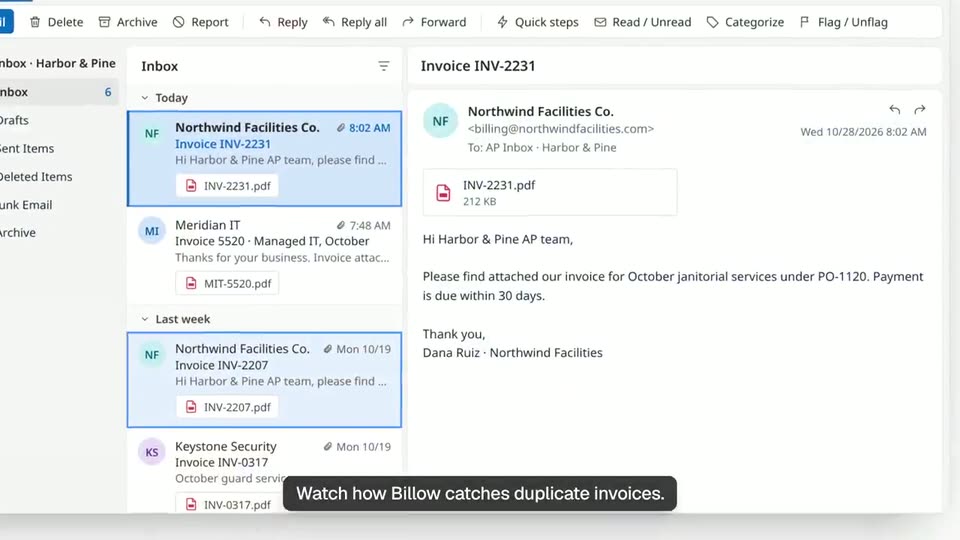
A static email client view shows an inbox list beside an opened invoice email from Northwind Facilities with a PDF attachment. A dark rounded caption with white text rises at the bottom center.
On-screen text: “Watch how Billo catches duplicate invoices.”
Camera: Push in
04 · Feature reveal · 0:04–0:10
Two invoice PDFs sit side by side over a blurred app background. Blue outlines and tags mark the matching vendor, lines and totals, orange outlines flag the differing invoice numbers, then a red REJECTED stamp reading Duplicate of INV-2207 lands on the right document.
On-screen text: “Watch how Billow catches duplicate invoices.”, “Same vendor, same amounts, new invoice number.”, “The original came in last week and was never entered.”
Techniques: Split screen
Camera: Static
05 · Feature reveal · 0:10–0:11
Two invoice windows sit side by side over a blurred app screen, with small comparison badges between them and colored callouts marking matching fields. The left invoice slides left and fades, revealing a vendor list window behind it while the right invoice and its REJECTED stamp stay.
On-screen text: “Received Oct 19 - never entered”, “Same vendor”, “New invoice number”, “Arrived today”, “Same lines”, “REJECTED”, “Duplicate of INV-2207”, “Same total”
Techniques: Split screen
Camera: Static
06 · Feature reveal · 0:11–0:13
A QuickBooks vendors screen fills the right side while a PDF invoice window for Acme Consulting floats over the left. A blue box highlights the matching vendor row, and small callout tags point to the letter q in both the invoice and the list. A dark caption pill sits at the bottom.
On-screen text: “Next, a lookalike vendor.”, “Closest vendor in QuickBooks”, “Printed “q””, “Your vendor has “q””
Camera: Push in
07 · Feature reveal · 0:13–0:16
A QuickBooks vendors page with a PDF invoice floating at left. The view zooms into the search field where the vendor name is typed out; the list empties to a no-results state and a REJECTED badge stamps in. A caption pill sits at the bottom.
On-screen text: “Billow keeps the name exactly as printed, so it can't hide.”
Techniques: UI zoom
Camera: Pull out
08 · Feature reveal · 0:16–0:19
A blurred bills table zooms out to a sharp interface view. An orange outline highlights the first row as a detail card slides in at right, then the highlight jumps down a row and the card swaps to a new vendor with an Already paid note.
On-screen text: “It also catches partial re-bills,”, “invoices you've already paid,”
Techniques: UI zoom
Camera: Static
09 · Feature reveal · 0:19–0:20
A billing table lists invoices with one row outlined in orange and tagged as a corrected duplicate. A detail card at the lower right flags the vendor invoice as already paid. A dark caption bar sits at the bottom center.
On-screen text: “invoices you've already paid,”
Camera: Static
10 · Feature reveal · 0:20–0:21
A blurred NetSuite Purchase Orders table snaps into focus. An orange outline highlights a vendor cell in the first row, and a small popover card appears on the right flagging that the PO belongs to another vendor. A dark caption pill sits at the bottom.
On-screen text: “and POs that belong to somebody else.”
Camera: Static
11 · Feature reveal · 0:21–0:22
A NetSuite Purchase Orders table sits on a light background. Orange highlight boxes draw around three cells, then small orange tags pop in with explanatory notes. A dark caption bar at the bottom shows the voiceover line.
On-screen text: “Not Brightline Media”, “Closed - INV-2290 sent back”, “$4,200 left - invoice is $10,600”, “and POs that belong to somebody else.”
Camera: Static
12 · Demo · 0:22–0:28
A light email view of an AP digest scrolls down past four stat boxes. A blue highlight box frames the auto-posting line, then the scroll reveals invoice tables under Needs approval, Needs AP review and Rejected, outlined in blue. Dark caption bars appear at the bottom.
On-screen text: “Nothing posts unless you set it up to.”, “Your AP team reviews the exceptions, not every invoice.”
Camera: Push in
13 · Other · 0:28–0:34
Locked-off frame over a blurred pile of invoice papers with small colored squares. A frosted glass card in the center adds three benefit lines one by one, each stamped with a white checkmark circle, while subtitles at the bottom follow the voiceover.
On-screen text: “Catches duplicate invoices”, “So Billow catches the duplicate invoices,”, “Stops fake vendors”, “stops fake vendors,”, “Checks every invoice against your POs”, “and checks every invoice against your POs.”
Techniques: Kinetic type
Camera: Static
14 · Other · 0:34–0:38
A cream background holds a centered black headline that builds line by line: first the brand line, then a second line carrying Slack, Teams and Email app icons. A dark caption pill at the bottom swaps its text, then the whole headline blurs out.
On-screen text: “Billow is an AI finance agent on Slack, Teams or Email,”, “Billow is an AI finance agent”, “on Slack, Teams or Email.”, “and it works with the tools you already use.”
Techniques: Kinetic type
Camera: Static
15 · Feature reveal · 0:38–0:41
A static headline sits above three rows of rounded pill badges, each pairing a third-party app logo with its name, on a light background. The badges fade in row by row until the full grid is visible, while a dark caption pill at the bottom fades out.
On-screen text: “Works with the tools you already use.”, “and it works with the tools you already use.”
Camera: Static
16 · CTA · 0:41–0:42
A centered white search field with a magnifying glass icon sits on a cream background, a blinking caret, then the letters of the URL type in one by one. A dark rounded caption pill at the bottom reads the demo call to action.
On-screen text: “Book a demo at thebillow.ai.”
Camera: Static
17 · CTA · 0:42–0:43
A white search bar on a pale background shows thebillow.ai being typed, then the field morphs into the Billow logo: a dark rounded square with a white wave beside a bold gray wordmark. A dark pill caption below reads Book a demo at thebillow.ai.
On-screen text: “thebillow.ai”, “Book a demo at thebillow.ai”, “Billow”
Techniques: Morph
Camera: Static
18 · CTA · 0:43–0:46
The Billow logo and bold wordmark sit centered on a cream background above a black pill button and the URL thebillow.ai. A cursor glides in, hovers over the button, which gains a soft highlight ring, then exits.
On-screen text: “thebillow.ai”
Techniques: Cursor demo
Camera: Static