2:30


Introducing Ramp for Accounting Firms
Ramp · Finance · Oct 2026
Liquid AI · Oct 2026 · 2:17 · AI-annotated
Liquid AI’s 2:17 launch film runs 28 scenes, about 4.9 s each. The product is on screen from the first frame and 4 features are revealed. The call to action lands at 2:10 (95% in), over a voiceover. A typed product intro sets the stage, then four named pillars (Understand, Execute, Control, Decide) each open on a big serif title card and prove the claim with HUD overlays, 3D laptop and phone mockups and live street footage, closing on a three-column value summary and the model-lineup call to action. The signature moves are typewriter reveals of headlines and tool-call code, a single violet accent, blinking carets, bounding-box HUDs over real video, and the bobbing mascot faces that frame a
Is this your launch? to your site or press kit.
Ramp · Finance · Oct 2026
Screenpipe · Sep 2026
LangEase · Sep 2025
On a white field, a violet caret types INTRODUCING above three glossy black spheres with a soft violet glow. A large serif LFM3 is typed, the 3 in violet, then the tagline is typed with Specialized in violet italic, and the Liquid logo fades in below.
On-screen text: “INTRODUCING”, “LFM3”, “Every Modality for Specialized Intelligence.”, “Liquid”
Techniques: Kinetic type
Camera: Static
Five purple mascot faces line the top, joined by thin lines to a central LFM3 wordmark, with model names and labels fading in beneath each. A row of demo cards slides up one by one along the bottom under the tagline Built to be specialized.
On-screen text: “LFM3”, “LFM3-1.7B”, “TEXT”, “agentic - tool calling - edge-fast”, “LFM3-VL-2B”, “VISION”, “images + video - embodied reasoning”, “LFM3-Audio-2B”, “AUDIO”, “ASR - TTS - speech out - multilingual”
Camera: Static
A white card holds the LFM3 wordmark over a dot grid and the tagline ONE BACKBONE · EVERY MODALITY. Left of it, TEXT, IMAGE, VIDEO labels sit on dashed lines linking to the card. The labels and card content fade out.
On-screen text: “LFM3”, “TEXT”, “IMAGE”, “VIDEO”, “ONE BACKBONE · EVERY MODALITY”
Camera: Static
A white card with a purple dot circle and the LFM3 title sits center, fed by dashed lines from TEXT, IMAGE, VIDEO, AUDIO labels on the left and TEXT, AUDIO, DECISION labels on the right. The card then widens as the dots morph into a gray architecture diagram.
On-screen text: “L FM3”, “ONE BACKBONE · EVERY MODALITY”, “TEXT”, “IMAGE”, “VIDEO”, “AUDIO”, “TEXT”, “AUDIO”, “DECISION”
Techniques: Morph
Camera: Push in
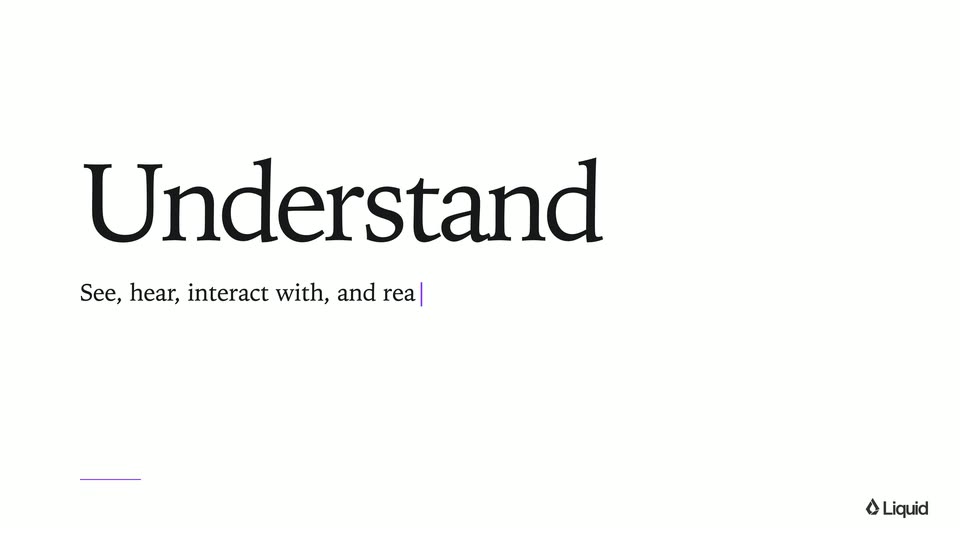
A large gray serif word “Understand” holds center on a plain off-white background, with a smaller gray serif line “See, hear, interact with, and” and a thin blinking cursor beneath it. A short purple rule sits lower left and the Liquid logo lower right.
On-screen text: “Understand”, “See, hear, interact with, and”
Camera: Static
On a plain white card, the word Understand sits in large black serif type at left. Beneath it a smaller serif line types out letter by letter with a blinking purple cursor, then the whole block slides up and fades as a thin purple line repositions to the top.
On-screen text: “Understand”, “See, hear, interact with, and reason about the world.”
Techniques: Kinetic type
Camera: Static
A white wash fades to reveal a forward-driving shot down a sunlit Japanese street with moving vans and a crosswalk. A small “Understand” label holds top left and a thin caption line sits at the bottom edge.
On-screen text: “Understand”, “AUDIO VISUAL QUESTION ANSWERING”
Camera: Push in
Street view in a Japanese city, moving forward with a HUD overlay. The camera pans right, freezes on a blue-and-yellow building sign, and draws a purple box around it. A question appears with a waveform; the answer types in word by word. The frame blurs as the camera drifts right.
On-screen text: “Understand”, “AUDIO VISUAL QUESTION ANSWERING”, “What is this blue and yellow building?”, “It's a Hello Storage building, a storage facility.”
Techniques: Kinetic type
Camera: Push in
A blurred, darkened street shot sits behind white serif headlines that brighten as the clip opens. A vertical list of language names scrolls past a fixed purple rounded outline, the centered name turning purple as it passes.
On-screen text: “Understand”, “LFM3-OMNI-2B”, “Global language support.”, “Speech in, speech out”, “Deutsch”, “Ελληνικά”, “English (UK)”, “Suomi”, “Français”, “Polski”
Techniques: Kinetic type
Camera: Static
A blurred night street fills the background while a vertical list of language names in white serif scrolls upward. A fixed purple rounded box in the center highlights each name as it passes, turning it purple. The headline sits above with a small subtitle.
On-screen text: “Understand”, “LFM3-OMNI-2B”, “Global language support.”, “Speech in, speech out”, “AUDIO VISUAL QUESTION ANSWERING”, “Liquid”
Techniques: Kinetic type
Camera: Push in
A forward-tracking shot down a busy Japanese street dissolves a multilingual headline, then freezes as a UI overlay types a German question and answer word by word, framing a red storefront logo in a purple bounding box.
On-screen text: “Global language support”, “Was steht auf diesem großen roten Logo an dem Gebäude?”, “What does this big red logo on the building say?”, “Das große rote Logo auf dem Gebäude sagt „Bic Camera“ auf Japanisch.”, “The large red logo on the building says “Bic Camera” in Japanese.”
Techniques: Kinetic type
Camera: Push in
A paused Tokyo street clip with the product's question-answering overlay cuts to a white card. A large serif “Execute” headline holds still while a body line types in letter by letter, then fades out.
On-screen text: “Execute”, “Say it once and LFM3 agent executes tools to get the job done.”
Techniques: Kinetic type
Camera: Static
A 3D laptop mockup on white shows a flight-booking UI. A cursor fills the form, picking Boston, San Francisco and Oct 30, while a purple code panel types the search_flights tool call on the right. Annotation tabs and a voice pill frame the scene.
On-screen text: “Understand”, “Execute”, “LFM3-OMNI-2B”, “YOU 3.3s”, “VOICE IN - VOICE OUT - TOOL CALLS”, “ON DEVICE - LAPTOP - OMNI POWERED ASSISTANT”, “Liquid”, “search_flights”, “origin=“Boston”, destination=“San Francisco”, date=“2026-10-30””, “looking for ‘to’ field”, “type “Boston””, “looking for ‘San Francisco’ airport option in the suggestions list”, “type “San Francisco””, “look for ‘Fri, Oct 30’ ”
Techniques: 3D mockup, Cursor demo
Camera: Static
A 3D laptop mockup shows an airline booking app cycling through flight results, a seat map, and a checkout page, while a code panel on the right scrolls new tool calls. A cursor clicks through each step and gray tooltips flag the target elements.
On-screen text: “Understand”, “Execute”, “LFM3-OMNI-2B”, “VOICE IN · VOICE OUT · TOOL CALLS”, “ON DEVICE · LAPTOP · OMNI POWERED ASSISTANT”, “Looking for seat 19A on the seat map”, “Looking for Complete booking button”
Techniques: Cursor demo, Split screen
Camera: Pan
A silver laptop in 3D perspective on a plain off-white field. Its screen switches from a flight booking card to a green 3D protein model while a purple tool-call log scrolls beside it. A large serif headline fades in across the laptop.
On-screen text: “Understand”, “Execute”, “LFM3-OMNI-2B”, “From personal to professional workflows.”, “VOICE IN · VOICE OUT · TOOL CALLS”, “ON DEVICE · LAPTOP · OMNI POWERED ASSISTANT”
Techniques: 3D mockup
Camera: Pan
A front-facing laptop on white shows a green protein ribbon in a molecular viewer. A monospace terminal on the right types commands while the view zooms into a yellow ligand, then stick residues pop in. A pill below the laptop toggles between prefilling and listening.
On-screen text: “ON DEVICE · REALTIME ALWAYS-ON · SCIENTIFIC WORKFLOW ASSISTANT”
Techniques: UI zoom
Camera: Static
A crossfade from a molecular view lands on a phone mockup showing a conference poster on a wall, sharpening as the spoken request types in beside a 3.6s waveform. Three monospace tool-call blocks then appear in sequence on the right, each with a result line, closing on a purple caption of three on-device tool calls.
On-screen text: “Understand”, “Execute”, “LFM3-OMNI-2B”, “Hey, can you add this to my calendar and invite Maya?”, “DEVICE NATIVE PHONE ASSISTANT”, “3 DEVICE-NATIVE TOOL CALLS · CALENDAR + CONTACTS · ON-DEVICE”
Techniques: Kinetic type, Split screen
Camera: Static
A flat phone mockup and a code panel fade out, leaving a large black serif headline and a typed tagline on an off-white field. The top-left tabs and the Liquid mark stay fixed while the UI clears.
On-screen text: “Control”, “From visually understanding the world to acting in it.”
Techniques: Kinetic type
Camera: Static
A light gray card shows the serif word Control above a tagline with a blinking caret. The card fades as a 2x2 grid of four robot demos rises over it, each with a small caption bar, while the title shrinks toward the top and a footer lists three terms.
On-screen text: “Understand”, “Execute”, “Control”, “From visually understanding the world to acting in it.”, “ORCHESTRATOR - TOOL CALLS”, “NAVIGATOR - PLANNED PATH”, “VLA - DUAL ARM”, “VLA - MOBILE MANIPULATION”, “VISION LANGUAGE - EMBODIED REASONING - ROBOT CONTROL”, “Liquid”
Techniques: Split screen
Camera: Static
A 2x2 split screen shows four robot demos, each with a lavender label pill and a white caption typing out word by word. A single arm targets a teal cube, a first-person view walks a hallway, a dual-arm stacks blocks, and a kitchen arm moves toward a fridge.
On-screen text: “Understand Execute Control”, “ORCHESTRATOR · TOOL CALLS”, “Put the teal cube into the tray.”, “NAVIGATOR · PLANNED PATH”, “Walk out of the kitchen, take the stairs up, and go to the bedroom dresser.”, “VLA · DUAL ARM”, “Move the blocks to the middle, then stack blue on green on red.”, “VLA · MOBILE MANIPULATION”, “Navigate to the fridge. Close the fridge door.”, “VISION LANGUAGE · EMBODIED REASONING · ROBOT CONTROL”
Techniques: Split screen, Kinetic type
Camera: Static
Four 3D robot simulations run in a 2x2 split screen: an arm places a teal cube in a tray, a first-person view climbs stairs to a red door, dual arms stack blocks, and a mobile robot closes a blue fridge. Task captions sit under each panel.
On-screen text: “Understand”, “Execute”, “Control”, “ORCHESTRATOR : TOOL CALLS”, ““Put the teal cube into the tray.””, “NAVIGATOR : PLANNED PATH”, ““Walk out of the kitchen, take the stairs up, and go to the bedroom dresser.””, “VLA : DUAL ARM”, ““Move the blocks to the middle, then stack blue on green on red.””, “VLA : MOBILE MANIPULATION”, ”
Techniques: Split screen, 3D mockup
Camera: Push in
A plain white card holds a large dark serif headline, Decide, that fades in, while a smaller serif line types out below it. Small section labels sit across the top and the Liquid mark rests at the bottom right.
On-screen text: “Understand Execute Control”, “Decide”, “Structured decisions from a single forward”
Techniques: Kinetic type
Camera: Static
A plain white card shows a large black serif headline 'Decide' above a single-line serif caption, with a purple text cursor blinking at the end. Small gray serif labels 'Understand', 'Execute', 'Control' sit at the top, and a brand mark rests bottom right.
On-screen text: “Understand”, “Execute”, “Control”, “Decide”, “Structured decisions from a single forward pass in milliseconds.”
Camera: Static
The scene fades in on a man in a white hoodie under a wooden roof with string lights; a purple face box tracks him, the label drops from 100% to 98%, hand and phone chips join the open-vocabulary panel, a frame-rate readout appears, and the serif title Decide fades out.
On-screen text: “Decide”, “DECISIONS, NOT TOKENS · OPEN-VOCABULARY DETECTION”
Camera: Static
A man in a white hoodie stands in a wooden attic, raising his hands and a phone. Colored bounding boxes lock onto his face, hands and phone with live confidence percentages. A top menu, a vocabulary panel and a row of latency stats frame the feed.
On-screen text: “DECISIONS, NOT TOKENS • OPEN-VOCABULARY DETECTION”
Camera: Static
White background. The serif headline 'Built for physical AI' with a purple italic 'AI' fades out on the left as 'Engineered for speed', with a purple italic 'speed', fades in on the right. Small gray caption lines sit under each. A Liquid logo marks the bottom right.
On-screen text: “Built for physical AI”, “SEES, HEARS, SPEAKS, ACTS”, “FIVE MODALITIES, ONE BACKBONE”, “Engineered for speed”, “MORE CAPABILITY PER PARAMETER”, “NEW TRI-HYBRID ARCHITECTURE”
Camera: Static
Three serif headlines with purple italic accents sit in columns divided by thin lines on white, each above two gray uppercase caption lines. The right column fades up into place, then the layout crossfades to four lavender face icons with LFM3 model labels and a centered purple LFM3 title.
On-screen text: “Built for physical AI”, “SEES, HEARS, SPEAKS, ACTS”, “FIVE MODALITIES, ONE BACKBONE”, “Engineered for speed”, “MORE CAPABILITY PER PARAMETER”, “NEW TRI-HYBRID ARCHITECTURE”, “Deployed on the edge”, “PHONES, LAPTOPS, ROBOTS”, “NO CLOUD REQUIRED”, “LFM3-1.7B”
Techniques: Kinetic type
Camera: Static
Five round purple mascot icons with simple faces sit in a row above model names and modality tags, joined by thin purple lines to the central serif LFM3 wordmark. The icons bob, blink and pop small ears; at 3.5s a headline, subline and Liquid logo fade in below.
On-screen text: “LFM3-1.7B”, “TEXT”, “LFM3-VL-2B”, “VISION”, “LFM3-Audio-2B”, “AUDIO”, “LFM3-Omni-2B”, “OMNI · GENERATIVE”, “d1-Omni-2B”, “OMNI · DECISION, LFM3, Every Modality for Specialized Intelligence., Made to be specialized. Every model fine-tunes on a single GPU., OPEN WEIGHTS · AVAILABLE ·”
Camera: Static