1:09

Y Combinator - .@ArmatureYCP26 helps companies monitor and optimize how AI agents ex
Armature · B2B · May 2026
RamAIn · Feb 2026 · 1:37 · AI-annotated
RamAIn’s 1:37 launch film runs 26 scenes, about 3.7 s each. The product shows up at 0:09 and 2 features are revealed, with social proof. The call to action lands at 1:32 (96% in), over a voiceover. The video alternates kinetic type cards on a pale green grid with flat and 3D UI demos of the agent typing through invoice portals and ERP forms. Its signature moves are letter-by-letter text builds with green accent words, tilted 3D interface windows, and a labeled cursor that fills every field in real time.
Is this your launch? to your site or press kit.
Armature · B2B · May 2026
ByteAsk · B2B · Nov 2026
On a pale green gradient with a faint grid, the dark gray line 'Your company's data' builds up centered, then gives way to 'lives everywhere,' with 'everywhere' in green, scaling into place.
On-screen text: “Your company's data”, “lives everywhere”
Techniques: Kinetic type
Camera: Static
A blurred, green-tinted desktop with floating app windows stays locked off while a centered headline swaps from white “Desktop Applications” to green “Web Portals”.
On-screen text: “Desktop Applications”, “Web Portals”
Techniques: Kinetic type
Camera: Static
A pale green desktop grid fills the frame, with blurred browser windows and app icons around the edges. A green Web Portals title sits centered, then a white Legacy Systems title appears over a sharper desktop.
On-screen text: “Web Portals”, “processpayment.com”, “Legacy Systems”
Camera: Static
A pale green gradient fills the frame, scattered with retro UI mockups: a save dialog, a web browser window, a file explorer, plus computer, disk and folder icons. The white headline 'Legacy Systems' sits centered and static while the camera stays locked off.
On-screen text: “Legacy Systems”
Camera: Static
A light green grid background features tilted black text. “Messy” sits on the left as dashed green circles draw around it. “Disconnected” and “Complex” slide in below, each enclosed in a dashed circle.
On-screen text: “Messy.”, “Disconnected.”, “Complex.”
Techniques: Kinetic type
Camera: Static
A pale green gradient with a faint perspective grid holds the tilted word “Messy.” in dark gray. It exits as the centered line “And when you think of” fades in. The pacing is quick, synced to the voiceover.
On-screen text: “Messy.”, “And when you think of”
Techniques: Kinetic type
Camera: Static
Centered sans-serif lines assemble from overlapping letters on a pale green gradient with a faint grid; green accents mark “AI automation?” and “end.” A large green “Meet” with a steaming ramen bowl illustration then resolves into the ramAln logo.
On-screen text: “And when you think of”, “AI automation?”, “It stops where APIs end.”, “Meet”, “ramAln”
Techniques: Kinetic type
Camera: Static
Faded browser, spreadsheet and file-explorer windows sit on a soft green gradient behind large text that swaps from black 'Uses your computer' to green 'just like a human,' then builds the line 'to move data between your web portals, legacy systems & desktop apps.' The mockups fade out.
On-screen text: “Uses your computer”, “just like a human”, “to move data between your”, “web portals”, “legacy systems & desktop apps.”
Techniques: Kinetic type
Camera: Pan
On a pale green grid background, the headline 'ramAln is 10x faster than computer use agents of' appears, and four rounded cards with the OpenAI, Anthropic, and Google logos fade in. '10x faster' turns green, then the layout crossfades into 'Invoice processing' surrounded by floating invoice panels.
On-screen text: “ramAln is 10x faster than computer use agents of”, “OpenAI”, “ANTHROPIC”, “Google”, “on surfaces ramAln is pre-trained on”, “Invoice processing”
Techniques: Kinetic type
Camera: Push in
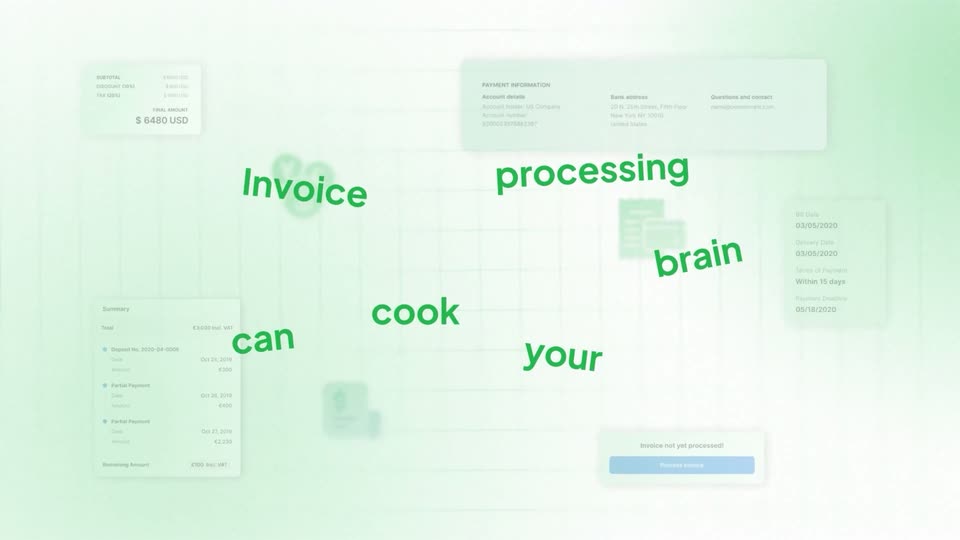
A black headline reads over a blurred invoice UI. The words turn green, rotate and fly off screen, revealing the ramAIN wordmark centered on a light green grid.
On-screen text: “Invoice processing can cook your brain”
Techniques: Kinetic type
Camera: Static
A light green gradient with a faint grid holds the headline as the green lower line scales up and un-masks. A 3D invoice portal interface then tilts into view behind the text.
On-screen text: “ramAln”, “can help”
Techniques: Masking, Kinetic type, 3D mockup
Camera: Static
A tilted 3D invoice portal window rests on a soft green field. Green outline boxes with white field labels snap onto the form, marking each input. The headline above then changes to a green “No APIs required”.
On-screen text: “Watch ramAI learn your interface like a human”, “No APIs required”
Techniques: 3D mockup
Camera: Pan
A flat browser window titled Partner Billing Portal sits on a green gradient. An invoice table loads in with rows of IDs, dates, vendors and green Approved tags, while a cursor tagged ramAln hovers a row and a Searching for invoice pill appears at the top.
Techniques: Cursor demo
Camera: Pan
A flat billing portal window sits on a light green gradient. The invoice list scrolls down while a black Searching for invoice pill with a spinner hovers at the top. A cursor tagged ramAln lands on the ramAln row as the frame zooms into a tighter crop.
On-screen text: “Searching for invoice”
Techniques: UI zoom, Cursor demo
Camera: Push in
The billing list blurs as the invoice modal centers in frame. A blue highlight bar sweeps down the invoice, marking each field and line item in turn, while the caption ramAln scans the invoice holds at the top.
On-screen text: “ramAln scans the invoice”
Techniques: UI zoom
Camera: Push in
A blurred invoice in a browser window rests on a light green gradient beneath the headline. The document's rows drift slowly downward while blue, orange and green highlights mark the extracted data fields.
On-screen text: “ramAln scans the invoice”
Camera: Static
A bordered white card shows a structured invoice table on a soft green gradient, captioned 'understands and structures the data'. The card slides off left as a dark ERP portal window with icon workflows slides in from the right.
On-screen text: “understands and structures the data”
Camera: Static
A white UI window for the ramAln Invoice Portal fades into the center of a light green background. Two lines of text appear above it, and a mouse cursor fades in at the bottom right.
On-screen text: “ramAln navigates your ERP”, “to input relevant data”
Camera: Push in
A green-and-black headline sits above an ERP window. A dark status pill with a spinner widens to read 'Creating invoice' while a cursor tagged 'ramAln' glides from the lower right to hover the Create Invoices tile.
On-screen text: “ramAln navigates your ERP to input relevant data”
Techniques: Cursor demo
Camera: Static
A ramAln invoice form sits on a pale green gradient as a labeled cursor fills each field in turn, then scrolls to the line-item table and types two rows. The view blurs behind a Send email dialog, and a green toast confirms the invoice was sent.
On-screen text: “ramAln navigates your ERP to input relevant data”
Techniques: Cursor demo, UI zoom, Light sweep
Camera: Pull out
The invoice portal screen dissolves out, leaving the centered wordmark ramAI connects on a pale green gradient with a faint grid. The frame stays locked off.
On-screen text: “ramAI connects”
Camera: Pan
A light green gradient with a faint grid holds a centered headline. The first line, ramAln connects, sits in black and green. The second line, Internal Apps with External Apps, fades in from left to right in green and black.
On-screen text: “ramAln connects”, “Internal Apps with External Apps”
Techniques: Kinetic type
Camera: Static
A light green diagram shows two columns of white boxes, Internal Apps left and External Apps right, linked by curved green lines to a central circular ramen bowl icon. The boxes settle in, then a white band wipes across the middle as the caption No matter appears.
On-screen text: “No matter”
Techniques: Masking
Camera: Pull out
On a pale green gradient with a faint grid, black text types in word by word: “No matter how they are built.” It swaps to “One Unified Agent” plus a green line “For API automation + UI automation”, then “Smarter than traditional” slides in.
On-screen text: “No matter how they are built.”, “One Unified Agent”, “For API automation + UI automation”, “Smarter than traditional”
Techniques: Kinetic type
Camera: Static
On a pale green grid background, three benefit lines stack in the center, each sliding in in turn: black, green, black. The lines then clear and a small ramen bowl illustration with a black wordmark, its AI letters in green, scales in as the sign-off.
On-screen text: “Smarter than traditional RPA.”, “10x faster than current CUAs.”, “Works where browser agents can't.”
Techniques: Kinetic type
Camera: Static
On a pale green grid background, the ramAln bowl logo and wordmark scale in at center. A green tagline slides in below, then a green URL pill pops in and a cursor glides up to click it.
On-screen text: “Automate workflows no one can”, “www.ramAln.ai/automate”
Techniques: Kinetic type, Cursor demo
Camera: Static