0:30
Explore
Mintlify - Introducing Autopilot: an always-on agent for your docs. Connect you
Mintlify · Oct 2026 · 0:26 · AI-annotated
- Length
- 0:26
- Scenes
- 14 · 1.9 s avg
- Product on screen
- 0:00
- Features shown
- 3
- Call to action
- 0:23 · 89%
- Voiceover
- Yes
00:00:00 / 00:26:11
Mintlify’s 0:26 launch film runs 14 scenes, about 1.9 s each. The product is on screen from the first frame and 3 features are revealed. The call to action lands at 0:23 (89% in), over a voiceover. The video is built as a logo-and-promise open, four left-headline / right-mockup feature beats, a centered closing tagline, a single toggle-flip call to action, and a brand mark, all on a flat light-gray field with soft blurred green photo panels behind the mockups. Pacing runs at a steady ~112 bpm with quick card morphs, a traveling logo badge, and a recurring purple cursor that lands on the active control, so each beat reads as one clean state-to-state transformation.
No filming indicatedEstimated needs: 5 capture groups — your screens or recordings · 1 official logo — reused across the film · 3 graphic passages — draw or supply
Is this your launch? to your site or press kit.
More like this
0:32
0:40
Devin Developers - Introducing Devin Desktop: the next generation of Windsurf Manage fl
Windsurf · Developer tools · Jun 2026
Mintlify - Introducing Autopilot: an always-on agent for your docs. Connect you, scene by scene
· 14 scenes as text
01 · Product intro · 0:00–0:02
A green loop-and-bandage line mark sits on a white tile that scales up into a horizontal bar; the dark gray wordmark Autopilot slides in to its right, then the bar contracts back to a small square icon anchored at left.
On-screen text: “Autopilot”
Camera: Static
02 · Demo · 0:02–0:04
A flat code-editor window with colored placeholder lines slides from the right to center as a second window exits left. A dark-green logo badge with a pointer travels from the top-right corner to the bottom-right. Lines reflow and a few rows flash yellow as edits land.
Camera: Static
03 · Demo · 0:04–0:05
A row of flat tool icons, GitHub, Slack, a striped disc, an N cube, a green S mark, a black smile icon, scales up and aligns along the top edge of a white bar. Two dark green squares bearing a lime looped logo drift above with small pointer triangles.
Camera: Static
04 · Demo · 0:05–0:06
A white card holds six tool icons, with a dark green speech-bubble logo at the left. The card slides right, the icons exit, the words Up to date scale in across it, and a green dot appears at the right edge.
On-screen text: “Up to date”
Techniques: Kinetic type
Camera: Static
05 · Demo · 0:06–0:07
A white rounded card with a green file icon and the words Up to date sits on a light gray field. The card and text stretch taller as a green check badge and a dark green Arc logo tile float up to the right.
On-screen text: “Up to date”
Techniques: Kinetic type
Camera: Static
06 · Feature reveal · 0:07–0:09
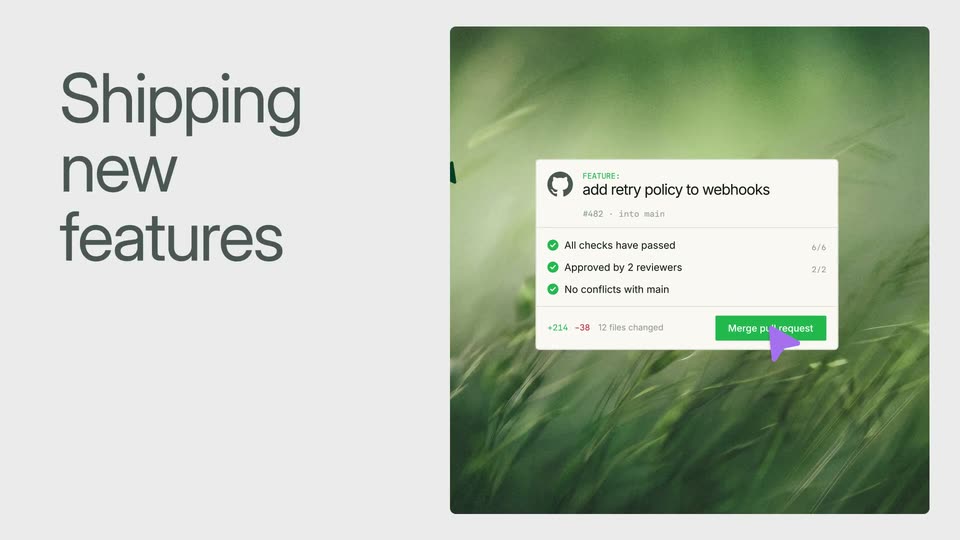
Split layout: large dark gray headline 'Shipping new features' on the left; a flat pull-request card with a green merge button and purple cursor over a blurred grass photo on the right. The card fades as a green palette icon pops in and a search bar appears.
On-screen text: “Shipping new features”
Techniques: Split screen, Cursor demo
Camera: Static
07 · Feature reveal · 0:09–0:10
Left: large dark gray headline “Shipping new features” on light gray. Right: a docs interface over a blurred green photo; a black cursor hovers a green logo tile above a green progress bar, and the main pane reads “Retry Webhooks” with gray skeleton lines. Locked-off.
On-screen text: “Shipping new features”
Techniques: Cursor demo
Camera: Static
08 · Feature reveal · 0:10–0:14
A light gray panel on the left reveals the headline Customer feedback while a green abstract panel on the right shows a fanned stack of Slack messages that settles into a single documentation card titled Rotate your API key.
On-screen text: “Customer feedback”
Techniques: Split screen
Camera: Static
09 · Feature reveal · 0:14–0:19
Left headline stays static over light gray; on the right, a white Slack message slides in over a blurred green backdrop, holds, then morphs into an empty GitHub card.
On-screen text: “Updates from Slack messages”
Techniques: Morph
Camera: Static
10 · Feature reveal · 0:19–0:20
A white diff card with a red minus line and green plus line floats over a blurred green field, settling upward into place. A purple cursor glides in and rests on the Approve button, while the headline holds on the left.
On-screen text: “Updates from Slack messages”
Techniques: Cursor demo
Camera: Static
11 · Other · 0:20–0:21
A left-aligned headline and a Slack diff card with a cursor on the Approve button blur and fade out. The frame locks off as a centered headline scales in over the defocused mockup.
On-screen text: “Updates from Slack messages”, “Keep pace with how fast”
Techniques: Kinetic type
Camera: Static
12 · Other · 0:21–0:23
On a light gray canvas framed by a thin grid and green corner handles, the headline “Keep pace with how fast” scales in, then “your team ships.” slides in beneath it. A purple cursor fades in at the lower right handle.
On-screen text: “Keep pace with how fast”, “your team ships.”
Techniques: Kinetic type
Camera: Static
13 · CTA · 0:23–0:25
A light gray grid with green corner markers frames a white settings row holding a green loop icon, the label Autopilot, and a toggle. A purple cursor rests on the toggle and flips it on, the switch sliding to a dark green state.
Techniques: Cursor demo
Camera: Static
14 · Outro · 0:25–0:26
The mintlify logo, a green leaf mark beside a black lowercase wordmark, holds centered on a plain off-white background. It eases in with a brief soft blur, then settles sharp and stays locked off.
Camera: Static