1:30
Introducing Shire
Shire · Nov 2026
The Browser Company · Jun 2024 · 0:26 · AI-annotated
The Browser Company’s 0:26 launch film runs 17 scenes, about 1.6 s each. The product shows up at 0:03 and 3 features are revealed. The call to action lands at 0:21 (83% in), over a voiceover. The video opens with a live-action promise, then alternates locked-off electric-blue tagline cards with tight, cursor-driven UI demos of the browser's calendar integration, each card introducing the next benefit. Signature moves are the word-by-word tagline build, the zoom-in on the calendar chip, and the 3D tilt of the floating browser windows that closes the demo.
Is this your launch? to your site or press kit.
Shire · Nov 2026
Simular AI · Nov 2026
Polar Browser · Sep 2026
Films whose music sounds like this one, voice left out
Lenovo Project AeroBlade · Electronic pop, funk, and house
Anthropic · Lo-fi hip-hop, chillwave, vaporwave
Miro · Electronic, Cinematic
A man in a blue beanie and backpack steps off a subway train onto a dim platform while another commuter walks past. The white tagline builds word by word across the center of the frame.
On-screen text: “Never be late again”
Techniques: Kinetic type
Camera: Static
White bold sans-serif text reading 'Never be late again' sits centered on a solid blue field. The frame is locked off and the text stays still for the full duration.
On-screen text: “Never be late again”
Camera: Static
A browser window shows a Google Calendar week view on a soft gradient backdrop. The view zooms in on the top bar, and a cursor glides to the Calendar shortcut chip and clicks it.
On-screen text: “Never be late again”
Techniques: UI zoom, Cursor demo
Camera: Push in
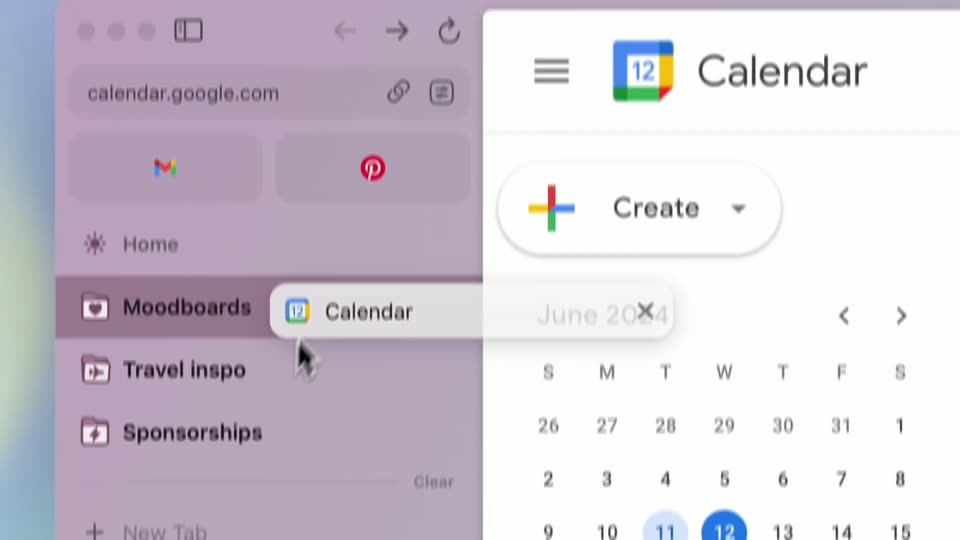
A cursor hovers the calendar tab in a browser sidebar, then the view zooms into the Google Calendar month grid as a notification card fades in over the top.
Techniques: Cursor demo, UI zoom
Camera: Push in
A black cursor glides down the left sidebar and hovers over the calendar icon button, which holds a blue focus ring. A rounded tooltip pops in beside it, while the Calendar app window behind stays dimmed and static.
Techniques: Cursor demo
Camera: Push in
A solid blue background fills the frame with the white line of text centered and held perfectly still. The locked-off shot holds for the full duration with no movement or additional elements.
On-screen text: “A friendly nudge”
Camera: Static
Close-up of a translucent browser sidebar beside a cream perfume card. A Kickoff meeting row with a Join button slides in above Home while a calendar chip counts down from 3m to 2m; the caption A friendly nudge holds still.
On-screen text: “A friendly nudge”
Camera: Static
A close-up of a macOS panel shows three app icons across the top and a task list below. A white cursor arrow glides up from the lower right corner and stops, hovering over the purple Join button beside the Kickoff meeting row.
Techniques: Cursor demo
Camera: Static
A flat mauve Join button sits centered on a dusty pink field while a large black cursor with a white outline hovers at its lower right. A white checkmark is drawn across the label and grows until it replaces the word, confirming the click.
Techniques: Cursor demo, Morph
Camera: Static
Two interface panels float on a soft blurred gradient: a browser window on the left with a task list that scrolls up one item, and a white Google Calendar panel on the right showing June 2024. The frame is locked off and the motion is limited to the small list scroll.
Techniques: Split screen
Camera: Static
A dashboard list settles from a cross-fade: Moodboards fades out while Team Happy Hour with a Join button slides into the top row and Home shifts down. Gmail and Pinterest tiles sit above a highlighted calendar chip reading 12 in 2m, and the frame holds.
Camera: Static
A flat blue background holds the centered white tagline for the full duration. The frame is locked off and the text stays perfectly still, with no motion, no camera move and no other elements.
On-screen text: “Just when you need it”
Camera: Static
A locked-off split screen pairs a YouTube skincare video page on the left with a WWD fashion article page on the right. Both browser views stay static while the large caption “Just when you need it” holds over the frames.
On-screen text: “Just when you need it”
Techniques: Split screen
Camera: Static
Two flat browser windows sit side by side, a YouTube video and a WWD article. The view reframes as a sidebar slides in from the left and the video window tilts into 3D perspective on the right.
Techniques: Split screen, 3D mockup
Camera: Push in
Two angled browser windows float over a pastel gradient. The left shows a start page with a URL bar, app shortcuts and a task list; the right shows a video tab with a play button and eye icons. The shot eases in and sharpens from blur to focus.
Techniques: 3D mockup
Camera: Static
A solid blue field holds the white centered line 'Available now on Mac', which is then replaced by the URL 'arc.net' in the same position.
On-screen text: “Available now on Mac”, “arc.net”
Camera: Static
On a solid blue field, the white word arc.net holds center, then dissolves as a looping line mark spins in and locks into a filled white-and-blue emblem.
On-screen text: “arc.net”
Camera: Static