1:30
Introducing Shire
Shire · Nov 2026
Simular AI · Nov 2026 · 1:24 · AI-annotated
Simular AI’s 1:24 launch film runs 43 scenes, about 2.0 s each. The product shows up at 0:15 and 4 features are revealed. The call to action lands at 1:12 (85% in), over a voiceover. The film compresses computer history into one typed line over grainy archival footage, then drops onto a cream field of hand-drawn wireframes where every claim is proven with a small animated diagram and a lime highlight. Cuts land on a 128 bpm grid with monospace captions typing over each shot, and the lime scan-bracket icon plus highlight box act as the recurring visual signature.
Is this your launch? to your site or press kit.
Films whose music sounds like this one, voice left out
Elorian · Modern electronic
Rox · Modern electronic
August · Modern electronic
Grainy archival footage of a large 1950s computer cabinet with a round drum, cutting to a suited man bending over a machine and feeding paper tape. A white monospace caption scales in across the center while a small '1956' tag holds in the lower-left corner.
On-screen text: “1956”, “Computers used to fill a room,”
Techniques: Kinetic type
Camera: Static
A dim, locked-off archival shot of a 1950s computer room shows men seated at consoles amid large boxy machines with round dials. A white monospace caption scales in across the center while the year 1956 sits fixed in the lower left.
On-screen text: “1956”, “Computers used to fill a room,”
Techniques: Kinetic type
Camera: Static
Grainy sepia archival close-up of a hand sweeping across a bank of toggle switches on an old computer panel. A centered caption reads over the footage while a small year sits in the lower left corner.
On-screen text: “1956”, “Computers used to fill a room,”
Techniques: Kinetic type
Camera: Static
Sepia archive footage of a vast room of operators seated at rows of 1960s computer consoles, shot from a high angle. A white monospace caption sits centered over the room while a small year label holds in the lower-left corner.
On-screen text: “1965”, “and need a team to run them.”
Camera: Static
Grainy, warm archival footage of a hand working across a beige 1965 computer console, pressing the button grid and flipping switches on the right. The camera is locked off on the panel.
On-screen text: “1965”, “and need a team to run them.”
Camera: Static
Grainy, dim archival footage of a 1970s computer room: rows of green and red consoles with operators in white shirts at the desks. The shot is locked off and dark, with a centered caption and a small year label held still over it.
On-screen text: “and need a team to run them.”, “1970”
Camera: Static
A grainy vintage shot of an old control panel with two small green screens, framed by a dark vignette. White monospace text reads 'and need a team to run them.' centered, with '1970' in the lower left corner. The camera holds still.
On-screen text: “and need a team to run them.”, “1970”
Camera: Pan
A dim, vignetted close-up of a hand pushing a black cartridge into a recessed slot in a white wall panel. Two lines of white text sit centered over the frame while the camera stays locked off.
On-screen text: “In 1977, few believed”, “anyone would want their own.”
Camera: Static
A dim, desaturated locked-off shot of a vintage beige CRT monitor on a desk. The caption 'Then 2,000,000,000' types out character by character on the dark screen with a blinking cursor, while '1990' stays small in the lower left.
On-screen text: “1990”, “Then 2,000,000,000”
Techniques: Kinetic type
Camera: Static
A hand operates a white computer mouse on a dark desk in a grainy close-up. White monospace text types out across the center of the frame.
On-screen text: “1990”, “Then 2,000,000,000”
Techniques: Kinetic type
Camera: Static
A grainy CRT monitor fills the frame, showing a Modify Layer dialog with a table of layer names and colors, framed by dark scan lines. A white monospace caption reads 'Then 2,000,000,000 landed on every desk.' centered, with a small '1990' in the corner. The frame is locked off.
On-screen text: “1990”, “Then 2,000,000,000”, “landed on every desk.”
Camera: Static
A grainy, desaturated shot of a woman with glasses at a desk, her hand on a mouse beside a beige 1990s desktop computer. The locked-off frame holds still as two lines of white monospace text and a small 1990 label sit static over the image.
On-screen text: “1990”, “Then 2,000,000,000”, “landed on every desk.”
Camera: Static
Grainy desaturated 1990 footage shows a man in a white shirt seated at a desk, holding a corded phone receiver to his ear beside a monitor and filing cabinet. A static center caption carries the line, with a small year tag in the bottom left.
On-screen text: “1990”, “Then 2,000,000,000”, “landed on every desk.”
Camera: Static
Close-up of a person in a black shirt holding a black phone, thumbs tapping the screen against a blurred outdoor background. Thin light-gray text types itself out over the frame, one word at a time, with a blinking cursor.
On-screen text: “1990”, “Then 2,000,000,000”, “landed on every desk.”, “Then 7,000,000,000”
Techniques: Kinetic type
Camera: Static
A man in silhouette sits on a stone ledge at dusk, head bowed over a phone, against a hazy city skyline. A thin white number types out across the middle of the frame as the digits fill in.
On-screen text: “Then 7,000,000,000”
Techniques: Kinetic type
Camera: Static
A desaturated street crowd seen from behind walks away down a narrow lane, a man in a black t-shirt centered. Pedestrians and shop fronts drift past on the right while two lines of white text hold fixed at the center of the frame.
On-screen text: “Then 7,000,000,000”, “in every pocket.”
Camera: Static
A high-angle time-lapse of a crowded Tokyo intersection, desaturated with a teal grade, shows pedestrians and cars moving fast through the crosswalks. Centered white monospace text with a black outline reads the line over the scene.
On-screen text: “Then 7,000,000,000”, “in every pocket.”
Camera: Static
On a black background, the white number 7,000,000,000 sits centered, then the line in every pocket. appears beneath it. The screen cuts to The next billion computers? with billion set in bold. All text stays static and centered.
On-screen text: “Then 7,000,000,000”, “in every pocket.”, “The next billion computers?”
Techniques: Kinetic type
Camera: Static
A black card holds a gray line 'The next billion computers?' above a white headline that types 'Personal Computer', erases it, and retypes 'Autonomous Computer'. A gray subline 'built for agents.' fades in, yellow corner brackets snap around 'agents', then a cut reveals a man seated at a desk.
On-screen text: “The next billion computers?”, “Personal Computer”, “Autonomous Computer”, “built for agents.”
Techniques: Kinetic type
Camera: Static
A man in a black Simular t-shirt sits at a wooden desk in a wood-paneled room, gesturing as he speaks to a locked-off camera; a closed laptop rests on the desk. A white lower-third card with a yellow accent bar slides in at the lower left.
On-screen text: “Ang Li”, “Co-founder & CEO, Simular”
Camera: Static
A man in a black SIMULAR t-shirt and glasses sits at a desk against a wood-paneled wall, gesturing with both open hands as he speaks to the camera. Potted plants and a black shelving unit frame the static medium shot.
Camera: Static
Thin lines sketch a hand-drawn desktop window on a cream background: menu bar, sidebar of three file icons, a dock with one yellow square. A cursor clicks the Projects folder, and a second sketch window opens, its eight file thumbnails fading in, the first highlighted yellow.
On-screen text: “SIMULAR”
Techniques: Cursor demo
Camera: Static
A screen capture of a blue DMV web page scrolls down as a mouse cursor drifts from the header banner to the breadcrumb row. A small gray caption reading 'screenshot → guess → click' rests at the bottom of the frame.
On-screen text: “screenshot → guess → click”
Techniques: Cursor demo
Camera: Static
A white vehicle registration form fills the frame as a cursor moves over the license plate field. The view pans across the page to reveal the browser bar, while a bottom caption highlights each word of the sequence in turn.
On-screen text: “screenshot → guess → click”
Techniques: Cursor demo, UI zoom
Camera: Static
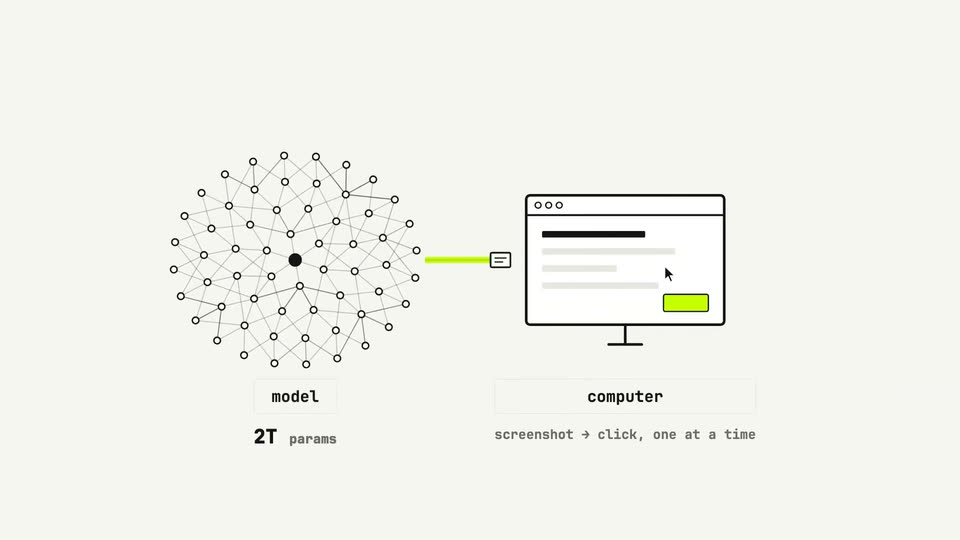
A line-drawn neural network grows from a small cluster to a dense sphere as the param count steps from 180B to 2T, while the dashed link to a monitor fills with green. The monitor slides left, its cursor clicks a green button, and the caption rescales.
On-screen text: “model”, “computer”, “params”, “screenshot → click, one at a time”, “180B”, “400B”, “1T”, “2T”
Techniques: Cursor demo
Camera: Pull out
A lime-green rounded square with dark corner brackets centers on a cream field, then the wordmark box by Simular slides in beside it and the lockup settles. A white prompt field with bracket corners opens, and paste this into any AI chat or agent types in behind a caret.
On-screen text: “box by Simular”, “paste this into any AI chat or agent”
Techniques: Kinetic type
Camera: Static
A white command bar framed by black corner brackets sits on a cream field; a monospace line types out a setup URL while a gray button turns lime. The bar then docks to the top as a flat box window with tabs and a file list slides in below it.
Techniques: Kinetic type
Camera: Static
A flat wireframe browser window sits below a top bar with an install command and a yellow Get a box button. The bar slides off, then the frame zooms into the window while yellow boxes and labels logins and files mark the signed-in badge and the file list.
On-screen text: “paste this into any AI chat or agent”, “Set up box from https://box.simular.ai/install”, “Get a box”, “logins”, “files”
Techniques: UI zoom
Camera: Push in
A monoline wireframe browser sits right of center on a cream field. A yellow callout box frames the file list, tagged files, then slides up to the tab bar as the tag flips to tabs and the tab titles resolve from scrambled letters.
On-screen text: “files”, “tabs”
Camera: Static
A browser window on a cream background shows the Google Flights page. The Where from field fills with SFO, a suggestion list drops down, San Francisco is entered, and the page scrolls to a world map. A label sits above the window.
On-screen text: “DeepSeek V4.1 Flash on box · no built-in computer use”
Camera: Static
A browser window shows Google Flights; the empty search form crossfades into a populated San Francisco to New York results list while a large headline overlay fades in across the screen.
On-screen text: “DeepSeek V4.1 Flash on box - no built-in computer use”, “Same model, 1.6X faster on box.”, “GPT-5 Astra on box”
Camera: Static
Two panels compare one flight-booking task. The left chat works slowly; the right browser loads Google Flights and finishes first, framed by a lime border. Time bars tick under each. The scene fades to a blue headline.
On-screen text: “Same model, 1.6x faster on box.”, “GPT-6 Astra no box”, “GPT-6 Astra + box”, “time”, “cost”, “Almost double the speed, faster on paper.”
Techniques: Split screen
Camera: Static
Two browser windows sit side by side under a bold headline, the left labeled GPT-6 Astra and the right DeepSeek V4.1 Flash. The left window loads from a black screen into a Google Flights page while time and cost bars below each column stretch and their numbers tick upward.
On-screen text: “Almost the same speed, 78x cheaper.”, “GPT-6 Astra + box”, “DeepSeek V4.1 Flash + box”, “time”, “cost”
Techniques: Split screen
Camera: Static
A bold title and mono caption sit above a three-row bar chart on cream. Faint weather-app mockups fade out; a lime bar with a crown fills the second row, and a boxed +3.7 s and a lime 78x tag pop in on the last.
On-screen text: “Same job, three setups”, “median of 3 runs”, “time”, “cost per run”, “GPT-6 Astra no box”, “94.3 s”, “$0.99”, “GPT-6 Astra + box”, “59.2 s”, “$0.68”
Camera: Static
A dark terminal interface shows a typed prompt line above an orange status line, with a block cursor at the end of the prompt. The frame is locked off and static throughout the short clip.
Camera: Static
A dark terminal window runs a coding agent, with a floating browser mockup above it. The browser first shows a restaurant search page, then splits into two side-by-side pages, while the agent badge at bottom left switches from Claude Code to Codex.
On-screen text: “Claude Code”, “Codex”
Techniques: Split screen
Camera: Static
A dark chat screen displays a tilted 3D browser mockup of a Walmart espresso search. The frame reframes to a windowed app with a left sidebar and a code line, keeping the same mockup centered.
Techniques: 3D mockup
Camera: Static
A light chat view shows a user prompt and a live desktop card displaying an Amazon page, then cuts to a dark chat view where the same card now shows a Google Maps route, each framed by a Take control button.
Camera: Static
A flat phone chat view scrolls upward, the embedded live screen switching from a map delivery route to a spreadsheet pie chart, while the lower-left caption changes from ChatGPT to Claude on iPhone.
On-screen text: “ChatGPT on iPhone”, “Claude on iPhone”
Camera: Static
A window displays a spreadsheet with a pie chart, then transitions to a 3D modeling interface showing red boxes.
Techniques: Morph
Camera: Pull out
A front-facing iPhone mockup scales into the center of a dark grid, its screen showing a browser window with a live 3D scene of two red cubes on a gray floor. A small caption with a colored icon sits locked above the device.
On-screen text: “OpenClaw on iPhone”
Camera: Pull out
A presenter in a black SIMULAR T-shirt sits at a wooden desk in a warm, wood-paneled room, gesturing with both hands while speaking to camera. A closed silver laptop lies on the desk; plants and shelves fill the background. The camera holds a static medium shot.
Camera: Static
A lime-green scan-bracket icon and the box by Simular wordmark sit on a cream field. Below, the tagline reads Give your model a computer, the highlighted word swapping to agent, then AI inside a green box and viewfinder brackets, with the URL box.simular.ai beneath.
On-screen text: “Give your model a computer.”, “box.simular.ai”, “Give your agent a computer.”, “Give your AI a computer.”
Techniques: Kinetic type
Camera: Static