0:54
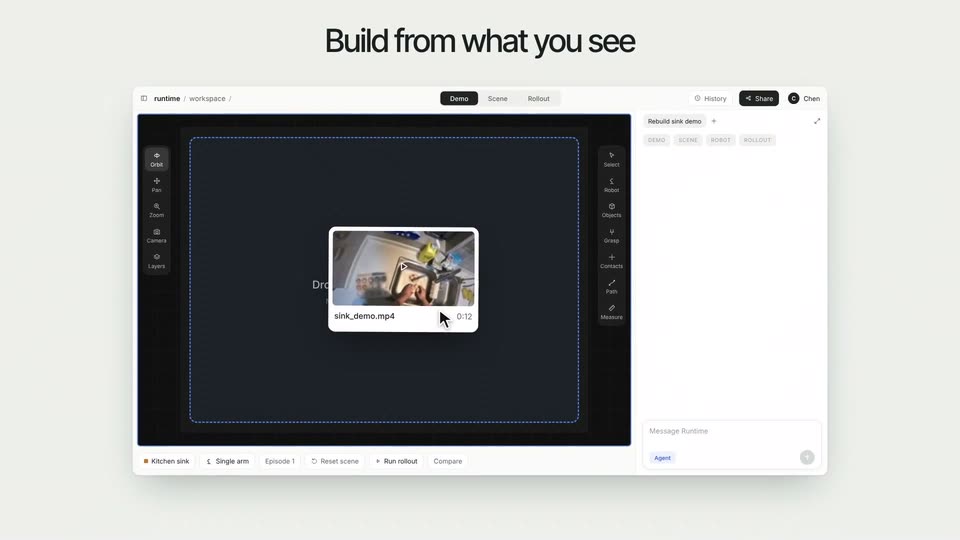
Runtime - Robots shouldn't need to be fine-tuned for every new task. Introduci
Runtime · B2B · Nov 2026
Polar Browser · Sep 2026 · 0:38 · AI-annotated
Polar Browser’s 0:38 launch film runs 22 scenes, about 1.7 s each. The product shows up at 0:04 and 3 features are revealed. There is no explicit call to action; a voiceover carries the film. The video strings three prompt-to-result demos together on a plain white field, each repeating the same beat: a letter-by-letter typed prompt, fanning 3D browser mockups, and a finished deliverable card. Its signature moves are the offset sliding cards, the fanned-out browser windows, and the floating circular badges that frame the ad-library segment.
Is this your launch? to your site or press kit.
Runtime · B2B · Nov 2026
Perplexity · AI · Jul 2025
Lightspark · Apr 2026
A minimal white chat screen fades in beneath the heading 'What can I do for you?'. The prompt 'Find me 50 US-based startups that raised money in the last 60 days' is typed into the input box, then a mouse cursor clicks the blue send button.
Techniques: Kinetic type, Cursor demo
Camera: Push in
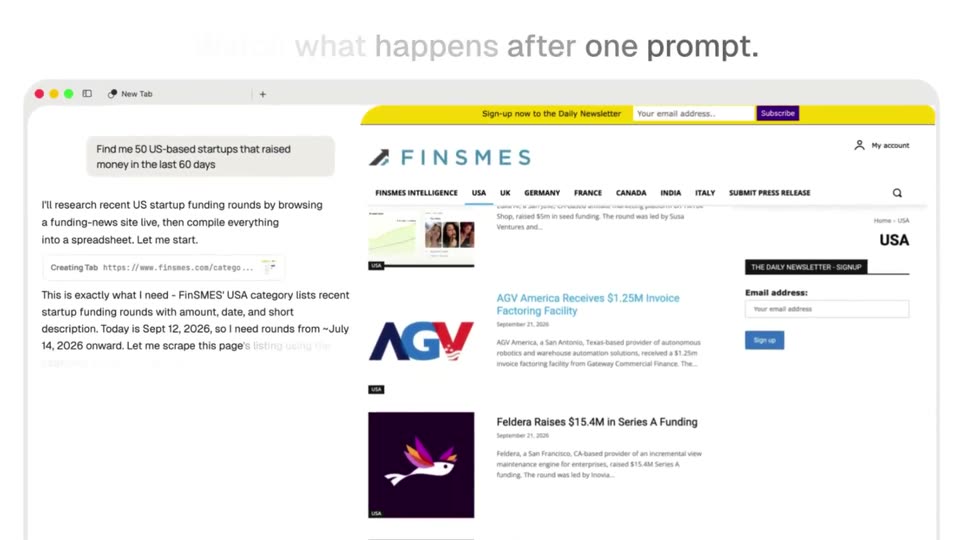
A split screen shows an AI chat on the left typing a plan to scrape a funding site, while a browser on the right loads and scrolls the FinSMES USA funding list. A dark headline sits above both panels.
On-screen text: “Watch what happens after one prompt:”
Techniques: Split screen
Camera: Static
A browser window shows an assistant transcript on the left and a live FinSMEs news page on the right. Both panes scroll up as the transcript fills in and a spreadsheet card slides into view, a cursor resting beside it.
Camera: Pull out
A white link-preview card titled US Startups Funded in Last 60 Days floats over a blurred browser window. The background fades to white as the cursor hovers the blue Open link, then the card fills with a multi-column table of funding rounds, dates, and company names.
Techniques: Cursor demo, Morph
Camera: Pull out
A close-up of a spreadsheet fills with rows of startup funding data, the rows sliding up and overlapping as they settle, then a cursor appears at the top right corner.
Techniques: Cursor demo
Camera: Pan
A white assistant screen shows a gray heading above a search field where a query types in character by character. A row of pill buttons and a startup funding spreadsheet with column headers fill the lower half.
Camera: Push in
On a white product screen, the heading “What can I do for you?” sits above a rounded input box where a prompt types out letter by letter. A cursor glides to the blue arrow button and clicks it, and the card slides into a duplicated offset position.
Techniques: Cursor demo
Camera: Pull out
Overlapping browser windows slide in on a white field, fanning out to reveal two YouTube channel pages next to an agent task list, as circular portrait photos float around the frame. A cyan headline assembles word by word above.
On-screen text: “Polar finds creators for you”
Techniques: Kinetic type
Camera: Push in
A tilted browser mockup floats in 3D space. The left pane lists an AI task with progress steps, while the right fans out overlapping YouTube and Instagram profile tabs that cycle through creator accounts. A cyan headline reads creators for your next campaign above.
On-screen text: “creators for your next campaign”
Techniques: 3D mockup
Camera: Pull out
A split browser view holds an AI agent panel on the left, listing a research task and a progress checklist. On the right, a strip of Instagram profile pages pans left, bringing the next creator profile into frame.
Camera: Pull out
A screen recording shows an AI chat panel on the left and an Instagram profile for setuppawn on the right. The view reframes to center the browser window inside a layout with a circular host avatar and a corner badge. A cursor rests on the page.
Techniques: UI zoom
Camera: Pull out
A rounded command bar floats in front of a browser window showing a chat thread and an Instagram profile. The typed text fills in as the background UI fades to a near-white wash, leaving the input field in focus.
Camera: Pull out
A light prompt screen shows the heading “What can I do for you?” over a rounded input field. A prompt types across two lines with a blinking caret while a pointer cursor moves onto the blue send button at right. A project row and suggestion pills sit still below.
Techniques: Cursor demo
Camera: Static
A chat prompt panel with a cursor on the send button dissolves into a task panel showing a browser window with a 16 steps header and a 0 percent progress bar, under the headline Polar checks Meta Ad Library. Colored rings sit in the corners.
On-screen text: “Polar checks Meta Ad Library”
Camera: Pull out
A white browser window mockup sits center, listing a Task progress panel with four steps. Circular logo badges for manus, OpenAI, Perplex and colored rings float around it. The window and the Perplex badge scale up while the black bold headline stays fixed at the top.
On-screen text: “Polar checks Meta Ad Library”
Camera: Pull out
A tilted 3D browser window floats on a white field, its screen recording Polar searching the Meta Ad Library for each competitor, a black cursor clicking through results. A bold black headline above swaps phrases, and circular logo badges ring the frame.
On-screen text: “Polar checks Meta Ad Library”, “and puts together a report”
Techniques: 3D mockup, Cursor demo, Kinetic type
Camera: Pull out
A white article card on a gray background scales up, then its content scrolls down, bringing the serif headline and competitor table into view as the right scrollbar thumb slides toward the bottom.
Techniques: UI zoom
Camera: Push in
A white report card on a light gray background scrolls vertically, revealing an intro paragraph, three stat cards, a competitor table, and a highlighted takeaway box.
Camera: Pan
A white rounded document card sits on a light gray field, showing a comparison table titled Volume at a glance with competitor rows and a yellow takeaway box. The view scrolls vertically, briefly ghosting two layers of text before settling; a cursor rests at the lower left.
Camera: Pan
The phrase “One prompt.” sits centered on a plain off-white background. It starts small and scales up to full size over the shot, filled with a gradient from cyan-teal on the left to dark navy on the right.
On-screen text: “One prompt.”
Techniques: Kinetic type
Camera: Static
On a plain off-white field, the line 'One prompt.' in black and teal scales in with a soft blur at center, then is replaced by solid black 'Polar for GTM'. Both fade out, leaving a small gray dot in the middle. The frame stays locked.
On-screen text: “One prompt.”, “Polar for GTM”
Techniques: Kinetic type
Camera: Static
A small black logo sits centered on a white background: a solid circle with a thin open ring overlapping its lower left. It eases in from a soft gray state to solid black and holds still.
Camera: Static