0:38
Polar Browser - 30 seconds of typing can now turn into 100 hours of GTM work. Introd
Polar Browser · Sep 2026
Lightspark · Apr 2026 · 0:40 · AI-annotated
Lightspark’s 0:40 launch film runs 16 scenes, about 2.5 s each. The product shows up at 0:02 and 1 feature is revealed. There is no explicit call to action. The video is a slow, locked-off tour of phone mockups on a paper-like dotted grid, where each screen change is a single clean move: a zoom into the UI, a 3D tilt of the device, or a scale-up from an app icon. Its signature moves are the fanning line bundles that link the phone to global rails and the morphing rounded-square icons, all framed by a persistent monospace HUD.
Is this your launch? to your site or press kit.
Polar Browser · Sep 2026
Anthropic · AI · Aug 2025
A light dotted grid holds small corner labels while a bold black counter in the center counts up from zero. A white phone mockup slides up from the bottom, revealing a wallet screen with a teal debit card and balance fields.
On-screen text: “Grid Global Accounts”, “$4,335.69”
Techniques: Kinetic type
Camera: Static
A white phone mockup on a dotted grid shows a wallet app with a green debit card and $4,792.68 balance. Green lines fan from the phone to network and country labels on both sides, then the view zooms into the screen as the activity list scrolls.
On-screen text: “Lightspark”, “Grid Global Accounts”, “(0,0,0)”, “21,000,000”, “Account no.”, “Routing no.”, “IBAN”, “CLABE”, “PIX”, “UPI, ”
Techniques: 3D mockup, UI zoom
Camera: Static
A flat white phone screen on a dotted gray field. A rounded callout card on the left cycles through activity rows, its icon swapping from flag to globe to dollar to bitcoin, while the list scrolls. The screen then switches to a debit card and total balance view.
On-screen text: “Lightspark”, “Grid Global Accounts”, “( 0, 0, 0 )”, “21,000,000”
Camera: Static
A white phone mockup showing a green-blue gradient debit card sits in front of a white card on a dotted grid. A black rounded square glides down over the card, its contactless icon filling with a green ring and resolving into a checkmark.
On-screen text: “Lightspark”, “Grid Global Accounts”, “(0,0,0)”, “21,000,000”
Techniques: 3D mockup, Morph
Camera: Static
A white phone mockup sits centered on a dotted gray field, showing a banking app. The camera zooms into the screen as the gradient home card dissolves into a transaction list, then the view scrolls up to an activity feed and a settings toggle.
On-screen text: “Lightspark”, “Grid Global Accounts”, “(0, 0, 0)”, “21,000,000”
Techniques: UI zoom
Camera: Static
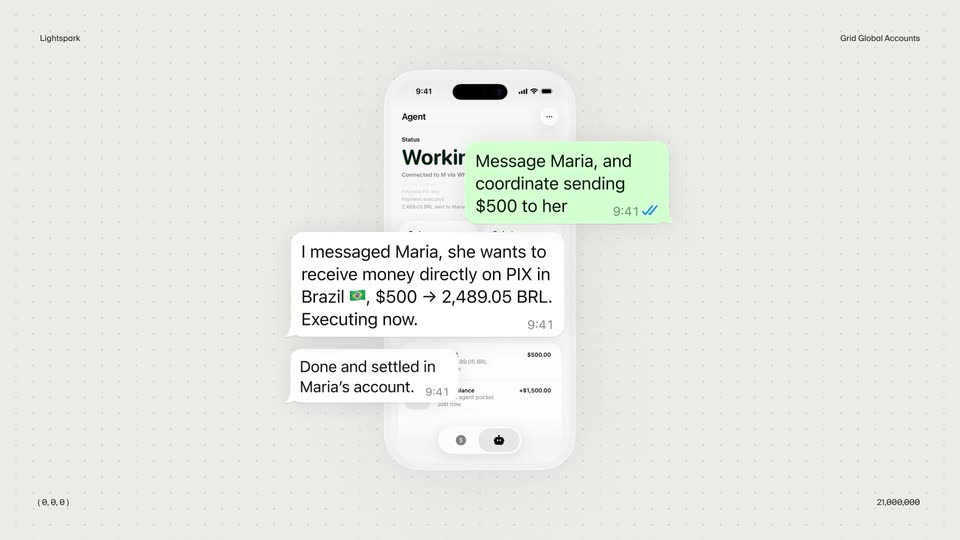
A tilted 3D phone mockup sits on a dotted off-white backdrop. Its agent screen reads Working in green, then flips to Done. Three chat cards drift in around it: a green instruction bubble, then two white status bubbles confirming a PIX transfer.
On-screen text: “Lightspark”, “Grid Global Accounts”, “( 0, 0, 0 )”, “21,000.000”, “Message Maria, and coordinate sending $500 to her”, “I messaged Maria, she wants to receive money directly on PIX in Brazil, $500 → 2,489.05 BRL. Executing now.”, “Done and settled in Maria's account.”
Techniques: 3D mockup
Camera: Static
On a dotted light-gray grid, a chat thread stacks downward: green task bubbles each receive a white “Done.” reply at its left. The flat list then rotates into a tilted 3D perspective stack of cards.
On-screen text: “Lightspark”, “Grid Global Accounts”, “(0,0,0)”, “21,000,000”
Techniques: 3D mockup
Camera: Pull out
A front-facing phone mockup sits centered on a light dotted grid with corner coordinate labels. A green circle with three dots at the center of the Money screen shrinks and resolves into a dark rounded-square icon bearing a white Z as the full interface fills in.
On-screen text: “Lightspark”, “Grid Global Accounts”, “(0,0,0)”, “21,000,000”
Techniques: Morph
Camera: Static
A dark phone mockup tumbles in 3D over a pale dotted grid, its screen showing a $5,000.00 balance and a transaction list. A flattened copy of the same screen scales up behind it while small corner labels mark the frame.
On-screen text: “Lightspark”, “Grid Global Accounts”, “(0, 0, 0)”, “21,000,000”
Techniques: 3D mockup
Camera: Static
A front-facing phone mockup of a wallet screen scales up from small to large at the center of a light gray dotted grid. Corner labels for brand and coordinates stay locked in place while the device grows.
On-screen text: “Lightspark”, “Grid Global Accounts”, “(0,0,0)”, “21,000,000”
Techniques: 3D mockup
Camera: Static
A purple app icon with a white speech bubble sits centered on a light dotted grid, then expands into a front-facing phone showing a dark balance screen with a $5,000.00 total and a transaction list. Small corner labels stay locked throughout.
On-screen text: “Lightspark”, “Grid Global Accounts”, “(0,0,0)”, “21,000,000”
Techniques: Morph
Camera: Static
A flat front-view iPhone mockup sits centered on a pale dotted grid, showing the Wallet screen with a $5,000 balance. A pink rounded logo mark shrinks away from the screen center, then a blue cursor lands on the Withdraw button. Small static annotations sit in the corners.
On-screen text: “Lightspark”, “Grid Global Accounts”, “(0,0,0)”, “21,000,000”
Techniques: Cursor demo
Camera: Static
A light dot-grid frame with small corner labels holds a centered app icon that swaps through a blue mark, a teal K, and a dark music note, then resolves into the black headline “Give your app.”
On-screen text: “Lightspark”, “Grid Global Accounts”, “(0,0,0)”, “21,000,000”, “Give your app”
Camera: Static
On a light dotted canvas, a centered dark-gray headline builds line by line, then fades as the Grid Global Accounts logo and wordmark appear. Two fans of thin curved lines, green and blue, sweep in diagonally from opposite corners.
On-screen text: “Give your app the most”, “powerful dollar account ever”
Techniques: Kinetic type
Camera: Static
A light dotted grid fills the frame with two bundles of thin flowing lines, green at top left and blue at bottom right, drifting slowly. The grid logo and the wordmark Grid Global Accounts settle into the center, sharpening from a soft offset into a locked position.
On-screen text: “Grid Global Accounts”
Camera: Static
On a light gray dot-grid field, a black spark mark rotates and settles at center, then the bold lightspark wordmark fades in to its right. Small corner labels hold in the four corners throughout the locked-off reveal.
On-screen text: “Lightspark”, “Grid Global Accounts”, “(0,0,0)”, “21,000,000”
Camera: Static