1:43
Anthropic - We’re expanding Claude for Financial Services, with an Excel add-in,
Anthropic · AI · Oct 2025
Anthropic · Aug 2025 · 0:32 · AI-annotated
Anthropic’s 0:32 launch film runs 13 scenes, about 2.5 s each. The product shows up at 0:04. There is no explicit call to action. The video opens with a hand-lettered title card on a flat beige field, then morphs a sketch of a browser into the real Chrome interface to introduce the Claude panel, followed by a series of gently tilted 3D browser mockups showing Claude working on Zillow, Google Docs, DoorDash and Salesforce. It closes on a serif tagline card and the asterisk logo, holding locked-off frames throughout with slow 3D tilts as its signature move.
Is this your launch? to your site or press kit.
Anthropic · AI · Oct 2025
Vercel · Developer tools · Oct 2023
Anthropic · AI · Jan 2026
On a flat beige field, a centered serif line reads out from “Now available as” to the full sentence while a small hand-drawn gray loop strokes in above it. The frame stays locked off.
On-screen text: “Now available as a research preview”
Techniques: Kinetic type
Camera: Static
A hand-drawn monitor on a cream background. A black line sketches a cursor on its blank screen, then the cursor slides to the top-right corner. A caption reads 'Now available as a research preview' while a large letter M slides in.
On-screen text: “Now available as a research preview”, “M”
Camera: Static
A hand-drawn sketch of a browser window morphs into a realistic dark browser chrome. A cursor moves to the orange Claude icon in the toolbar and clicks it, and a Claude side panel labeled Research preview slides in from the right.
Techniques: Morph, Cursor demo
Camera: Static
Close-up of a tablet screen resting on a beige surface, framed on its lower half. The bottom prompt field types its placeholder out letter by letter beside a peach arrow button, then a star, the word Claude and a Research preview label scale and slide in at the top.
Camera: Static
A close-up of a tablet's search bar reading “How can I help you today?” pulls back to reveal two devices side by side, the left one showing a Claude webpage with a black Try now button.
Techniques: UI zoom, 3D mockup
Camera: Pull out
A flat browser window showing the Claude Chrome extension page and a right-hand chat panel tilts into 3D perspective on a beige background, then eases back and scales down to recenter.
Techniques: 3D mockup
Camera: Pull out
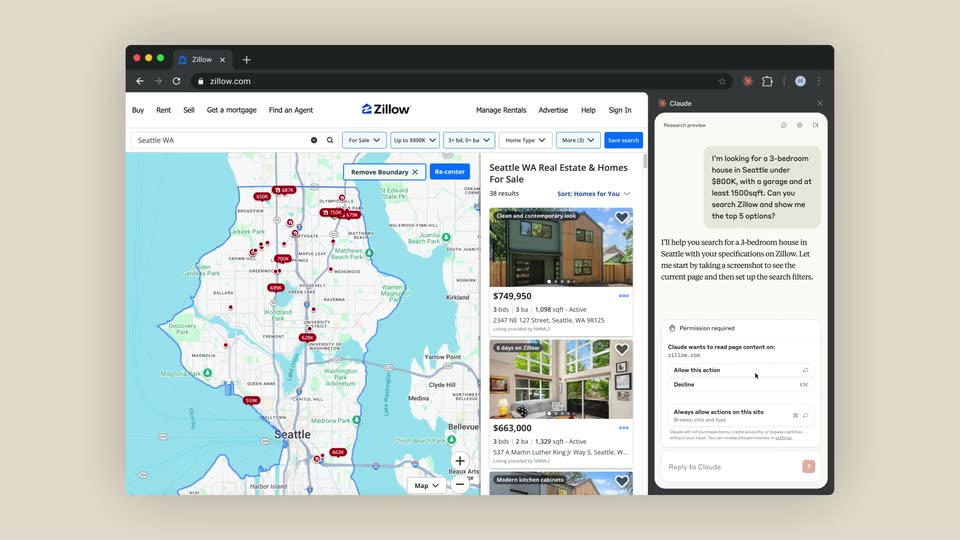
A tilted 3D browser window floats on a cream background, showing a Zillow map of Seattle with a home list. A Claude panel beside it types a search request and a permission prompt, while a cursor moves over the dialog.
Techniques: 3D mockup, Cursor demo
Camera: Static
A flat browser window shows a Google Docs product requirements document with a Claude summary panel docked on the right. The document scrolls steadily down through the Core Features table while the side panel scrolls slightly.
Camera: Static
A tilted 3D browser mockup shows a food delivery homepage with a garlic noodles search. A right sidebar chat types a response, ending with a blinking cursor.
Techniques: 3D mockup, Kinetic type
Camera: Static
A DoorDash browser window, with a garlic noodles search and a Claude assistant panel on the right, sits as a 3D mockup on a plain beige backdrop. The window tilts and rotates slowly in perspective, the listings and chat text staying legible.
Techniques: 3D mockup
Camera: Pull out
A locked-off screen shows a Salesforce Convert Lead dialog in a browser, while a Claude AI panel on the right types its analysis line by line. The dialog and background stay still as the panel text streams in.
Camera: Static
A plain cream background holds a small outlined pill badge with a flask icon and the words RESEARCH PREVIEW, centered above a serif headline. The headline completes its entrance, settling on Meet your thinking partner on any tab. The frame stays locked off and static.
On-screen text: “RESEARCH PREVIEW”, “Meet your thinking partner on any tab”
Techniques: Kinetic type
Camera: Static
On a flat beige field, a tiny orange asterisk mark at center scales up into the full Claude logo, and the black serif wordmark Claude appears beside it, holding still on a locked-off frame.
Camera: Static