1:54


The First of a New Era | Introducing the New BMW iX3.
BMW · Sep 2025
Lenovo Project AeroBlade · Sep 2026 · 1:10 · Full motion · AI-annotated
Lenovo Project AeroBlade’s 1:10 launch film runs 25 scenes, about 2.8 s each. The product shows up at 0:07 and 8 features are revealed. There is no explicit call to action; a voiceover carries the film. Built as a single continuous 3D product film: an abstract metallic sheet resolves into the named device, then a long exploded-view block proves the engineering, followed by a rapid run of benefit cards (thin, cool, quiet, light) each paired with one clean product shot, and closed by a tagline and logo lockup. The signature moves are the slow camera orbits and glint sweeps on dark metal, the layered exploded view, and the decode/scramble text reveals, all cut at a steady mid-tempo against a dark,
Is this your launch? to your site or press kit.
BMW · Sep 2025
DJI · Hardware · Sep 2026
Films whose music sounds like this one, voice left out
Sony · Electronic dance music
Rockstar Games · A mix of cinematic orchestral score, indie/alternative rock, and synth-pop/electronic dance music.
Google · Electronic, Funk, Country-Pop, Rock, Metalcore, Pop
A metallic blue sheet unfurls from the top of a black frame, twisting and rotating in 3D space. It flattens progressively until it settles as a thin horizontal line across the center of the frame.
Techniques: Light sweep, Morph
Camera: Static
A closed laptop, seen edge-on as a thin dark line, lifts open in 3D perspective, the lid rising to reveal the screen and keyboard. A headline and tagline fade in above the device on a black background.
On-screen text: “Meet Project AeroBlade Concept”, “The next evolution of Ultra-thin premium PCs”
Techniques: 3D mockup
Camera: Static
A closed ultra-thin laptop lies edge-on across the lower frame on a dark background, a glint of light sweeping its edge left to right. A white headline and subhead sit above, with the Lenovo ThinkBook logo top-left.
On-screen text: “Meet Project AeroBlade Concept”, “The next evolution of Ultra-thin premium PCs”
Techniques: Light sweep
Camera: Static
A closed laptop lies centered on a dark gray backdrop. The lighting rises from near-black to full brightness, and a diagonal glint sweeps across the lid. Static headline text holds in the frame, and a large Lenovo wordmark slides in at the end.
On-screen text: “The next evolution of Ultra-thin premium PCs”, “ThinkBook”, “Meet Project AeroBlade Concept”, “Lenovo”
Techniques: Light sweep
Camera: Static
Close-up of a dark gray laptop lid in 3D perspective, the embossed white Lenovo logo sliding across the frame as the camera slowly tracks along the surface. A glint sweeps along the letters, brightening them in sequence.
Techniques: Light sweep, 3D mockup, Kinetic type
Camera: Pull out
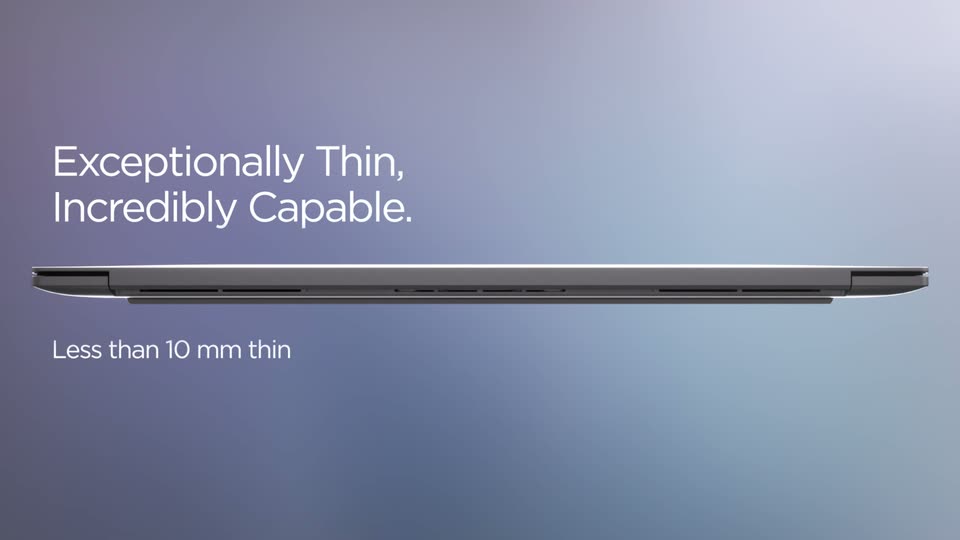
A laptop is shown edge-on against a dark blue gradient, its thin profile centered while a two-line headline blurs in above and a small caption settles below. In the last second the chassis separates into floating layers, exposing the internal circuitry in an exploded view.
On-screen text: “Exceptionally Thin,”, “Incredibly Capable.”, “Less than 10 mm thin”, “Lenovo”
Techniques: Kinetic type, 3D mockup
Camera: Static
An exploded laptop floats in 3D against a pale lavender gradient, its five layers stacked vertically. The camera tilts from a flat front view to a three-quarter angle, exposing the depth of each component.
On-screen text: “Visuals simulated for demonstration purposes. Actual product may vary.”
Techniques: 3D mockup
Camera: Push in
An exploded laptop floats in 3D against a soft blue gradient, logic board and fan chassis separated in layers. Fine silver particles scatter from the lower frame while the camera holds a low upward angle.
On-screen text: “Visuals simulated for demonstration purposes. Actual product may vary.”
Techniques: 3D mockup, Particles
Camera: Static
A 3D exploded view of a device chassis floats in separated layers against a pale blue background. The camera tilts down and in toward the metal frame, where a copper plate and two black grid modules settle into the open cavity.
On-screen text: “Visuals simulated for demonstration purposes. Actual product may vary.”
Techniques: 3D mockup
Camera: Push in
A glowing blue chip sits on a laptop motherboard in 3D perspective. The camera pulls back and orbits, revealing the full board and a floating disassembled chassis, while white Lenovo Active Flow text appears at the right and light streaks flow across the frame.
On-screen text: “Visuals simulated for demonstration purposes. Actual product may vary.”, “Lenovo Active Flow”, “The world's first solid-state”, “active cooling for laptops”
Techniques: 3D mockup, Parallax
Camera: Pull out
A laptop is shown as an exploded 3D stack of five silver and black layers floating over a soft purple-to-blue gradient. The layers drift and then slide together, closing into the flat top lid with a centered logo, seen from above. The camera stays locked off.
On-screen text: “Visuals simulated for demonstration purposes. Actual product may vary.”
Techniques: 3D mockup
Camera: Static
A silver laptop in side profile floats on a dark blue field, then its lid swings open as a soft beam of light sweeps in from the left edge.
Techniques: 3D mockup, Light sweep
Camera: Static
A silver laptop in side profile eases its lid closed against a soft blue gradient. On the left, two lines of white text decode from a scrambled, color-bar state into clean type.
On-screen text: “Cleaner Aesthetics”, “A More Premium Experience”
Techniques: Kinetic type, 3D mockup
Camera: Pull out
A silver laptop sits at an angle on a blue gradient beside two lines of white text, then swings to a front view on a blurred office desk as the text disappears.
On-screen text: “Cleaner Aesthetics”, “A More Premium Experience”
Techniques: 3D mockup
Camera: Pull out
A 3D ThinkBook laptop on a white office desk shows a colorful bloom wallpaper. A dark headline and subline fade in at the top left. The camera pulls back to a wide desk shot, then tilts to a low angle as the wallpaper spills past the top of the lid.
On-screen text: “Always Ready to Go”, “Ultra-light for every journey”
Techniques: 3D mockup
Camera: Pull out
A blue laptop floats at a three-quarter angle on a pale blue background, its screen filled with a swirling blue, green and pink wallpaper. The device rotates slowly, the keyboard base tilting into view.
Techniques: 3D mockup
Camera: Pull out
A 3D laptop with a rainbow swirl wallpaper hovers at a three-quarter angle. The plain backdrop fills with soft blue draped fabric as the laptop settles onto the textured surface.
Techniques: 3D mockup
Camera: Static
A silver laptop rests on a soft blue fabric surface, its screen showing a colorful abstract plume. The laptop slowly rotates in 3D from a left-facing to a right-facing angle. A dark gray headline and two lines of text appear on the right and hold.
On-screen text: “Freedom to Work”, “Desk, Lap, Lounge - Anywhere”, “Ready for Quiet Cooling”
Techniques: 3D mockup
Camera: Pull out
A silver laptop floats in 3D against a pale blue-to-pink gradient, its screen showing a colorful swirl. Translucent white paper sheets swirl around it, then scatter and fade as the laptop turns to a near edge-on angle. A dark gray headline and subtext fade in at the right.
On-screen text: “Dual Physical Cooling States”, “Passive when possible. Active when needed.”
Techniques: Particles, 3D mockup
Camera: Push in
A ghosted, semi-transparent 3D laptop in perspective on a pale blue gradient dissolves into a live shot of the same open laptop on a desk, while the headline block on the right fades out.
On-screen text: “Dual Physical”, “Cooling States”, “Passive when possible.”, “Active when needed.”
Techniques: 3D mockup
Camera: Static
A dark laptop sits open on a white desk in a rendered office, its screen showing a colorful abstract swirl. A white headline block on the left scales in, holds, then fades out as the framing widens to reveal a lamp and window.
On-screen text: “Productivity”, “Without”, “Compromise”, “20W+”, “Performance Unleashed”
Techniques: 3D mockup, Kinetic type
Camera: Pull out
A 3D laptop with a colorful abstract wallpaper sits on a desk beside a lamp and stationery, in a dim office with a blurred city window behind. The camera slowly pushes in while the headline text brightens to white.
On-screen text: “Blends Naturally into Your Workspace”, “Less than 31 dBA under maximum load”
Techniques: 3D mockup
Camera: Pull out
A laptop with a colorful screen is shown with a horizontal scan-line distortion, then cuts to a dark background where the text 'Exceptionally Thin | Incredibly Capable' appears in white.
On-screen text: “Exceptionally Thin | Incredibly Capable”
Camera: Pull out
A white headline reads “Exceptionally Thin | Incredibly Capable” centered on a black field, resting above a thin glowing horizontal line. The text and the line dim together and dissolve to black over the short clip.
On-screen text: “Exceptionally Thin | Incredibly Capable”
Camera: Static
A red Lenovo logo block fades and slides into the center of a magenta field tiled with faint geometric shapes. The white tagline appears to its right, then the pattern dissolves into a smooth purple and red gradient, leaving the lockup with a soft shadow.
On-screen text: “Lenovo”, “Smarter technology for all”
Camera: Static