
1:06
Explore
Henry Schuck - GTM Audience to Ads in a couple of clicks in ZoomInfo GTM Studio is N
ZoomInfo · May 2026 · 0:34 · Full motion · AI-annotated
- Length
- 0:34
- Scenes
- 21 · 1.7 s avg
- Product on screen
- 0:03
- Features shown
- 4
- Voiceover
- No
- Views
- 2M on X
as of November 14, 2026
00:00:00 / 00:34:22
- Length
- 0:34
- Scenes
- 21 · 1.7 s avg
- Product on screen
- 0:03
- Features shown
- 4
- Voiceover
- No
- Views
- 2M on X
as of November 14, 2026
ZoomInfo’s 0:34 launch film runs 21 scenes, about 1.7 s each. The product shows up at 0:03 and 4 features are revealed. There is no explicit call to action. The video opens on a promise card, then moves feature by feature through UI demos on solid color fields, and closes on a word montage and the stacked-squares logo. Signature moves are the cursor-driven zooms into buttons, the expanding gradient frame, and the per-feature color-block backgrounds.
No filming indicatedEstimated needs: 3 capture groups — your screens or recordings · 1 official logo — reused across the film · 3 graphic passages — draw or supply · 2 3D passages — build or supply
Is this your launch? to your site or press kit.
More like this
0:33

Orior - Copy any pose, right from Pinterest. Any pin you find, recreated wit
Orior AI · AI · Oct 2026
0:50

Henry Schuck - GTM Audience to Ads in a couple of clicks in ZoomInfo GTM Studio is N, scene by scene
· 21 scenes as text
01 · Hook · 0:00–0:00
A white rounded card rests on a pale background while the dark blue phrase slides into the center, expanding from a single word to the full line.
On-screen text: “Reach the right buyers,”
Techniques: Kinetic type
Camera: Static
02 · Hook · 0:00–0:03
On a white background, a rounded square with a multicolor gradient outline frames the centered headline as eight brand logos (Bloomberg, Meta, BuzzFeed, Fortune, Nasdaq, LinkedIn, Amazon, Vox) fade in around the border. The two headline lines slide in one after the other.
On-screen text: “Reach the right buyers,”, “across all ad platforms.”
Techniques: Kinetic type
Camera: Static
03 · Feature reveal · 0:03–0:03
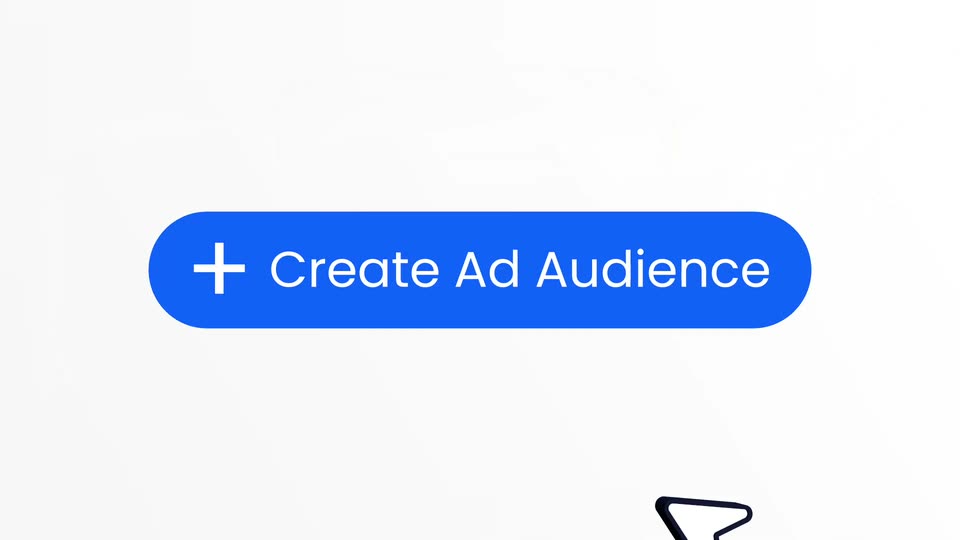
A blue pill button reading Create Ad Audience sits centered on a plain light field. A black-outlined cursor arrow glides in from the lower right and stops at the button's bottom edge, while a caption slides across the frame.
On-screen text: “Reach the right buyers,”
Techniques: Cursor demo, Kinetic type
Camera: Static
04 · Feature reveal · 0:03–0:04
A centered white pill button with a blue plus and blue label sits on a pale background. A black cursor hovers below it, then the label fades out, leaving an empty white card.
Techniques: Cursor demo
Camera: Static
05 · Feature reveal · 0:04–0:06
A cursor glides up a vertical list of data-source options and clicks Salesforce, the row highlights blue, then the view zooms into the Salesforce label until it fills the frame.
Techniques: Cursor demo, UI zoom
Camera: Push in
06 · Feature reveal · 0:06–0:07
On a pale off-white background, the headline resolves from overlapping words into a clean line. Below it, four colored pill chips (red, blue, orange, green) slide in and expand to reveal labels for intent, HQ location, industry and revenue, the last chip carrying a close icon.
On-screen text: “Build ad audiences from every GTM signal”, “Intent: Cyber Security”, “HQ Location: California”, “Industry: Financial Ser”, “Revenue: $50M+”
Techniques: Kinetic type
Camera: Static
07 · Feature reveal · 0:07–0:08
A white field holds a navy headline above four overlapping colored pills, red, blue, orange, green. The background warms to peach as a flat GTM Studio filter card scales in behind, and the pills fill with values, Cyber Security and Finance, sliding into place.
On-screen text: “Build ad audiences from every GTM signal”, “Intent:”, “HQ Location:”, “Industry:”, “Revenue: $50M+”, “Cyber Security”, “Finance”
Techniques: Kinetic type
Camera: Static
08 · Feature reveal · 0:08–0:11
On an orange background, a CRM Record card and a GTM Studio table sit side by side. Table rows fill with emails and numbers, Missing labels flip to Partial, Match Rate climbs from 2% to 68%, then the view zooms onto the Enrich button as a cursor points at it.
Techniques: UI zoom, Cursor demo
Camera: Push in
09 · Feature reveal · 0:11–0:11
A close-up of a data table with an Enrich button pulls back to reveal the full GTM Studio interface: a CRM record card on the left and a contact table on the right, with a white headline reading Boost ad match rates at the bottom.
On-screen text: “Boost ad match rates”
Techniques: UI zoom
Camera: Pull out
10 · Feature reveal · 0:11–0:15
Two flat UI panels sit on green under the caption Boost ad match rates. The CRM card's Missing flags flip to Complete and its match rate climbs 42% to 92% as the table fills in. The shot zooms to the Enrich button, where a cursor hovers and the sparkle glows.
On-screen text: “Boost ad match rates”
Techniques: UI zoom, Cursor demo
Camera: Push in
11 · Feature reveal · 0:15–0:16
A blurred close-up of a data table with a green revenue tag, a sparkle button and a blue-purple Enrich pill. The view pans right as the table separates into a floating card and a white side panel with an Ask anything input slides in on a red background.
Techniques: UI zoom
Camera: Pull out
12 · Feature reveal · 0:16–0:18
A white card with a purple sparkle mark and the headline Your AI Ads Agent floats over a blurred dashboard on a red background. A prompt types into the input field, then a cursor glides in and hovers the blue send button.
On-screen text: “Your AI Ads Agent”, “Unlock insights, enrich data, and take action.”
Techniques: Cursor demo
Camera: Static
13 · Feature reveal · 0:18–0:21
Split layout: the left interface table defogs from blur into a buying committee list with headshots, while the red right panel trades a white agent card for the headline 'Target buying committees for ad activation.'
On-screen text: “Target buying committees for ad activation”
Techniques: Split screen
Camera: Static
14 · Feature reveal · 0:21–0:21
A product table of a buying committee, with avatar photos and job titles, fills the left half. A pink panel on the right holds the white headline, then slides left over the table as the headline fades out.
On-screen text: “Target buying committees for ad activation”
Camera: Pan
15 · Feature reveal · 0:21–0:22
A white wireframe globe spins on a blue gradient field, ringed by circular headshots with magenta borders. A white contact list with an Enrich button slides out to the left, and a small LinkedIn logo fades in beside the sphere.
Techniques: 3D mockup
Camera: Static
16 · Feature reveal · 0:22–0:24
On a blue gradient, a white wireframe globe holds six face avatars in red badges. Publisher logo cards for Meta, Google and LinkedIn drift into place around it with floating thumbs-up icons, while the headline fades in and its brand word swaps from LinkedIn to Google.
On-screen text: “Activate across Google”, “+ 100s of ad publishers”
Techniques: Kinetic type
Camera: Static
17 · Other · 0:24–0:26
On a white field with a faint blue branch pattern at the left edge, a centered bold headline cycles through three gradient phrases. The text crossfades from blue-green to orange-red to purple-pink while the frame stays locked.
On-screen text: “INTENT ACTIVATION”, “NET-NEW PROSPECTING”, “ICP TARGETING”
Techniques: Kinetic type
Camera: Static
18 · Other · 0:26–0:27
The word COMPETITIVE DISPLACEMENT centers on a white field with a faint blue fractal shape at left. The letters start overlapping in a teal gradient, then space out and shift to a magenta-to-orange gradient as they settle.
On-screen text: “COMPETITIVE DISPLACEMENT”
Techniques: Kinetic type
Camera: Static
19 · Other · 0:27–0:28
Bold multicolor sans-serif terms swap in sequence at center over a faint blue ink-blot on white. CRM ENRICHMENT in red and purple-teal gives way to WATERFALL PROCESSES in blue and teal, then AD AUDIENCES, on a locked-off frame.
On-screen text: “CRM ENRICHMENT”, “WATERFALL PROCESSES”, “AD AUDIENCES”
Techniques: Kinetic type
Camera: Static
20 · Other · 0:28–0:29
A light blue torn-edge background holds the gradient headline AD AUDIENCES centered and static as a yellow 3D card with blue and orange edges slides in from the left.
On-screen text: “AD AUDIENCES”
Techniques: 3D mockup
Camera: Static
21 · Outro · 0:29–0:34
Two 3D gradient squares fly in and stack into a three-layer logo mark on the left, releasing a white particle burst. The black wordmark GTM Studio and by zoominfo settle in beside it over a light blue field with a white grid and splatter edge, then hold still.
On-screen text: “GTM Studio”, “by zoominfo”
Techniques: Particles
Camera: Static