0:33

Framer - 🌎 Hola, Bonjour, こんにちは! Introducing AI-powered Localization for your
Framer · Design · Oct 2023
Dia · Jul 2025 · 1:06 · AI-annotated
Dia’s 1:06 launch film runs 50 scenes, about 1.3 s each. The product shows up at 0:02 and 4 features are revealed. There is no explicit call to action. The video chains three skill demos behind a recurring 'Sometimes you need more...' refrain and single-word cards, alternating moody live-action B-roll with crisp split-screen UI captures. Fast 152 BPM cutting, macro product shots and a serif wordmark give it a cinematic, high-energy rhythm that resolves on the Dia logo.
Is this your launch? to your site or press kit.
Framer · Design · Oct 2023
HeyClicky · Consumer · Aug 2026
Airtable · Productivity · Oct 2026
A close-up of a spinning bicycle wheel and black derailleur on a wooden floor, the camera locked off as the spokes and floor blur. A line of white text fades in across the lower frame.
On-screen text: “Sometimes you need more...”
Camera: Static
A soft-focus macro shot of a dark workbench holds a black rounded tool and a few blurred objects. The frame stays locked off and the focus never sharpens, while a centered white caption sits over the scene.
On-screen text: “Sometimes you need more...”
Camera: Static
A screen capture of a Reddit post titled “Carb Tuning help For GSX600f 1996” fills the frame, its body text highlighted in blue. The view scrolls down slightly to reveal the final line of the post while a caption sits still.
On-screen text: “Sometimes you need more...”
Camera: Static
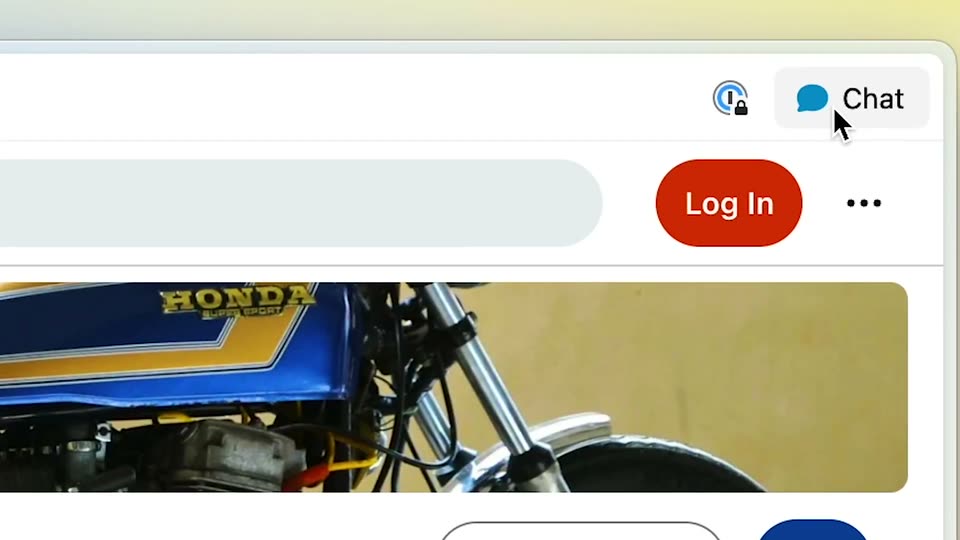
A locked-off close-up of a webpage header shows a red Log In button beside a Chat button with a blue speech bubble. A black cursor hovers and drifts upward toward the Chat button, above a video player displaying a blue Honda motorcycle.
Techniques: Cursor demo
Camera: Static
A man in a dark coat stands behind a large spoked bicycle wheel as it spins, kicking up a cloud of dust. Warm sunset light fills the background while the camera holds a static wide shot, framing the figure inside the rim.
Camera: Pan
A browser window splits a forum thread on the left and an AI chat on the right. The French reply streams in line by line while the overlapping forum text on the left settles into a clean paragraph.
Camera: Push in
A close-up of a bicycle's rear wheel and frame moves through a dark, teal-lit space as a rider's foot pedals. The word Power. sits statically in the center of the frame.
On-screen text: “Power.”
Camera: Static
A large still word Power. is held on a ChatGPT settings screen in a locked-off frame, while the black header label and the prefix field are typed, switching from french to mote.
On-screen text: “Power.”
Camera: Static
A white text panel with a thin gray border fills the frame, holding a dense paragraph of prompt instructions. The block starts as a doubled, overlapping ghost and resolves into a single clean line of black sans-serif text while drifting slightly left.
Camera: Pan
An extreme macro shot of a dark device with a teal rim, opening soft and motion-blurred. The focus then pulls to reveal perforated metal details as the camera drifts slowly around the object resting on a light surface.
Camera: Static
A close-up of a chat interface shows a black model selector bar. A cursor moves from the open dropdown to the ChatGPT o3 option, and the bar label switches from ChatGPT 4.1 to ChatGPT o3.
Techniques: Cursor demo
Camera: Static
A tilted chat interface in 3D perspective rests on a cream backdrop. A French message about swapping a GSX600F engine types out line by line below a Reddit link card and a blue /moto-french bubble, while an English draft sits in the left column.
On-screen text: “ChatGPT o3”
Techniques: 3D mockup, Kinetic type
Camera: Push in
Close-up of a spinning motorcycle wheel on a wooden floor cuts to a rider crossing a grass field, then a runner in a blue shirt, then the rider again with panniers, then a runner in red, all shot with strong motion blur.
Camera: Push in
A tight profile of a helmeted rider cuts to a wide tracking shot of two motorcyclists crossing a flat plain at dusk. Silhouetted against a pink and orange sunset, the bikes throw cyan light and kick up smoke from the rear tires.
Camera: Pan
A tight side view follows the spinning front wheel and teal fender of a moving motorcycle. The grassy hillside streaks past in blur, conveying speed.
Camera: Static
Grainy black-and-white footage of a rider on a motorcycle speeding along a street. The camera tracks the bike past a graffiti-covered wall and a brick wall, heavy motion blur streaking the frames.
Camera: Pan
A dark close-up shows a flashlight lying on carpet, its lens glowing warm on the right. A hand enters from above and grips the flashlight while the caption stays centered.
On-screen text: “Sometimes you need more...”
Camera: Static
A dark hazy space holds two teal light beams that drift slowly while faint dust particles float. The white caption sits centered and remains locked in place throughout the shot.
On-screen text: “Sometimes you need more...”
Techniques: Particles
Camera: Static
A hand holds a flashlight with an orange rim against a dark teal and magenta background. The lens glows bright, then the light cuts off, leaving only a thin sliver of orange. The subject's hair stays softly blurred on the right as the frame holds still.
On-screen text: “Sometimes you need more...”
Camera: Static
A white word “Scope.” holds centered over a defocused field of purple and yellow bokeh lights. The blurred lights drift slowly while the text stays locked and still. The pace is calm and static.
On-screen text: “Scope.”
Camera: Static
A close-up of a settings form under a black header bar. The header word and the prefix field change from 'deepmarize' to '/deep-research' as the field text is selected and retyped, while a mouse cursor hovers at the field's edge. The prompt box below keeps its static copy.
Techniques: Cursor demo
Camera: Static
A near-black close-up: a hand-held flashlight lens flares into a bright orange-rimmed glow at left, while a soft-focus figure in magenta and teal clothing fills the right of frame. Small static prompt captions sit over the dark image.
On-screen text: “When I prefix a query with:”, “Run the following prompt:”, “Summarize this page or selected text”, “deep-research”, “/deep-research”
Camera: Static
A silhouetted lighthouse is centered against a grainy dark blue night sky. Its lamp burns amber, throwing a warm beam toward the upper left that flares into a vertical glow. The structure holds still as the light shifts.
Camera: Static
A dark scene with a bright central glow cuts to a product screen showing the deep-research prompt. The frame pans right to the model selector, where a cursor opens the dropdown and selects ChatGPT o3.
Techniques: UI zoom, Cursor demo
Camera: Pan
A product window splits into an article on the left and an AI research panel on the right. The panel scrolls from a Thinking deeply reasoning box down through an Executive Summary and bulleted Key Insights, with a cursor resting over the text.
Techniques: Cursor demo
Camera: Push in
Aerial view of a white lighthouse on a dark rocky headland at night. Its lamp glows warm yellow against a deep teal sea and cloudy sky. The camera holds a slow, steady pull-back over the tower and coastline.
Camera: Static
A dark lighthouse silhouette on a rocky headland, its lamp glowing bright against a purple dusk sky over a calm sea. The camera drifts slowly forward, the light flaring at the lens.
Camera: Static
A flat illustration of a white lighthouse stands on the right against a pale blue sky and cream sea, its dark lamp pulsing with a soft glowing halo. White text reading “Sometimes you need more...” sits left of center while clouds drift along the bottom.
On-screen text: “Sometimes you need more...”
Camera: Pan
A hand grips large tailoring scissors and cuts a long strip of magenta striped cloth on a worktable. A hazy workshop with standing figures fills the background in warm light.
On-screen text: “Sometimes you need more.”
Camera: Pull out
A close-up follows hands in a red knit sweater and red beaded bracelet as orange-handled scissors cut a seam in light blue fabric, the sewing machine head resting at left.
Camera: Push in
A close-up shot follows a pair of hands cutting dark blue fabric with metal scissors along a white chalk line. A wooden ruler sits blurred in the foreground while a ringed hand steadies the cloth on the right.
Camera: Static
A person in a white jacket trims the stems of red flowers with long metal scissors over a white table. The hands work slowly in dim, warm light, with a brown paper wrap at the right edge.
Camera: Pan
A pair of metal scissors lies on a rust-orange textured surface as a lock of brown hair falls into the right side of the frame. The word Precision. sits centered in white over the still, locked-off composition.
On-screen text: “Precision.”
Camera: Static
A browser window with a tab sidebar displays a barbershop website showing a black and white photo of a man getting a haircut. A cursor moves to the Chat button in the top right and clicks it, creating a small ripple.
On-screen text: “Precision.”
Techniques: Cursor demo
Camera: Static
A flat browser window on a blue-to-yellow gradient shows a barber shop webpage beside an assistant panel with a Capture Tool card and a question field. A cursor drifts from the panel's top corner onto the page as the orange headline and button fade in.
Camera: Static
A custom-command settings panel fills the frame. A mouse pointer hovers over the input field, then the header, field and prompt box dissolve from the distance command to the nyc-expert command, a text caret sitting in the field.
Camera: Static
Tight close-up of a chat window's black top bar. The cursor taps the model selector, a dropdown lists ChatGPT 4.1 and ChatGPT o3, then the cursor slides down to the o3 row and the header label switches from ChatGPT 4 to ChatGPT o3.
Techniques: Cursor demo, UI zoom
Camera: Static
A split screen shows a barber shop website on the left and an AI chat panel on the right. The website scrolls down slowly while the chat streams out a step-by-step guide line by line.
Techniques: Split screen
Camera: Pan
A copper laser head fires a bright white beam onto a dark metal sheet, sending a shower of orange sparks flying outward. The frame stays locked off while the white text Dia Skills holds center-left and scales gently.
On-screen text: “Dia Skills”
Techniques: Particles
Camera: Static
A close-up of a cutting head on a teal sheet throws off sparks as the frame sharpens from a blur. Centered white text reads Dia Skills, then swaps to Now with Reasoning.
On-screen text: “Dia Skills”, “Now with Reasoning”
Techniques: Kinetic type
Camera: Static
A close-up of a metal fitting held in a clamp, a tool touches it from above and bright orange sparks burst outward against a warm amber background. The white text 'Now with Reasoning' sits centered and static over the action.
On-screen text: “Now with Reasoning”
Camera: Static
Extreme close-up of a laser tracing a stylized cutout into a dark glossy surface, bright glints along the fresh edge and fine dust in the air. A white caption “Now with Reasoning” sits in the center, then the large white Dia logo appears over the cut shape.
On-screen text: “Now with Reasoning”, “Dia”
Camera: Static
The white Dia wordmark and dome logo sit centered over a macro shot of a metallic probe above a grid of glowing pink and yellow dots.
On-screen text: “Dia”
Camera: Static
A white logo, a rounded icon beside the serif word Dia, holds centered and still over a soft-focus close-up of a metallic nozzle and warm bokeh. The frame is locked off with no motion.
On-screen text: “Dia”
Camera: Static
The white Dia wordmark and its rounded mark sit centered over a blurred close-up of a metallic cylinder with a thin tip and a red glow, above warm out-of-focus lights. The frame is locked off and the logo holds still.
On-screen text: “Dia”
Camera: Static
A centered white Dia wordmark with a rounded blob mark holds still over a defocused macro of a metallic nozzle tip against a teal and magenta backdrop. The frame is locked off with no motion across the clip.
Camera: Static
A white Dia logo, a circle with a wavy lower edge beside a serif wordmark, sits centered on a dark field beneath a metallic drill tip. The frame is locked-off and static.
Camera: Static
A white Dia wordmark with a notched-circle mark holds centered on a near-black teal field, a dim 3D mechanical component hovering above it, the frame locked and still.
Camera: Static
A white serif “Dia” wordmark with a half-circle icon holds centered over a dark teal macro of a metallic cylindrical nozzle and a row of vertical bars. The frame is locked off and static, with no motion.
On-screen text: “Dia”
Camera: Static
A white Dia wordmark with a round speech-bubble mark sits centered on black. It holds still, then fades out to black.
On-screen text: “Dia”
Camera: Static