
0:32
Explore
Zolvo - Launch
Zolvo · Oct 2026 · 1:08 · Full motion · AI-annotated
- Length
- 1:08
- Scenes
- 20 · 3.4 s avg
- Product on screen
- 0:05
- Features shown
- 9
- Voiceover
- Yes
- Views
- 21 on YouTube
as of November 23, 2026
00:00:00 / 01:08:02
- Length
- 1:08
- Scenes
- 20 · 3.4 s avg
- Product on screen
- 0:05
- Features shown
- 9
- Voiceover
- Yes
- Views
- 21 on YouTube
as of November 23, 2026
Zolvo’s 1:08 launch film runs 20 scenes, about 3.4 s each. The product shows up at 0:05 and 9 features are revealed, with social proof. There is no explicit call to action; a voiceover carries the film. The film is built as a chain of single-feature beats: a problem line, a logo tagline, then one headline-plus-demo per feature, closing on a compliance seal and a leaf-to-logo sign-off at a steady 128 bpm pace. Signature moves are flat white cards that slide in and tick off green checkmarks, 3D card walls that flatten into interface panels, and a mint accent that flips between pale and near-black stages.
No filming indicatedEstimated needs: 8 capture groups — your screens or recordings · 1 official logo — reused across the film · 4 graphic passages — draw or supply · 5 3D passages — build or supply
Is this your launch? to your site or press kit.
More like this



Similar soundtrack
Films whose music sounds like this one, voice left out
1:24


box by Simular - Give your AI a computer.
Simular AI · Electronic, cinematic
2:13

Ishan Mukherjee - Announcing @rox_ai just hit a $1.3B valuation, only 12 months after l
Rox · Modern electronic
2:48

Anuruddh Mishra - We raised $12M from @Accel and @PeakXV to put AI through the bullshit
August · Modern electronic
Zolvo - Launch, scene by scene
· 20 scenes as text
01 · Problem · 0:00–0:05
A dimmed legacy loan software screen with dense form fields; a setup dialog opens while the view slowly zooms in. A large white handwritten caption reads across the center, then a second line appears below it in orange.
On-screen text: “Traditional lending software”, “is becoming obsolete.”
Techniques: UI zoom, Kinetic type
Camera: Static
02 · Product intro · 0:05–0:08
The zolvo logo sits centered on a plain off-white background as the tagline fades in beneath it, “We've got your” in black and “facility covered.” in green.
On-screen text: “We've got your”, “facility covered.”
Camera: Static
03 · Feature reveal · 0:08–0:09
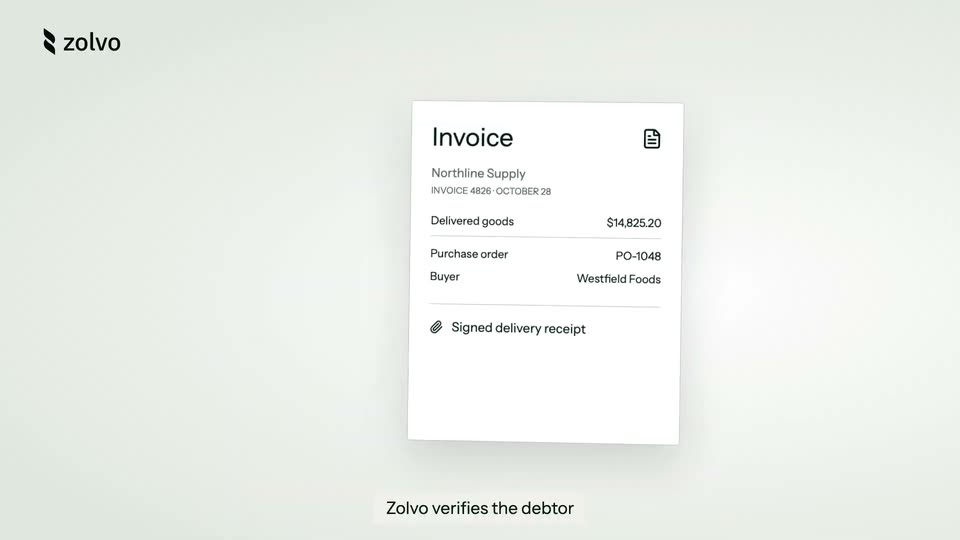
Two invoice cards stacked in 3D perspective flatten into a single centered card as a “Verifying invoice” status bar with a clock icon fades in at its bottom. The Zolvo logo sits top left and the caption “Zolvo verifies the debtor” stays fixed at the bottom.
On-screen text: “Zolvo verifies the debtor”, “We've got your”, “facility covered.”
Techniques: 3D mockup, Morph
Camera: Pull out
04 · Feature reveal · 0:09–0:13
A flat layout holds a static 'Invoice verification.' headline on the left and a white invoice card in the center. A debtor confirmation card slides in on the right, its three checks fill in sequence, and the card's progress bar resolves into a green 'Verified' button while bottom captions swap.
On-screen text: “Invoice verification.”, “Zolvo verifies the debtor”, “and checks the invoice before you fund it.”
Camera: Static
05 · Feature reveal · 0:13–0:15
A 3D wall of white and mint document cards recedes diagonally on the right against black, while a large white headline and mint subline hold on the left. A white caption pill fades in at the bottom as the camera drifts slowly.
On-screen text: “Supporting documents.”, “Read and checked by Zolvo.”, “It reads the supporting documents”
Techniques: 3D mockup
Camera: Pull out
06 · Feature reveal · 0:15–0:16
On a dark stage, a tilted 3D grid of document cards fills the right side while the left heading crossfades from Supporting documents. to Prepared for underwriting. and a flat verification panel with tabs slides in. A bottom caption updates with the voiceover.
On-screen text: “Supporting documents.”, “Read and checked by Zolvo.”, “It reads the supporting documents”, “Prepared for underwriting.”, “and prepares the information you need for underwriting.”
Techniques: 3D mockup
Camera: Pull out
07 · Feature reveal · 0:16–0:19
Under the headline Prepared for underwriting., a light panel shows a grid of document tiles. A green progress bar fills to 2,418 files as tiles turn green and a dark side panel populates with borrower data, ending on a Ready for underwriting status.
On-screen text: “Prepared for underwriting.”, “and prepares the information you need for underwriting.”
Camera: Static
08 · Feature reveal · 0:19–0:26
Under the headline “Your systems work through Zolvo.”, a flat hub diagram builds on pale mint: Bank accounts and Loan management cards fade in left, a Communication channels card right, and curved green lines draw into the central logo. Bottom captions swap, then the diagram crossfades out.
On-screen text: “Your systems work through Zolvo.”, “And it connects your bank, loan system”, “and communication channels”, “so they can work together.”
Camera: Static
09 · Feature reveal · 0:26–0:33
A workflow diagram builds on a pale background: a Send reminder card branches into two wait-time cards, then a Got a reply? decision and two outcome cards, while connectors light up green and a day timeline draws beneath. A cursor hovers over the second card.
On-screen text: “Test your collection strategy.”, “Compare two reminder timings.”, “You can test when to follow up,”, “and adjust your collection strategy as you learn.”, “Compare confirmed payments over the following week.”
Techniques: Cursor demo
Camera: Static
10 · Feature reveal · 0:33–0:39
On a dark background, a white payment policy card sits left under the headline. A cursor drags its slider right, the limit counts from $10,000 to $20,000, and green and orange outcome boxes appear on the right, linked by curved lines. A caption updates at the bottom.
On-screen text: “You decide what needs approval.”, “You set the approval limit, and Zolvo brings in your team when a payment exceeds it.”
Techniques: Cursor demo
Camera: Static
11 · Feature reveal · 0:39–0:45
A dark payment-match card sits center on a pale background, flanked by four source labels. Inside the card, four icon tiles light up one by one, each triggering a checkmark and a colored dashed line to its matching outer label. The status line switches from linking to verified.
On-screen text: “See where each number came from.”, “Each decision links back to the bank record,”, “the conversation and the original documents.”
Camera: Static
12 · Feature reveal · 0:45–0:47
A white payment-match card sits under a black “Approve once.” headline on a light gray background. A cursor clicks the black Approve button, which turns green and reads Approved, while a bottom caption shifts to “Zolvo applies the payment.”
On-screen text: “Approve once.”, “Once you approve the match,”, “Zolvo applies the payment”
Techniques: Cursor demo
Camera: Static
13 · Feature reveal · 0:47–0:49
A 3D network of white card stacks links to a flat mint-edged device, with cyan light pulsing along the connecting tracks. On the left, the Zolvo logo and a two-line headline sit above notification cards that stack in, while a caption at the bottom updates.
On-screen text: “Cash posting is complete.”, “Zolvo applies the payment”, “and updates the loan system.”
Techniques: 3D mockup, Light sweep
Camera: Static
14 · Feature reveal · 0:49–0:49
A pale 3D tray system with cyan card stacks recedes into depth. The left headline and stacked status cards appear, then a white loan panel fades in on the right.
On-screen text: “Cash posting is complete.”, “and updates your loan system.”
Techniques: 3D mockup
Camera: Static
15 · Feature reveal · 0:49–0:52
A four-row checklist sits left of a loan card showing $25,000 applied, under the heading Cash posting is complete. A bottom caption fades out, then the layout cuts to a facility card with balances and a covenants chart under a new heading.
On-screen text: “Cash posting is complete.”, “and updates your loan system.”, “Keep track of every facility.”
Camera: Static
16 · Feature reveal · 0:52–0:58
A white facility card sits under the headline as a green line draws across its covenant chart and a 1.42× value pops in. A report card slides in from the right, checkmarks tick on, then the scene fades to a circular SOC 2 stamp.
On-screen text: “Keep track of every facility.”, “It also monitors your facilities,”, “tracks covenants”, “and keeps your reports up to date.”, “SOC 2 COMPLIANT”
Techniques: Kinetic type
Camera: Static
17 · Social proof · 0:58–1:02
A dark circular AICPA SOC seal fades in on the left of a near-black background while thin concentric rings pulse outward around it. On the right, the two-line headline and two small icon labels fade in beside it.
On-screen text: “SOC 2 compliant.”, “Information secured.”, “Type II”, “Controlled access”
Camera: Static
18 · Outro · 1:02–1:04
A stylized line-drawn branch with dark green leaves sits centered on a pale gray background. Two outer leaves flip to mustard gold.
Camera: Static
19 · Outro · 1:04–1:04
A stylized branch with sage-green leaves and two yellow leaves sits on a pale gray field. The green stems and leaves fade out and the background darkens to gray, leaving the two yellow leaf shapes centered.
Camera: Static
20 · Outro · 1:04–1:08
A beige S-shaped logo mark on dark gray grows and turns white on black as the lowercase wordmark zolvo and the URL zolvo.com fade in below, then hold.
On-screen text: “zolvo”, “zolvo.com”
Techniques: Kinetic type
Camera: Static