2:38
Explore
Shensi Ding - We just cut AI spend by 75% across an entire workforce in one click.
Merge · Aug 2026 · 0:32 · AI-annotated
- Length
- 0:32
- Scenes
- 20 · 1.6 s avg
- Product on screen
- 0:04
- Features shown
- 3
- Voiceover
- Yes
00:00:00 / 00:32:17
Merge’s 0:32 launch film runs 20 scenes, about 1.6 s each. The product shows up at 0:04 and 3 features are revealed, with social proof. There is no explicit call to action; a voiceover carries the film. The video alternates tight UI close-ups with flat diagram animations on a cream field, cutting roughly every two seconds to a mid-tempo beat. Signature moves are slow zoom-ins on dropdowns, 3D-tilted interface cards, and dashed routing lines that pan across the frame.
No filming indicatedEstimated needs: 4 capture groups — your screens or recordings · 1 official logo — reused across the film · 6 graphic passages — draw or supply · 1 3D passage — build or supply
Is this your launch? to your site or press kit.
More like this

Shensi Ding - We just cut AI spend by 75% across an entire workforce in one click., scene by scene
· 20 scenes as text
01 · Problem · 0:00–0:02
A dark model-governance layout with floating task cards cuts to a cream screen under a “Hey, early bird” headline, where a cursor types a prompt and clicks the model dropdown as the view zooms in.
On-screen text: “MERGE AI Model Governance”, “Hey, early bird”
Techniques: Cursor demo, UI zoom
Camera: Push in
02 · Problem · 0:02–0:04
Close-up of a chat input bar with an open model dropdown. The frame zooms in as a cursor moves over the list and rests on Fable 5, then the menu closes and the screen fades to a plain light background.
Techniques: UI zoom, Cursor demo
Camera: Push in
03 · Product intro · 0:04–0:06
A black two-stroke symbol and the word MERGE converge from a horizontal motion blur into a centered lockup on a cream background, then hold still.
Camera: Static
04 · Feature reveal · 0:06–0:10
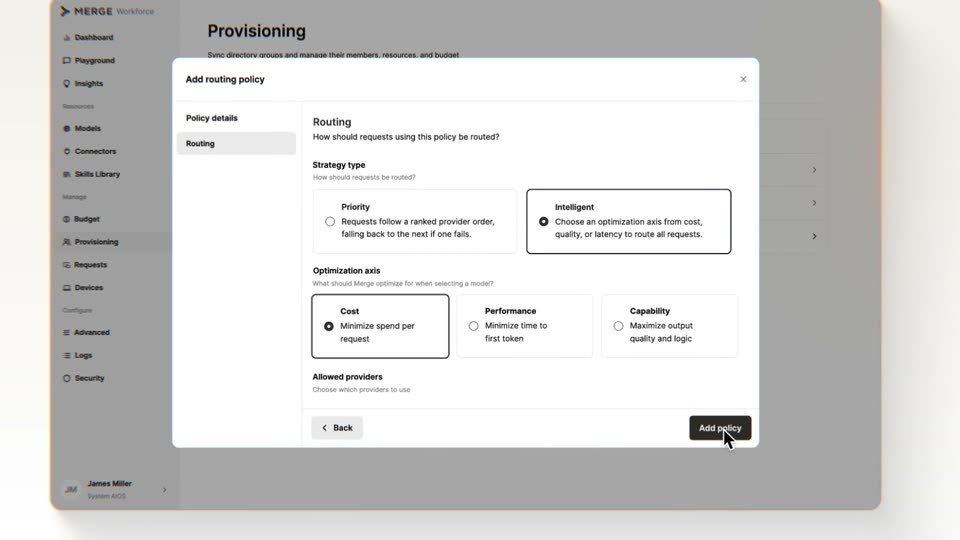
The Merge Workforce dashboard shows the Provisioning page; the cursor clicks the Groups tab, then an Add routing policy modal opens over it. The cursor selects the Intelligent strategy and the Cost axis, then clicks Add policy. The interface sits in a lightly tilted 3D card.
Techniques: Cursor demo, 3D mockup
Camera: Push in
05 · Feature reveal · 0:10–0:12
A green progress bar fills under the logo and a status line with a ticking device counter. The view pans down as the logo lifts, revealing dashed lines branching to a grid of laptops; green pulses travel down each line and laptops light up with a green checkmark in turn.
On-screen text: “Deploying policy to devices”, “729 / 1,248 devices updated”, “1,239 / 1,248 devices updated”
Techniques: UI zoom
Camera: Pan
06 · Feature reveal · 0:12–0:13
A grid of laptop icons fills a white background. The upper rows carry green outlines and checkmark badges; the lower rows stay gray with loading spinners. A green highlight steps down row by row as the whole grid drifts upward.
Camera: Pan
07 · Feature reveal · 0:13–0:14
A grid of flat laptop icons inside rounded cards drifts upward. The top rows glow green with a checkmark on each screen; the bottom rows stay gray with a loading spinner that flips to a checkmark as it reaches the top.
Techniques: Morph
Camera: Push in
08 · Feature reveal · 0:14–0:15
A cursor clicks the Merge status icon in the macOS menu bar, and a white card fades in below showing a Protected status, a two-color progress bar, and a weekly usage bar chart.
Techniques: Cursor demo
Camera: Static
09 · Feature reveal · 0:15–0:16
A macOS desktop zooms out from a tight crop of the Merge dashboard to the full screen, exposing a compact menu bar notification in the top right corner. The dashboard window then shrinks away as the cursor drops to the Merge icon in the dock.
Techniques: UI zoom, Cursor demo
Camera: Pull out
10 · Feature reveal · 0:16–0:19
A chat interface fills the frame, greeting 'Hey, early bird' above a large input box. A prompt types into the box, then a cursor clicks the orange send button, triggering a small loading indicator. The shot reframes from a full browser window to the interface alone.
Techniques: Cursor demo
Camera: Pull out
11 · Feature reveal · 0:19–0:20
A UI card on the left holds a text field and a 'Merge routing policy' row with mic and red button. A dashed line links it to a black icon on the right labeled 'Merge routing layer' with a caption; the layout shifts left as the right text slides in.
On-screen text: “Merge routing layer”, “Evaluating the best model for speed, cost, and accuracy”
Camera: Static
12 · Feature reveal · 0:20–0:21
A flat diagram pans right across a pale background. A settings card with a microphone and red button sits left, linked by a dashed line to a black Anthropic icon titled Merge routing layer. The pan reveals a grid of AI provider logos, ending on a green dot.
Camera: Static
13 · Feature reveal · 0:21–0:22
A black icon with a white chevron sits left under the title 'Merge routing layer', linked by a dashed green line to a green pill 'Sonnet 5 + Best fit' pointing at an orange asterisk among a vertical stack of AI model logos on the right; the diagram slides upward.
On-screen text: “Merge routing layer”, “Evaluating the best model for speed, cost, and accuracy”, “Sonnet 5 + Best fit”
Camera: Static
14 · Feature reveal · 0:22–0:23
A chat card with a green file icon and a five-row sales table settles into place as the prompt bubble above it shifts up. A response line with reaction icons fades in beneath the card, ending on a small orange burst mark.
Camera: Pan
15 · Feature reveal · 0:23–0:25
Two tilted interface panels sit in 3D perspective. A cursor clicks the Google row in the provider list, then the panel rotates to show Google's models, where the cursor checks Gemini 3 Pro, highlighting the row with a context label.
Techniques: 3D mockup, Cursor demo
Camera: Pull out
16 · Feature reveal · 0:25–0:26
A settings modal for configuring default model access fills the frame, listing providers and Gemini models with a cursor hovering. The view then zooms out and dims as a dark hexagon shape scales up in the center.
Techniques: UI zoom
Camera: Pull out
17 · Feature reveal · 0:26–0:27
A blurred model-selection panel fills the background while a dark hexagon bearing a padlock icon floats in the foreground, scaling as a white-outlined cursor arrow glides toward it from the right.
Techniques: Cursor demo
Camera: Pull out
18 · Social proof · 0:27–0:28
A black shield with a white padlock sits over a blurred form while a cursor points at it and peach hexagon outlines ripple outward. The shield fades out, and a dark Results tag appears above a rising orange line chart.
On-screen text: “Results”
Techniques: Cursor demo
Camera: Static
19 · Social proof · 0:28–0:30
A line chart pulls back from a tight crop on the orange Results node to show the whole plot: a high, steady orange line and a falling gray Costs line with a shaded area between them. The chart then collapses to a blank background.
Techniques: UI zoom
Camera: Pull out
20 · Outro · 0:30–0:32
On a near-white field, the MERGE logo assembles at center. The two-stroke mark and the uppercase wordmark fade from a soft translucent gray to solid dark gray, the letters resolving into a crisp lockup, which then holds still for the rest of the clip.
On-screen text: “MERGE”
Camera: Static