
1:02
Explore
00:00:00 / 01:25:11
- Length
- 1:25
- Scenes
- 28 · 3.0 s avg
- Product on screen
- 0:13
- Features shown
- 4
- Voiceover
- Yes
- Views
- 247 on YouTube
as of November 26, 2026
Yuma AI’s 1:25 launch film runs 28 scenes, about 3.0 s each. The product shows up at 0:13 and 4 features are revealed, with social proof. There is no explicit call to action; a voiceover carries the film. The video runs a problem-to-product arc: a live-action frustration block over a long support document, a clean UI showcase of the Ask Yuma hub, a rapid run of short ask-and-answer demos, and a trust-card close. Pacing is quick at about eight cuts per minute, built on flat locked-off UI shots, soft pastel gradients, and the purple Ask Yuma button as the recurring visual anchor.
Footage neededEstimated needs: 8 capture groups — your screens or recordings · 9 filmed passages — shoot, supply or replace · 2 graphic passages — draw or supply · 1 3D passage — build or supply
Is this your launch? to your site or press kit.
More like this
Similar soundtrack
Films whose music sounds like this one, voice left out
2:24

Runway - Today, we're sharing new research on GWM Worlds 2. Our latest General
Runway · Electronic, Corporate Tech
1:10

Shiraz AI (YC S26): Robots that learn on the job
Shiraz AI · Electronic
1:15

Stunning Video Commercials for @LOPUS AI
Lopus · Upbeat electronic
Ask Yuma | Conversational AI to Run Your Support Operation, scene by scene
· 28 scenes as text
01 · Hook · 0:00–0:00
A horizontal split frame: the top band holds a soft pastel gradient with the purple headline Hi Merchants! sliding upward, while the bottom shows a curly-haired man looking down at a floating document window titled Master_Support_Process_v4.2_FINAL.
On-screen text: “Hi Merchants!”
Techniques: Split screen, Kinetic type
Camera: Static
02 · Problem · 0:00–0:07
A curly-haired man in a green shirt sits at a desk with a laptop, a second man blurred behind him, while a support-process document window floats at left and its text scrolls upward.
On-screen text: “Hi Merchants!”
Camera: Pan
03 · Problem · 0:07–0:08
A tired man in a brown shirt rests his head on his hand at a desk. On the right, a floating document window morphs from a long text page into a node-based automation builder diagram with condition boxes and a cursor.
Techniques: Morph
Camera: Static
04 · Problem · 0:08–0:09
A frustrated man in glasses rests his head on his hand at a desk on the left, while a flat UI panel on the right flips from a flowchart diagram to a text document page.
Techniques: Split screen
Camera: Static
05 · Problem · 0:09–0:10
A young man with glasses rests his head on his hand at a desk, looking stressed, while a flat automation-builder flowchart panel with purple, orange and green nodes sits on the right. The frame is locked off and still throughout.
Techniques: Split screen
Camera: Static
06 · Problem · 0:10–0:10
A tired young man in a tan shirt sits at a desk, hand on his forehead, in a softly lit office. A white document window titled Master_Support_Process floats at the right, its body text scaling slightly. The frame stays locked off.
Camera: Static
07 · Problem · 0:10–0:11
A tired man in a tan shirt rests his head on his hand at a desk, filmed in a shallow-focus office. On the right, a flat Automation Builder window crossfades from a flowchart of trigger and action nodes into a pasted document with section headings.
Camera: Static
08 · Problem · 0:11–0:12
A tired young man in a tan shirt rests his head on his hand at a desk, eyes on a laptop, while a white automation-builder flowchart panel floats on the right and its document text clears into clean nodes.
Camera: Static
09 · Problem · 0:12–0:13
A woman in a black sleeveless top stands against a dark gray backdrop, her head turning to the side with an open-mouthed expression. White italic text reading the question sits at the left edge, held static.
On-screen text: “What if you could just... paste it?”
Camera: Static
10 · Product intro · 0:13–0:15
A light dashboard with a left sidebar and metric cards sits flat and locked off. Over it, the word Ask Yuma in bold purple scales up and fades from faint to solid across the center of the frame.
On-screen text: “Ask Yuma”
Techniques: Kinetic type
Camera: Static
11 · Demo · 0:15–0:19
A purple Ask Yuma button sits at left while a vertical list of search rows scrolls up at right, a purple highlight with a checkmark and bar chart hops from row to row. At the end the button rises and Deep Search and Flows buttons appear at the top corners over a faint dotted circle.
Camera: Static
12 · Demo · 0:19–0:21
On a white background with faint concentric circles, five colored pill buttons with white icons and labels (blue, purple, yellow, green, red) pop in one by one around the center, then the whole cluster scales down toward the middle.
On-screen text: “Deep Search”, “Flows”, “Ask Why”, “Insights”, “Product Reports”
Camera: Static
13 · Demo · 0:21–0:22
On a pale background with faint concentric rings, a tight cluster of colored feature chips (blue, purple, orange, green, red) bursts outward to points on the rings, leaving a soft purple glow at the center.
Camera: Static
14 · Demo · 0:22–0:24
A purple pill button labeled Ask Yuma with a sparkle icon floats centered on a white field over a soft purple glow. Small multicolored dots drift around faint concentric rings while the button eases slightly downward.
Techniques: Particles
Camera: Static
15 · Demo · 0:24–0:28
A purple pill button reading “Ask Yuma” with a sparkle icon holds center as four white feature cards scale and fade in around it, each linked by dotted lines that draw outward. The cards fill with interface content and the frame locks off.
On-screen text: “Ask Yuma”
Camera: Static
16 · Feature reveal · 0:28–0:33
A minimal chat screen in a rounded card floats on a soft blue gradient. A cursor rises to the Setup Autopilot chip, the view zooms into the Ask Yuma input field, and a letter is typed before the field shows its placeholder again.
Techniques: Cursor demo, UI zoom
Camera: Static
17 · Feature reveal · 0:33–0:39
A flat chat interface card sits on a blue gradient. A cursor hovers at the right edge as the main panel fills with a generated SOP document, its markdown text reformats into styled sections and a table, then a confirmation question card slides in.
Techniques: Cursor demo
Camera: Pull out
18 · Feature reveal · 0:39–0:56
A white question card on a soft blue gradient steps through a four-part form as a cursor ticks options and presses Submit. The screen then shows a flowchart, zooming from a full overview down to single nodes and back out.
Techniques: Cursor demo, UI zoom
Camera: Static
19 · Feature reveal · 0:56–0:58
A pale gray rounded panel sits on a soft blue-purple gradient. A centered input bar shows the placeholder with a purple sparkle icon, then text types in letter by letter as the bar widens and the mic and send buttons slide right.
Techniques: Cursor demo
Camera: Static
20 · Feature reveal · 0:58–1:01
A white chat input field with a purple border sits centered on a light gray background. The query “Hi, what can we automate next?” types out letter by letter behind a blinking caret, with a sparkle icon on the left and a paperclip plus purple send button on the right.
Techniques: Kinetic type
Camera: Static
21 · Feature reveal · 1:01–1:06
A white app window fades in over a soft blue-green gradient. Inside, a report auto-scrolls down past purple donut charts with legends, ending on a numbered focus list, while a dark chat bubble and an input bar stay fixed at the edges.
Camera: Pull out
22 · Feature reveal · 1:06–1:08
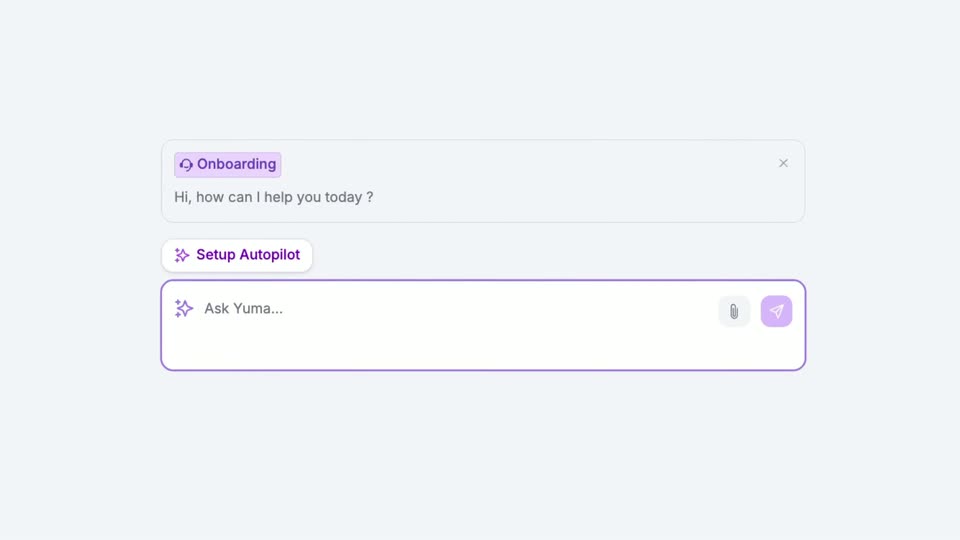
On a light gray background, an Onboarding card and a Setup Autopilot pill settle into place above a purple-bordered input field, where a query types out letter by letter beside a purple send button.
Techniques: Kinetic type
Camera: Pull out
23 · Feature reveal · 1:08–1:11
A chat window shows a dark query bubble on the right and a cursor. A result card slides in from the left with a purple pie chart and legend, then the view zooms into the investigation summary text listing the webhook failure and fixes.
Techniques: Cursor demo, UI zoom
Camera: Pull out
24 · Feature reveal · 1:11–1:12
A chat card labeled Onboarding with the greeting Hi, how can I help you today ? sits above a Setup Autopilot input bar. The view zooms into the input as the query how do our policies types itself out behind a blinking caret, with a purple send button at the right.
Techniques: UI zoom, Cursor demo
Camera: Pull out
25 · Feature reveal · 1:12–1:15
A rounded chat card hovers in 3D perspective over a white field, a dark user bubble on the right. It rotates flat against a blue-green gradient while its content swaps from a policy question panel to a results table and bullet list.
Techniques: 3D mockup
Camera: Pull out
26 · Demo · 1:15–1:17
A grid of white prompt cards on a lavender background scrolls slowly upward. Each card holds a sparkle icon, an example prompt, a paperclip and a purple play button, and the prompt text crossfades between different examples.
Techniques: Morph
Camera: Static
27 · Other · 1:17–1:21
A light dashboard of four metric cards fades in from white, its gauges, bars and lists filling with data, while a purple Ask Yuma button with a soft glow rests at the bottom center.
Camera: Static
28 · Social proof · 1:21–1:25
A white frame fades in: the yuma.ai wordmark and speech-bubble mark sit left of a thin divider, next to a red G2 badge and five red stars. A gray line reads “Trusted by the world’s biggest brands” above a dense grid of gray partner logos, then holds still.
On-screen text: “Trusted by the world’s biggest brands”
Camera: Static