2:33
Explore
Best AI SaaS Product Launch Video | WMP
WMP · Aug 2025 · 1:13 · Full motion · AI-annotated
studio ObiN Studio
- Length
- 1:13
- Scenes
- 38 · 1.9 s avg
- Product on screen
- 0:06
- Features shown
- 4
- Call to action
- 1:04 · 87%
- Voiceover
- No
- Views
- 107K on YouTube
as of November 27, 2026
00:00:00 / 01:13:13
- Length
- 1:13
- Scenes
- 38 · 1.9 s avg
- Product on screen
- 0:06
- Features shown
- 4
- Call to action
- 1:04 · 87%
- Voiceover
- No
- Views
- 107K on YouTube
as of November 27, 2026
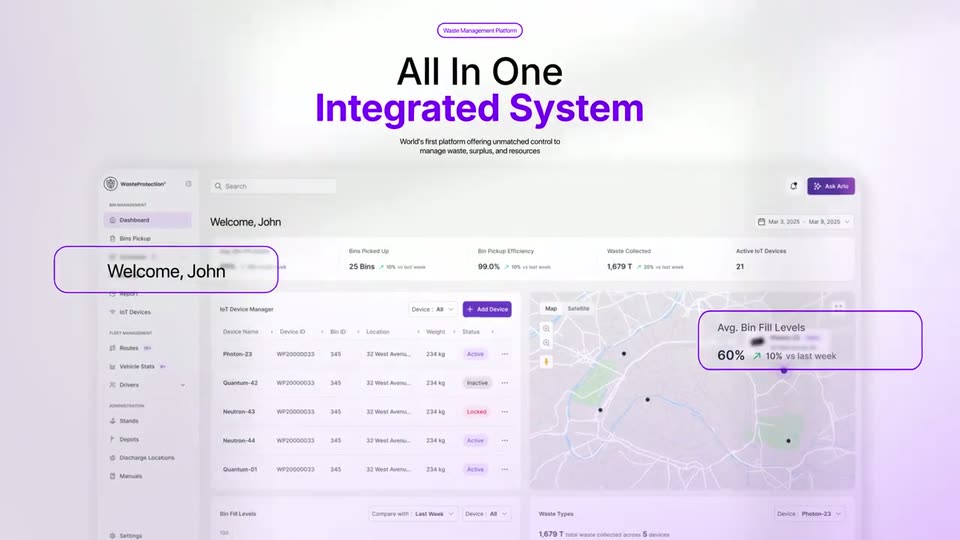
WMP’s 1:13 launch film runs 38 scenes, about 1.9 s each. The product shows up at 0:06 and 4 features are revealed, with social proof. The call to action lands at 1:04 (87% in). The video opens on abstract particle waves and taglines, names WasteProtection, then tours the dashboard in 3D-tilted panels before isolating each feature (Arlo, SmartOps, Track what Matters) behind oversized type cards. Its signature moves are the sliding giant type, the tilt-to-flat interface reveals, and the recurring four-pointed star that punctuates every transition.
No filming indicatedEstimated needs: 3 capture groups — your screens or recordings · 1 official logo — reused across the film · 12 graphic passages — draw or supply · 12 3D passages — build or supply
Is this your launch? to your site or press kit.
More like this

3:12

Shadeform - Some of the most in-demand GPUs on Earth are sitting idle right now,
Shadeform · Oct 2026
1:30

Rive text is here!
Rive · Design · Aug 2023
Similar soundtrack
Films whose music sounds like this one, voice left out
0:54

Introducing Perplexity Pages
Perplexity · Electronic, synthwave, future bass
1:23

Fitbit Sense: A New Era of Innovation
Fitbit · Lo-fi hip-hop, Chillwave, Vaporwave, Future Bass
1:20

Introducing the new Bing in Windows and More
Microsoft · Electronic dance music blended with cinematic and orchestral elements, featuring trap and future-bas
Best AI SaaS Product Launch Video | WMP, scene by scene
· 38 scenes as text
01 · Hook · 0:00–0:03
A centered white headline builds word by word on a dark purple gradient, then a large purple word sweeps across and the line is replaced by “Built for real - world operations” above a faint grid floor.
On-screen text: “The Advanced”, “The Advanced Waste Management Platform”, “Built for real - world operations”
Techniques: Kinetic type
Camera: Static
02 · Hook · 0:03–0:05
A white headline, Built for real - world operations, scales in at the center of a black frame. Along the bottom edge a blue and purple dotted wave undulates like a particle field, its crest brightening toward the right.
On-screen text: “Built for real - world operations”
Techniques: Kinetic type, Particles
Camera: Pull out
03 · Hook · 0:05–0:06
A field of glowing blue and purple dots ripples across the bottom of a black frame. Faint scattered letters resolve into the centered tagline over a smaller line, then a huge white title scales in over the wave.
On-screen text: “Powered by AI”, “Built for real - world operations”, “Intro”
Techniques: Particles, Kinetic type
Camera: Static
04 · Product intro · 0:06–0:08
Giant white lowercase letters slide left across a purple gradient while the small caption Powered by AI holds steady. A dotted wave ripples along the lower edge, then a new letter enters from the right.
On-screen text: “Powered by AI”, “cing”
Techniques: Kinetic type, Parallax
Camera: Pan
05 · Product intro · 0:08–0:11
The view pulls back from a close-up of huge lavender letters on a purple gradient, then the title “Introducing WasteProtection” scales in at center inside a thin circle that morphs into a rounded frame as small line icons fade in at the edges.
On-screen text: “Introducing WasteProtection®”
Techniques: Kinetic type, Morph
Camera: Pull out
06 · Product intro · 0:11–0:12
A dark purple gradient fills the frame while outline icon tiles drift at the edges. The title “Introducing WasteProtection°” scales in at the center as a dashboard UI slides up from the bottom edge.
On-screen text: “Introducing WasteProtection°”
Techniques: Kinetic type
Camera: Pull out
07 · Feature reveal · 0:12–0:15
A purple pill badge and the headline 'All In One Integrated System' assemble word by word over a pale background, a small gray subline beneath. A tilted dashboard mockup fades in below with two purple callout boxes, then the camera zooms into the interface.
On-screen text: “Waste Management Platform”, “All In One Integrated System”, “World's first platform offering unmatched control to manage waste, surplus, and resource”
Techniques: Kinetic type, 3D mockup, UI zoom
Camera: Pan
08 · Feature reveal · 0:15–0:16
A tilted dashboard interface slides up from the lower edge and rotates into a right-angled 3D perspective on a purple gradient backdrop. A flat purple arrow pointer hovers at the left margin beside the panel.
Techniques: 3D mockup
Camera: Pull out
09 · Feature reveal · 0:16–0:17
A white waste-management dashboard, tilted in 3D perspective on a purple gradient, rotates upright to face the camera. A purple cursor hovers over the left sidebar menu as the panel levels out.
Techniques: 3D mockup
Camera: Pan
10 · Feature reveal · 0:17–0:21
A purple WasteProtection dashboard titled Bins Pickup tilts from a 3D angle into a flat view as a duplicate layer slides away. A purple cursor then travels down the Bin Operational Status table, stopping on rows from C001 to C006.
Techniques: 3D mockup, Parallax, Cursor demo
Camera: Push in
11 · Feature reveal · 0:21–0:24
A tilted 3D mockup of the WasteProtection dashboard sits on a purple gradient. The sidebar highlight moves from Bins Pickup to Routes as the camera flattens and zooms in, revealing the Routes overview and a map, while a purple cursor glides across the table.
Techniques: 3D mockup, Cursor demo, UI zoom
Camera: Pull out
12 · Feature reveal · 0:24–0:28
A 3D-tilted dashboard flattens to face the camera as the purple headline Unified Platform fades in above it. The view pans right across the metrics, then the screen breaks into a row of angled 3D panels showing the Operators and Bins Pickup views.
On-screen text: “Unified Platform”
Techniques: 3D mockup, UI zoom
Camera: Pan
13 · Feature reveal · 0:28–0:29
Three WasteProtection app windows stack in 3D perspective over a purple gradient, the front panel showing a Bins Pickup status table. The cascade drifts gently to the right as it settles into place.
Techniques: 3D mockup
Camera: Static
14 · Feature reveal · 0:29–0:30
Three interface mockups, a wide web dashboard and two phone screens, float in 3D perspective against a purple gradient background. The panels are angled toward the camera and drift slowly, with the rear phone shifting at a different speed than the front screens.
Techniques: 3D mockup, Parallax
Camera: Pan
15 · Demo · 0:30–0:35
Dark city map with purple roads; a white route line draws between two trucks as circular badges pop in. Two data cards with a truck and percentage bars slide in, a purple glow pulses around the right truck, then the scene fades through a rounded mask.
Techniques: Masking
Camera: Static
16 · Demo · 0:35–0:36
A dark map dashboard sits in a rounded square on a light lavender field, with a white route line, truck icons and a red zone. Purple alert cards slide in from the sides and overlap the frame as the central map scales down.
Camera: Pull out
17 · Demo · 0:36–0:36
A dark map view with a white route line and four purple alert callouts sits centered on white as large purple words slide in from the left and right edges.
On-screen text: “what”, “Happened”
Techniques: Kinetic type
Camera: Pull out
18 · Demo · 0:36–0:37
A dark tablet map with a white route line and purple alert cards sits centered on a white background. The purple phrase “But what” and “Happens next?” appears on either side, the right half scaling in as the scene holds.
On-screen text: “But what”, “Happens next?”
Techniques: Kinetic type
Camera: Pull out
19 · Demo · 0:37–0:38
On a white field, a soft purple radial glow blooms at the center and fades out. The centered purple line scales slightly and sharpens into place as the glow dissolves.
On-screen text: “But what happens next?”
Techniques: Kinetic type
Camera: Static
20 · Feature reveal · 0:38–0:40
On a dark purple gradient, the purple ring mark scales in at the lower right as the oversized purple letters of the Arlo wordmark slide up into frame. Small captions read 'But what happens next?' and 'Ask Arlo' beside the forming logo.
On-screen text: “But what happens next?”, “Ask Arlo”
Techniques: Kinetic type
Camera: Pan
21 · Feature reveal · 0:40–0:41
A dark rounded chat input card eases in from the right over a purple gradient as a large purple Arlo wordmark exits left. The four-point sparkle icon lights up, and the Ask Arlo and Add attachment labels slide into place beside it.
Camera: Static
22 · Feature reveal · 0:41–0:42
A dark rounded input panel sits on a soft purple gradient. The Ask Arlo and Add attachment rows slide out of the panel, then the field settles empty, showing a 0/1000 counter and a purple arrow button at the lower right.
Techniques: UI zoom
Camera: Static
23 · Feature reveal · 0:42–0:46
A dark chat input box on a purple gradient: a waste-management prompt is typed, then the box slides up as earlier questions stack above and fade while new ones type in. The box exits upward and a large purple four-pointed star scales in at center.
Techniques: Kinetic type
Camera: Static
24 · Feature reveal · 0:46–0:47
A purple four-pointed star shape scales up in the center of a purple gradient as a dark UI card with a question and an add-attachment row slides off to the right.
Camera: Pan
25 · Feature reveal · 0:47–0:48
On a dark field with soft purple corner glow, a purple four-pointed star scales down from center to a tiny point at left, and a thin wavy ribbon in purple and white draws out along a horizontal dashed guide line.
Camera: Static
26 · Feature reveal · 0:48–0:49
A dark violet gradient holds thin white and purple sine waves above a dashed line. The waves contract toward the left edge as a large lavender word slides in from the right.
On-screen text: “St”
Techniques: Kinetic type
Camera: Static
27 · Feature reveal · 0:49–0:52
A purple gradient backdrop holds the large light-lavender wordmark SmartOps behind a front-facing phone mockup that scales down to reveal its lock screen. Stacked message notifications pop onto the screen while a white WasteProtection card slides up from the bottom.
On-screen text: “SmartOps”
Camera: Pan
28 · Feature reveal · 0:52–0:54
A 3D-tilted WasteProtection app mockup starts as a close-up of its content and zooms out to the full window, while Operator 2 and Operator 1 cursor pills slide into place. The interface then morphs into four rounded purple squares on a soft gradient.
On-screen text: “Operator 2”, “Operator 1”
Techniques: 3D mockup, UI zoom, Morph
Camera: Pull out
29 · Social proof · 0:54–0:57
Four rounded video tiles of factory workers form a 2x2 grid on a purple gradient. The top-left tile scales up and drops its purple tint while the others shrink aside, then the bottom-right tile grows. A purple pill with the label slides in over the corner.
On-screen text: “Diverse industries”
Techniques: Split screen, Masking
Camera: Static
30 · Social proof · 0:57–0:58
Four rounded video tiles of warehouse workers float in a loose cluster over a lavender gradient, each outlined in purple. Small purple pill labels read Diverse industries, 1,000+ bin and 20% Reduction at the edges. The group drifts slightly.
On-screen text: “Diverse industries”, “1,000+ bin”, “20% Reduction”
Camera: Static
31 · Other · 0:58–1:01
A purple 2x2 grid icon on a soft lavender gradient turns into a four-pointed star that expands to fill the frame. The small caption “More than Software” scales in at the center, then gives way to the larger “It's a Smarter way”.
On-screen text: “More than Software”, “It's a Smarter way”
Techniques: Morph, Kinetic type
Camera: Push in
32 · Feature reveal · 1:01–1:02
Purple gradient background with rows of pill tags (Tracking, Automation, Smart Waste, Monitoring) scrolling horizontally. The headline Track what Matters fades in as a tilted dashboard mockup rises from the bottom in 3D perspective.
On-screen text: “Track what Matters”
Techniques: Kinetic type, 3D mockup
Camera: Pull out
33 · Feature reveal · 1:02–1:04
A purple gradient backdrop holds a tilted 3D dashboard mockup showing a waste management UI with stats, a device table and a map. Above it, the headline 'Track what Matters' sits over large faded background text. The frame stays locked-off.
On-screen text: “Track what Matters”
Techniques: 3D mockup
Camera: Static
34 · CTA · 1:04–1:04
A purple shield emblem fills the frame, then the view opens to a glowing purple globe with radiating light lines and small floating dots. The white headline builds word by word across the center.
On-screen text: “Get started with WasteProtection”
Techniques: Kinetic type, Particles
Camera: Static
35 · CTA · 1:04–1:06
A purple gradient fills the frame with a 3D globe anchored at the bottom, its rim glowing magenta and its surface marked by thin vertical lines and scattered white dots. White text sits centered over the globe, holding still.
On-screen text: “Get started with WasteProtection”
Camera: Static
36 · CTA · 1:06–1:07
On a dark purple gradient, the line Visit WasteProtection.com scales up at center while the faint headline Get started with WasteProtection fades out behind it.
On-screen text: “Get started with WasteProtection”, “Visit WasteProtection.com”
Techniques: Kinetic type
Camera: Static
37 · Outro · 1:07–1:12
A shield emblem fades in at the center of a black background, a thin white ring sweeps around it, then the mark slides left as the wordmark fades in beside it and a small URL scales in below.
On-screen text: “WasteProtection®”, “Visit WasteProtection.com”
Techniques: Light sweep
Camera: Static
38 · Outro · 1:12–1:13
A bold black WP wordmark with a small circled R sits centered on a pale off-white field. The mark holds a locked-off frame for the full duration, serving as a static sign-off.
On-screen text: “WP”, “R”
Camera: Static