2:35
Explore
Shadeform - Some of the most in-demand GPUs on Earth are sitting idle right now,
Shadeform · Oct 2026 · 3:12 · AI-annotated
- Length
- 3:12
- Scenes
- 31 · 6.2 s avg
- Product on screen
- 0:00
- Features shown
- 2
- Call to action
- 2:58 · 93%
- Voiceover
- Yes
00:00:00 / 03:12:01
Shadeform’s 3:12 launch film runs 31 scenes, about 6.2 s each. The product is on screen from the first frame and 2 features are revealed. The call to action lands at 2:58 (93% in), over a voiceover. A split-screen talking head drives the narrative, alternating with dark motion graphics that distill each feature into ring-and-dot diagrams before a slow dashboard walkthrough. Pacing is deliberate at about two cuts per minute, built on slow zooms, blur transitions and rolling counters.
Footage neededEstimated needs: 2 capture groups — your screens or recordings · 1 official logo — reused across the film · 10 filmed passages — shoot, supply or replace · 7 graphic passages — draw or supply · 1 3D passage — build or supply
Is this your launch? to your site or press kit.
More like this

Shadeform - Some of the most in-demand GPUs on Earth are sitting idle right now,, scene by scene
· 31 scenes as text
01 · Product intro · 0:00–0:00
A man in a black sweater speaks into a studio microphone in a white room, gesturing with his hand. At 0.5s the frame splits, adding a dark blue panel on the left holding a glowing white ring.
Techniques: Split screen
Camera: Pan
02 · Product intro · 0:00–0:08
Split screen: left, a glowing white ring on dark navy distorts as Flex VMs scales in and Spot fades in and out beside a lit dot, with a name pill below; right, a man in a black sweater speaks into a studio microphone in a white room.
On-screen text: “Flex VMs”, “Andrew Chang”, “Head of Al”, “Spot”
Techniques: Split screen, Kinetic type, Morph
Camera: Pan
03 · Feature reveal · 0:08–0:11
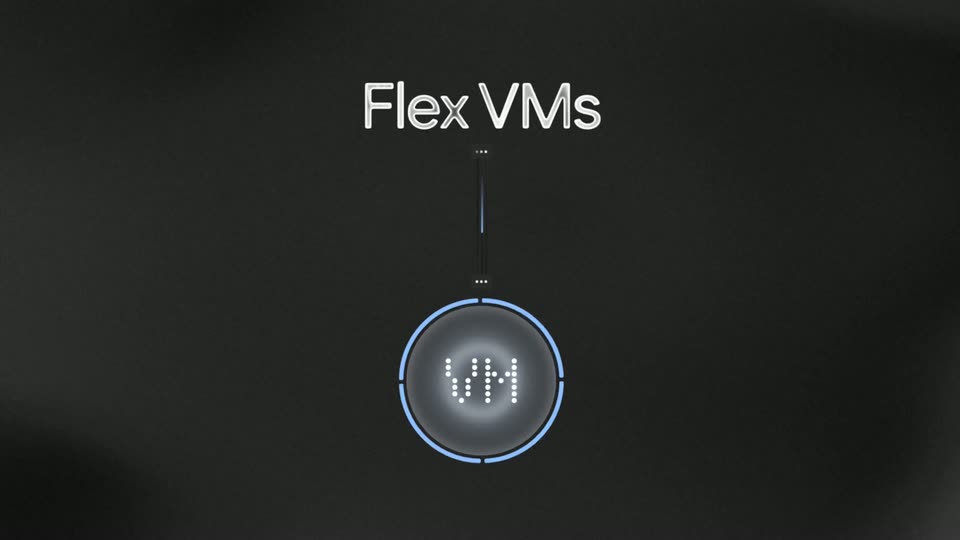
Dark charcoal background. The white title Flex VMs holds top center as a thin cable drops to a circular badge showing dotted BM. A blue arc fills the ring, the display shifts to VM, and the badge glows. The graphic defocuses as Earning fades in at left.
On-screen text: “Flex VMs”, “Earning”
Camera: Static
04 · Feature reveal · 0:11–0:13
Dark charcoal background. The white label Earning holds left while a light-blue dollar amount in a rounded pill ticks up, its digits rolling with ghosted echoes. A faint dot grid fades in as a rising arc of white dots sweeps from lower left to upper right.
On-screen text: “Earning”, “$12,126”
Techniques: Kinetic type, Particles
Camera: Static
05 · Feature reveal · 0:13–0:14
A dark gray dot-grid background holds a white dotted curve rising left to right. The word Earning sits center-left in white, beside a glassy pill where a blue dollar figure rolls from $12,789 to $12,820. The frame blurs as a face wipes in from the right edge.
On-screen text: “Earning”, “$12,789”
Techniques: Kinetic type, Masking
Camera: Static
06 · Feature reveal · 0:14–0:18
A split screen holds a black title card on the left and a man in a black shirt speaking into a studio microphone on the right. White text reads Shadeform Spot above and Flex VMs below a thin vertical device mockup, fading in from blur as he gestures.
On-screen text: “Shadeform Spot”, “Flex VMs”
Techniques: Split screen
Camera: Static
07 · Feature reveal · 0:18–0:21
Split screen: a man speaks into a studio microphone on the right while a dark graphic on the left fades in GPU Pool with a glowing ring. Providers and Customers labels appear and curved lines converge into the ring. The left panel then collapses as a white panel wipes in.
On-screen text: “GPU Pool”, “Providers”, “Customers”
Techniques: Split screen, Kinetic type
Camera: Static
08 · Feature reveal · 0:21–0:24
Locked-off dark gray background: the GPU Pool logo, a glowing blue ring beside the white wordmark, scales in at top center. Below it a grid of small circles assembles into five rows, then a few dots drift off to the right.
On-screen text: “GPU Pool”
Techniques: Kinetic type, Particles
Camera: Static
09 · Feature reveal · 0:24–0:25
On a dark gray field, the label GPU Pool with a glowing blue ring slides off left as Earning and a white ring settle center; a pill badge counts up to $12,819 while scattered white dots tighten into a neat grid.
On-screen text: “GPU Pool”, “Earning”, “$12,819”
Techniques: Kinetic type, Particles
Camera: Pan
10 · Feature reveal · 0:25–0:27
A dark screen holds a blue dollar counter in a rounded pill that rolls upward, the white word Earning and a glowing blue ring beside it, above a 10-by-5 grid of white dots. A white panel wipes in from the right to reveal a UI edge.
On-screen text: “Earning”, “go”
Techniques: Masking
Camera: Static
11 · Demo · 0:27–0:35
Split screen: on the left, a dark panel shows the heading How it works above three pill labels, Connect, List On Spot, Reclaim, joined by vertical lines, with focus pulling down the list. On the right, a man in a black shirt talks into a studio microphone.
On-screen text: “How it works”, “Connect”, “List On Spot”, “Reclaim”
Techniques: Split screen
Camera: Static
12 · Demo · 0:35–0:44
The dark Shadeform provider dashboard fills the frame while a presenter talks into a mic from a video-call window in the lower right. A cursor clicks the copy icon on the enrollment command field as the camera pushes in, then pulls back. The fleet utilization ticks between 85% and 93%.
Techniques: Cursor demo, UI zoom
Camera: Static
13 · Demo · 0:44–0:49
A dark terminal window on the Shadeform dashboard shows a node enrollment checklist filling in line by line, each checkmark appearing in turn. A small webcam inset at the bottom right shows a man speaking into a microphone. The frame then zooms in on the terminal, pushing the sidebar out of view.
Techniques: UI zoom
Camera: Push in
14 · Demo · 0:49–1:22
A dark terminal prints a Shadeform node enrollment checklist line by line, then types in company answers, while a small presenter video sits in the bottom-right corner. Near the end the view zooms out to reveal the full dashboard and FAQ page.
Techniques: UI zoom
Camera: Pull out
15 · Demo · 1:22–1:23
A dark product canvas fills the frame with the Shadeform logo centered. A white cursor hovers above it. A rounded webcam inset in the lower right shows a man speaking into a studio microphone. The logo brightens from gray to white.
Camera: Static
16 · Demo · 1:23–1:29
A dark provider-enrollment dashboard fills the frame with a four-step stepper, a progress checklist and a node spec card, while a small video of a man speaking into a microphone holds the bottom-right corner. The mouse cursor drifts from the stepper to the empty left panel over a static layout.
Techniques: Cursor demo
Camera: Static
17 · Demo · 1:29–1:33
A dark provider enrollment dashboard fills the frame, its progress timeline and hardware specs visible, while a small webcam feed of a man at a microphone sits in the bottom right. The view then zooms into the top of the interface, tightening on the progress and supply-team panels.
Techniques: UI zoom
Camera: Push in
18 · Demo · 1:33–1:34
A dark provider dashboard scrolls down past an enrollment checklist and an approval card, while a talking presenter's video stays pinned in the lower right. A cursor drifts down the sidebar and rests on the Provider Dashboard item.
Techniques: Cursor demo
Camera: Push in
19 · Demo · 1:34–2:17
A dark dashboard titled Northlight Compute AB Overview eases in, then scrolls to a capacity table and regions card. A cursor hovers a cell as the row's available and utilization figures update live, then the view zooms onto the Launch on-demand button while a presenter talks in a corner webcam.
Techniques: Cursor demo, UI zoom
Camera: Push in
20 · Demo · 2:17–2:25
A dark Shadeform instance form fills the screen with a small presenter inset in the lower right. The view zooms toward the bottom bar as a cursor clicks the blue Launch button, then the form crossfades into the new instance page.
Techniques: UI zoom, Cursor demo
Camera: Static
21 · Demo · 2:25–2:30
A dark Shadeform dashboard fills the frame, showing an instance detail page with status and config panels. In the bottom right, a rounded video feed shows a man in a black shirt speaking into a studio microphone, gesturing with his hands. The interface stays static while he talks.
Camera: Static
22 · Other · 2:30–2:35
A man in a black sweater speaks into a studio microphone in a white room, gesturing with his hands. White outlined labels “Flex VMs” and “Spot” sit on either side of him, then a dark blue panel wipes in from the left, pushing him to the right edge.
On-screen text: “Flex VMs”, “Spot”
Techniques: Masking
Camera: Pan
23 · Other · 2:35–2:42
Split screen: left, a circular dot-matrix display lifts onto a stem as a blue ring draws around it and the letters flip from BM to VM; an Earning label and ticking counter appear while white dots rise in a wave. Right, a host talks into a studio mic.
On-screen text: “Earning”, “$12,126”
Techniques: Split screen, 3D mockup, Particles
Camera: Pan
24 · Other · 2:42–2:44
Split screen: left is a dark field with two dark pill labels, IPv4 address and SSH access, each with a blue ring icon; right shows a man in a black sweater speaking into a studio mic against a white wall. The frame is locked off.
On-screen text: “IPv4 address”, “SSH access”
Techniques: Split screen
Camera: Static
25 · Other · 2:44–2:45
Split screen: on the left, a dark panel with soft glowing arcs as the word Spot scales up between the labels IPv4 address and SSH access; on the right, a man in a black sweater speaks into a studio microphone and gestures with his hands.
On-screen text: “IPv4 address”, “Spot”, “SSH access”
Techniques: Split screen, Kinetic type
Camera: Static
26 · Other · 2:45–2:51
Split screen: on the left, Providers and Customers labels slide in and shrink over a dark panel, thin lines converge to a pulsing blue dot labeled Earning above a grid of white circles; on the right, a man in a black shirt speaks into a studio microphone, gesturing with his hands.
On-screen text: “Providers”, “Customers”, “Earning”, “60”
Techniques: Kinetic type, Split screen
Camera: Static
27 · Other · 2:51–2:58
Split screen, locked off: a dark left panel shows a pill button labeled Deploy gaining a blue glow, then a second pill button Offboard appears and gains an amber glow, while a man talks into a studio microphone on the right.
Techniques: Split screen, Light sweep
Camera: Static
28 · CTA · 2:58–3:02
Split screen: a dark navy panel on the left holds the title while a man in a black sweater talks into a studio microphone on the right. The left title starts as large light-gray Flex VMs, then scales down as a glowing blue ring and the word Spot slide in to read Flex VMs Spot.
On-screen text: “Flex VMs”, “Spot”, “Run this on your GPU node to start”
Techniques: Split screen, Kinetic type
Camera: Static
29 · CTA · 3:02–3:09
A split screen: left, a dark navy panel where a white headline and a rounded terminal command pill slide into place, the cursor blinking; right, a man in a black sweater speaks into a studio microphone against a white wall.
On-screen text: “Run this on your GPU node to start”, “$ curl -fsSL https://api.shadeform.ai/v1/enroll | sh”
Techniques: Split screen, Kinetic type
Camera: Push in
30 · CTA · 3:09–3:10
A dark, out-of-focus background holds a centered monospace caption, “Run this on your GPU node to start,” above a rounded pill containing the curl enroll command. Both lines slide in, then the frame defocuses and fades to black.
On-screen text: “Run this on your GPU node to start”, “$ curl -fsSL https://api.shadeform.ai/v1/enroll | sh”
Techniques: Kinetic type
Camera: Static
31 · Outro · 3:10–3:12
The white Shadeform mark and wordmark hold center on a dark, blurred gradient with faint diagonal light bands. A small monospace command line slides in along the bottom edge.
On-screen text: “$ curl -fsSL https://api.shadeform.ai/v1/enroll | sh|”
Camera: Static