0:28
Explore
00:00:00 / 01:13:15
- Length
- 1:13
- Scenes
- 9 · 8.2 s avg
- Product on screen
- 0:00
- Features shown
- 2
- Voiceover
- No
- Views
- 84K on YouTube
as of November 26, 2026
Weel’s 1:13 launch film runs 9 scenes, about 8.2 s each. The product is on screen from the first frame and 2 features are revealed. There is no explicit call to action. The video opens on the logo, tours the GPS interface, then stages a fender bender to reveal the auto-recording dashcam and the AI report, and closes on flat blue benefit cards that end in the logo lockup. Captions fade in on the left over a phone in a car mount, while the end cards hold locked-off with white type on a drifting blue gradient.
No filming indicatedEstimated needs: 1 capture group — your screens or recordings · 1 official logo — reused across the film · 3 3D passages — build or supply
Is this your launch? to your site or press kit.
More like this


Similar soundtrack
Films whose music sounds like this one, voice left out
1:18

Y Combinator - Tornyol (@tornyolsystems) is building micro-drones that kill mosquito
Tornyol · Modern trap and electronic dance music
0:46
Flighty - Introducing @Flighty 4 😱 See WHY you're delayed. Finally! ✈️ Late Ai
Flighty · Electronic, EDM, Cinematic
0:27


OpenSea - Introducing Deals: offer your NFTs for theirs, securely on OpenSea. 👉
OpenSea · Electronic dance music, trap
Weel: The first GPS app with a built-in dashcam, scene by scene
· 9 scenes as text
01 · Product intro · 0:00–0:04
A phone clamped in a black holder shows a white screen. A blue triangle slides down beside the black “weel” wordmark, a blue crescent pops in to its left, then the screen blurs into a small grid view.
On-screen text: “weel”
Techniques: Kinetic type
Camera: Pull out
02 · Demo · 0:04–0:12
A phone in a dashboard mount shows a GPS map with a small street video feed in the corner. White caption lines fade in on the left, while the map draws a purple route, opens a destination panel, then starts turn-by-turn navigation with a zoom into the street.
On-screen text: “At first glance it is a normal GPS app”, “Where you can plan trips”, “But did you notice the video feed?”
Techniques: 3D mockup, Kinetic type, UI zoom
Camera: Pull out
03 · Feature reveal · 0:12–0:32
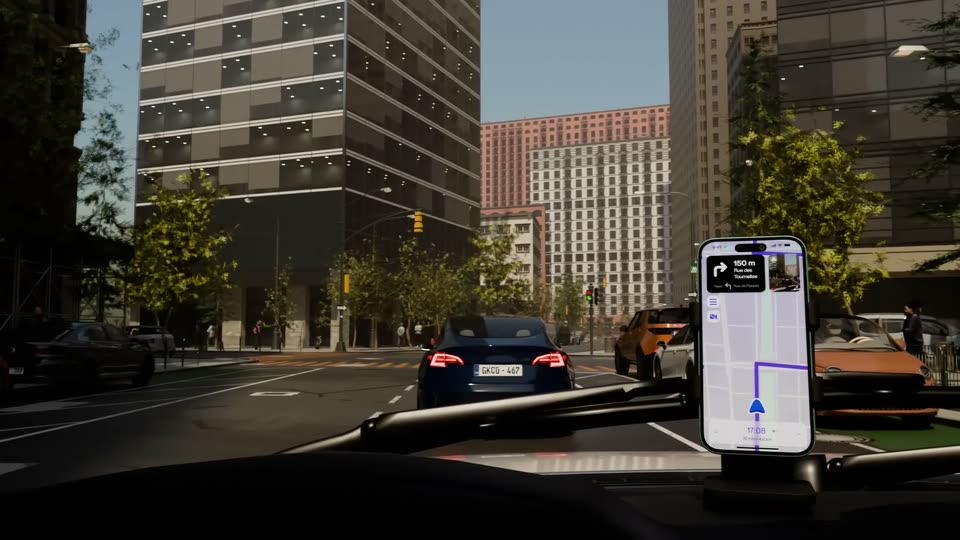
A car drives through a city street, seen from the dashboard; a phone on the right shows a navigation map with a purple route. The car stops behind a blue sedan. White captions appear left, and the shot ends with a push-in on the phone.
On-screen text: “Weel automatically starts to record when you drive”, “It is the first GPS app with built-in dashcam”, “What now?”
Techniques: Masking, 3D mockup, UI zoom
Camera: Push in
04 · Feature reveal · 0:32–0:34
A phone clamped in a car mount displays a navigation map with a turn instruction card and a small dashcam clip of a car on a street. White text fades in on the right and a purple dot appears over the clip, then both fade out.
On-screen text: “Weel automatically recorded the incident”
Camera: Pan
05 · Feature reveal · 0:34–0:52
A phone in a mount shows the Weel app on the left while white headlines fade in over a blurred right panel. The incident video plays, an AI report types itself out, and the Send to Insurance button taps into Sent! before a purple wipe closes the scene.
On-screen text: “You can review it”, “While Weel AI analyses it”, “Weel AI then writes a report that you can edit”, “or directly send to your insurer”
Techniques: 3D mockup, Kinetic type, Masking
Camera: Pan
06 · Other · 0:52–0:54
A three-line white headline sits locked on the left over a flat blue gradient, with a faint lighter patch in the lower right corner. The frame holds completely still for the full duration, no text or background motion.
On-screen text: “Send video proof”, “to your insurer”, “in 1 click”
Camera: Static
07 · Other · 0:54–0:57
A soft blue radial gradient fills the frame, its highlight drifting from the top right toward the top left. A three-line white headline fades in on the left, holds, then fades out and is replaced by a second three-line headline.
On-screen text: “Send video proof”, “to your insurer”, “in 1 click”, “Save up to 30%”, “on your”, “insurance premium”
Camera: Static
08 · Other · 0:57–1:02
White sans-serif copy on a soft blue gradient. The line “Save up to 30% on your insurance premium” fades out, then “Don't waste $400 on an annoying dashcam” fades in at the same left-aligned position. Locked-off frame, no movement.
On-screen text: “Save up to 30%”, “on your”, “insurance premium”, “Don't waste”, “$400 on an”, “annoying dashcam”
Camera: Static
09 · Outro · 1:02–1:13
Bold white lines appear on a blue gradient: 'Don't waste $400 on an annoying dashcam,' then 'Just download Weel.' The lines fade as the weel logo assembles in the center, joined by the tagline 'Next-Gen Driving Companion' and a Y Combinator credit.
On-screen text: “Don't waste”, “$400 on an”, “annoying dashcam”, “Just”, “download”, “Weel”, “Next-Gen Driving Companion”, “Backed by Y Combinator”
Techniques: Kinetic type, Morph, Masking
Camera: Static