1:10

Introducing ClickUp 3.0
ClickUp · Productivity · Jun 2022
Wan · Aug 2026 · 0:28 · AI-annotated
Wan’s 0:28 launch film runs 23 scenes, about 1.2 s each. The product is on screen from the first frame and 1 feature is revealed. There is no explicit call to action. The video opens with a flat-color title card, states its feature as a pill equation, then spends the middle on a fast montage of prompt bars and generated outputs that cut on the beat. Its signature moves are scaling type, pill-shaped UI chips, and circular preview frames over black and cream fields.
Is this your launch? to your site or press kit.
Bold black headline 'Use Wan to generate everything' sits on a flat yellow field with a red circle and small red triangle drifting behind it. The block scales up, the middle line drops out, and the background shifts to cream as 'everything' grows until it crops at the right edge.
On-screen text: “Use Wan to generate everything”
Techniques: Kinetic type
Camera: Push in
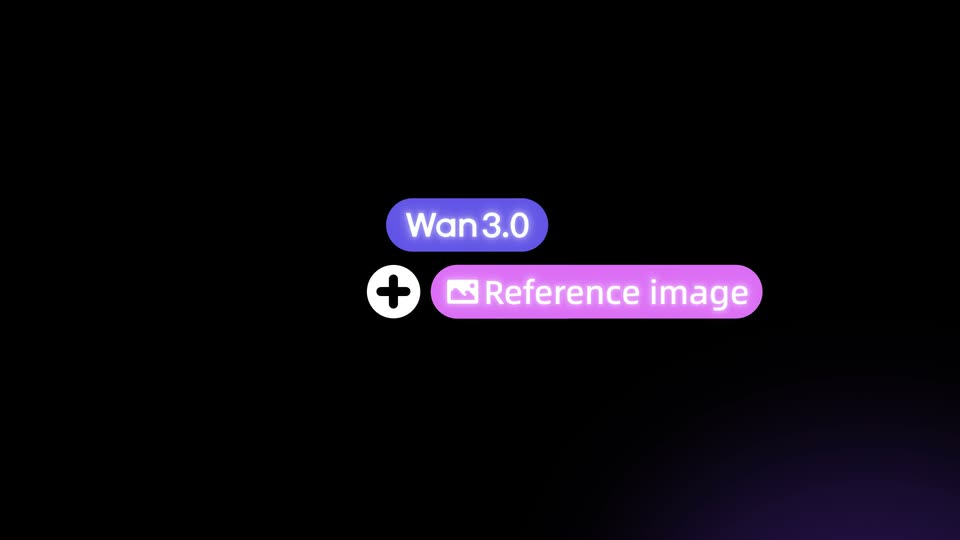
On black, a purple pill reading Wan3.0 sits centered as a white plus circle and a pink pill reading Reference image, with a small image icon, scale and slide in below it. The two pills lock into a stacked pair. Locked-off frame.
On-screen text: “Wan3.0”, “Reference image”
Techniques: Kinetic type
Camera: Static
On a black field, a purple 'Wan3.0' pill and a pink 'Reference image' pill appear beside a plus icon, then give way to a centered equals sign. A purple 'Smooth multimedia animation' pill scales in to the right of the equals.
On-screen text: “Wan3.0”, “Reference image”, “Smooth multimedia animation”
Techniques: Kinetic type
Camera: Static
A white circle holding two black bars sits beside a purple-to-pink gradient pill on black. The pill contracts horizontally, squeezing the white text until the letters overlap, while a white cursor arrow tracks the pill's right edge.
On-screen text: “Smooth multimedia animation”
Techniques: Kinetic type
Camera: Static
A white headline on a purple gradient pill, with a small line icon and a pointing cursor, scales up from center to fill the frame; the pill's gradient becomes the full background and the icon grows into a large circle at left.
On-screen text: “Smooth multimedia animation”
Techniques: Kinetic type
Camera: Pan
A 3D field of floating media cards (images, video, file icons) recedes outward as the camera zooms into a central dark prompt bar, where a typography prompt types out letter by letter. White captions fade in below and at the edges.
On-screen text: “Simple Input. Smart Output.”, “Let visuals speak for all.”, “Supports uploading up to 10 images”
Techniques: 3D mockup, Parallax, UI zoom
Camera: Push in
A dark interface shows a rounded prompt bar centered on screen, filled with a long white prompt about typography, with a caption below it. The view zooms in steadily on the bar, enlarging the text and pushing surrounding panels out of frame.
Techniques: UI zoom
Camera: Push in
Rows of the black serif wordmark Wan fill a cream field, push toward the camera, then bend into a white 3D ring on blue that rotates away, leaving a single Wan scaling in at center.
Techniques: Morph, Kinetic type
Camera: Push in
On black, the word Wan in white serif repeats in a ring around a central Wan. The outer ring scales up and blurs out of frame while the center holds, then a green disc grows behind it to form the Wan logo.
On-screen text: “Wan”
Techniques: Kinetic type
Camera: Push in
A flat green field holds the word Wan in a thin cream serif outline. The letters thicken and scale up as a horizontal line draws out to the right, then the line vanishes and the solid word settles centered.
On-screen text: “Wan”
Techniques: Kinetic type
Camera: Static
On a hot pink field, the word Wan repeats diagonally in dark maroon serif. The frame scales rapidly into a single oversized Wan, its counter filled by a yellow dot, until the letters fill the screen.
On-screen text: “Wan”
Techniques: Kinetic type
Camera: Push in
A yellow field fills with the word Wan in dark purple serif, repeated in concentric rings that radiate from the center. The central Wan scales up as the rings expand outward, the outer letters growing huge and cropping the frame edges.
On-screen text: “Wan”
Techniques: Kinetic type
Camera: Push in
Four colorful butterflies sit in the corners of a cream canvas above a dark prompt bar with typed text. The butterflies dissolve as a purple pixel grid flashes, revealing a red 3D sphere and cube while the bar slides to the bottom right.
Techniques: Particles
Camera: Pull out
A cream-colored town map with blue 3D buildings and fine line art fills the frame. A dark rounded prompt bar at the bottom center types a sentence describing a hybrid animation short film.
Camera: Pull out
A flat blue-and-white vase illustration fills the frame on a cream ground. The view pulls back from a tight crop to show three full vases side by side. A small dark prompt bar with a model tag and resolution sits at the bottom center.
Camera: Pull out
A line-drawn East Asian pagoda on a white background cuts to a flat-color illustration of a red-headed bird on a blossoming branch, a gray prompt bar stays fixed at the bottom.
Camera: Static
A light gray technical grid with orbiting circle lines and monospace coordinate labels fills the frame. A giant black word “Everything” scales into view over a selected image that swaps from a compass to a circuit board, then a dark prompt bar types out a long prompt at the top right.
On-screen text: “Everything”, “CUSTOM-BUILT FOR YOU”, “UNDERSTANDING > MEMORIZING”
Techniques: Kinetic type
Camera: Pull out
A circular preview window on a light gray stage shows a black grid with a rotating metallic iris, framed by thin concentric rings and dashed crosshairs. A green arc travels the rim as the omni prompt panel floats at the top right.
Camera: Push in
A gray backdrop with a thin target reticle frames a green-ringed circular preview window. The window rotates quickly in 3D, its gridded surface swinging from a white dial gauge to a metallic turbine, beneath a dark prompt bar.
Techniques: 3D mockup
Camera: Push in
A circular viewfinder with a green progress arc and a center target marker scales up to fill the frame, its interior shifting from a partial grid image to a dense field of green dots on a pale gray background.
Techniques: Masking
Camera: Pull out
A loose grid of motion-design clips and 3D mockups drifts, scales and rotates around a black center, where a two-line tagline holds still. Panels slide in and out at different depths, some in 3D perspective, while the tagline remains fixed.
On-screen text: “Motion Design that inspires.”, “Fluid interactions that feel natural.”
Techniques: Parallax, 3D mockup
Camera: Pan
On a black field, a centered tagline in white and violet fades out, then the bold violet wordmark Wan3.0 fades in at center, with a small dot above the 3.
On-screen text: “Simple Input. Smart Creation.Where imagination meets reality.”, “Wan3.0”
Camera: Static
The product name Wan3.0 sits centered on a black field in a bold purple gradient sans-serif, with a faint violet glow in the lower right corner. The frame stays locked and still throughout.
On-screen text: “Wan3.0”
Camera: Static