2:26

Introducing Warp 2.0: The Agentic Development Environment
Warp · Developer tools · Jun 2025
Riverside · Mar 2023 · 1:08 · AI-annotated
Riverside’s 1:08 launch film runs 29 scenes, about 2.4 s each. The product shows up at 0:08 and 2 features are revealed. There is no explicit call to action; a voiceover carries the film. The video alternates near-black title cards with a single centered line, one keyword set in bold, against dim live-action shots and dark UI demos, cutting at about 8 cuts per minute on a steady 123 bpm pulse. Its signature moves are words sliding in to complete a line, the purple waveform accent recurring across cards and editors, and UI highlights that track the voiceover word by word.
Is this your launch? to your site or press kit.
Warp · Developer tools · Jun 2025
ClickUp · Productivity · Jun 2022
A camera on a gimbal tripod sits in sharp focus in the right foreground while three people in headphones sit at a table, blurred, in a dim studio. The white text “To the creator” holds centered over the frame, “creator” in bold, as the shot drifts slowly sideways.
On-screen text: “To the creator”
Camera: Push in
A close-up of a hand turning knobs on a mixing console in a dim studio, warm low-key light, shallow depth of field. The white title sits centered over the frame and holds still as the fingers move.
On-screen text: “To the creator”, “The storyteller”
Camera: Push in
A hand rests on a dimly lit mixing console, fingers touching a fader, in warm low light. The centered title holds still over the frame while the hand makes small adjustments to the board.
On-screen text: “The storyteller”
Camera: Push in
A woman in a white top lifts over-ear headphones to her head at a desk, a studio microphone on a boom arm in the soft-focus foreground. The white text 'The podcaster' sits centered over the bright room.
On-screen text: “The podcaster”
Camera: Push in
A hand grips a microphone in shallow focus against a dark gray backdrop, the lens slowly sharpening on the metal grille. Centered white captions swap in place, the key word in each line set in bold.
On-screen text: “The podcaster”, “To everyone”, “a story to share”
Camera: Static
On a near-black field, the white phrase Meet the new slides into the center, then a rounded square icon with a tilde and the bold word RIVERSIDE slide in to finish the line.
On-screen text: “Meet the new”, “RIVERSIDE”
Techniques: Kinetic type
Camera: Static
On a black background, white type reads “One place” in mixed light and bold weights, then “Record” slides in oversized as faint video camera, microphone and waveform icons fade in behind it.
On-screen text: “Meet the new”, “RIVERSIDE”, “One place”, “Record”
Techniques: Kinetic type
Camera: Static
A dark interface shows a purple audio waveform bar with a cursor, flanked by dimmed record, mic and share icons. Large white words Record, Edit and Share slide in over the bar, naming the workflow.
On-screen text: “Record”, “Edit”, “Share”
Techniques: Kinetic type, Cursor demo
Camera: Static
A dark video-call interface frames three participants in a horizontal grid. Centered white text reads “Look & sound”, then the word “professional” slides in to complete the line while the middle speaker talks and the timer ticks.
On-screen text: “Look & sound”, “Look & sound professional”
Techniques: Kinetic type
Camera: Pull out
A laptop mockup sits on a desk in a warm, blurred living room, its screen showing a three-person video call. White bold text builds word by word across the frame, reading “Without needing to be professional.”
On-screen text: “Look & sound”, “Without needing to be professional”
Techniques: 3D mockup, Kinetic type
Camera: Pull out
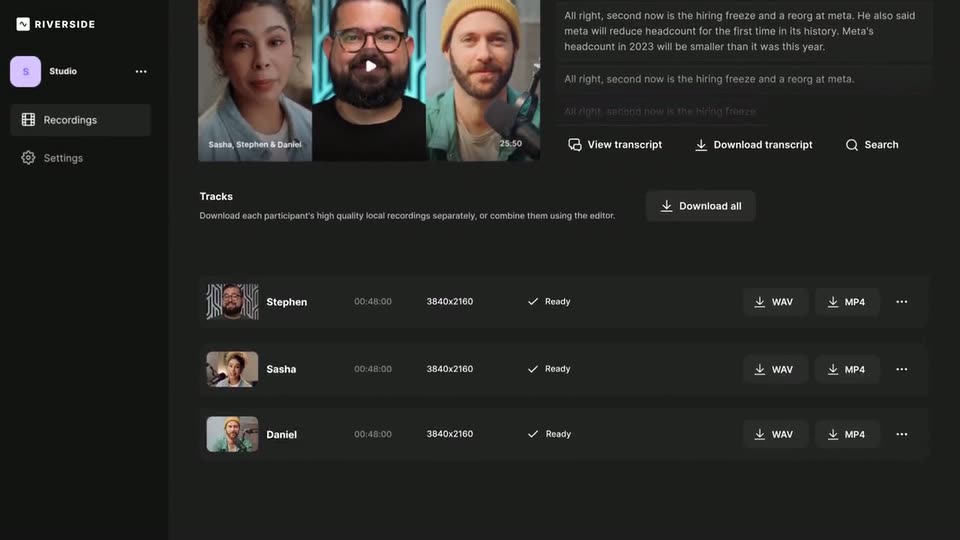
A dark Riverside studio page scrolls downward through the recording view, passing the title, a three-person video thumbnail, a transcript panel, and a list of participant tracks with WAV and MP4 download buttons.
On-screen text: “Without needing to be professional”
Camera: Pull out
A dark list of three participant tracks, each with an avatar, duration, resolution and WAV, MP4 buttons. A cursor moves down the rows, lighting the buttons purple, then the list dims as the title Local Recording fades in at center.
On-screen text: “Local Recording”
Techniques: Cursor demo, Kinetic type
Camera: Static
The headline holds centered on a near-black background, 'Local' in thin gray and 'Recording' in bold white with a small red record dot at the upper right. A purple audio waveform pulses in behind the word.
On-screen text: “Local Recording”
Camera: Static
A dark background holds the word Sound in white, its letters crossed by a purple audio waveform. The waveform clears and the word great slides in to complete the phrase Sound great, which then holds static.
On-screen text: “Sound great”
Techniques: Kinetic type
Camera: Static
A man in a bright green shirt sits on a rocky outcrop with a laptop on his lap, a blue backpack beside him, a snow-capped peak rising behind him under a cloudy sky. He glances up, then looks down and types. The camera holds a static wide shot.
On-screen text: “Sound great”
Camera: Static
A near-black card centers a white line that blurs in with a brief horizontal echo, then settles to the still phrase “But now there's even more”.
On-screen text: “But now there's even more”
Techniques: Kinetic type
Camera: Static
A black card holds a centered line reading “But now there's even more”, with “there's even” in bold white and “more” in pale green. The word “more” fades in during the first second while the rest of the line stays locked off.
On-screen text: “But now there's even more”
Camera: Static
A dark transcription view opens zoomed in on the first caption, then pulls back as the list scrolls up. Purple highlights sweep across the words allow, your recordings, and like a doc in time with the voiceover.
Techniques: UI zoom
Camera: Pull out
A dark transcription app fills the frame: timestamped transcript blocks on the left, a video of two people at microphones on the right, a purple waveform timeline below. A cursor glides from the Split button to Transcript, then up to the Search field.
Techniques: Cursor demo
Camera: Pull out
A dark UI screen shows a search bar above a two-line transcript. The word “freaking” is typed into the search and highlighted in the text, then the transcript slides up to reveal a purple waveform with yellow trim handles and timecodes, while the cursor hovers over the track.
Techniques: Cursor demo
Camera: Static
A locked-off dark UI: a purple waveform bar sits under a caption box where the word freaking is highlighted. A white cursor arrow clicks the Delete button; the middle slice of the waveform is removed, opening a gap between the two segments, then a purple Export button fades in below.
Techniques: Cursor demo
Camera: Static
The studio screen fades from dim to full brightness, showing two participant video tiles side by side beneath a toolbar; a white cursor moves to the purple Export button, which gains a bright outline as it is clicked.
Techniques: Cursor demo
Camera: Static
A dark editor screen shows a clip of a man and a woman inside a rounded frame that morphs between 16:9, 9:16 and 1:1 ratios. The matching ratio button above highlights in sequence as the frame reshapes.
Techniques: Morph
Camera: Static
A purple-bordered video player on a dark background morphs between aspect ratios: a square split of two creators becomes a 16:9 landscape, then a 1:1 square of the woman. White comment cards pop in around the player, filling the frame.
Techniques: Morph
Camera: Static
The word RECORD. holds center on a black field, then EDIT. and SHARE slide in from the right, the line re-centering as it completes. The finished tagline holds still for the rest of the clip.
On-screen text: “RECORD. EDIT. SHARE”
Techniques: Kinetic type
Camera: Static
A black field holds the white line “It's simple” at center. The line scales down while “In a professional way.” builds word by word to its right in green and dark gray, closing the beat.
On-screen text: “RECORD. EDIT. SHARE”, “It's simple In a professional way.”
Techniques: Kinetic type
Camera: Static
On a near-black background, a grey phrase and a green phrase begin stacked in the center, then slide apart horizontally to settle into one centered line.
On-screen text: “It's simple”, “In a professional way.”
Techniques: Kinetic type
Camera: Static
A white rounded-square icon with a black wavy line sits left of the bold uppercase wordmark RIVERSIDE on a black field. The wordmark wipes in through a mask, then the centered lockup holds still.
Techniques: Masking
Camera: Static
The Riverside lockup, a white rounded square with a wave glyph beside the wordmark, holds centered on a near-black field, then fades out to black.
On-screen text: “RIVERSIDE”
Camera: Static