0:25


Instinct - Today, we are releasing the first frontier agent harness built to giv
Instinct · Fintech · Oct 2026
Wato · Jun 2026 · 3:18 · Full motion · AI-annotated
Wato’s 3:18 launch film runs 10 scenes, about 20 s each. The product is on screen from the first frame and 3 features are revealed. There is no explicit call to action; a voiceover carries the film. The video is a single continuous screen-share walkthrough: a dark app UI fills the frame while a small rounded webcam tile of the presenter in a red shirt stays pinned to the bottom right, and white subtitles on a black pill cycle along the bottom. It moves feature by feature (chat demo, file-based memory, change history, live artifacts) with slow scrolling, hover cursors and modal pop-ups as the only motion, at a steady conversational pace with no cuts or title cards.
Is this your launch? to your site or press kit.
Instinct · Fintech · Oct 2026
Factory · Jun 2026
Replit · Developer tools · Nov 2026
Dark chat interface of an agent building a revenue risk dashboard, filling the frame while a small rounded webcam inset of a man in a red shirt sits bottom right. The log scrolls slowly downward through the conversation, the cursor hovers over the text, and white subtitles on a dark pill cycle at the bottom center.
On-screen text: “I had a lot of questions on like”, “the Wato memory system and”, “how exactly it works and what”, “better way to kind of show you guys”, “So this is a chat that I kind”, “So this is a chat that I kind of had a bit”, “So this is a chat that I kind of had a bit while back”, “So it's like build me a live dashboard and tell me”, “So it's like build me a live dashboard and tell me where our”, “So it's like build me a live dashboard and tell me where our revenue is”
Techniques: Cursor demo, Kinetic type
Camera: Pan
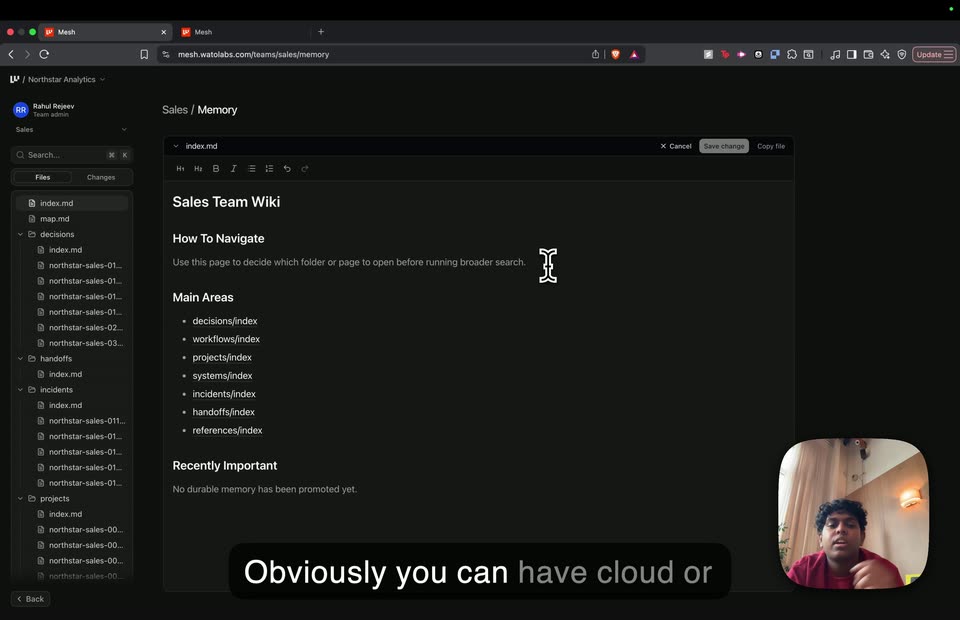
A dark wiki screen shows a Sales Team Wiki page with a file tree on the left and a small webcam of a man in red at bottom right. The cursor clicks Edit file, opening a toolbar and caret, while white captions cycle on a black pill below.
On-screen text: “And so again, this is the memory”, “yields”, “Our memory system is like a file”, “system”, “The idea here is that it's super”, “easy for your agent to”, “work with a file system.”, “It already knows how to do”, “things like rep searches”, “and run bash commands. And so all of this stuff works really well at scale and also it's super easy to audit. You can see what files are in kind of the system. ”
Techniques: Cursor demo
Camera: Pan
A dark wiki interface fills the frame, a file tree on the left and a markdown page titled Sales Team Wiki in the center. A white cursor hovers over the Changes tab. A small video of a presenter sits in the bottom right corner.
On-screen text: “And what's also super powerful”
Techniques: Cursor demo
Camera: Static
A dark web app screen shows a left list of change proposals; the cursor selects one and the main pane fills with a document header and body text. A small face-cam sits in the bottom right corner while white subtitles swap along the bottom.
On-screen text: “is the fact that you can see all”, “the different changes that were”, “So you can see who proposed”, “what changes, who reviewed it”, “and you can always roll those”, “changes back over time.”
Techniques: Cursor demo
Camera: Static
A dark web app in a browser window shows an Artifacts page with a grid of dashboard preview cards. A cursor hovers near the top. A black caption bar at the bottom shows white subtitle text. A small video call tile with a person in red sits bottom right.
On-screen text: “And now going back to the”, “dashboard what you can do is I”
Techniques: Cursor demo
Camera: Static
A dark dashboard grid of artifact cards; a hand cursor clicks Create new artifact, a modal opens, then a macOS file picker appears as the cursor selects a file. A webcam feed of the presenter sits bottom right, white subtitles on black pills at the bottom.
On-screen text: “dashboard, what you can do is I”, “can upload the dashboard that”, “was created as kind of a live”, “artifact.”, “So if I open this file, I choose it”
Techniques: Cursor demo
Camera: Static
A dark dashboard app shows a Create artifact modal over a grid of cards. A cursor opens the live-data-team dropdown, then clicks publish; the modal closes to reveal the new card. A man in a red shirt appears in a small bottom-right video inset, with white subtitles along the bottom.
On-screen text: “So if I open this file, I choose it”, “to be sure with the engineering”, “team, I can publish the artifact”, “and let's just give it a second”
Techniques: Cursor demo, UI zoom
Camera: Static
A dark web app screen shows a revenue risk dashboard, then the cursor clicks the Settings tab to reveal access and sharing controls. The view zooms in slightly as the cursor moves to the Open button, while white subtitles caption the narration at the bottom.
On-screen text: “It's published.”, “I can go in here, I can edit who”, “it's shared to, I can choose”, “teams that it's configured with, I”, “can get a live share of a link.”
Techniques: Cursor demo, UI zoom
Camera: Static
A blank dark browser window fills the frame, a hand cursor hovers in the upper right. A small rounded webcam tile of a man in a red shirt sits in the bottom right corner. Subtitle captions in a black bar update at the bottom center.
On-screen text: “can get a live share of a link.”, “Let's just go ahead and open it”
Camera: Static
A dark sales dashboard fills a browser; a cursor clicks Sign in to Wato and Refresh live data, the warning banner vanishes, and live-data text appears. Bottom captions narrate the refresh while a small webcam inset shows a speaker.
On-screen text: “Let's just go ahead and open it”, “and then if I sign in to Wato, give”, “it a second to refresh the live”, “Oops, sign in.”, “Now it's pulling live data from”, “Salesforce, Linear and Notion to”, “kind of create this dashboard.”, “And so yeah so you always”, “have the most updated”, “information. You can share this link with your colleagues or customers and it works really well.”
Techniques: Cursor demo
Camera: Static