0:37
Explore
Factory - Missions are now available on Factory Desktop.
Factory · Jun 2026 · 0:52 · AI-annotated
- Length
- 0:52
- Scenes
- 20 · 2.6 s avg
- Product on screen
- 0:00
- Features shown
- 8
- Voiceover
- No
00:00:00 / 00:52:20
Factory’s 0:52 launch film runs 20 scenes, about 2.6 s each. The product is on screen from the first frame and 8 features are revealed. There is no explicit call to action. The video opens on the Factory mark and the MISSIONS title card, then tours the dashboard one feature at a time, each introduced by a monospace title card and a zoom into the live interface before pulling back to the full window. Signature moves are the orange highlight outlines, the 3D tilt of the dashboard over a gray grid, and constantly ticking counters and streaming logs.
No filming indicatedEstimated needs: 10 capture groups — your screens or recordings · 1 official logo — reused across the film · 2 3D passages — build or supply
Is this your launch? to your site or press kit.
More like this
Factory - Missions are now available on Factory Desktop., scene by scene
· 20 scenes as text
01 · Product intro · 0:00–0:00
A black app icon labeled Factory sits on a faint gray grid as a cursor glides in from the top right. The icon scales up and the grid brightens as the cursor reaches it, ending with a large arrow resting on the icon.
Techniques: Cursor demo, UI zoom
Camera: Static
02 · Product intro · 0:00–0:01
A black rounded-square app icon with a white flower mark and a white cursor arrow sits centered on a light gray grid. A blue pill reading Factory below it scales up together with the icon on a locked-off frame.
On-screen text: “Factory”
Camera: Static
03 · Product intro · 0:01–0:04
A white pinwheel logo spins at center on black, then slides left as the large word MISSIONS slides in beside it. A gray monospace tagline types out below with a block cursor. The lockup dims as FACTORY Desktop slides in.
On-screen text: “MISSIONS”, “> LONG RUNNING SOFTWARE DEVELOPMENT AGENTS”, “FACTORY Desktop”
Techniques: Kinetic type
Camera: Static
04 · Product intro · 0:04–0:06
A dark grainy background carries a huge faint MISSIONS title while the centered line Now available on FACTORY Desktop slides upward. A small uppercase tagline scales in beneath the logo, then a desktop app window rises from the bottom edge to reveal the Missions Dashboard interface.
On-screen text: “MISSIONS”, “Now available on”, “FACTORY Desktop”, “LONG RUNNING SOFTWARE DEVELOPMENT AGENTS”
Techniques: Kinetic type
Camera: Static
05 · Demo · 0:06–0:12
A starburst logo and 'FACTORY Desktop' title slide away over a dimmed dark dashboard, which brightens into a full desktop app view. The interface updates live: an orange bar fills, counters tick, log rows stream in, and a cursor hovers across the panels.
On-screen text: “FACTORY Desktop”, “Now available on”
Techniques: Cursor demo
Camera: Pan
06 · Feature reveal · 0:12–0:16
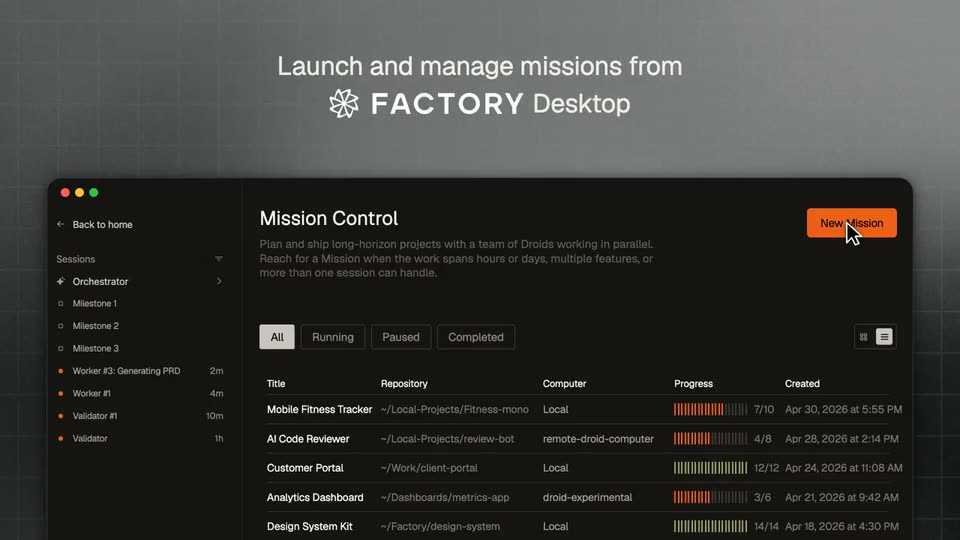
A dark Mission Control dashboard window sits in 3D perspective on a gray grid, under a white headline. A cursor clicks the orange New Mission button, then a second window with a DROID logo slides in from the top, overlaps, and slides away.
On-screen text: “Launch and manage missions from FACTORY Desktop”
Techniques: 3D mockup, Cursor demo
Camera: Pan
07 · Feature reveal · 0:16–0:16
A dark desktop app window with a file sidebar and session list holds centered on a grid backdrop, a segmented DROID wordmark in its main pane. The previous logo dissolves out in the first frames while the gray headline stays fixed above the window.
On-screen text: “Run locally, or on a remote machine”
Camera: Static
08 · Feature reveal · 0:16–0:21
A dark app window with a project sidebar sits on a gray grid, the DROID wordmark centered. A cursor clicks the Local button, a machine dropdown opens, and the cursor selects remote-droid-computer, which replaces the button label.
On-screen text: “Run locally, or on a remote machine”
Techniques: Cursor demo
Camera: Static
09 · Feature reveal · 0:21–0:22
A dark product dashboard fills the frame, dimmed under a large faint DROID mark and a small tagline. The view pushes in, reframing onto the session list and a comment thread with a diff file path.
On-screen text: “DROID”, “Run locally, or on a remote machine”
Techniques: UI zoom
Camera: Push in
10 · Feature reveal · 0:22–0:25
A white headline and gray caption brighten beside an orange-bordered sessions panel. The view zooms into the panel, then pulls back into a tilted 3D perspective of the full dark dashboard.
On-screen text: “Agent Sessions”, “Every Droid on the mission – the orchestrator plus its parallel workers and validators, grouped by milestone.”
Techniques: UI zoom, 3D mockup
Camera: Pull out
11 · Feature reveal · 0:25–0:27
The full dark dashboard fades back as the view zooms onto the top status bar, now outlined in orange. A monospace headline and a two-line caption fade in above it, then dim, leaving the highlighted bar over a faint grid.
On-screen text: “Mission Status & Progress”, “Live run state, the completion bar, elapsed time and token usage for the whole mission at a glance.”
Techniques: UI zoom
Camera: Push in
12 · Feature reveal · 0:27–0:34
A title caption and a glowing orange status bar with ticking counters sit over a dark grid; the full agent dashboard then fades in, the frame zooms into the left chat panel under a second caption, and pulls back out.
On-screen text: “Mission Status & Progress”, “Live run state, the completion bar, elapsed time and token usage for the whole mission at a glance.”, “Live Agent Session”, “The active Droid's reasoning, file edits, commands and test runs, streaming as the work happens.”
Techniques: UI zoom
Camera: Pull out
13 · Feature reveal · 0:34–0:36
A dark AI code reviewer dashboard fills the frame. A left sidebar lists sessions, the center thread shows review comments with file diffs, and a right column holds model assignments and a progress log. An orange bar marked RUNNING sits at the top. The layout holds still.
Camera: Push in
14 · Feature reveal · 0:36–0:39
A dim frame brightens to a 'Model Assignment' headline beside a bordered panel listing Orchestrator, Worker and Validator, then the view pulls back to reveal the full dark dashboard: a milestone sidebar, a center code-review feed, and the assignment panel with a progress log on the right.
On-screen text: “Model Assignment”, “Which model drives each role – orchestrator, worker and validator – tuned to the job at hand.”
Techniques: UI zoom
Camera: Pull out
15 · Feature reveal · 0:39–0:40
A dark multi-panel dashboard for an AI code reviewer fills the frame, then the framing shifts right to reveal the model assignment and progress log columns on the right. The center panel holds a running diff analysis with file paths, commands and an orange progress bar.
Camera: Push in
16 · Feature reveal · 0:40–0:43
A dark slide fades in over the previous one: left, the heading “Features” above a short monospace paragraph; right, a rounded panel with an orange border lists milestone items with check and dot markers, the “Diff analysis pipeline” row highlighted by a light bar. The composition holds static.
On-screen text: “Features”, “The mission scoped into features by milestone, tracked from not-started to in-progress to complete.”, “Features”, “4/8”, “Milestone 1: Ingestion”, “PR webhook listener”, “Diff parser”, “Payload validation”, “Rate limiting”, “Milestone 2: Review Engine', 'Diff analysis pipeline', 'Inline comment generation', 'GitHub app install flow', 'Suggested fixes”
Camera: Static
17 · Feature reveal · 0:43–0:44
A dark multi-panel product dashboard assembles in a horizontal slide. A left explainer card labeled Features glides out of frame while the central AI code reviewer panel and a right milestone list expand into view, motion blur softening the moving edges.
On-screen text: “Features”, “The mission is scoped into features by milestone, tracked from not-started to in-progress to complete.”
Camera: Pull out
18 · Demo · 0:44–0:45
A dark AI code-review dashboard floats in 3D perspective over a faint grid. The frame pushes in on the window, reframing from the full layout to the central review log, which scrolls upward while the side panels hold their positions.
Techniques: 3D mockup, UI zoom
Camera: Push in
19 · Feature reveal · 0:45–0:48
A close-up of an orange-bordered Progress Log card sits on a dark grid, its rows refreshing as new entries push in from the top. The headline and caption fade in on the left. The camera then pulls back to reveal the full Missions Dashboard interface.
On-screen text: “Progress Log”, “A live feed of milestones – who completed what, and when – as the mission advances.”
Techniques: UI zoom
Camera: Pull out
20 · Demo · 0:48–0:52
A dark code-review dashboard runs to completion: the orange progress bar fills, the status flips from RUNNING to COMPLETED, counters tick up, feature rows gain checkmarks, and the feed scrolls up at the close.
Camera: Static