2:42

spacesheep - dashboard creation should be as fast as a comet here’s how spaceshee
Spacesheep · B2B · Nov 2026
HumanLayer · Sep 2026 · 1:13 · AI-annotated
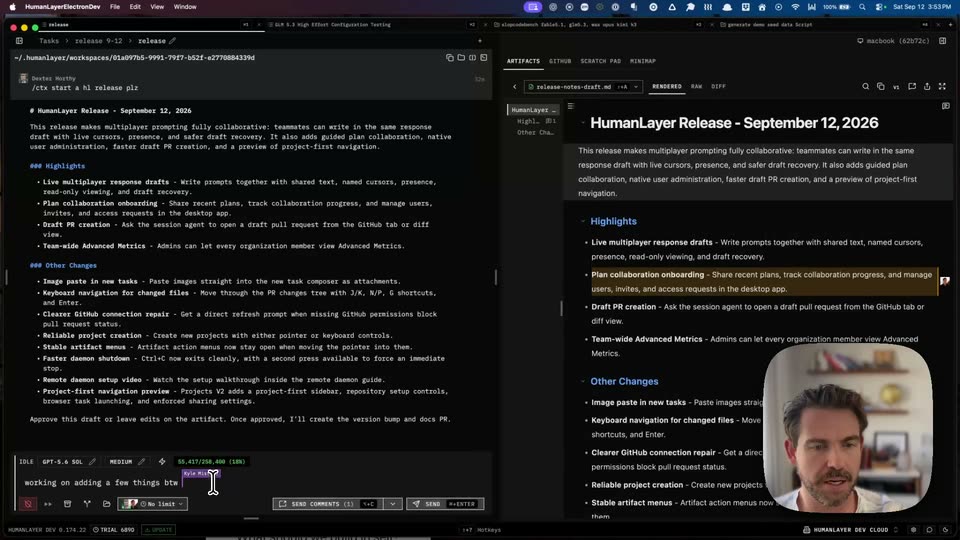
HumanLayer’s 1:13 launch film runs 22 scenes, about 3.4 s each. The product is on screen from the first frame and 1 feature is revealed. There is no explicit call to action; a voiceover carries the film. One uncut screen recording of a developer demoing multiplayer prompting inside the HumanLayer editor, with a face-cam inset pinned to the lower-right corner. The split-pane layout holds the frame while the demo plays out in real time: a collaborator's purple cursor types, comments stream in, and the agent's task log updates as it edits the release notes. Pacing is unedited and event-driven, letting the live cursors, comments, and streaming task log carry the visual interest instead of cuts or on
Is this your launch? to your site or press kit.
Spacesheep · B2B · Nov 2026
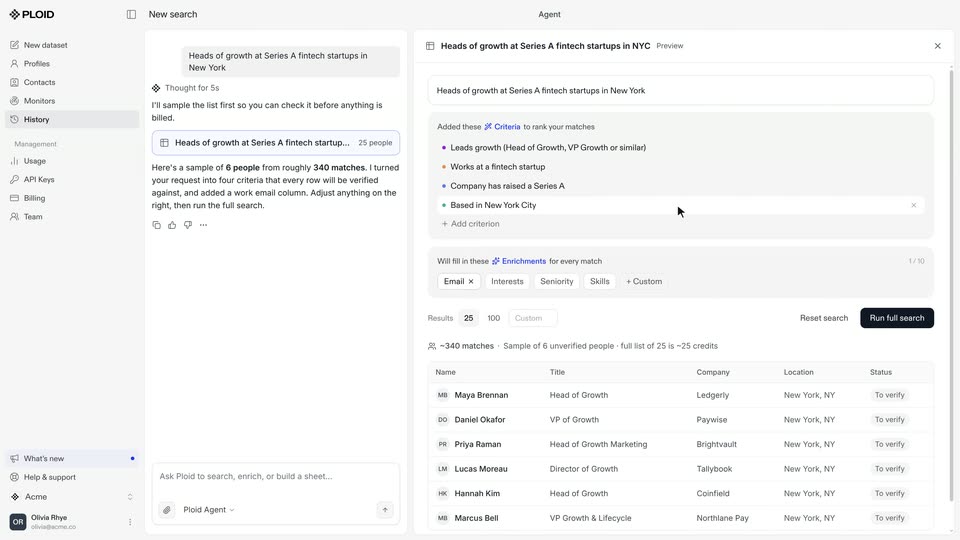
Ploid · B2B · Oct 2026
Ekpa · Fintech · Jul 2026
A screen capture of a release-notes tool, with a raw markdown pane left and a rendered preview right. A rounded webcam tile of a bearded man sits in the bottom right corner. The frame holds still, the cursor resting and the man's head shifting slightly.
Camera: Static
A screen recording of the release-notes tool shows a markdown draft on the left and its rendered preview on the right. A video-call bubble of a man sits in the lower right while the cursor drifts over the draft and the text scrolls.
Techniques: Cursor demo
Camera: Static
A dark markdown editor and its rendered preview fill the screen, with a circular webcam feed of a man in the corner. A multiplayer prompting modal opens and closes, a remote comment is applied to the text, and a purple Kyle Mistele cursor appears as lines are typed.
Techniques: Cursor demo
Camera: Static
A dark code editor displays a release-notes document with bulleted highlights, a comment panel on the right, and a small video-call tile of a man in the lower-right corner. A white mouse cursor drifts upward across the page as the live demo continues.
Techniques: Cursor demo
Camera: Static
A dark editor window shows a release-notes page with a live comment panel on the right; a rounded webcam of a talking man occupies the lower-right corner. A cursor glides across the text.
Techniques: Cursor demo
Camera: Static
A dark code editor displays a rendered release notes document. A cursor hovers across the text, highlighting the plan collaboration onboarding line, while a small webcam feed of a man sits in the lower right corner.
Techniques: Cursor demo
Camera: Static
A dark code editor displays a release notes document with a bulleted list of changes, the cursor gliding over the text. A small rounded webcam feed of a man occupies the lower right corner. The framing stays static.
Techniques: Cursor demo
Camera: Static
A dark release notes page lists highlights and other changes. A white cursor glides left across the body text. A small rounded video of a bearded man in a room occupies the lower-right corner.
Techniques: Cursor demo
Camera: Static
A dark editor displays a release notes document with a comment thread panel on the right and a rounded webcam inset of a man in the lower corner. A hand cursor glides from a highlighted line down to the Other Changes heading.
Techniques: Cursor demo
Camera: Static
Split-pane app screen: markdown release draft left, rendered preview right, a man's face-cam bottom-right. A hand cursor types a message in the input box and sends it; the left pane streams the agent's patch actions while the right preview gains new bullets.
Techniques: Cursor demo
Camera: Static
A dark two-panel app fills the frame: a task log on the left scrolls upward as a cursor hovers over its entries, while the right panel holds a static release-notes document with a small webcam inset of a man in the lower corner.
Techniques: Cursor demo
Camera: Static
A locked-off view of a dark two-pane developer tool: the left pane lists agent task steps while a white cursor moves down the list, and the right pane renders a release notes document. A small webcam feed of a presenter sits in the bottom right corner.
Techniques: Cursor demo
Camera: Static
A dark code editor displays a JSON block of artifact comments as a mouse cursor hovers over the text. A rounded webcam feed of a man occupies the bottom right corner, and a comment notification panel is pinned to the top right.
Techniques: Cursor demo
Camera: Static
A split-screen product interface: a dark agent terminal on the left lists working tasks and file operations that update in place, while a rendered release-notes document on the right stays still, its Highlights header gaining a tan bar, with a small video-call inset of a man at lower right.
Techniques: Split screen
Camera: Static
A split developer interface shows a dark terminal log on the left and a rendered release-notes document on the right, with a small video-call inset of a man in the lower corner. A mouse cursor moves over the terminal list as the agent processes steps.
Techniques: Cursor demo
Camera: Static
A split view of the app shows a dark task list with bash commands and a pointer on the left, and a rendered release-notes document on the right. A small rounded video inset of a man speaking sits in the lower right corner.
Techniques: Split screen
Camera: Static
A dark IDE screen fills the frame, split into a scrolling task log on the left and a rendered release-notes document on the right. A small rounded video of a man speaking sits in the lower right corner, and a cursor drifts over the log.
Camera: Static
A dark IDE screen shows a task log on the left and a rendered release notes page on the right, with a small webcam feed of the presenter in the corner. A mouse cursor drifts from the left panel to the right panel.
Techniques: Cursor demo
Camera: Static
A screen capture of the HumanLayer app shows a task log on the left and a rendered release-notes document on the right, a cursor resting on the Highlights header, while a small rounded webcam of a man speaking sits in the lower right corner.
Camera: Static
A split-screen interface shows a dark task terminal left and a rendered release-notes document right, with a small webcam feed of a presenter in the corner. A 'Multiplayer Prompting' modal opens at center as a cursor types a name into the search field and picks a time limit.
Techniques: Split screen, Cursor demo
Camera: Static
A dark developer workspace fills the screen: a code editor left, a Multiplayer Prompting modal center with a time-limit row, a rendered release document right. A small facecam of a man sits in the lower right corner while the cursor drifts across the panels.
Techniques: Cursor demo
Camera: Static
A split-screen dev tool shows a code diff on the left and a rendered release notes document on the right. A rounded video call window in the corner shows a man gesturing as he speaks. The green code block on the left updates while the document stays still.
Techniques: Split screen
Camera: Static