2:27


Zapier Central is in Public Beta... Try It Now!
Zapier · Productivity · Sep 2024
Warp · May 2022 · 1:51 · Full motion · AI-annotated
Warp’s 1:51 launch film runs 10 scenes, about 11 s each. The product is on screen from the first frame and 4 features are revealed. The call to action lands at 1:45 (94% in), over a voiceover. A single continuous screen-recording walkthrough anchored by a fixed circular webcam inset, where the cursor is the only on-screen actor and each beat is one UI step: the command grid, search, a detail page, the terminal, the GitHub repo, and a theme toggle. Pacing is steady and unhurried, with hard cuts between screens and no motion design beyond the app's own transitions, so the presenter's voice carries the structure.
Is this your launch? to your site or press kit.
Zapier · Productivity · Sep 2024
Inconvo · B2B · Jan 2026
Klaus AI · B2B · Feb 2026
A static browser window displays the commands.dev homepage, a grid of command cards under a bold headline. A circular webcam overlay of the presenter occupies the lower left, with a recording bar beneath. A cursor rests over one highlighted card.
Camera: Static
A dark-mode Google homepage fills the browser window, with a small circular webcam of the presenter in the lower-left corner. The cursor moves into the address bar and types the URL, opening an autocomplete dropdown list above the search field.
Techniques: Cursor demo
Camera: Static
A screen recording of the Commands.dev site shows a grid of terminal-command cards under the heading. A circular webcam of a presenter sits in the lower-left corner. The cursor hovers a card, then types 'delete' and 'git' into the search bar, filtering the list.
Techniques: Cursor demo
Camera: Static
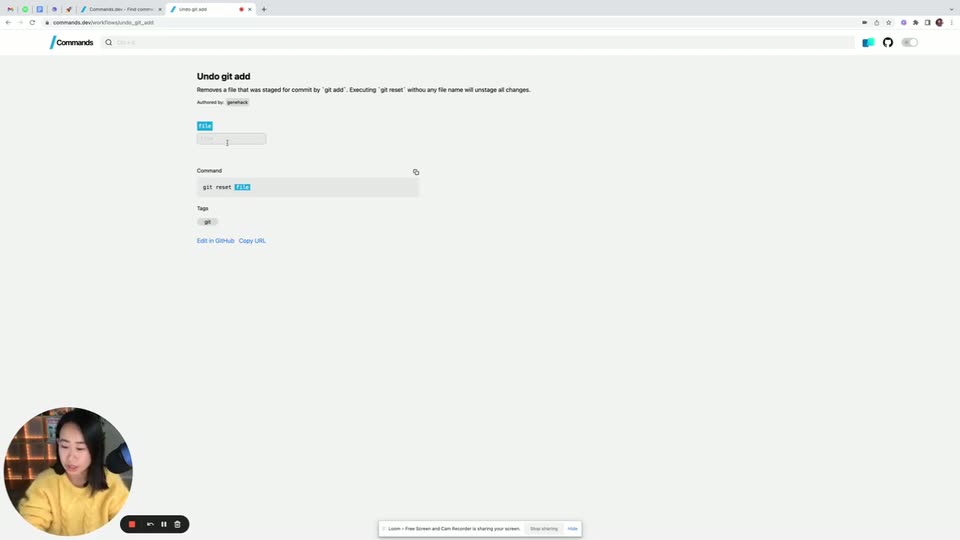
A static screen of the commands.dev page for the Undo git add command, with the presenter's webcam in the lower left. The cursor drifts to the file input, clicks it, and types README, which fills the command box in real time.
Techniques: Cursor demo
Camera: Static
A locked-off desktop shows the Commands.dev interface beside a black terminal, with a small circular webcam of a presenter at the bottom left. The cursor clicks the copy icon, pastes the command into the terminal, then opens the GitHub repo page showing the YAML file.
Techniques: Split screen, Cursor demo
Camera: Static
A browser shows a GitHub repository; a YAML file with code sits center, then the page switches to the repo overview with a README and file list. A circular webcam inset of a woman in a yellow top stays in the bottom-left corner as a cursor hovers near the tabs.
Techniques: Cursor demo
Camera: Static
A browser window shows the GitHub repo page for warpeddev/workflows, file list and README with a code-snippet image, held on a locked-off frame. A circular webcam feed in the lower-left corner shows a woman in a yellow sweater talking, the only moving element.
Camera: Static
A browser window shows the commands.dev site in light mode: a heading over a grid of command cards, with a small circular presenter feed at bottom left. A cursor glides to the top-right toggle and clicks it, flipping the whole page to a dark theme.
Techniques: Cursor demo
Camera: Static
A dark website fills the locked-off frame, showing a grid of command cards beneath a headline. A small circular webcam overlay in the lower left shows a person speaking to the camera. The interface remains static throughout the short clip.
Camera: Static
A browser window displays the Commands.dev page, a grid of white command cards on a light background. A cursor glides to the Check if a file exists card and hovers, tinting it gray. A circular webcam of the presenter rests in the bottom-left corner as she signs off.
Techniques: Cursor demo
Camera: Static