
2:28
Explore
00:00:00 / 01:58:20
- Length
- 1:58
- Scenes
- 32 · 3.7 s avg
- Product on screen
- 0:00
- Features shown
- 3
- Call to action
- 1:46 · 89%
- Voiceover
- Yes
- Views
- 150K on YouTube
as of November 22, 2026
OpenAI’s 1:58 launch film runs 32 scenes, about 3.7 s each. The product is on screen from the first frame and 3 features are revealed. The call to action lands at 1:46 (89% in), over a voiceover. The video alternates a sunlit talking-head host with slow zooms into a screen-recorded Codex session, pinning the host's face in a corner tile during UI shots. Signature moves are gentle camera pushes and 3D tilts of the interface over a starfield, keeping the pace steady and explanatory.
Footage neededEstimated needs: 4 capture groups — your screens or recordings · 1 official logo — reused across the film · 10 filmed passages — shoot, supply or replace
Is this your launch? to your site or press kit.
More like this


Similar soundtrack
Films whose music sounds like this one, voice left out
3:31

The NEW Email Editor is here!
Resend · Upbeat electronic
4:46
Introducing Galaxy Z Fold7 | Galaxy AI | Samsung
Galaxy Z Fold7 · Modern electronic
0:56
Wix Harmony: Big Game Commercial Extended 2026 | The New Way to Create
Wix Harmony · Indie rock, electronic dance, pop/rock
Meet GPT-5.6, scene by scene
· 32 scenes as text
01 · Product intro · 0:00–0:02
A close-up shows hands lifting a closed laptop lid to reveal the logo on a desk beside a black mug, then cuts to a man seated behind the open laptop. White text GPT-5.6 slides in top left and from OpenAl sits bottom right.
On-screen text: “GPT-5.6”, “from OpenAl”
Techniques: Kinetic type
Camera: Static
02 · Product intro · 0:02–0:15
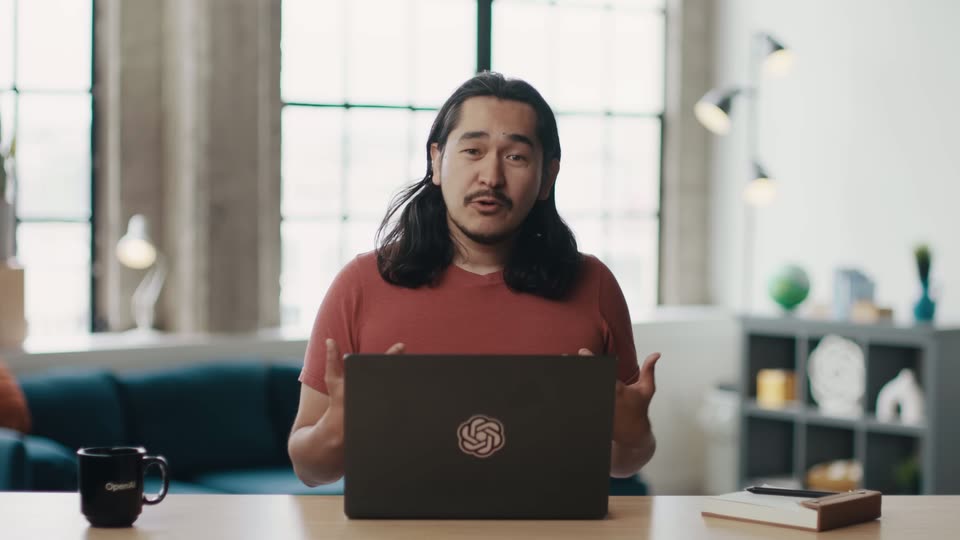
A long-haired man in a rust tee sits at a wooden table behind a closed laptop with the OpenAI mark, speaking to camera and gesturing. A bright office with tall windows and a teal sofa fills the background. A white lower-third caption names him.
On-screen text: “Charlie Guo”, “Developer Experience Engineer at OpenAI”, “GPT-5.6”, “from OpenAI”
Camera: Static
03 · Product intro · 0:15–0:17
A man with long dark hair and a mustache in a rust t-shirt speaks to camera in a soft-focus office with a teal sofa behind him. A lower-third caption with his name and title sits at the bottom left while the frame stays locked off.
On-screen text: “Charlie Guo”, “Developer Experience Engineer at OpenAl”
Camera: Static
04 · Demo · 0:17–0:23
A prompt composer under the heading 'What should we build in card-game?' fills with typed text about a celestial card game, while a small presenter video sits top right. A cursor clicks the send button and the view scrolls to a worktree log.
Techniques: Cursor demo
Camera: Static
05 · Demo · 0:23–0:27
A coding-agent chat interface fills the frame, scrolling down to reveal a feature list, file names, and a run command, while a small video of a man in a red shirt at a laptop sits in the right column. The view reframes from the full window to the inner chat.
Techniques: UI zoom
Camera: Pull out
06 · Demo · 0:27–0:33
A browser window shows a dark space card game with a central planet and orbital rings, plus a presenter in a video call inset at top right. The view zooms into the interface as a cursor drags planet cards from the hand onto the orbits, filling them with values.
Techniques: UI zoom, Cursor demo
Camera: Push in
07 · Demo · 0:33–0:41
A chat view scrolls through a bulleted game brief as the assistant's reply types in word by word; a small video of a man at a laptop fades in on the right. The frame zooms out to the whole window, revealing rows of generated card art.
Techniques: Split screen, Kinetic type, UI zoom
Camera: Pull out
08 · Demo · 0:41–0:43
A static ornate card game board, ASTRAL XXI, fills the frame with two illustrated goddesses and a central moon. A small video of a presenter in a red shirt talks at the right edge over a starfield background.
Camera: Static
09 · Demo · 0:43–0:44
A dark app window over a starry backdrop displays four Art Nouveau tarot cards, switches to a list of generated file names, then returns to the cards. A small video tile of the presenter stays at the right.
Camera: Static
10 · Demo · 0:44–0:52
A product interface scrolls up through a markdown document and a file list, settling on a 'What changed' section with bullet points. A man in a red shirt talks and gestures in a small video tile fixed on the right.
Techniques: Split screen
Camera: Pan
11 · Feature reveal · 0:52–0:56
A long-haired man in a rust t-shirt sits at a wooden desk behind a closed laptop, talking to the camera and gesturing with both hands. A black mug and an open notebook rest on the desk in a bright room with tall windows.
Camera: Static
12 · Feature reveal · 0:56–1:04
A man with long dark hair and a mustache, in a rust t-shirt, sits in a softly lit room and speaks to an off-screen interviewer. The shallow-focus medium close-up holds on his face as he glances down and back up while talking.
Camera: Static
13 · Feature reveal · 1:04–1:06
A long-haired man in a rust t-shirt sits at a wooden desk behind a closed black laptop with a glowing knot logo on the lid. He blinks and gestures with his hands while speaking. A black mug and a notebook rest on the desk, bright windows behind.
Camera: Static
14 · Feature reveal · 1:06–1:08
A man with long dark hair and a mustache, in a rust t-shirt, speaks slightly off-camera. Shallow focus blurs the interior behind him, showing a teal couch and a hanging lamp. He holds a right-weighted frame with small head movements as he talks.
Camera: Static
15 · Feature reveal · 1:08–1:14
A chat window over a starfield holds a document and a row of tarot-style generated images. The view zooms into the model picker, a cursor drags a blue-to-purple slider rightward so the label shifts from Extra High to Ultra, then the camera pulls back to the full window.
Techniques: UI zoom, Cursor demo
Camera: Pull out
16 · Feature reveal · 1:14–1:23
A split product UI fills the frame: a design document on the left, a Subagents panel on the right. The cursor clicks through the panel as its content flips between research notes and a done list, a video thumbnail pops onto the left, then the whole interface tilts into 3D.
Techniques: Cursor demo, 3D mockup
Camera: Push in
17 · Feature reveal · 1:23–1:26
A document view with a man at a laptop on the left and a Subagents list on the right. The cursor clicks Soundtrack research, the panel opens to a V2 audio workflow, then the frame zooms onto that detail.
Techniques: Cursor demo, UI zoom
Camera: Pull out
18 · Feature reveal · 1:26–1:28
A workspace screen shows two panes. Left, a woman in a red shirt talks at a laptop in a video call, framed by document panels. Right, a document lists the V2 audio workflow. A cursor glides down the bullet list.
Techniques: Cursor demo
Camera: Static
19 · Feature reveal · 1:28–1:29
Split-screen product view. Left, a man with headphones sits at a laptop before a whiteboard. Right, a workflow panel switches from a Soundtrack research document to a Done list of finished subagent tasks with small avatars, while a cursor moves across it.
Techniques: Cursor demo
Camera: Static
20 · Feature reveal · 1:29–1:30
A light app screen shows a document panel on the left and a Subagents sidebar on the right with four done tasks. The view reframes to reveal the top bar while the cursor glides down to hover the V2 code audit row.
Techniques: UI zoom, Cursor demo
Camera: Push in
21 · Feature reveal · 1:30–1:31
A two-panel app window floats over a starfield. The right panel swaps from a list of subagent tasks to a detailed document with bulleted file and risk lists. A cursor rests on the selected row. The left panel of body copy scrolls slowly.
Techniques: Cursor demo
Camera: Pull out
22 · Feature reveal · 1:31–1:32
A two-panel interface fills the frame: the left panel holds a project document with notes on parallel work tracks, the right panel lists a code audit with affected files and technical risks. Both panels remain static.
Techniques: Split screen
Camera: Static
23 · Feature reveal · 1:32–1:35
Two app panels sit side by side: a long planning document on the left and a subagent code-audit report on the right listing affected files and technical risks. The view holds still with no animation.
Techniques: Split screen
Camera: Static
24 · Other · 1:35–1:41
A man with long dark hair and a mustache, in a rust shirt, speaks to an off-camera interviewer. A steady medium close-up holds on his face against a blurred interior with teal seating and bright windows.
Camera: Static
25 · Other · 1:41–1:46
A man with long dark hair and a rust t-shirt sits behind a closed laptop bearing the OpenAI logo, talking to camera and gesturing with his hands. A black mug and a notebook rest on the wooden desk in a bright room.
Camera: Static
26 · CTA · 1:46–1:47
A game UI panel sharpens from a blurred zoom into focus. On the left, an arched illustration of a robed woman holding a basket sits behind a tree-of-life card. On the right, the heading Root and Branch, light target numbers, and a green Start with Terra button appear.
Techniques: UI zoom
Camera: Push in
27 · CTA · 1:47–1:48
A celestial map interface fades in from a gray overlay to a dark starfield. Three columns labeled Night I to III stand side by side; the first holds a circular constellation diagram titled Crux above a smaller planet marker.
Camera: Static
28 · CTA · 1:48–1:51
A five-node cross constellation sits center on a cream board. A star card slides in from below, the cross flares gold with a brief particle burst and a +12 tag, the Night Light counter jumps from 30 to 42, then the nodes settle to dark brown.
Techniques: Particles
Camera: Static
29 · CTA · 1:51–1:55
A long-haired man in a rust shirt sits at a desk behind a laptop showing a rose knot logo, talking to camera in a sunlit room. He smiles as two small green and purple dots pop in at his chest.
Camera: Static
30 · Outro · 1:55–1:57
The OpenAI wordmark sits centered on a plain white background. The letters AI fade from light gray to black while the rest of the mark holds still.
On-screen text: “OpenAI”
Camera: Static
31 · Outro · 1:57–1:57
A black line-drawn knot mark sits centered on a plain off-white field. It sharpens from a soft, slightly rotated state and scales gently into a clean, static position.
Camera: Static
32 · Outro · 1:57–1:58
A black line-drawn interlocking knot logo with a central S mark sits centered on a plain off-white field. The mark holds still, locked off, for the full duration of the clip.
Camera: Static