0:44
shubham - Introducing Agnost AI. The first infrastructure that lets your AI age
Agnost AI · May 2026
Vellum’s 1:51 launch film runs 75 scenes, about 1.5 s each. The product shows up at 0:06 and 7 features are revealed. There is no explicit call to action; a voiceover carries the film. A 112 BPM, 14 cuts per minute launch film that alternates live action from a sunlit apartment with 2D and 3D mockups floating over a blurred sunset landscape, using a fixed bottom caption pill to carry the voiceover. The style is built on a cream and white palette punctuated by purple and orange, squishy cartoon mascots, and 3D-tilted UI windows that zoom and drift, so a motion designer should pair snappy radial wipes and zoom-ins with soft parallax on the landscape backdrops.
Is this your launch? to your site or press kit.
Agnost AI · May 2026
Salesforce · Aug 2026
A bearded man in a black V-neck sits in a sunlit room with sheer curtains and a plant, speaking to camera. A large white figure rolls up behind his head to $25,000,000 while bottom captions track his words.
On-screen text: “$25,000,000”, “We raised $25 million”, “from the co-founders”
Techniques: Kinetic type
Camera: Pull out
On a light gray field, the HubSpot wordmark and orange dot icon assemble from scattered fragments, hold, then cut to the Dropbox mark and word assembling the same way. A dark caption pill reading “of HubSpot and Dropbox” sits fixed at the bottom throughout.
On-screen text: “of HubSpot and Dropbox”
Techniques: Masking, Morph
Camera: Static
On a plain cream background, a large serif line builds word by word, reading The world's first personal intelligence, with the final phrase in orange. A small caption in a dark pill at the bottom updates from first personal intelligence. to ChatGPT.
On-screen text: “The world's first personal intelligence”, “first personal intelligence.”, “ChatGPT”
Techniques: Kinetic type
Camera: Static
A bearded man in a black V-neck speaks to camera in a bright apartment. ChatGPT and Claude wordmarks slide in at the lower corners, then two purple flowers with black oval eyes pop in on either side, and a giant purple petal wipes across the frame as a transition.
On-screen text: “ChatGPT and Claude”, “ChatGPT”, “Claude”, “we're built to serve big tech.”, “We built an assistant meant”, “to serve you.”
Techniques: Masking
Camera: Pull out
On a white background, a black rounded-square icon with a white radial spark mark slides left as the lowercase word vellum scales in beside it, forming the brand lockup. A gray pill caption reading Introducing Vellum sits at the bottom.
On-screen text: “Introducing Vellum”
Camera: Static
A purple flower-shaped mascot with two cartoon eyes bounces up into frame over a soft-focus sunset landscape. A dark caption box reads “Let's say you're” at the bottom while the brand title scales in.
On-screen text: “Introducing Vellum”, “vellum”, “Let's say you're”
Camera: Static
A purple 3D flower with cartoon eyes floats in front of a tilted white dashboard set against a blurred dusk hillside. The flower spins to its side, then shrinks and docks into the interface as a small icon. A caption sits at the bottom.
On-screen text: “trying to grow a business.”
Techniques: 3D mockup
Camera: Static
A Shopify dashboard mockup floats in 3D over a blurred outdoor background. The sales line chart draws upward, the donut and bar charts fill in, and the top figures tick up. A white caption sits at the bottom.
On-screen text: “trying to grow a business.”
Techniques: 3D mockup
Camera: Static
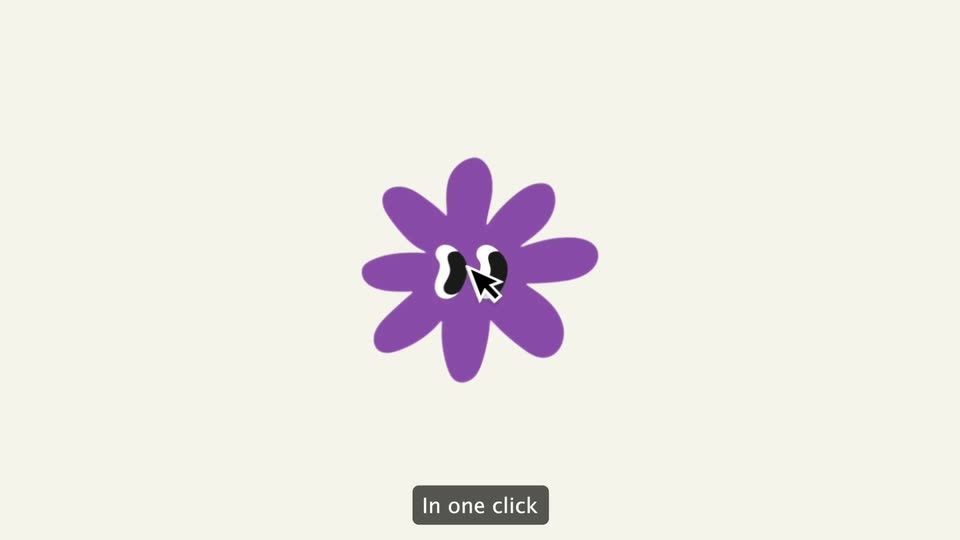
A purple flower with a two-eyed face sits on a cream field. A black cursor arrow glides in from the lower right and clicks the face, the petals snap into long spikes, and a dark caption box appears below.
On-screen text: “In one click”
Techniques: Cursor demo, Morph
Camera: Static
A purple and cream sunburst of rays radiates from a small black-and-white logo at the center, the rays rotating gently. A dark rounded caption pill sits at the bottom, swapping its subtitle line as the clip plays.
On-screen text: “In one click”, “we'll connect your assistant”
Camera: Static
A white assistant settings window over a blurred warm landscape comes into focus, then the frame zooms into the Channels list. A cursor clicks each Set up button, flipping them to green Connected labels, while bottom captions track the voiceover.
On-screen text: “we'll connect your assistant”, “to every app you use.”, “Email, Slack,”, “and we'll even give it its own”
Techniques: UI zoom, Cursor demo
Camera: Push in
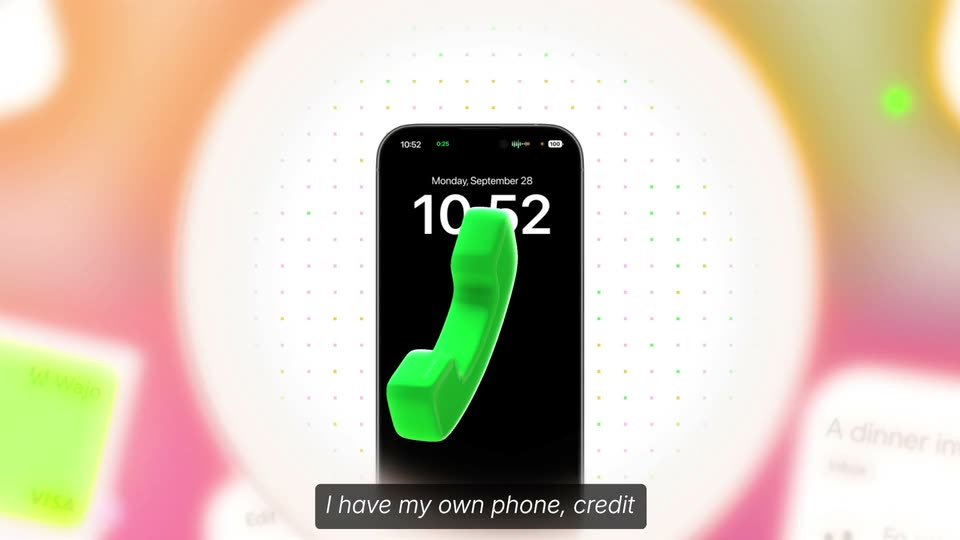
A tilted smartphone mockup floats over a hazy sunset landscape, its purple call screen showing a phone number and a running timer. The device sharpens and centers, then gives way to a cream-colored abstract blob on the same pink hills.
On-screen text: “and we'll even give it its own”, “phone number.”
Techniques: 3D mockup
Camera: Pull out
On a flat purple field, a white blob shape morphs into a purple flower holding a white S, then a rounded 'Ask me anything' bar with clip, mic and send icons appears below as a large cursor arrow points at it.
On-screen text: “We named the AI assistant Ash.”
Techniques: Morph, Cursor demo
Camera: Static
A purple flower character with black eyes floats above a white chat bar on a cream grid. The phrase “You shall be named Ash” types into the bar as the cursor glides to the green send button, and the flower shrinks.
On-screen text: “We named the AI assistant Ash.”
Techniques: Cursor demo
Camera: Static
A white chat panel sits on a pale grid background. A cursor taps the green send button, then the assistant's reply bubble appears beside a purple flower avatar. A gray caption pill at the bottom states the naming line.
On-screen text: “We named the AI assistant Ash.”
Techniques: Cursor demo
Camera: Pull out
A white phone modal on a cream grid zooms in as a red eyed blob flies in from the left and settles in the center above a Generate Random button. A cursor taps the right edge while a dark tooltip sits at the bottom.
Techniques: UI zoom, Cursor demo
Camera: Static
A phone mockup of a green chat with Ash slides right as a desktop Telegram window with a conversation slides in from the left, the two views side by side on a cream background. A dark bottom caption reads And now Ash lives, then in your text messages.
On-screen text: “And now Ash lives”, “in your text messages”
Techniques: Split screen
Camera: Static
Two chat windows sit on a pale grid background: a white email thread on the left and a green Telegram chat with Ash on the right. A dark caption pill at the bottom reads 'in your text messages', then swaps to 'in text messages'.
On-screen text: “in your text messages”, “in text messages”
Camera: Static
A Slack chat window showing an Ash-bot message floats in front of a faded inbox automation window on a pale grid. The two windows drift slightly while a dark caption reads and in Slack. at the bottom.
On-screen text: “and in Slack.”
Camera: Pan
A hazy green mountain landscape fills the frame, held static. A dark lock-screen pill with an orange circle and white square icon floats at center, labeled 'Slide to wake up'. A white caption 'When you wake up,' sits on a black box at the bottom.
On-screen text: “When you wake up,”
Camera: Push in
A white inbox card tilted in 3D over a blurred mountain backdrop fills with recap rows and ticking counters as a side panel slides in; the camera pulls back to reveal the full card. A dark caption pill updates the status at the bottom.
On-screen text: “Ash is already done”, “triaging 621 emails,”
Techniques: 3D mockup
Camera: Pull out
An inbox list with one email outlined in red, plus a black caption 'triaging 621 emails,'. The view zooms into the rows as a hand cursor and a white 'Ash' badge step down the list one row at a time.
On-screen text: “triaging 621 emails,”
Techniques: UI zoom, Cursor demo
Camera: Push in
A Slack window floats in 3D tilt over a purple backdrop and blurred field, captioned with the message count. The frame zooms into the message box as a labeled cursor types a confirmation reply.
On-screen text: “37 slack messages,”, “(5261, 1353.2)”, “(3010.4, 7535.4)”
Techniques: 3D mockup, UI zoom, Cursor demo
Camera: Push in
A Slack-style chat thread floats in 3D perspective over a blurred mountain backdrop, tilted at an angle. A red selection box with a coordinate label covers the lower area as a cursor glides to the green send button at the bottom right.
Techniques: 3D mockup, Cursor demo
Camera: Pan
A tilted calendar app for July 2026 floats in 3D over a blurred landscape. A cursor moves to the Create button as a small Ash avatar chip drifts in the center, and a bottom caption reads and is scheduling.
On-screen text: “and is scheduling”
Techniques: 3D mockup, Cursor demo
Camera: Static
A week-view calendar with an event dialog open; a cursor moves through the dialog fields while a small red-shirt avatar chip labeled Ash follows it. A dark caption pill at the bottom reads three meetings on your calendar.
On-screen text: “three meetings on your calendar.”
Techniques: Cursor demo
Camera: Pull out
A calendar interface fills with three new event blocks as a detail popup closes. A cursor glides across the grid while a dark caption bar at the bottom switches from one line to the next.
On-screen text: “three meetings on your calendar.”, “But that's just the start.”
Techniques: Cursor demo
Camera: Push in
The scene opens on a tight close-up of the chat composer, then pulls back to reveal the full Ash-bot window with its purple sidebar and cartoon shapes on a cream backdrop. A signed document page pops into the thread as the caption continues.
On-screen text: “It's 3 p.m.”, “and Ash just got you a signed”
Techniques: UI zoom
Camera: Pull out
A dark purple browser window shows a chat interface with a message from Ash and a VELLUM invoice card. The invoice zooms in to fill the frame while a black caption pill reads new customer.
On-screen text: “new customer.”
Techniques: UI zoom
Camera: Push in
A Gmail-style email window floats over a mountain landscape. A cursor hovers the toolbar, an Ash reply badge pops in, then a red signature card with a blue Sign button appears beside the email body. A dark caption pill at the bottom reads the line.
On-screen text: “It responded to a lead's email,”
Techniques: Cursor demo
Camera: Push in
A white email composer card floats over a blurred desk background and drifts upward. A pink highlight flashes across the body text, then an Ash tag with a fox icon pops in. A bottom caption reads It responded to a lead's email, then swaps to edited a contract.
On-screen text: “It responded to a lead's email,”, “edited a contract”
Camera: Push in
A Docsign window floats over a blurred landscape, showing a Sales Agreement with a fields sidebar. A cursor moves over a highlighted date field as the document scrolls, while an avatar labeled Ash with a green check and the caption edited a contract sit at the bottom center.
On-screen text: “Ash”, “edited a contract”
Techniques: Cursor demo
Camera: Push in
A DocuSign sales agreement fills a browser window, with 'Enterprise Plan - Annual' highlighted in red and an Ash comment bubble beside it. The view zooms in on the highlight as the bottom caption swaps from 'edited a contract' to 'and sent it out for DocuSign.'
On-screen text: “edited a contract”, “and sent it out for DocuSign.”
Techniques: UI zoom
Camera: Push in
A document viewer with a Back button and a purple Send button floats over a mountain lake landscape. A cursor presses Send, then a large purple rounded panel scales in to cover the screen. A subtitle runs along the bottom.
On-screen text: “and sent it out for DocuSign.”, “Now, nobody's perfect yet.”
Techniques: Cursor demo
Camera: Push in
A bearded man in a black V-neck shirt speaks in a bright room, framed medium close-up against a blurred window and plant. He looks slightly off camera and talks. A white caption on a dark bar sits at the bottom of the frame.
On-screen text: “Now, nobody's perfect – yet.”
Camera: Push in
A bearded man in a black V-neck sweater sits in a sunlit living room with a window, plant and sofa behind him, speaking to the camera. A white subtitle on a dark rounded bar sits at the bottom of the frame.
On-screen text: “Now, nobody's perfect – yet.”
Camera: Static
A purple Slack window shows a chat where the Ash bot lists subtasks, the last one, Attach Invoice, marked with a red X as a cursor hovers. The view zooms in on the message area. A dark caption bar at the bottom reads the narrator's line.
On-screen text: “Now, nobody's perfect – yet.”, “You see, Ash made a mistake.”
Techniques: UI zoom, Cursor demo
Camera: Push in
A flat email app window sits on a light background. The frame starts zoomed into the sent list and the open contract email, then pulls back to reveal the full window with its sidebar. A dark caption bar at the bottom swaps lines of text.
On-screen text: “You see, Ash made a mistake.”, “without the Loom video.”, “without sending an invoice.”
Techniques: UI zoom
Camera: Push in
A split view shows a Loom recording panel on the left and an email inbox titled All Sent on the right. A black cursor glides to the red Start recording button. A dark caption box at the bottom carries the line about giving Ash feedback via a Loom video.
On-screen text: “So we'll give Ash feedback via a Loom video.”
Techniques: Cursor demo
Camera: Pull out
A light email client shows a sent list on the left and an open contract email on the right. A blue circular Loom play badge with the number 2 hovers at the center. A black caption pill sits at the bottom.
On-screen text: “feedback via a Loom video,”
Camera: Pull out
An email client interface fades from dim to full brightness, showing a sent-message list on the left and an open contract email on the right. A blue circular Loom play button counts down in the center, with a small annotation tooltip beside it.
On-screen text: “feedback via a Loom video,”
Camera: Static
A Loom player frame pulls back to reveal the full interface around an email mockup, with the red Loom mascot on the right and a circular video thumbnail of a man in the corner. A caption reads feedback via a Loom video at the bottom.
On-screen text: “feedback via a Loom video,”
Techniques: UI zoom
Camera: Pull out
A Loom player shows an email thread while an orange blob mascot with eyes slides across the frame, squashing and stretching. A status pill flips from Updating memory to a green Updated memory. Bottom captions advance phrase by phrase.
On-screen text: “and Ash will literally”, “watch the Loom video”, “Let's make sure to always attach”, “an invoice moving forward.”, “Ash remembers forever, but Ash”
Techniques: Morph
Camera: Static
A red cartoon mascot holds the center of a dotted grid, then shrinks as a network of pastel app icons and thin connecting lines blooms outward around it. A dark rounded caption pill at the bottom reads “Ash remembers, forever.”
On-screen text: “Ash remembers, forever.”
Camera: Static
A horizontal workflow of connected nodes, Signing projects, Contracts and a glowing Invoicing diamond, scrolls left across a dotted white grid. A dark caption bar at the bottom reads Ash remembers, forever, then switches to But Ash can do so much more.
On-screen text: “Ash remembers, forever.”, “But Ash can do so much more.”
Camera: Pull out
A bearded man in a black V-neck shirt speaks just off camera in a bright room, a window and green plant soft in the background. A white caption in a black pill sits at the bottom edge.
On-screen text: “But Ash can do so much more.”
Camera: Pull out
A light weekly calendar grid with date columns 14 to 23 stays static while an orange Gym Time!!! event bar drops into the 15th column, overlapping the purple Sauna session booked block. A dark rounded caption pill sits at the bottom center.
On-screen text: “But Ash can do so much more.”, “Ash can make sure you go”
Camera: Pull out
A tilted 3D calendar of June 2026 floats on a cream backdrop, then zooms in and gives way to a tilted 3D phone showing a Hinge profile, with two more profile cards at the edges. A dark caption box reading to the gym. stays fixed at the bottom.
On-screen text: “to the gym.”
Techniques: 3D mockup, UI zoom
Camera: Pull out
A smartphone mockup floats in 3D perspective over a curved row of profile cards. A hand cursor taps the heart button on the center profile, and a small profile tag appears at the right. A dark caption pill sits at the bottom.
On-screen text: “One user”, “even had their assistant swipe”
Techniques: 3D mockup, Cursor demo
Camera: Static
A front-facing phone mockup shows a dating app profile while a curved row of profile cards floats behind it in 3D. A hand cursor hovers over the screen beside a small Ash tag, with red and green heart counters above. The profile swaps as the cards shift.
On-screen text: “even had the assistant swipe”
Techniques: 3D mockup, Cursor demo
Camera: Push in
A centered phone mockup displays a dating profile of a woman, flanked by a row of tilted photo cards marked with X or heart icons. A hand cursor hovers at the phone's lower corner as a green like counter climbs from 8 to 10, while a red pass counter sits at 11.
On-screen text: “even had the assistant swipe”
Techniques: Cursor demo, 3D mockup
Camera: Pan
A centered phone mockup on a cream grid background shows a woman's photo above a caption field. The caption types out to 'I'm filing for divorce' as a hand cursor moves from the keyboard to the Done button, and a black subtitle bar appears at the bottom.
On-screen text: “calls on hinge for them.”
Techniques: Cursor demo
Camera: Push in
A front-facing phone mockup on a pale grid backdrop shows a chat screen titled Sofia. A black line-drawn rose animates into view, stem and leaves first, then the flower head, while a white caption on a dark pill sits at the bottom.
On-screen text: “calls on hinge for them.”
Techniques: 3D mockup
Camera: Static
A dark chat mockup types out a user message in a right bubble, then a left bubble with a spiral AI icon replies with a deadpan line. A green organic shape wipes in from the left, masking the bubbles as a transition.
On-screen text: “Every other Al”, “you what to”, “what you want to hear”
Techniques: Masking
Camera: Push in
White serif words pop into orange, purple, pink and green rounded chips, spelling A Few Moments Later on a dark green field. A pink and purple monster and an orange spiky monster fade in at the corners as the subtitle line changes.
On-screen text: “what you want to hear”, “A”, “Few”, “Moments”, “Later”, “and forgets”
Techniques: Kinetic type
Camera: Static
A dark chat screen: an OpenAI message slides up from the bottom into the top, then a McDonald's delivery card with red M badge, item lines and prices fades in below it. White captions in black boxes swap at the bottom edge.
On-screen text: “and forgets”, “everything you told it yesterday.”
Camera: Push in
A dark chat screen scrolls down past the McDonald's receipt and order-status timeline as a gray reply bubble reading 'WHAAAAAAAT????? CANCEL IT!!' pops in on the right above the 'Ask anything' input bar.
On-screen text: “everything you told it yesterday.”
Camera: Pull out
The serif headline 'We built' sharpens from blur at the center of a white panel. The panel then slides left, revealing a green side panel with small cartoon creatures and a white V logo, while a dark caption box stays locked at the bottom.
On-screen text: “We built”, “We built Vellum differently.”
Techniques: Masking
Camera: Static
A dark brown rounded card holding a cluster of small cartoon monster icons scales up to fill the frame, and its fill turns orange as the word Differently. grows to center in white serif. A caption line sits at the bottom throughout.
On-screen text: “We built Vellum differently.”, “Differently.”
Techniques: Kinetic type
Camera: Static
A browser window on a cream grid background holds a dark canvas where a pink spiky blob sits at the center. Colored lines radiate outward and the endpoint icons expand into eight labeled capability cards, while a caption sits below the window.
On-screen text: “We built Vellum differently.”, “Differently.”, “We kept all of the capabilities,”
Techniques: Kinetic type, UI zoom
Camera: Pull out
A dark interface window with eight labeled capability tiles and a pink mascot sits centered on a cream field. Red hand-drawn padlock, no-entry, and warning icons pop in around it while the window shrinks and blurs. Subtitles run along the bottom.
On-screen text: “We kept all of the capabilities,”, “but got rid of the guardrails.”
Camera: Pull out
A pink spiky character with cartoon eyes anchors a dark network graph; thin colored lines link it to feature tiles for Communication, Productivity, Work and Automation. The view eases outward, exposing more tiles at the edges, while a bottom caption reads.
On-screen text: “but got rid of the guardrails.”
Camera: Push in
A bearded man in a black long-sleeve shirt stands centered in a bright loft with floor-to-ceiling windows and a gray sofa, speaking to camera. A white subtitle line sits at the bottom of the frame.
On-screen text: “To prove how powerful he is,”
Camera: Push in
A bearded man in a black V-neck speaks in a bright room with a window and plant. The full-frame shot shrinks into a rounded video card, and a social post layout opens around it with a headline above and a caption plus engagement counts below.
On-screen text: “To prove how powerful he is,”, “we gave”, “Stop using 20+ pieces of software, build your personalized AI assistant thanks to Vellum”, “Ash full control of my X account.”
Techniques: Masking
Camera: Pull out
On a white background, a red cartoon blob with two eyes peeks out from behind a tilted X post card. The card shows a tweet introducing Vellum with a video thumbnail of a man. A dark caption bar sits at the bottom.
On-screen text: “Ash full control of my X account.”
Camera: Pull out
A white X post card, showing a bearded man speaking in an embedded video, scrolls down to reveal the reply field and a dark Reply button. Two dark rounded caption boxes with white text appear at the bottom in turn.
On-screen text: “Ash full control of my X account.”, “Comment anything below”
Techniques: UI zoom
Camera: Push in
A video post of a bearded man in a black shirt sits above like and share counts while a comment types itself below. A black cursor glides to the Reply button and dark caption tooltips appear in turn.
On-screen text: “Comment anything below”, “and Ash will respond.”
Techniques: Cursor demo
Camera: Pan
A social feed of two posts scrolls up, bringing a red card with a pair of cartoon eyes into view under the reply post. A dark caption reading and Ash will respond sits at the bottom.
On-screen text: “and Ash will respond.”
Camera: Pan
A white reply composer fills in as a cursor types a question and clicks the black Reply button, then the frame pans right to a Generating a response panel. Dark caption pills at the bottom echo the typed words.
On-screen text: “You can ask,”, “how do I get more”, “paying customers?”
Techniques: Cursor demo, UI zoom
Camera: Static
A Twitter reply card slides in from the left beside a 'Generating a response' panel whose steps fade in down a vertical line, topped by a pulsing green dot. A dark caption bar at the bottom carries the closing line.
On-screen text: “And Ash will make a plan for you.”
Camera: Static
A white post card fills the frame; a numbered reply fades in while a black cursor taps a green 'Ash' badge, then the view zooms into a stock-price list. Dark caption pills swap at the bottom.
On-screen text: “And Ash will make a plan for you.”, “Ask Ash to pick stocks for you.”
Techniques: Cursor demo, UI zoom
Camera: Static
A flat browser window lists stocks with green performance charts. A Slack window slides in from the right showing a deal message as a cursor hovers inside it, and a dark Ash pill drifts down the list. Bottom captions swap phrases.
On-screen text: “Ask Ash to pick stocks for you”, “and try to beat the market.”
Techniques: Cursor demo
Camera: Static
Flat interface windows for Inbox, Slack and Telegram float on a white background while a dark pill badge with the orange Ash mascot and the name Ash glides from right to left, trailed by a cursor arrow.
On-screen text: “and try to beat the market.”, “It can literally do”
Techniques: Cursor demo
Camera: Static
A collage of tilted app windows, an email draft, a Telegram chat, a Slack card and a CRM panel, drifts on a pale background. A green paper-plane cursor glides right across the panels while a dark pill caption reads whatever you want.
On-screen text: “whatever you want.”
Techniques: Cursor demo, Parallax
Camera: Pull out
On a plain white background, a black rounded square with a white radial starburst mark assembles at center, its strokes rotating into place, then the lowercase wordmark vellum appears beside it and holds.
On-screen text: “vellum”
Techniques: Morph
Camera: Static