1:37


RamAIn (YC W26) Launch Video
RamAIn · B2B · Feb 2026
Upstream’s 1:10 launch film runs 30 scenes, about 2.3 s each. The product shows up at 0:10 and 4 features are revealed, with social proof. The call to action lands at 1:04 (93% in), over a voiceover. The video is built as a cold open (dramatic focus rack on the founder) into a problem statement, a named product intro with an illustrated brand card, a four-beat feature tour cut on the voiceover sentences, a testimonial block, a closing interface montage, and a URL card. Its signature moves are the locked-off talking-head shots with word-by-word outlined captions, the tilted 3D product mockups that zoom and pull back, and the recurring painted sky with drifting hot air balloons that bookend as
Is this your launch? to your site or press kit.
RamAIn · B2B · Feb 2026
Wabi · Mar 2026
Films whose music sounds like this one, voice left out
BYT · Upbeat electronic
Netlify · Upbeat electronic dance music with funk and nu-disco influences
Bambu Lab · Modern electronic
A man in a gray sweater leans over the camera, his face soft and out of focus, then the focus racks sharp onto his eyes as he stares down. A white subtitle line sits centered at the bottom of the frame.
On-screen text: “Al was supposed”
Camera: Pull out
A man in a gray sweater speaks to camera against a dark blue wall, looking down then up with a slight smile. White subtitles caption his words at the bottom of the locked-off frame.
On-screen text: “AI was supposed”, “It's been two years”, “and your inbox”, “still looks the same”
Camera: Static
A man in a gray zip sweater talks to camera against a blue wall, a green chair blurred behind. White rounded sans text with a blue outline builds word by word on both sides of him, following the voiceover.
On-screen text: “Your drafts sound like chatGPT, important stuff gets lost in the noise, and you still drop the ball on so many things”
Techniques: Kinetic type
Camera: Static
A man in a grey quarter-zip sweater talks to camera in a bright white loft with pendant lights and a plant, the lens arcing around him. A lower-third name assembles left, subtitles run along the bottom, and the shot tightens to a close-up as he points forward.
On-screen text: “Upstream is the first inbox where”, “Louis Lecat”, “Co-Founder · CEO”, “agents take care of your email”, “for you.”
Techniques: Kinetic type
Camera: Pull out
The white upstream logo and a two-line tagline fade in at the center of an illustrated blue sky. A hot air balloon drifts upward on the left above snow-capped mountains, and a small UI panel materializes at the left edge.
On-screen text: “The first inbox designed for humans and agents”
Camera: Pan
The upstream wordmark and tagline hold center over a painted mountain sky. A translucent inbox panel with an Analyzing list fades in on the left, then recedes, while the caption When you join, drops in at the bottom.
On-screen text: “The first inbox designed for humans and agents”, “When you join,”
Camera: Static
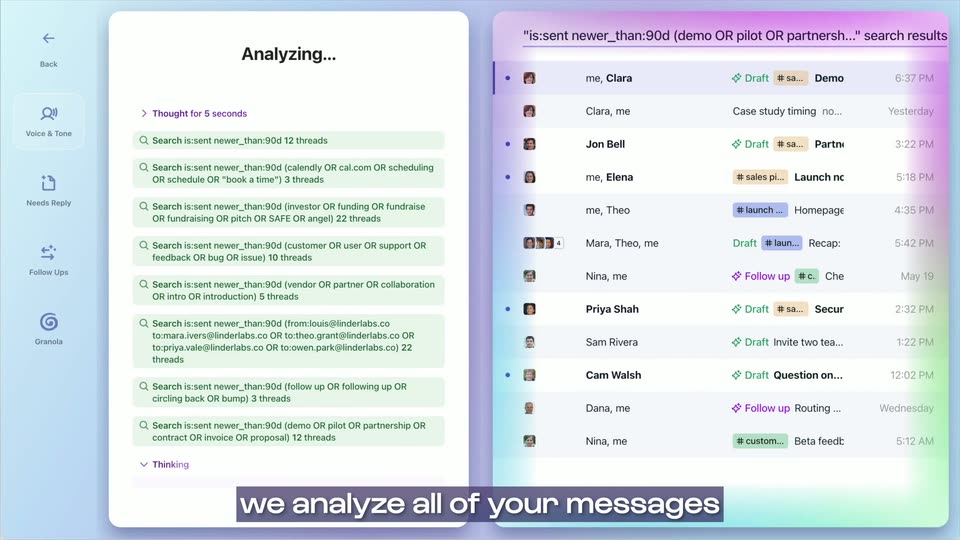
Split view of the inbox product: the left panel holds an Analyzing list of search queries while the right panel cuts from a labeled message list to an open email thread. A purple banner at the bottom carries the caption, which changes from When you join, to we analyze all of your messages.
On-screen text: “When you join,”, “we analyze all of your messages”
Techniques: Kinetic type, Split screen
Camera: Static
Two panels sit side by side: left, a white card titled “Analyzing...” lists scrolling agent actions; right, an email thread with messages and a reply box. A dark bottom caption swaps from “we analyze all of your messages” to “and create a custom writing agent.”
On-screen text: “we analyze all of your messages”, “and create a custom writing agent.”
Techniques: Split screen
Camera: Static
A two-panel app screen: the left Voice & Tone settings list scrolls up to reveal the Voice Prompt and Audiences fields, while the right shows a static email thread with a draft preview. Bottom caption boxes swap from 'a custom writing agent.' to 'Your inbox is fully organized.'
On-screen text: “a custom writing agent.”, “Your inbox is fully organized.”
Camera: Pan
A close-up of an email inbox pans right across message rows under the Needs Reply and Follow Ups tabs. Names, avatars and subject lines slide left past a fixed dark caption bar at the bottom that reads Your inbox is fully organized.
On-screen text: “Your inbox is fully organized.”
Camera: Pan
A close-up of an email inbox zooms out to reveal the full interface, with the left sidebar and a list of categorized messages. A dark caption bar highlights the phrases 'Inbox is fully organized' and 'Spammy emails are moved' at the bottom.
On-screen text: “Inbox is fully organized”, “Spammy emails are moved”
Techniques: UI zoom
Camera: Pull out
A light inbox list with three email rows sits beneath category tabs in the Upstream interface. A cursor glides onto the top row, revealing archive, delete and snooze icons at the right, while a dark caption bar at the bottom types out the line.
On-screen text: “The stuff you need to reply to”, “is front and center”
Techniques: Kinetic type, Cursor demo
Camera: Static
A tilted 3D mail client shows an open thread while a purple lower-third reads 'wish I had an agent,' then 'unique drafts that sound unique to each conversation.' The view zooms into the compose box as a dark panel slides in listing Drive, Notion and Calendar, then pulls back.
On-screen text: “wish I had an agent”, “unique drafts that sound”, “unique to each conversation.”
Techniques: 3D mockup, UI zoom
Camera: Static
The Upstream email client sits behind a white panel where app icons in rounded tiles slide in from the left one after another: a black N tile, a tri-color pinwheel, a blue calendar tile, then a green spiral. A caption bar at the bottom updates the line.
On-screen text: “Agents can access”, “your favorite tools”
Camera: Static
A wide view of the Upstream inbox shows a prompt typed into the left AI panel. The camera zooms in as the assistant replies with a plan and a draft email, then zooms out and cuts to a receipt email view. White subtitles caption the voiceover at the bottom.
On-screen text: “so that they can do”, “the grant work for you,”, “like finding receipts,”, “scheduling meetings,”, “or sending personalized messages.”, “You can even bring in”
Techniques: UI zoom
Camera: Static
A two-pane interface shows a receipt email on the left and an OpenClaw agent posting a Receipt matched comment on the right, its bullet lines typing in one by one as the view zooms onto the comments panel.
On-screen text: “You can even bring in”, “your own custom agents,”, “or use it directly in Claude or Codex.”
Techniques: UI zoom
Camera: Push in
A flat chat window shows a user bubble asking about the inbox. A spinning star icon marks the loading state, then a numbered answer streams in, listing two threads. A mauve-highlighted caption sits fixed at the bottom edge.
On-screen text: “or use it directly in Claude or Codex.”
Camera: Static
A light product UI listing two inbox threads cuts to a man in a gray sweater walking toward camera in a stone courtyard. Two white testimonial cards hang at the top corners while white subtitles run along the bottom.
On-screen text: “Already,”, “Honestly I used to dread my inbox. With Upstream everything's already sorted and half the replies are drafted, and now I actually enjoy doing email. Didn't. —”, “Inbox zero sounded like pure fiction until Upstream came along. I used to lose so much time every day and I dreaded the time I'd have to spend sorting things”, “thousands of people are”
Camera: Static
A smiling man in a gray sweater stands in a blurred outdoor plaza, opening his arms in a presenting gesture, as white rounded testimonial cards drift in around him and bold white captions cycle across the bottom.
On-screen text: “managing their emails”, “Using Upstream.”, “And they love it!”, “It was literally”
Techniques: Kinetic type
Camera: Static
A man in a blue fleece jacket speaks directly to a locked-off camera in a bright office, a whiteboard and wooden beams behind him. A name caption slides in at the lower left while white subtitles cycle along the bottom edge.
On-screen text: “It was literally”, “Arthur Taubner”, “Startup Founder”, “the biggest time saver.”, “I'm in and out of my inbox in just minutes.”
Camera: Static
A bearded man in a black t-shirt faces the camera against a soft gray wall, speaking. A white name caption slides in at lower left, and a bold subtitle runs along the bottom edge.
On-screen text: “Cedric Blanchard”, “Product Lead”, “I'm in and out of my inbox in just minutes.”
Camera: Static
A smiling blonde woman in a leopard print top gestures while speaking in a room with pale green walls. A lower third with her name and title types out on the left, and a subtitle sits at the bottom.
On-screen text: “Drafts are exactly my voice.”, “Adrienne Larson”, “Investment Manager”
Techniques: Kinetic type
Camera: Static
A man in a gray zip-up sweater talks to camera against a dark blue wall. The shot opens as a blurry close-up of his chest, then racks focus and widens to a sharp medium close-up. White subtitles and a name lower-third sit at the bottom.
On-screen text: “Adrienne Larson”, “Investment Manager”, “Upstream is the”, “only email client”, “where agents learn”
Camera: Static
The full Upstream inbox view reframes into a close-up of the left assistant panel, where a model picker dropdown lists GPT 5.5, Opus 4.7 and Sonnet 4.6. A bottom caption reads “where agents manage”, then swaps to “your inbox for you”.
On-screen text: “where agents manage”, “your inbox for you”
Techniques: UI zoom
Camera: Static
A close-up of an email draft tagged with a purple Auto follow-up chip pulls back to reveal the full inbox interface with its sidebar and message list. A lavender caption bar reading your inbox for you, stays pinned at the bottom.
On-screen text: “your inbox for you,”
Techniques: UI zoom
Camera: Static
A light blue screen holds two integration cards, then the Upstream interface fills the frame with a channel sidebar and a radar of file and mail icons circling a red hashtag. A dark caption bar at the bottom reads the narration.
On-screen text: “your inbox for you,”, “so that your email”
Camera: Static
A settings panel with a team list closes over the product screen, cutting to an inbox view where a message thread shows an auto-draft reply. A cursor rests on the Send later button while the caption holds at the bottom.
On-screen text: “so that your email”
Techniques: Cursor demo
Camera: Static
A light-themed email client fills the frame, showing a conversation thread and a right-hand comments panel. A cursor moves to the share icon, and a blue share banner drops into the panel. A purple caption bar sits along the bottom edge.
On-screen text: “can finally be fun again 😊”
Techniques: Cursor demo
Camera: Static
A translucent inbox UI with an open share menu and a hovering cursor fades out, revealing a flat illustration of green hills, pine forest and snowy peaks under a blue sky. The white Upstream logo sits centered over the landscape.
Techniques: Cursor demo
Camera: Pan
A painted blue sky with drifting clouds, hot air balloons and snow-capped mountains. The white upstream logo holds center while the tagline types out below it, and a tilted 3D inbox mockup slides up into the lower right corner.
On-screen text: “Try it free today at”, “upstream.do”
Techniques: Kinetic type, 3D mockup
Camera: Pan