1:18
Explore
00:00:00 / 02:11:08
- Length
- 2:11
- Scenes
- 65 · 2.0 s avg
- Product on screen
- 0:00
- Features shown
- 17
- Voiceover
- Yes
- Views
- 36K on YouTube
as of November 26, 2026
Bambu Lab’s 2:11 launch film runs 65 scenes, about 2.0 s each. The product is on screen from the first frame and 17 features are revealed. There is no explicit call to action; a voiceover carries the film. The video alternates live-action workshop footage with 3D product renders and frosted-glass UI cards, introducing each feature with a bold left-aligned headline and a bottom caption. Pacing runs about fourteen cuts per minute, built on quick push-ins, orbiting 3D turntables, and dissolves from live scans to gray point-cloud models.
Footage neededEstimated needs: 6 capture groups — your screens or recordings · 1 official logo — reused across the film · 30 filmed passages — shoot, supply or replace · 28 3D passages — build or supply
Is this your launch? to your site or press kit.
More like this



Similar soundtrack
Films whose music sounds like this one, voice left out
1:10

Upstream - The first inbox designed for humans and agents
Upstream · Upbeat electronic
2:13

Brad Menezes - Introducing Superblocks 2.0: AI-generated enterprise apps – finally u
Superblocks · Electronic
1:00

Motion Graphics Explainer Video for AI Education Platform | BYT
BYT · Upbeat electronic
Bambu Lab S1 | 3D Scanner, scene by scene
· 65 scenes as text
01 · Product intro · 0:00–0:00
A black desk with a monitor, desk lamp and small gadgets anchors the foreground of a garage, a white sports car parked at left and a man in a black shirt standing in the soft-focus background. The shot holds a shallow depth of field on the desk.
Camera: Static
02 · Product intro · 0:00–0:03
A garage-style workshop set opens wide with two figures walking past a desk, then the camera pushes in to a low close-up of a black handheld scanner. It settles on a locked-off frame as the device's screen lights up with the brand logo. Bottom captions read the product name.
On-screen text: “This,”, “is Bambu Lab S1.”
Camera: Push in
03 · Feature reveal · 0:03–0:04
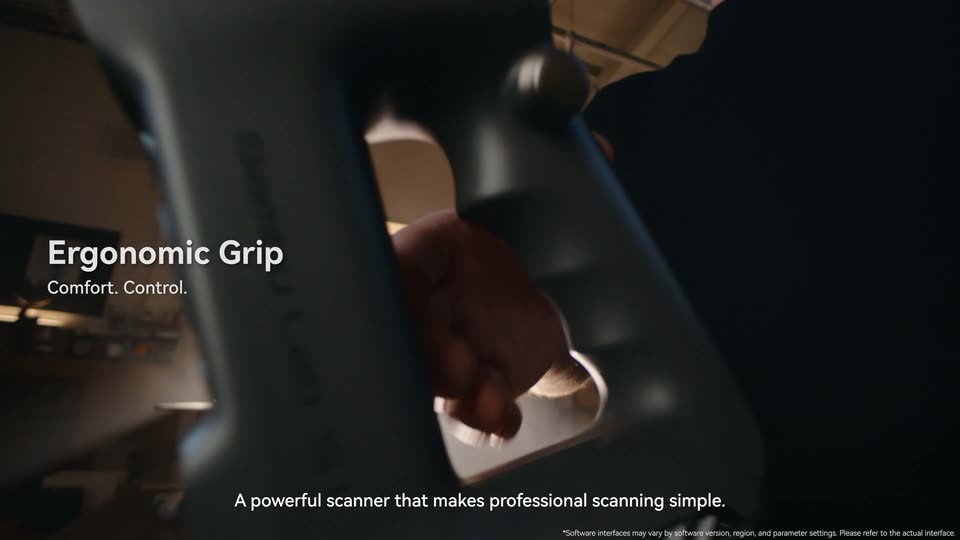
A dimly lit lab room with a window and desk in the background. A hand enters from the right and grips the dark handle of a scanner held in the foreground. White text sits on the left and a tagline at the bottom.
On-screen text: “Ergonomic Grip”, “Comfort. Control.”, “A powerful scanner that makes professional scanning simple.”, “*Software interfaces may vary by software version, region, and parameter settings. Please refer to the actual interface.”
Camera: Static
04 · Feature reveal · 0:04–0:08
A hand holds a black handheld scanner in a dim workshop, the shot tilting from the grip to the glowing touchscreen listing project presets. White heading and subline sit on the left, a caption runs along the bottom.
On-screen text: “Ergonomic Grip”, “Comfort. Control.”, “A powerful scanner that makes professional scanning simple.”, “*Software interfaces may vary by software version, region, and parameter settings. Please refer to the actual interface.”
Camera: Pull out
05 · Feature reveal · 0:08–0:12
A man holds a handheld 3D scanner in a sunlit loft; the camera pulls back from a close-up to a wide shot revealing a parked car and office set, then translucent preset label chips with small 3D icons pop in around him.
On-screen text: “14 Built-In Presets”, “One Tap. Auto Setup.”, “Fourteen built-in presets cover a wide range of scanning scenarios.”
Techniques: Kinetic type
Camera: Pull out
06 · Feature reveal · 0:12–0:17
A green 'Automotive parts' card with a white rim icon holds center over a blurred workshop shot. Frosted settings panels pop in around it, their sliders and toggles animate to new values, then fade out.
On-screen text: “*Software interfaces may vary by software version, region, and parameter settings. Please refer to the actual interface.”, “Just choose with one tap.”, “Complex scan settings adjust automatically.”
Camera: Static
07 · Feature reveal · 0:17–0:19
A close-up of a hand holding a black scanner at the car's mirror cuts to a man in a dark sweater beside a white car in a loft, its body dotted with small markers and a blue light strip on the fender. He holds the device steady.
On-screen text: “Starting a scan really is as simple as that.”
Camera: Pull out
08 · Feature reveal · 0:19–0:20
A dim shot of a man holding the device by a car fades to black, where the unit then rotates alone in 3D to reveal its LED face. The label sits at left and a caption holds at the bottom.
On-screen text: “Starting a scan really is as simple as that.”, “All-in-One”, “Powerful hardware, all in one.”
Techniques: Kinetic type, 3D mockup
Camera: Static
09 · Feature reveal · 0:20–0:21
An exploded 3D view of a black handheld device rotates slowly, its shell, battery and buttons floating apart against a gray gradient.
On-screen text: “All-in-One”, “Powerful hardware, all in one.”, “*Visuals are for creative illustration only. Please refer to the actual product.”
Techniques: 3D mockup
Camera: Static
10 · Feature reveal · 0:21–0:22
Low-angle close-up of a dark camera body with a button panel, starting soft and dim, then the light rises and the device sharpens as the headline scales in above it. The bottom caption swaps from the first line to 'Professional optics,'.
On-screen text: “Powerful hardware, all in one.”, “Dual Light Sources”, “Professional optics,”, “*Visuals are for creative illustration only. Please refer to the actual product.”
Techniques: 3D mockup, Kinetic type
Camera: Pull out
11 · Feature reveal · 0:22–0:24
A dark 3D scanner bar with two lens arrays and a central camera cluster floats in perspective on a gray gradient. The camera eases around it as the white headline scales above and a small caption holds below.
On-screen text: “Dual Light Sources”, “Professional optics,”, “*Visuals are for creative illustration only. Please refer to the actual product.”
Techniques: 3D mockup, Kinetic type
Camera: Pull out
12 · Feature reveal · 0:24–0:24
The camera glides along the dark body of a handheld scanner in 3D perspective until its screen, showing a list with one green highlighted row, fills the frame. A large white headline “Dual Light Sources” scales in above a small caption.
On-screen text: “Dual Light Sources”, “Professional optics,”, “Visuals are for creative illustration only. Please refer to the actual product.”
Techniques: 3D mockup, Kinetic type
Camera: Static
13 · Feature reveal · 0:24–0:25
A black handheld 3D scanner mockup sits in 3D perspective on a dark gradient, its screen showing a scan-preset list and a green Start scanning button. White labels orbit the device as the camera pulls back to reveal the full body and the Bambu Lab mark.
On-screen text: “3.5-inch”, “Touch Screen”, “a large display,”, “*Visuals are for creative illustration only. Please refer to the actual product.”
Techniques: 3D mockup, Parallax
Camera: Pull out
14 · Feature reveal · 0:25–0:27
A 3D cutaway of a phone rotates to reveal a blue cylindrical battery with a grid texture, set diagonally on a gray backdrop. White labels '4800mAh*2' and 'Big Battery' scale and slide in with the turn, above a small still caption.
On-screen text: “4800mAh*2”, “Big Battery”, “and a high-capacity battery.”, “*Visuals are for creative illustration only. Please refer to the actual product.”
Techniques: 3D mockup, Kinetic type
Camera: Pull out
15 · Feature reveal · 0:27–0:29
A dark handheld device with a lit screen and pistol grip turns in 3D on a plain gray background. It moves from a close angled view to a centered front view, then rotates toward a side view.
On-screen text: “Visuals are for creative illustration only. Please refer to the actual product.”
Techniques: 3D mockup
Camera: Pull out
16 · Feature reveal · 0:29–0:30
A hand holds the black handheld scanner in a dark room while a transparent 3D render of the device dissolves away over it. White title text with a thin leader line sits at left, and a caption line fades in along the bottom.
On-screen text: “Built-In High-Speed”, “Wi-Fi6”, “High-speed Wi-Fi six gives wireless scanning low latency,”
Techniques: 3D mockup
Camera: Static
17 · Feature reveal · 0:30–0:31
A hand holds a handheld 3D scanner in a dark workshop, then the shot pulls back to a wide room with a desk monitor showing a 3D car scan. The left Wi-Fi 6 headline fades out as a new Wireless / Millisecond Latency headline scales in at top center.
On-screen text: “Built-In High-Speed”, “Wi-Fi 6”, “High-speed Wi-Fi six gives wireless scanning low latency,”, “*To use Wi-Fi 6 high-speed wireless connectivity, the PC connected to the scanner must support the Wi-Fi 6 protocol or be equipped with a Wi-Fi Adapter that支持s?”, “”, “Wireless”, “Millisecond Latency”
Techniques: Kinetic type
Camera: Push in
18 · Feature reveal · 0:31–0:34
A dim studio set frames a monitor on a metal table running a 3D car-scan app, lit by a desk lamp. The camera pushes in as the two-line title scales in overhead and the bottom caption swaps from the Wi-Fi claim to “down to milliseconds.”
On-screen text: “Wireless”, “MillisecondLatency”, “High-speed Wi-Fi six gives wireless scanning low latency,”, “*To use Wi-Fi 6 high-speed wireless connectivity, the PC connected to the scanner must support the Wi-Fi 6 protocol or be equipped with a Wi-Fi Adapter that支持s.”, “down to milliseconds.”
Techniques: Kinetic type
Camera: Push in
19 · Feature reveal · 0:34–0:35
A dim 3D-rendered garage at night: a silver BMW i8 sits center frame on a tiled bay while a technician crouches at the front wheel. Feature text scales in over the locked-off shot.
On-screen text: “*To use Wi-Fi 6 high-speed wireless connectivity, the PC connected to the scanner must support the Wi-Fi 6”, “Wireless”, “MillisecondLatency”, “down to milliseconds.”
Techniques: 3D mockup, Kinetic type
Camera: Static
20 · Feature reveal · 0:35–0:36
A dim 3D-rendered garage holds a silver sedan with lit headlights while a worker moves at a cart on the left. A white light beam cuts across the frame as the camera settles from blur to focus, with the battery spec and a caption pinned to the lower corners.
On-screen text: “4800 mAh x 2”, “Batteries”, “Long battery life powers through long, demanding scans”
Techniques: 3D mockup
Camera: Static
21 · Feature reveal · 0:36–0:40
A tilted 3D garage shows a white SUV on a turntable while a man crouches and walks around it, blue scan dots crawling across the body. The camera orbits slowly. A left headline swaps to a battery stat and a bottom caption extends with the closing line.
On-screen text: “Up to 3.5 Hours of Scanning”, “Long battery life powers through long, demanding scans”, “—all in one go.”
Techniques: 3D mockup, Particles
Camera: Pan
22 · Demo · 0:40–0:41
A hand plugs a blue cable into the side of a black handheld scanner in a dim industrial space. The device screen and green indicator are visible, with a blue perforated panel at the right edge.
On-screen text: “Versatile optics handle a wide range of scanning tasks with ease.”
Camera: Static
23 · Demo · 0:41–0:43
A person in a black shirt holds a gray handheld 3D scanner with rows of glowing blue LEDs, framed low against a workshop of shelves and a bicycle. The camera settles from motion blur into a locked-off shot as the caption holds at the bottom.
On-screen text: “Versatile optics handle a wide range of scanning tasks with ease.”
Camera: Static
24 · Demo · 0:43–0:44
A man stands behind a silver BMW in a dim garage, holding a tablet that glows with small blue lights. The low front view of the car fills the foreground while workbenches and a skylight frame the background. A white caption sits at the bottom.
On-screen text: “Versatile optics handle a wide range of scanning tasks with ease.”
Camera: Push in
25 · Feature reveal · 0:44–0:47
A hand holds a handheld 3D scanner, sweeping it across the front of a gray sports car covered in round scan markers. Blue crossed laser lines project onto the car's surface and shift as the device moves, while a workshop with shelves and a sign stays blurred behind. The locked-off camera watches the hand travel from left to right.
On-screen text: “34 Crossed”, “Blue Laser Lines”, “Fast Capture. Large Objects.”, “Crossed laser lines scan at high speed,”, “*Models were generated from Bambu Lab S1 scans and refined in post-processing. Results may vary by method, mode, and environment; please refer to”
Camera: Static
26 · Feature reveal · 0:47–0:48
A hand holds a handheld scanner over the front of a white car, projecting crossed blue laser lines across the body. A gray 3D scan model of the car's front then dissolves over the live shot while the headline block stays locked on the left.
On-screen text: “34 Crossed”, “Blue Laser Lines”, “Fast Capture. Large Objects.”, “Crossed laser lines scan at high speed,”, “*Models were generated from Bambu Lab S1 scans and refined in post-processing. Results may vary by method, mode, and environment; please refer to”, “quickly capturing scan data from large objects.”
Techniques: Morph
Camera: Static
27 · Feature reveal · 0:48–0:51
A matte gray 3D car model sits on a black background, framed from the front-left so the grille and front wheel dominate. A white caption and a small disclaimer sit at the bottom while the frame stays locked off.
On-screen text: “quickly capturing scan data from large objects.”, “*Models were generated from Bambu Lab S1 scans and refined in post-processing. Results may vary by method, mode, and environment; please refer to actual results”
Techniques: 3D mockup
Camera: Static
28 · Feature reveal · 0:51–0:52
A hand holds a gray handheld 3D scanner, its screen showing a blue point-cloud view, while parallel blue laser lines project onto a small part below. White headline text sits at left; a caption scales in at the bottom.
On-screen text: “7 Parallel”, “Blue Laser Lines”, “Fine Detail. Industrial Inspection.”, “Parallel laser lines capture fine detail,”
Camera: Static
29 · Feature reveal · 0:52–0:54
A hand holds a handheld 3D scanner in a dark workshop, its screen showing a blue point-cloud model of a mechanical part while blue laser lines project onto a blue object below. White headline text sits on the left and a caption scales in at the bottom as the device tilts.
On-screen text: “7 Parallel”, “Blue Laser Lines”, “Fine Detail. Industrial Inspection.”, “Parallel laser lines capture fine detail,”
Techniques: 3D mockup, Kinetic type
Camera: Static
30 · Feature reveal · 0:54–0:56
A gray 3D cast-metal part with circular recesses rotates slowly on a black background. A bottom caption shows the first line, then swaps to the second line while the model keeps turning.
On-screen text: “Parallel laser lines capture fine detail,”, “preserving richer data.”, “*Models were generated from Bambu Lab S1 scans and refined in post-processing. Results may vary by method, mode, and environment; please refer to actual results”
Techniques: 3D mockup
Camera: Static
31 · Feature reveal · 0:56–0:58
A hand holds a Bambu Lab handheld scanner over a workbench; its screen shows a live scan of a metal part as a blue laser line projects onto a small bracket. A brake disc sits blurred at left while the camera tilts up past the orange trigger.
On-screen text: “Single Blue Laser Line”, “Tight Spaces. Reverse Engineering.”, “A single laser line reaches deep inside,”, “*Models were generated from Bambu Lab S1 scans and refined in post-processing. Results may vary by method, mode, and environment; please refer to actual results”
Camera: Static
32 · Feature reveal · 0:58–0:59
A hand holds a handheld 3D scanner over a workbench, its screen showing the 3D model of the part. A thin blue laser line crosses the machined metal part. The camera holds a tight close-up with slight drift; white title text sits at left, a caption at the bottom.
On-screen text: “Single Blue Laser Line”, “Tight Spaces. Reverse Engineering.”, “capturing screw holes, grooves, and other recessed structures.”, “*Models were generated from Bambu Lab S1 scans and refined in post-processing. Results may vary by method, mode, and environment; please refer to actual results”
Camera: Static
33 · Feature reveal · 0:59–1:03
A gray 3D model of a mechanical housing rotates slowly on a dark gradient background, turning to expose recessed cavities, holes and grooves. A white caption sits at the bottom center while a small disclaimer line holds in the lower right corner.
On-screen text: “capturing screw holes, grooves, and other recessed structures.”, “*Models were generated from Bambu Lab S1 scans and refined in post-processing.”
Techniques: 3D mockup
Camera: Static
34 · Feature reveal · 1:03–1:04
A man in a dark shirt sits at a desk in a dim workshop, hands on a keyboard, facing a transparent display that shows a rotating 3D scan of a mechanical part. A desk lamp lights the scene while white spec text and a tagline sit over the lower frame.
On-screen text: “0.02 mm + 0.06 mm/m”, “Volumetric Accuracy”, “Ultra-high accuracy brings every detail into focus.”, “*Models were generated from Bambu Lab S1 scans and refined in post-processing.”
Camera: Static
35 · Feature reveal · 1:04–1:07
A man with glasses sits at a workbench in a dim workshop, hands on a keyboard, facing a translucent holographic panel showing a 3D scan of a machined part. The camera pushes in until the model fills the frame; white captions stay fixed at the lower left.
On-screen text: “0.02 mm + 0.06 mm/m”, “Volumetric Accuracy”, “Ultra-high accuracy brings every detail into focus.”, “*Data comes from Bambu Lab's laboratory. Results may vary depending on operating mode, environment, and method. Please refer to actual results.”
Techniques: 3D mockup, UI zoom
Camera: Push in
36 · Feature reveal · 1:07–1:09
A woman's face resolves from a radial zoom blur as she smiles at the camera. A frosted panel of scan options and a size slider fades in to her right. Bottom captions swap from a teaser line to a full sentence.
On-screen text: “And there's more...”, “Smart Scan Setup”, “Describe It. Auto Setup.”, “Bambu Lab S1 intelligently recommends the right scanning mode for your needs.”
Camera: Pull out
37 · Feature reveal · 1:09–1:10
Two frosted-glass UI cards float in 3D perspective over a blurred shot of a hand holding the device. The cards slide horizontally, the left cycling scan tiles and the right swapping size for detail options. White headline and caption sit lower-left.
On-screen text: “Smart Scan Setup”, “Describe It. Auto Setup.”, “Bambu Lab S1 intelligently recommends the right scanning mode for your needs.”, “*Software interfaces may vary by software version, region, and parameter settings. Please refer to the actual interface.”
Techniques: 3D mockup
Camera: Static
38 · Feature reveal · 1:10–1:15
Over a blurred live shot of a person holding the scanner, frosted glass question cards slide left in a row, the center card in focus and the side cards soft. The caption below swaps once, then the cards fade and four small feature pills appear around the device.
On-screen text: “Smart Scan Setup”, “Describe It. Auto Setup.”, “Bambu Lab S1 intelligently recommends the right scanning mode for your needs.”, “*Software interfaces may vary by software version, region, and parameter settings. Please refer to the actual interface.”, “Answer a few simple questions, and get scan settings tailored to you.”, “Laser mode”, “Alignment”, “Point Cloud Data”, “Color Scan”
Camera: Static
39 · Feature reveal · 1:15–1:16
A woman holds a dark handheld scanner vertically in front of her face in a warm room, while four translucent settings panels float at the corners. A white headline and a bottom caption fade in over the live footage.
On-screen text: “Smart Scan Setup”, “Describe It. Auto Setup.”, “Answer a few simple questions, and get scan settings tailored to you.”, “*Software interfaces may vary by software version, region, and parameter settings. Please refer to the actual interface.”
Camera: Static
40 · Feature reveal · 1:16–1:18
A tilted, motion-blurred wide shot levels into a steady frame on a sunlit room; a woman stands at a desk holding a black 3D-printed model while a colorful parrot figurine sits on the glass table. White text fades in at left.
On-screen text: “*Models were generated from Bambu Lab S1 scans and refined in post-processing.”, “Results may vary by method, mode, and environment; please refer to actual results.”, “High-Precision”, “True to The Color. Art Preserved.”, “A high-precision RGB camera captures rich colors in art pieces.”
Camera: Push in
41 · Feature reveal · 1:18–1:24
A 3D scan model of a colorful macaw on a branch rotates slowly on a dark gradient background, its edges outlined by a glowing cyan rim. White text sits static on the left and a caption runs along the bottom.
On-screen text: “High-Precision RGB Camera”, “True to The Color. Art Preserved.”, “A high-precision RGB camera captures rich colors in art pieces.”, “*Models were generated from Bambu Lab S1 scans and refined in post-processing. Results may vary by method, mode, and environment; please refer to actual results”
Camera: Pull out
42 · Demo · 1:24–1:24
A colorful macaw 3D model with a glowing white rim floats centered on a dark background. A striped carousel, a white bust, and a red disc drift in at the frame edges. The caption Simple controls. sits at the bottom.
On-screen text: “Simple controls.”, “*Models were generated from Bambu Lab S1 scans and refined in post-processing.”, “Results may vary by method, mode, and environment; please refer to actual results.”
Techniques: 3D mockup
Camera: Pull out
43 · Demo · 1:24–1:25
A 2x3 grid of 3D scan models, a red disc, colored statue, striped tent, wireframe chair, white bust and colored elephant, rotates on a dark gray field. A white caption at the bottom center switches from 'Simple controls.' to 'Scanning task, easily handled.'
On-screen text: “Simple controls.”, “Scanning task, easily handled.”, “*Models were generated from Bambu Lab S1 scans and refined in post-processing. Results may vary by method, mode, and environment; please refer to actual results”
Camera: Pull out
44 · Demo · 1:25–1:27
Six 3D scanned objects, a red-rimmed disc, a parrot, a striped tent, a wireframe chair, a bust, and a colorful elephant, sit in a two-by-three grid on a dark gradient and rotate slowly in place. A white caption holds still at the bottom.
On-screen text: “Scanning task, easily handled.”
Techniques: 3D mockup
Camera: Pull out
45 · Demo · 1:27–1:29
A 3D office interior, glass desk holding a chair, bust, box and figurine shown as white wireframe and point-cloud scan overlays. The overlays fade out and the room brightens with window light, leaving the solid models in place.
On-screen text: “Scanning task, easily handled.”, “*Models were generated from Bambu Lab SI scans and refined in post-processing”, “Results may vary by method, mode, and environment; please refer to actual results.”
Camera: Pull out
46 · Feature reveal · 1:29–1:30
A woman holds a black handheld 3D scanner with two LED-ringed camera modules toward the camera in a bright room; the device stays sharp while she blurs in the background. Small white captions appear at the bottom.
On-screen text: “Results may vary by method, mode, and environment; please refer to actual results.”, “IR structured light lets you scan the human body quickly and safely.”
Camera: Push in
47 · Feature reveal · 1:30–1:32
A woman in the foreground holds a handheld scanner toward a seated man. A blue dot-matrix light projects onto his face, filling in a 3D point cloud of his head as the scanner screen shows a green wireframe model. The frame stays locked off.
On-screen text: “IR Structured Light”, “Safe Body Scans.”, “IR structured light lets you scan the human body quickly and safely.”, “*Models were generated from Bambu Lab S1 scans and refined in post-processing. Results may vary by method, mode, and environment; please refer to actual results”
Camera: Static
48 · Feature reveal · 1:32–1:35
A man in a white t-shirt turns his head from left profile to right profile against a dark gray background, a faint profile silhouette ghosting behind him at the start. White headline and caption text stay locked on the left and bottom.
On-screen text: “IR Structured Light”, “Safe Body Scans.”, “IR structured light lets you scan the human body quickly and safely.”, “*Models were generated from Bambu Lab S1 scans and refined in post-processing”, “Results may vary by method, mode, and environment; please refer to actual results.”
Camera: Push in
49 · Feature reveal · 1:35–1:37
In a warm wood-paneled studio, a person aims the handheld S1 scanner at a white classical bust, projecting blue structured-light lines across it. The camera orbits the bust and pushes in to a close-up of the device as feature labels and a bottom caption appear.
On-screen text: “IR Structured Light”, “Safe Body Scans.”, “Bambu Lab S1 also brings a professional scan-to-create workflow.”, “Results may vary by method, mode, and environment; please refer to actual results.”
Techniques: Light sweep
Camera: Pull out
50 · Feature reveal · 1:37–1:38
A white classical bust turns slowly on a black field, rotating from a three-quarter profile toward the front. A single caption line holds static at the bottom of the frame for the full shot.
On-screen text: “Bambu Lab S1 also brings a professional scan-to-create workflow.”
Camera: Static
51 · Feature reveal · 1:38–1:39
A white 3D bust on black is reframed as a dark interface, with corner brackets marking the scan area and a left toolbar appearing. A centered caption remains below while small legal text appears bottom right.
On-screen text: “Bambu Lab S1 also brings a professional scan-to-create workflow.”, “Software interfaces may vary by software version, region, and parameter settings.”, “Please refer to the actual interface. Features are free to use after purchasing a Bambu Lab S1.”
Techniques: 3D mockup
Camera: Static
52 · Feature reveal · 1:39–1:40
A desktop monitor sits in a dim office, its screen showing a 3D app with a blue classical bust inside a wireframe bounding box. The camera orbits the monitor while a title block and caption hold in the lower corners.
On-screen text: “Bambu Scan: 8 Free Tools”, “All-in-One Post-Processing.”, “Professional Bambu Scan software”, “Software interfaces may vary by software version, region, and parameter settings.”, “Please refer to the actual interface. Features are free to use after purchasing a Bambu Lab S1.”
Techniques: 3D mockup
Camera: Static
53 · Feature reveal · 1:40–1:47
Camera pulls back from a close-up of a laptop screen to a woman at a desk in a warm studio. Eight frosted circular icons pop in around her, then expand into labeled pills naming the tools. White headline and captions hold at the bottom.
On-screen text: “Bambu Scan: 8 Free Tools”, “All-in-One Post-Processing.”, “Professional Bambu Scan software”, “includes eight advanced editing tools for all your post-processing tasks.”, “And every one is free.”, “Software interfaces may vary by software version, region, and parameter settings.”, “Please refer to the actual interface. Features are free to use after purchasing a Bambu Lab S1.”
Techniques: Morph
Camera: Pull out
54 · Feature reveal · 1:47–1:48
A gray 3D bust sits in a modeling viewport beside an angled creation panel. A cursor taps the head and base, dropping green selection rings, while the headline and a caption hold in the lower corners.
On-screen text: “Features”, “Fast Geometry Creation.”, “Create geometric features fast.”, “Please refer to the actual interface. Features are free to use after purchasing a Bambu Lab S1.”
Techniques: Cursor demo
Camera: Static
55 · Feature reveal · 1:48–1:49
A dark CAD interface fills the frame. A green wireframe cylinder sits center-bottom while a creation-method panel with a green Create button holds the right edge. White captions read Features and Create geometric features fast. as the camera eases out.
On-screen text: “Features”, “Fast Geometry Creation.”, “Create geometric features fast.”
Camera: Static
56 · Feature reveal · 1:49–1:52
A blue 3D bust fills a dark modeling viewport, crossed by white dimension lines with green markers. A glowing volume readout appears at its center while the right tool panel switches to the highlighted volume tab. The view eases in toward the model and panel.
On-screen text: “Measure”, “Instant Dimensions.”, “Measure in an instant.”
Techniques: UI zoom
Camera: Push in
57 · Feature reveal · 1:52–1:55
A close-up of a 3D sculpting viewport shows a glossy blue draped model beside a dark Sculpt Tools panel. The view pushes in on the model as the panel settles on the right, while the left caption fades out and a bottom caption fades in.
On-screen text: “Sculpt”, “Precise Detail Control.”, “Fine-tune model details.”, “*Software interfaces may vary by software version, region, and parameter settings. Please refer to the actual interface.”
Techniques: UI zoom
Camera: Push in
58 · Feature reveal · 1:55–1:56
A 3D-rendered home office: a monitor shows a blue bust in Bambu Studio while a hand types on the keyboard. The camera pushes in on the screen as a large copy of the bust fills the left foreground.
On-screen text: “One-Click to Bambu Studio”, “Scan. Then Print.”, “And link seamlessly with three-D printing.”, “*Raw scan data may contain imperfections depending on model quality. After repair, it can be used for 3D printing - actual results may vary.”
Techniques: 3D mockup, UI zoom, Parallax
Camera: Push in
59 · Feature reveal · 1:56–1:58
A dark export menu on a tilted screen in 3D perspective, background softly blurred. A cursor taps the green Export button, slides down the two options and rests on Export to Bambu Studio. White headline and caption hold on the left and bottom.
On-screen text: “One-Click to Bambu Studio”, “Scan. Then Print.”, “And link seamlessly with three-D printing.”, “*Raw scan data may contain imperfections depending on model quality. After repair, it can be used for 3D printing - actual results may vary.”
Techniques: 3D mockup, Cursor demo
Camera: Static
60 · Feature reveal · 1:58–1:59
A woman at a home-office desk opens the door of a 3D printer, revealing a white bust on the build plate and the filament system above. The camera pushes in toward the machine while a caption sits at the bottom.
On-screen text: “Your scanned model, ready to go straight to print.”
Camera: Push in
61 · Feature reveal · 1:59–2:02
A hand lifts the white printed bust from the open 3D printer, then the camera whips back to a high angle as the woman at a sunlit desk holds the bust and looks toward the machine.
On-screen text: “Your scanned model, ready to go straight to print.”, “*Raw scan data may contain imperfections depending on model quality. After repair, it can be used for 3D printing - actual results may vary.”
Camera: Pull out
62 · Outro · 2:02–2:03
A close-up of the printer's dark screen shows the white Bambu Lab logo, then the camera pulls back to reveal the black 3D printer body against a light gray studio background. The white caption “That's Bambu Lab S1.” stays at the bottom.
On-screen text: “That's Bambu Lab S1.”, “*Currently supported only on Windows PCs with specific configurations. Please refer to official Bambu Lab informatio”
Techniques: 3D mockup
Camera: Pull out
63 · Outro · 2:03–2:04
A soft-focused black scanner floats right of center on a gray gradient as 'That's Bambu Lab S1.' scales in below. It snaps to a sharp front view at center while 'Bambu Lab S1 3D Scanner' and 'Easy in hand. Pro in every scan.' lock in on the left.
On-screen text: “That's Bambu Lab S1.”, “Bambu Lab S1 3D Scanner”, “Easy in hand. Pro in every scan.”
Techniques: 3D mockup
Camera: Static
64 · Outro · 2:04–2:09
A dark handheld 3D scanner stands upright on a glossy black surface against a gray gradient, angled in 3D perspective. White headline text sits at left; a tagline caption and fine-print disclaimer sit at the bottom. The bottom caption cross-fades while the rest stays locked off.
On-screen text: “Bambu Lab S1 3D Scanner”, “Easy in hand. Pro in every scan.”, “That's Bambu Lab S1.”, “Easy in hand, Pro in every scan.”, “*Currently supported only on Windows PCs with specific configurations. Please refer to official Bambu Lab information for details.”
Techniques: 3D mockup, Kinetic type
Camera: Static
65 · Outro · 2:09–2:11
A white Bambu Lab logo, a geometric mark of vertical bars beside a two-line wordmark, sits centered on a pure black background. The frame is locked off and the mark holds still for the entire shot.
Camera: Static