1:41
Introducing Traversal, the AI SRE for the enterprise
Traversal AI · Nov 2026
Unitree’s 0:50 launch film runs 30 scenes, about 1.7 s each. The product is on screen from the first frame and 4 features are revealed, with social proof. There is no explicit call to action; a voiceover carries the film. A dark stage-and-lab narrative interleaves live rehearsal footage with angled UI fly-throughs, each feature announced by a top-left headline and proven by a real robot response. Pacing is brisk with hard cuts synced to the 85 bpm track, using a recurring palette of black, slate blue and cyan glow, and the signature move is the whip from a laptop dashboard to the robots executing the same motion on stage.
Is this your launch? to your site or press kit.
Traversal AI · Nov 2026
Ageospatial · Fintech · Sep 2026
Films whose music sounds like this one, voice left out
xTerra Robotics · Electronic rock / Big beat
Fireflies · Upbeat, high-energy rock instrumental with a modern production style.
Canva · Electronic dance music with funk and house influences
A static dark lab shot holds two humanoid robots, one mid-motion with an arm raised, behind a laptop on a desk. A person's hands rest on the keyboard, its screen showing a red point-cloud map and node editor, while a face watches in profile at the right.
On-screen text: “Unitree UniUni”, “Intelligent Swarm Control System”
Camera: Static
A woman in a black dress with a white collar holds a microphone and tablet in the foreground, facing a dark stage where three white humanoid robots move in synchronized steps. A glowing uni logo hangs on the backdrop. The camera stays locked off.
On-screen text: “Real Footage Throughout No Speed-Up”, “Okay, let's do it once more”
Camera: Push in
A woman in white and a man in black talk urgently before a dark stage where white humanoid robots with glowing blue heads dance. He points at them, runs both hands through his hair, then leans over her laptop as the frame widens.
On-screen text: “Real Footage Throughout No Speed-Up”, “Okay, let's do it once more”, “New request. Need to adjust movements and add pathing”, “The performance is starting soon, how are we gonna make it in time?”, “Let's test it”
Camera: Pull out
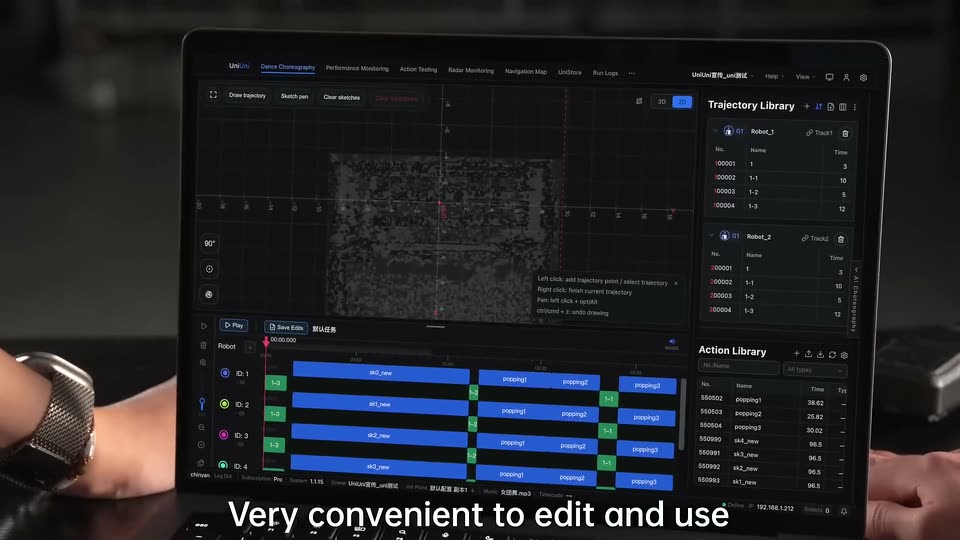
Two hands hold a tablet steady over a dark desk, the screen showing a trajectory editor with a dark map and a blue-green timeline. A white caption sits at the bottom while a scaling line of text appears.
On-screen text: “Let's test it”, “Very convenient to edit and use”
Camera: Push in
A locked-off shot of a laptop on a desk, its screen filling a LiDAR point-cloud scene in yellow and cyan dots that slowly rotates. A hand works the trackpad at right and a blurred humanoid robot stands behind. White headline text sits top-left, a caption at the bottom.
On-screen text: “LiDAR Mapping”, “Centimeter Level Cloud Scene Construction”, “Very convenient to edit and use”
Camera: Static
Split screen: left, a colored LiDAR point cloud of a room spins on black while two cursors with selection rings edit it; right, a silver humanoid robot turns its head under three bright studio lights. White feature titles sit top left.
On-screen text: “LiDAR Mapping”, “Centimeter Level Cloud Scene Construction”, “Very convenient to edit and use”
Techniques: Split screen
Camera: Static
Split screen: a choreography editor with a 3D point cloud and timeline on the left, a dark stage with three humanoid robots dancing on the right. A cursor drags a clip block, then the word Done fades in at the bottom.
On-screen text: “Dance Choreography”, “Single Robot, Single Track, Easy to Use”, “Done”
Techniques: Split screen, Cursor demo
Camera: Pull out
Opens on a close-up of a laptop screen running a project timeline app, then cuts to a woman in a white top speaking against a dark stage, a white logo sign at left. A white caption sits at the bottom.
On-screen text: “New request again. Increase the number of units to 5”
Camera: Pull out
A close-up of a short-haired person at a laptop, lit from the side against a black background, speaks while looking down at the screen. A white subtitle sits at the bottom edge of the frame.
On-screen text: “No problem, leave it to me”
Camera: Static
Close-up of two hands typing on a black laptop keyboard, filmed at a low diagonal angle with shallow depth of field. Fingers press the keys while a static caption holds over the frame.
On-screen text: “No problem, leave it to me”
Camera: Push in
Extreme close-up of a woman's face in profile against a black background, lit by soft directional light. The frame tightens onto her eye and brow as she looks down, a small rectangular earring glinting at her ear.
Camera: Push in
A dark motion-editor timeline scrolls right past blue and green clip blocks labeled popping1 to popping3, while a cursor hovers over a row and a circular spinner spins around it. A top viewport shows a grayscale frame with red trajectory points and shortcut hints.
Techniques: UI zoom, Cursor demo
Camera: Push in
A person in a dark polo shirt looks up from a task and forms an OK sign with their fingers, facing another person whose head fills the right foreground. The shot is an over-the-shoulder close-up against a dark backstage set with equipment cases.
On-screen text: “OK”
Camera: Push in
Three white humanoid robots with glowing blue visors dance in sync on a dark stage, arms raised, legs kicking. A large LED screen behind them shows a blue and pink neon tunnel, with stage lights glowing along the floor. The camera sits low with a slight tilt.
On-screen text: “OK”
Camera: Push in
A humanoid robot with a glowing white visor stands center stage as the camera whips past, its torso lit blue. Raised arms of other figures flank it against bright LED screens and pink and blue stage haze.
Camera: Push in
A group of white and black humanoid robots dance in formation across a dark, hazy stage. Cyan and magenta light beams cut through the fog, and a large LED wall of geometric panels glows behind them, with a guitar amplifier at the left edge.
Camera: Push in
Three humanoid robots with glowing visors stride forward through a dark hall lit by diagonal blue and red light beams. The camera tracks the central robot as the framing tightens, motion blur smearing the neon beams and floating dust.
Techniques: Parallax, Particles
Camera: Push in
White humanoid robots with glowing face visors run across a reflective stage under blue and pink lights. The camera tracks their legs and torsos mid-stride, capturing the motion blur of their limbs.
Camera: Pull out
An angled monitoring dashboard with a map and device cards reframes into a flat status list. A hand cursor moves to the middle row and presses the red E-Stop button, which highlights with a ring.
On-screen text: “Performance Monitoring”, “Status Early Warning, Safe Braking”
Techniques: 3D mockup, UI zoom, Cursor demo
Camera: Static
A dark monitoring panel tilted in 3D perspective shows three data rows with progress bars, percentages and temperatures; a hand cursor hovers over the middle E-Stop button while white headline text sits top-left.
On-screen text: “Performance Monitoring”, “Status Early Warning, Safe Braking”
Techniques: 3D mockup, Cursor demo
Camera: Static
A dark stage framed by two blurred audience heads: four silver humanoid robots with glowing blue faces dance in a row beneath a white UNI logo sign that brightens. A white subtitle at the bottom reports a critical battery and emergency stop.
On-screen text: “Unit 1 battery critical,emergency stop activated”
Camera: Pan
In a dim industrial hall, a woman in a gray polo and a woman in a white top look up and speak urgently. The camera pushes in from the two-shot to a close-up of the woman in white as she calls the team in, with white subtitles at the bottom.
On-screen text: “I told you to fully charge it before use.”, “Quick, swap it out.”, “Everyone stay sharp. Final segment.”, “Unit 1 battery critical, emergency stop activated”
Camera: Push in
Four silver humanoid robots with glowing blue face displays dance in a line on a black stage, seen past two blurred heads in the foreground. A white angular uni logo panel slides horizontally above them.
On-screen text: “Everyone stay sharp. Final segment.”
Camera: Static
A dark chat interface fills the frame. A long instruction prompt sits in a blue-outlined input box above an Image control and a blue Send button. The prompt is sent, the box empties, a Choregraphing badge appears at the top and the button turns into Stop.
On-screen text: “AI Choreography”, “Supports Natural Language Choreography”
Camera: Static
A dark robot choreography interface is shown in angled 3D perspective. A cursor moves to the blue Apply to Timeline button, and a circular click ripple appears over it.
On-screen text: “AI Choreography Supports Natural Language Choreography”
Techniques: 3D mockup, Cursor demo
Camera: Static
A dark coordinate grid rendered in 3D perspective, with two columns of small white bubble markers, each with a colored pointer tail, flanking an orange center dot labeled (0,0). The camera drifts diagonally across the plane as axis numbers slide past.
Techniques: 3D mockup
Camera: Pan
Macro close-up of a finger pressing a key on a black laptop keyboard. The fingertip holds sharp focus while the surrounding keys blur into a soft background. The finger descends and taps a key near the shift symbol, then lifts slightly.
Camera: Push in
Eight white humanoid robots with glowing cyan face screens run in from the left into a round spotlight on a black stage. They settle into two columns and perform synchronized knee bends and arm lifts under a high-angle camera.
Camera: Push in
A woman in a black polo stands on a stage, phone to her ear, smiling and gesturing toward silver humanoid robots dancing before a large LED screen. The camera opens on a laptop dashboard, then pulls back to frame her.
On-screen text: “Boss, check this out.”, “That fast”
Camera: Static
A white UNITREE wordmark and a block of small disclaimer text sit centered on a black background. Both elements brighten from dim gray to full white over the clip.
Camera: Static