1:21
Explore
Introducing Traversal, the AI SRE for the enterprise
Traversal AI · Nov 2026 · 1:41 · Full motion · AI-annotated
- Length
- 1:41
- Scenes
- 36 · 2.8 s avg
- Product on screen
- 0:07
- Features shown
- 3
- Voiceover
- Yes
00:00:00 / 01:41:27
- Length
- 1:41
- Scenes
- 36 · 2.8 s avg
- Product on screen
- 0:07
- Features shown
- 3
- Voiceover
- Yes
Traversal AI’s 1:41 launch film runs 36 scenes, about 2.8 s each. The product shows up at 0:07 and 3 features are revealed, with social proof. There is no explicit call to action; a voiceover carries the film. The video is built as a problem-to-proof arc: a halftone error montage, a kinetic wordmark, three feature demos (Workers, the world model sphere, and the pre-merge review terminal), a trust line, and a particle-burst logo close. Its signature moves are 3D tilt-and-flatten UI cards over a drifting green halftone terrain, plus particle systems that assemble into the brand mark.
No filming indicatedEstimated needs: 4 capture groups — your screens or recordings · 1 official logo — reused across the film · 5 graphic passages — draw or supply · 6 3D passages — build or supply
Is this your launch? to your site or press kit.
More like this




Introducing Traversal, the AI SRE for the enterprise, scene by scene
· 36 scenes as text
01 · Problem · 0:00–0:01
A green halftone Macintosh Classic sits centered on a dark green dotted background shaped like a face. The camera slowly pushes in toward the screen while terminal code lines appear inside the monitor.
Camera: Push in
02 · Problem · 0:01–0:04
A dark code editor window labeled checkout.ts floats over a green halftone landscape. Code lines type out one after another as the view slowly pushes in, settling on a highlighted function line above a blinking prompt.
Techniques: Kinetic type, UI zoom
Camera: Push in
03 · Problem · 0:04–0:05
A dark teal tunnel of green rounded frames recedes in 3D, filled with scrolling code snippets and a terminal window. The camera dollies inward as red error lines flash at the top and a highlighted code token slides in on the right.
Techniques: Parallax, 3D mockup
Camera: Pull out
04 · Problem · 0:05–0:06
Over a dark teal field of blurred green code, a glowing green wireframe laptop outline sits in perspective while large red monospace error lines and white text tags drift past at different speeds, revealing “FATAL 3” and “connections” on the left.
On-screen text: “retries”, “ERROR checkout-api 503”, “FATAL 3”, “connections”
Techniques: Parallax, 3D mockup
Camera: Push in
05 · Problem · 0:06–0:07
A dark code screen fills the frame, green source lines behind a green window outline. Red log banners for a 503 error and a fatal message sit at the edges. The view zooms in quickly on the code, blurring it as it tightens while the red banners hold their position.
Techniques: UI zoom, Parallax
Camera: Push in
06 · Product intro · 0:07–0:13
Scattered white letters converge into the Traversal wordmark beside a green line-art peak logo over a drifting halftone mountain backdrop. The lockup fades and a two-line tagline assembles with green highlight bars and corner handles.
On-screen text: “Traversal”, “The AI SRE that keeps the world's most complex systems running”
Techniques: Kinetic type, Parallax
Camera: Pull out
07 · Feature reveal · 0:13–0:15
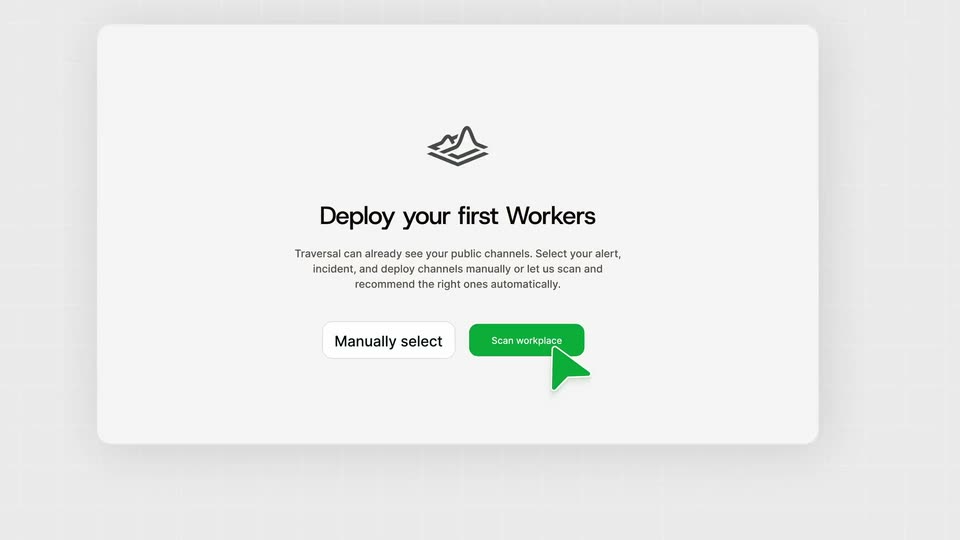
A white onboarding card with a green logo and the heading 'Deploy your first Workers' zooms in from the center of a pale gray grid. A green arrow cursor slides in from the right and presses the green 'Scan workplace' button, which darkens.
On-screen text: “The AI SRE that keeps”, “the world's most complex systems running”
Techniques: UI zoom, Cursor demo
Camera: Static
08 · Feature reveal · 0:15–0:19
A green scan band wipes across a blurred onboarding page, clearing to reveal a white modal card on a faint grid. The card's progress list fills in step by step, green dots lighting up, ending on a gray dot and a Scanning status with a Close link.
Techniques: Masking
Camera: Static
09 · Feature reveal · 0:19–0:21
A white modal panel titled Deploy Workers on a light gray background lists hashtag chips for alert workers and a toggle for auto-joining incident channels. The panel drifts upward a few pixels as the lower fields settle into view.
Camera: Pull out
10 · Feature reveal · 0:21–0:23
A settings panel titled Deploy Workers lists incident and alert worker options with channel chips, then the view zooms onto the green Deploy 12 Workers button as a large green cursor arrow points at it.
Techniques: UI zoom, Cursor demo
Camera: Push in
11 · Feature reveal · 0:23–0:26
A white Workers dashboard card sits tilted in 3D over a dotted green field, a green banner reading Deploy 12 Workers hovering at its edge. The card flattens as the worker list scrolls down, then tilts back while a Workers Deployed banner rises above it.
On-screen text: “Deploy 12 Workers”, “Workers Deployed”
Techniques: 3D mockup
Camera: Pull out
12 · Feature reveal · 0:26–0:28
A green “Workers Deployed” badge with a white checkmark scales up over a dotted green mountain backdrop and a thin wireframe grid, while a white Workers panel slides down out of the bottom of frame.
On-screen text: “Workers Deployed”
Techniques: Kinetic type
Camera: Pan
13 · Feature reveal · 0:28–0:28
A green pill badge labeled Workers Deployed scales and slides out left over a teal halftone-dot backdrop as a white incident card with an Urgent tag and a dark scratchpad panel slide in from the right to center.
On-screen text: “Workers Deployed”
Techniques: Kinetic type
Camera: Static
14 · Feature reveal · 0:28–0:30
A Slack incident channel fills the frame over a green dotted background. A white alert card marked Urgent zooms in, then the view scrolls down to reveal a dark worker scratchpad with Current State and Working Theory sections. A green cursor hovers over the card.
Techniques: UI zoom, Cursor demo
Camera: Push in
15 · Feature reveal · 0:30–0:33
A dark incident scratchpad with two note cards sits on a green pixel-textured background. The frame zooms in on the lower Working Theory card while a green arrow cursor drifts across its body text.
Techniques: UI zoom, Cursor demo
Camera: Push in
16 · Feature reveal · 0:33–0:34
A Slack-style workspace fills the frame: purple channel sidebar on the left, white message pane on the right. The channel title scales in while a sidebar row slides, then the whole interface defocuses and blurs out.
Techniques: UI zoom
Camera: Pan
17 · Feature reveal · 0:34–0:36
A Slack-style chat card on a cream background scales up and back. A gray Worker started an investigation pill fades in, then a green bot avatar posts a status message that fills in and appends a blue Investigating now link.
Camera: Push in
18 · Feature reveal · 0:36–0:41
A chat thread in an incidents channel scrolls downward on a cream background. Messages from a worker and a user give way to an incident card, a Fix ready checklist with green checkmarks, a purple pull request card, and a code diff highlighting one changed line.
Camera: Pan
19 · Feature reveal · 0:41–0:41
A light cream UI panel shows an automated incident workflow. A checklist and a pull request card with a YAML diff sit at top; the view then reframes onto a red regression alert and a rollback checklist that fills in with green checkmarks ending on Recovered.
Techniques: UI zoom
Camera: Static
20 · Feature reveal · 0:41–0:44
A chat message card on a cream background scrolls up, revealing a green “Recovered” box, then a “Root cause analysis” card with a “View Evidence” button slides in from below. A green pointer peeks in at the bottom right corner.
Techniques: UI zoom
Camera: Pan
21 · Feature reveal · 0:44–0:45
A white result card slides up from the bottom and settles centered over a pale green halftone dot background. It shows the title Root cause analysis, a subtitle line, and a View Evidence button, while a green cursor glides in from the lower right and hovers on the button.
Techniques: Cursor demo
Camera: Static
22 · Feature reveal · 0:45–0:48
A white incident card titled Traversing lists gray bullet findings about a payments outage, a green cursor hovers at its top-right, then the card glitches with color-split tears and dissolves into a dark green field of radial light streaks.
On-screen text: “Root cause analysis”, “View Evidence”, “Evidence chain · 6 linked sources”
Techniques: Cursor demo, Particles
Camera: Static
23 · Feature reveal · 0:48–0:49
A swarm of small colored dots in blue, orange, green and purple streaks outward from the center of a dark green field, then settles into a wide scattered pattern.
Techniques: Particles
Camera: Pull out
24 · Feature reveal · 0:49–0:49
A dense swarm of multicolored dots on a dark green field; the frame opens out so the dots read as a centered spherical disc, with some blurred for depth.
Techniques: Particles
Camera: Pull out
25 · Feature reveal · 0:49–0:57
A sphere of thousands of small blue, green, orange and purple dots rotates slowly on a dark teal field. The camera drifts back as a black tooltip labeled Infrastructure pops up beside a bright blue dot on the surface.
Techniques: Particles
Camera: Pull out
26 · Feature reveal · 0:57–1:11
A multicolored particle sphere rotates on dark teal. Six node labels pop in, then green lines draw out to connect them into a network. The camera dives into the sphere as a search bar slides up and a question types itself in.
Techniques: Particles, UI zoom
Camera: Push in
27 · Feature reveal · 1:11–1:12
A translucent search bar floats over a dark sphere of colored dots. The query types out character by character, then a green cursor moves onto the send button, which lights up white.
Techniques: Kinetic type, Cursor demo, Particles
Camera: Pull out
28 · Feature reveal · 1:12–1:12
A 3D sphere of multicolored dots sharpens and centers against a dark teal field while a flat chat input bar holding a typed outage question slides down below it. A green cursor arrow hovers at the right edge.
Techniques: Particles, 3D mockup
Camera: Pan
29 · Feature reveal · 1:12–1:13
A circular disc of green particles drifts on a dark teal background. In the center, a green wireframe molecule expands from a small cluster into a larger branched structure.
Techniques: Particles
Camera: Pull out
30 · Feature reveal · 1:13–1:14
A diagnostic report card fades in over a dark teal field, its green particle globe glowing behind it. The panel fills with a root-cause summary and a request-flow diagram linking Client, api-gateway and auth-service to a stack of function boxes.
Techniques: Particles
Camera: Static
31 · Feature reveal · 1:14–1:15
A dark report card with a request-flow diagram scrolls down over a rotating 3D globe of green network nodes. The card's top header slides off frame while the globe's lower hemisphere emerges beneath it.
Techniques: Parallax
Camera: Static
32 · Feature reveal · 1:15–1:20
A dark terminal window on a green dotted grid types a code review line by line: a PR title, two checkmarks, then a diff with one red line. A red HIGH RISK banner and incident notes drop in below, while the frame zooms in and scrolls up.
Techniques: UI zoom
Camera: Pull out
33 · Feature reveal · 1:20–1:24
A dark code editor over a green dotted map types out a red risk alert and a suggested diff, ending on a Yes/No prompt. It cuts to a framed terminal where the fix is applied, the line glows green, and a check confirms success.
Camera: Pull out
34 · Feature reveal · 1:24–1:29
A dark terminal window over a green dotted world map types out a Traversal review: a code diff, green check lines, then a Passed summary. The window tilts back into 3D perspective as the map recedes.
Techniques: Kinetic type, 3D mockup, Parallax
Camera: Pull out
35 · Social proof · 1:29–1:35
White kinetic text on a dark green field with a faint dot-matrix globe: “Traversal is already trusted by” holds centered, its words then scatter and exit, giving way to “some of the biggest companies in the world.”, which blurs out as the dots glow into green bokeh.
On-screen text: “Traversal is already trusted by”, “some of the biggest companies in the world.”
Techniques: Kinetic type
Camera: Static
36 · Outro · 1:35–1:41
A green particle burst radiates from the center, then coalesces into the white Traversal logo and wordmark on a dark teal field. The lockup holds centered while a faint halftone landscape texture drifts slowly behind it, with the URL captioned below.
On-screen text: “Visit traversal.com”
Techniques: Particles
Camera: Pull out