0:59
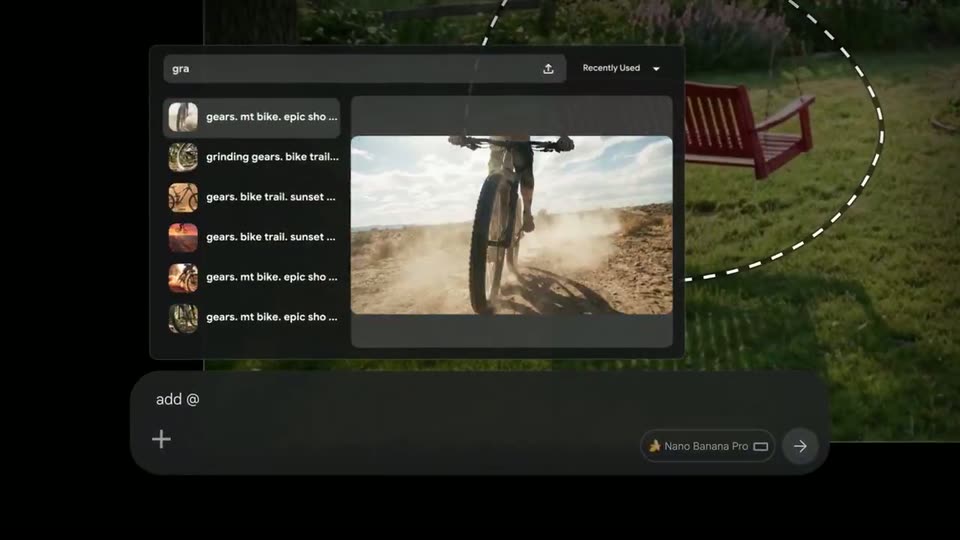

Google Flow - Today we're expanding Flow into a full AI creative studio. We’ve rede
Google · AI · Feb 2026
TinyFish · Sep 2026 · 0:51 · Full motion · AI-annotated
TinyFish’s 0:51 launch film runs 40 scenes, about 1.3 s each. The product shows up at 0:15 and 1 feature is revealed. The call to action lands at 0:46 (91% in), over a voiceover. The video is cut as a tight narrative: real web artifacts and a pixel-fish mascot open it, the product logic is compressed into single-word beats (Fetch, Compare, Nothing, Sent), and the interface is shown through zoom-ins on forms and code diffs. Its signature moves are hard cuts between black title cards, orange halftone and blue pixel fields, all paced to a steady 115 bpm.
Is this your launch? to your site or press kit.
Google · AI · Feb 2026
SideKit · B2B · Jan 2026
Byteport · B2B · Mar 2026
Films whose music sounds like this one, voice left out
Paraform AI · Modern corporate electronic
MangoDesk · Upbeat electronic
Superblocks · Electronic
A white product card for an Apple Mac mini scales up and sharpens into the center of an orange halftone dotted background. The card shows a Best Seller badge, product photo, title, price, and a yellow Add to cart button, all locked off.
Camera: Push in
A flat browser window on an orange dotted background loads the SEC What's New page. The masthead, blue banner, and a filings table with a September 2026 entry fill in one after another.
Camera: Static
A light product interface shows a filter bar with Search, Year, Month and Division/Office fields plus a blue APPLY button, above a results table. The table lists dates and regulatory filing titles, the whole view shifting up slightly.
Camera: Static
Oversized words scroll left across a blue pixel-column background, with “doesn’t” and “wait” in orange, as a small table graphic fades out at center. Then the full line “The web doesn’t wait for you to look” scales in small and white at center and holds.
On-screen text: “The web doesn't wait for you to look”
Techniques: Kinetic type
Camera: Static
A pixelated blue bar-graph background shifts as the white tagline breaks apart, its words sliding from a single centered line to scattered positions across the frame.
On-screen text: “The web doesn't wait for you to look”
Techniques: Kinetic type
Camera: Static
A field of vertical blue pixel columns shifts and fades, unmasking the white sentence as its words slide into position. Two smiling pixel-art fish, one orange and one red, pop in over the columns.
On-screen text: “The web doesn't wait for you to look”
Techniques: Kinetic type, Masking
Camera: Static
Pixel goldfish with smiley faces swim across a blue pixelated water field, then the frame cuts to a tilted 3D view of a pixel-block webpage. The words 'The web doesn't wait for you to look' slide in over the page.
On-screen text: “The web doesn't wait for you to look”
Techniques: 3D mockup, Kinetic type
Camera: Pan
On black, a browser window with the SEC site and a terminal window float over orange pixel blocks; the blocks clear, the windows center, and the terminal prints JSON lines. The word Fetch sits in white between them.
On-screen text: “Fetch”
Camera: Static
Two markdown document windows sit side by side on a black background. Orange diff highlights glow in each window, and the word Compare. scales in at the center between them.
On-screen text: “Compare.”
Techniques: Kinetic type
Camera: Pan
Two orange terminal panes holding JSON responses sit at the top, then slide off frame as a large orange N scales up from the left. The white caption Compare. fades out, and a big white Nothing. locks in centered on the black background.
On-screen text: “Compare.”, “Nothing.”
Techniques: Kinetic type, Masking
Camera: Static
On a black field, the white word Nothing. holds center, then gives way to Multiple times on the left while a small orange pixel fish enters from the right, a Z popping above its head.
On-screen text: “Nothing.”, “Multiple times”
Techniques: Kinetic type
Camera: Static
On a black background, the white caption “Mutiple times” holds left while a pixel-art fish with closed eyes bobs gently on the right, two orange Z marks drifting above it to suggest sleep.
On-screen text: “Mutiple times”
Camera: Static
A collage of tinted web screenshots fills the frame behind “checking is the most,” then collapses into a small circle as “expensive” appears beside a green pixelated dollar sign. The circle becomes an orange dot next to “your agent does.” before the scene fades to black.
On-screen text: “checking is”, “the most”, “expensive”, “your agent does.”
Techniques: Kinetic type, Morph
Camera: Pull out
The clip opens dark: a glowing cream orb, the caption “your agent does.”, and a green pixelated bar on the right. It cuts to white as the TinyFish logo with an orange fish mascot appears, “Monitor.” joins the wordmark, and a second fish swims up from the bottom edge.
On-screen text: “your agent does.”, “TinyFish Monitor.”
Techniques: Kinetic type
Camera: Static
A dark TinyFish dashboard shows the New monitor form. A cursor moves down from the Name field to the URL to watch field, where the placeholder Any public page. appears as the form scrolls.
Techniques: Cursor demo
Camera: Push in
A dark new-monitor form fills the frame. A cursor hovers at the name field, then the view pushes in toward the URL field and its placeholder.
Techniques: Cursor demo, UI zoom
Camera: Push in
A dark form is framed wide with a cursor hovering over the URL field, then the view zooms in on that field as the address https://cursor.com/pricing is typed character by character.
Techniques: Cursor demo, UI zoom
Camera: Push in
A dark settings form fills the frame. A cursor arrow hovers over a URL field as https://cursor.com/pricing types in, then the view scrolls down to a second field where Pro+ plan dropping below $60 is typed, and the form fades to black.
On-screen text: “https://cursor.com/pricing”
Techniques: Cursor demo, UI zoom
Camera: Pull out
On a near-black background, a form label 'How often to check' sits above a dropdown reading 'Every day'. A cursor clicks the field, the menu opens to show Every week and Custom, then closes again.
Techniques: Cursor demo
Camera: Static
A dark interface shows a check-frequency dropdown listing Every day, Every week and Custom; the list slides out as the cursor moves to the orange Create monitor button, then the frame fades to black.
Techniques: Cursor demo
Camera: Static
Two dark pricing cards for Pro +, $60/mo and $55/mo with a Special offer badge, rise into view on an orange grid background while a small pixel-art runner dashes across the frame from left to right.
Camera: Static
Two dark pricing cards sit on an orange dotted background, the left showing $60/mo and the right $55/mo with a Special offer pill. A small pixel-art orange mascot runs across the gap between them while faint code text drifts in the background.
Techniques: Parallax
Camera: Static
Two dark pricing cards on an orange field give way to a centered code editor window showing HTML source with two green-highlighted lines; faint card text fragments linger at the frame edges.
Camera: Push in
A dark code editor view of HTML source. The frame tightens onto two price lines, the $60 line tinted red with a red cross and the $55 line tinted green with a check, then the view drifts down past a checklist of feature rows.
Techniques: UI zoom
Camera: Push in
A dark notification card on a black field scrolls slowly upward. The white price-drop headline stays centered while the gray “Monitor check” header exits the top and a small line of certification text appears along the bottom edge.
Camera: Static
A dark webpage footer sits on a black screen beneath a faded nav link. The copyright year ticks from 2025 to 2026 while the certification line shifts right, marking a trivial change that triggers no alert.
Techniques: Kinetic type
Camera: Static
On a black background, a large X built from a fine grid of dark dots sits behind the centered white caption “Not sent.” The frame stays locked and the text holds still for the whole shot.
On-screen text: “Not sent.”
Camera: Static
A dark feature list with white checkmarks sits beneath a price header and button. The frame slowly zooms in on the first row, “Extended limits on Agent,” pushing the button and price out of view.
On-screen text: “Not sent.”
Techniques: UI zoom
Camera: Static
On a black field, a cross mark built from tiny gray dots assembles in the center while the white caption fades in and out over it.
On-screen text: “Not sent.”
Techniques: Particles
Camera: Static
On a black background, the Cursor pricing page assembles: the title and Monthly/Yearly toggle fade in at top while four plan cards (Hobby, Individual, Teams, Enterprise) slide up from the bottom edge into a side-by-side row, settling into a static locked-off frame.
On-screen text: “Not sent.”
Camera: Static
A dark pricing interface pulls back to reframe on the Individual card. The billing toggle flips, the price steps from $60 to $55 per month, and an orange Special offer badge fades in at the card's top corner.
Techniques: UI zoom
Camera: Static
On a black field, a tiny white rectangle scales up into a large central block as the word Sent. appears over it. Small monospace captions for Email, Webhook and Pass fade in around the edges, top and bottom.
On-screen text: “Email”, “Send an alert”, “Webhook”, “Trigger a workflow”, “Pass”, “Sent.”
Camera: Static
A black field holds the word “Sent.” in white at center while three small label pairs, Email, Webhook and Agent each with a one-line caption, scroll downward in two staggered rows, looping past the center word.
On-screen text: “Sent.”, “Email”, “Send an alert”, “Webhook”, “Trigger a workflow”, “Agent”, “Pass it to an agent”
Techniques: Kinetic type
Camera: Pull out
On a black field, four small gray icons (a spiral, a four-point star, a cube, a slashed circle) travel slowly around a thin elliptical orbit line. The frame stays locked off while the icons keep circling at a steady pace.
On-screen text: “0”, “G”
Camera: Static
On black, the words API and MCP type out at center, the a in orange. Small gray icons, a swirl, a star, a cube and a bird, travel a tilted elliptical ring around the text. Locked-off frame.
On-screen text: “API and MCP”
Techniques: Kinetic type
Camera: Static
A black frame holds the centered white headline while five small monochrome icons travel slowly along a thin elliptical orbit around it.
On-screen text: “API and MCP”
Camera: Static
Black frame with white “API and MCP” centered inside a thin elliptical orbit carrying small gray icons. The text is replaced by an oversized “Subscribe” that slides across the screen, with a small “X” at the right edge and the tagline “Subscribe to the web.” settling below.
On-screen text: “API and MCP”, “Subscribe”, “X”, “Subscribe to the web.”
Techniques: Kinetic type
Camera: Static
On a plain white background, a small cartoon orange fish with a face swims from the lower center toward the right edge, rotating as it travels. The black centered tagline stays fixed in place throughout the shot.
On-screen text: “Subscribe to the web.”
Camera: Static
On a white background, an orange cartoon fish slides from the top left to the center and rotates horizontal, settling beside the wordmark as the tagline fades out.
On-screen text: “Subscribe to the web.”, “TinyFish Monitor”
Camera: Static
The TinyFish Monitor lockup holds centered on a plain white field: an orange cartoon fish with a smiling face sits left of the black wordmark. The frame stays locked off and the logo remains still throughout the shot.
On-screen text: “TinyFish Monitor”
Camera: Static