1:22

Introducing Lumi, the Product Adoption Agent | Userlens
Userlens · Nov 2026
EverMind · Oct 2026 · 1:13 · AI-annotated
EverMind’s 1:13 launch film runs 36 scenes, about 2.0 s each. The product shows up at 0:09 and 8 features are revealed. The call to action lands at 1:02 (85% in). Soft studio white with a warm cream glow, charcoal interstitials, and a single golden-yellow accent; bold condensed sans headlines with one word colored yellow, light UI mockups in rounded windows. The video is built as a problem-to-feature cascade: a hazy 3D hook, then a rapid run of short feature reveals, each a bold headline card paired with a clean UI demo, punctuated by dark tagline cards and a closing logo card.
Is this your launch? to your site or press kit.
Userlens · Nov 2026
ElevenLabs · AI · Dec 2024
An isometric 3D grid of team tiles with white icon cubes sharpens from haze as the headline “Every team runs on agents now.” fades in right. The view reframes onto two mismatched note cards as a yellow Conflict tag and outline appear, then a dark tooltip pops below.
On-screen text: “Every team runs on agents now.”, “Many people. Many agents. Many projects.”, “Conflict”, “Two agents, two answers.”
Techniques: Kinetic type, 3D mockup, UI zoom
Camera: Static
A soft-focus light gray stage racks into sharp view as three tilted white pills reading Launch: Nov 12 sit inside a yellow outline box tagged Duplicates, beside a lone Office closed Fridays pill. A dark caption pill pops in below: One fact, three copies.
On-screen text: “Duplicates”, “One fact, three copies.”
Techniques: 3D mockup
Camera: Static
Small white note cards with short labels drift across a pale gradient background. A bold black headline, with the last word in yellow, fades in centered over the cards.
On-screen text: “At scale, memory gets messy.”
Techniques: Kinetic type
Camera: Pull out
Faint white memory note cards float behind a bold black headline on a light gradient. The line blurs and crossfades into a second headline with the yellow EverOS logo, then dissolves out as the cards scatter back into view.
On-screen text: “At scale, memory gets messy.”, “All you need is EverOS.”
Techniques: Kinetic type
Camera: Static
White pill labels with project notes drift apart and fade on a pale gradient background while the EverOS badge settles on the left, then a large orange italic headline, One memory layer, fades in.
On-screen text: “Kestrel is on Enterprise”, “Brand voice”, “Launch: Nov 12”, “Orion budget: on hold”, “Pricing sheet v2”, “One memory layer”
Techniques: Kinetic type
Camera: Static
On a pale gradient, the EverOS logo in a white circle is orbited by four small icons (code, search, phone, document) that ease into place, as a three-line headline de-blurs into sharp focus on the right.
On-screen text: “One memory layer for every team and agent.”
Techniques: Kinetic type
Camera: Static
A rounded app icon with a soft glow sits left of a two-line headline on a pale gradient. The card then expands into a light UI window with traffic-light dots and a memory list, the headline fading out as the interface resolves.
On-screen text: “One memory layer for every team and agent.”
Techniques: Morph
Camera: Push in
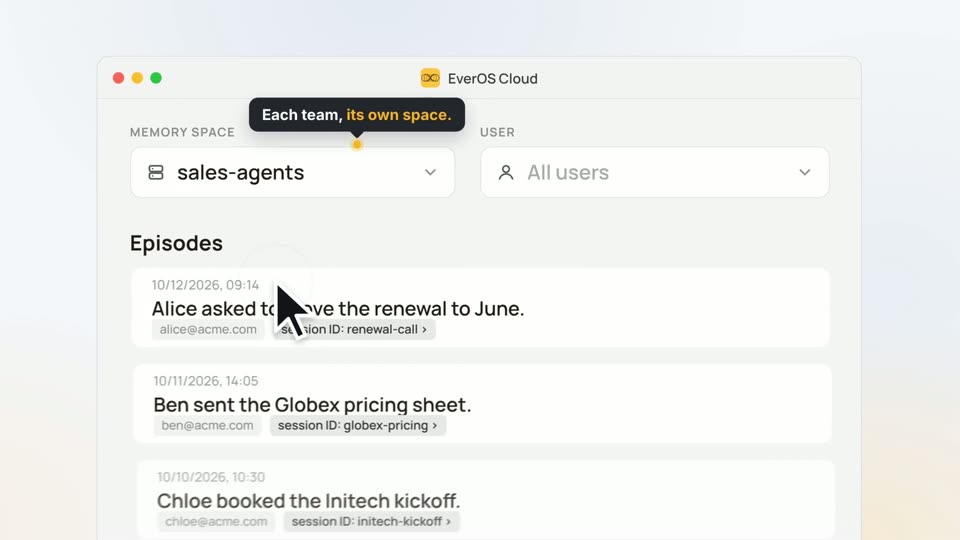
A light product window shows a memory-space dropdown. The cursor opens the menu, the selection switches from research-agents to sales-agents, and the episodes list below swaps to new entries. A dark callout reading 'Each team, its own space.' pops in above the field.
On-screen text: “Each team, its own space.”
Techniques: Cursor demo
Camera: Push in
A flat EverOS Cloud interface shows an open USER dropdown listing three emails while a cursor hovers the options. A dark callout above reads Each person, their own memory. The screen then blurs out of focus.
On-screen text: “Each person, their own memory.”
Techniques: Cursor demo
Camera: Pull out
A product window on the right lists memory episodes, then switches to a profile panel. On the left, bold headlines blur in and out, swapping from one phrase to another while the cursor rests over the list.
On-screen text: “Memory that stays clean at scale.”, “Deduped. Corrected. Up to date.”
Techniques: Kinetic type
Camera: Static
A product panel on the right lists a Profiles card and Episodes entries, the top one highlighted yellow. On the left, three stacked words sit on a pale gradient, linked to the panel by a thin orange line. The words recolor from gray to orange in sequence.
On-screen text: “Deduped.”, “Corrected.”, “Up to date.”
Camera: Push in
A bold headline block on the left cycles its lines between black and yellow as a percentage counter rolls in. On the right, a product window scrolls to a Profiles card where a date is struck through and corrected, a yellow connector line tracking the change.
On-screen text: “Deduped.”, “Corrected.”, “Up to date.”, “90.04%”, “memory recall · HaluMem · EverMind”
Techniques: Kinetic type
Camera: Pull out
Pale split layout: bold black headline with 'Up to date.' in yellow and '90.04%' on the left; an Account card and an Episodes list on the right. A thin yellow line ties the text to the Updated timestamp. The layout eases with a slow downward drift.
On-screen text: “Deduped. Corrected. Up to date.”, “90.04%”, “memory recall · HaluMem · EverMind”
Camera: Push in
A blurred interface list sits inside a circular mask on a pale field, then the frame cuts to a dark background holding the headline, with the word 'leaks' in orange and the rest in white.
On-screen text: “Nothing leaks between clients.”
Techniques: Masking
Camera: Static
A single line of bold text is centered on a dark charcoal background. The phrase is white except the word leaks, which is orange. The frame is locked off with no motion throughout the clip.
On-screen text: “Nothing leaks between clients.”
Camera: Static
A soft black disc in the center fades out as four white circles sharpen into a row, two with folder icons and two with person icons, each with a lock badge. A scales icon and a grid icon hover above. Legal and Healthcare fade in below.
On-screen text: “Legal”, “Healthcare”
Camera: Static
Two icon clusters labeled Legal and Healthcare sit on a pale gradient, each pairing folders or people with lock badges and a blocking X mark. The view zooms out with motion blur as the elements tile into a full grid of locked white circles.
On-screen text: “Legal”, “Healthcare”
Techniques: Speed ramp
Camera: Pull out
A Codex chat window fades in on the left over a field of small gray icons; action rows appear in sequence and a fix message types out, then two memory cards slide up below. The bold headline “Gets better with use.” holds on the right as the icons fade.
On-screen text: “Gets better with use.”
Camera: Push in
On a soft gradient background, two product cards labeled Case and Skill sit on the left with an arrow between them, the Skill card outlined in yellow. The left side sharpens out of a blur as the headline Every run becomes a skill. fades in on the right.
On-screen text: “Every run becomes a skill.”
Camera: Pull out
A Codex chat card and Request Logs table sit on a pale background beside a large tagline. The chat fills in with a yellow memory chip, a green check row and a reply line; dark tooltips pop on the chip and latency cell as the view reframes onto the cards.
On-screen text: “Next time, it already knows.”, “Skill reused from memory”, “One memory search · 54 ms”
Techniques: UI zoom
Camera: Push in
A light UI mockup sits left, showing a Codex chat and a context bar where yellow EverOS squares appear one by one. Right, large black and yellow copy reads ...and cheaper, with the 90% figure counting up.
On-screen text: “...and cheaper.”, “Up to 90%”, “lower token cost”, “vs. sending the full history · EverOS Cloud”
Techniques: Kinetic type
Camera: Static
A Codex chat panel with a memory highlight sits on the left while a large stat headline reads on the right. The camera pushes into the headline, the words smearing with horizontal motion blur until the percentage fills the frame.
On-screen text: “...and cheaper.”, “Up to 90%”, “lower token cost”, “vs. sending the full history · EverOS Cloud”
Techniques: Split screen
Camera: Push in
A dark charcoal screen holds a centered tagline. The white phrase “One memory.” and yellow phrase “Every agent.” appear together, then remain locked in place.
On-screen text: “One memory. Every agent.”
Camera: Static
A dark disc masks the center of the frame, leaving a bold white-and-yellow headline visible at the edges. The disc shrinks and vanishes, opening onto a flat Claude Code window that holds a yellow skill card.
On-screen text: “One memory. Every agent.”
Techniques: Masking
Camera: Static
A Claude Code window holds a yellow-bordered card reading “Fix readiness probe port mismatch”, then the view pulls back to a receding 3D grid of identical windows and pushes back to the center card.
Techniques: 3D mockup, UI zoom
Camera: Pull out
A two-by-three grid of app window mockups on a pale cream gradient, each titled with a different tool name and showing the same yellow-bordered EverOS memory card. The card text resolves from a brief double-exposure into a clean state over the first second.
Camera: Pull out
In 3D perspective, the EverOS Cloud window sits on the right with a half-typed search query over four stat tiles, while three pale-yellow cards reading 'See it.', 'Own it.' and 'Trust it.' stack on the left. The tilted scene rotates and sharpens into a flat, in-focus frame.
On-screen text: “See it.”, “Ask what your agent knows.”, “Own it.”, “Trust it.”
Techniques: 3D mockup, Parallax
Camera: Static
In 3D perspective, a stack of cream cards on the left rotates to bring See it., Own it. and Trust it. into focus, while a tilted browser mockup on the right crossfades from a stats grid to a list of agent memories.
On-screen text: “See it.”, “Ask what your agent knows.”, “Own it.”, “Trust it.”
Techniques: 3D mockup, Kinetic type
Camera: Static
Cream 3D panels reading See it, Own it, Trust it sit beside the EverOS Cloud skill list, the whole composition tilting from a slanted angle to a flat front view. A cursor opens a row menu and rests on the pink Delete item.
On-screen text: “See it.”, “Own it.”, “Edit or delete any memory.”, “Trust it.”
Techniques: 3D mockup, Cursor demo
Camera: Push in
A 3D stack of gold cards on the left cycles through See it., Own it. and Trust it. while the right side swaps a cloud UI window for a SOC 2 badge and a Claude Code prompt. The cards tilt in perspective and fade as Live in production appears.
On-screen text: “See it.”, “Own it.”, “Edit or delete any memory.”, “Trust it.”, “Hosted on EverOS Cloud.”, “Live in production”
Techniques: 3D mockup
Camera: Push in
A flat Claude Code chat window on the left types a prompt, then a gray message bubble and two code lines with green check marks appear, followed by a yellow connection card. On the right, the static headline sits on a light gradient background.
On-screen text: “Live in minutes.”
Camera: Static
A flat Claude Code chat window on the left shows a prompt, two completed steps, and a highlighted EverOS Cloud card, while a large two-line headline reads on the right; the locked-off frame then fades out to a faint EverOS Cloud PRO interface.
On-screen text: “Live in minutes.”
Camera: Push in
On a soft gradient background, a small pill badge reads EVEROS CLOUD · PRO above the line Sign up right now., which blurs into place and holds. The line then cuts to a giant yellow 1x with the word Get set above it.
On-screen text: “EVEROS CLOUD · PRO”, “Sign up right now.”, “Get”, “1x”
Techniques: Kinetic type
Camera: Static
On a light background, the bold headline 'Get 3x your monthly usage allowance for 6 months.' fades in with orange accents, then three white stat cards slide up beneath it. After a short hold, the whole composition tilts and slides out toward the lower left.
On-screen text: “Get”, “3x”, “your monthly usage allowance for 6 months.”, “750K MCU / month”, “250K on Pro today”, “≈ 7.5M messages / month”, “1 MCU ≈ 10 messages”, “1.5M retrieval calls / month”, “500K on Pro today”
Techniques: Kinetic type
Camera: Push in
A yellow rounded-square icon with a black loop symbol sits centered on a pale cream gradient. The symbol morphs from two overlapping rings into three as a faint gray headline and two small stats fade out behind it.
On-screen text: “your monthly fee is all you'll ever see”, “≈ 7.5M”, “1.5x”
Techniques: Morph
Camera: Static
On a pale gradient, the yellow EverOS icon and wordmark settle into place as the final letters snap from blur to sharp. The gray tagline fades in beneath, then a dark pill button with the URL and a yellow arrow rises up.
On-screen text: “EverOS”, “Memory that learns, not just remembers.”, “Get started at everos.evermind.ai”
Camera: Static