
1:56
Explore
Introducing ElevenLabs Conversational Agents
ElevenLabs · Dec 2024 · 1:57 · Full motion · AI-annotated
00:00:00 / 01:57:02
- Length
- 1:57
- Scenes
- 45 · 2.6 s avg
- Product on screen
- 0:08
- Features shown
- 7
- Call to action
- 1:47 · 92%
- Voiceover
- Yes
ElevenLabs’s 1:57 launch film runs 45 scenes, about 2.6 s each. The product shows up at 0:08 and 7 features are revealed, with social proof. The call to action lands at 1:47 (92% in), over a voiceover. The video alternates black title cards, white UI mockups and glossy 3D pinwheel transitions, cut to a driving 152 bpm pulse. Signature moves are word-by-word headline reveals, cursor-driven form walkthroughs and the iridescent pinwheel orb that morphs between sections.
No filming indicatedEstimated needs: 7 capture groups — your screens or recordings · 1 official logo — reused across the film · 7 graphic passages — draw or supply · 4 3D passages — build or supply
Is this your launch? to your site or press kit.
More like this
1:22

Introducing Lumi, the Product Adoption Agent | Userlens
Userlens · Nov 2026
1:10

Tech Explainer Video Example: Eccasion EV Platform | Beliv8 Motion Studio
Eccasion · Nov 2026
Similar soundtrack
Films whose music sounds like this one, voice left out
2:14

Shobhit Banga - Drop 3/15: Introducing the Speech Recognition Benchmark on @voicearen
VoiceArena · Electronic
2:02
Coworker.ai - Today we're launching OM2. Your AI re-reads your entire company from
Coworker · Electronic
1:42
Stanley Wei - AI is already smart enough. Real-world tasks are still slow, expensi
Pine · Modern electronic corporate tech
Introducing ElevenLabs Conversational Agents, scene by scene
· 45 scenes as text
01 · Hook · 0:00–0:00
On a black background, a headline reveals word by word: “Building” in white, the remaining words in blue, each fading in with a soft glow and a slight scale. The line completes as “Building AI agents that can speak.”
On-screen text: “Building AI agents that can speak”
Techniques: Kinetic type
Camera: Static
02 · Hook · 0:00–0:03
On black, a headline builds word by word with a blue glow: white “Building” then blue “AI agents that can speak”, cut to “is now easier than ever.”. The line scales up, the word “easier” becomes a 3D extruded shape, and a create-agent form appears behind it.
On-screen text: “Building AI agents that can speak”, “is now easier than ever.”
Techniques: Kinetic type, 3D mockup, UI zoom
Camera: Static
03 · Hook · 0:03–0:05
A flat product screen shows a Create an AI agent form with a name field and four template cards. A black cursor hovers over the Blank template card as the panel shifts up and right to center, and a soft pink blob fades in at the lower left.
Techniques: Cursor demo
Camera: Static
04 · Hook · 0:05–0:08
A glossy blue and pink pinwheel disc spins on a white background, its radial segments rotating and shifting hue. A soft cyan glow surrounds it. Near the end the center collapses into a solid blue circle while the pattern retracts into an outer ring.
Techniques: Morph
Camera: Static
05 · Product intro · 0:08–0:11
A small gradient orb pulses at the center of a white field, then the headline “Conversational AI” fades in with a soft pink glow behind it. The black ElevenLabs logo and wordmark drop in beneath, locking the frame.
On-screen text: “Conversational AI”, “ElevenLabs”
Camera: Static
06 · Demo · 0:11–0:12
The QuickCrate agent setup screen snaps into place on the right as a large black cursor hovers over the System Prompt field, which fills with typed text. On the left, bold words “Build,” then “test,” stack in one by one.
On-screen text: “Build,”, “test,”
Techniques: Kinetic type, Cursor demo
Camera: Static
07 · Demo · 0:12–0:17
A settings panel scrolls down on the right as a black cursor clicks through dropdowns, selecting an LLM, a voice, and avatar colors, while the headline stays fixed on the left.
On-screen text: “Build, test, and deploy.”
Techniques: Cursor demo
Camera: Static
08 · Demo · 0:17–0:17
A bold black headline sits static on the left while a light settings panel on the right scrolls upward, revealing LLM, Voice and Avatar sections with dropdowns and color fields, a black cursor drifting below.
On-screen text: “Build, test, and deploy.”
Camera: Static
09 · Demo · 0:17–0:18
A chat view on a pale background: a right bubble with a blue-purple gradient border holds the welcome line, while a left white bubble types out a reply letter by letter. A black cursor rests at the lower left.
Techniques: Kinetic type
Camera: Static
10 · Demo · 0:18–0:22
A two-sided chat on a pale background types out a greeting and an order-status question, word by word. The frame scrolls up as a third bubble types a reply, each bubble tagged with a small pinwheel avatar.
Techniques: Kinetic type
Camera: Static
11 · Demo · 0:22–0:25
A flat chat interface with rounded, gradient-bordered bubbles on a pale background. The thread scrolls up as the bot's final message types out and a success tag appears, then the frame zooms in on a small transcription icon.
Techniques: UI zoom
Camera: Static
12 · Problem · 0:25–0:31
A single pale gray card with a microphone icon sits centered, then six more labeled cards slide in to form a row linked by dashed lines. The cards reflow into a loose cluster, then shrink and arrange into a spinning pinwheel over a blue and pink gradient.
On-screen text: “Transcription”, “Turn taking”, “LLM”, “Knowledge base”, “Text-to-Speech”, “Testing”, “Phone”, “Website”
Techniques: Morph
Camera: Static
13 · Feature reveal · 0:31–0:32
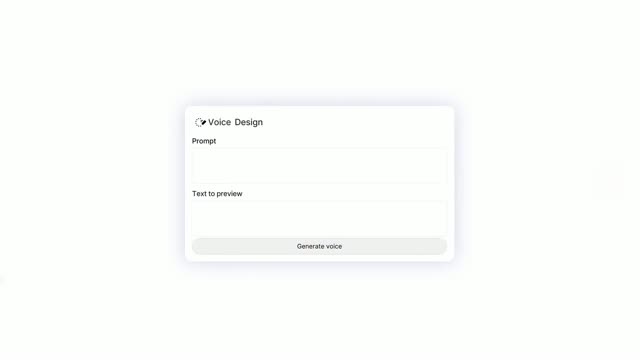
A blue and magenta pinwheel disc spins inside a white rounded card on a cream background, then the card resolves into a Voice Design panel showing a Prompt field, a Text to preview field and a Generate voice button.
Techniques: Morph
Camera: Static
14 · Feature reveal · 0:32–0:34
A white Voice Design panel is centered on a plain background. Text types into the Prompt and preview fields, then the Generate voice button shows a loading bar.
Techniques: Kinetic type
Camera: Static
15 · Feature reveal · 0:34–0:35
On a locked-off white frame, the Voice Design panel with its prompt and preview fields dissolves away, leaving two iridescent blue-pink discs: a small pinwheel icon in a pill and a larger swirling gradient circle.
Camera: Static
16 · Feature reveal · 0:35–0:39
A vertical name list scrolls beside a large circular swirl preview; the selected name sits in a pill row and the preview shifts color to match. A black cursor clicks JESSICA, then the list fades and the circle scales up to center.
Techniques: Cursor demo, UI zoom
Camera: Static
17 · Feature reveal · 0:39–0:40
A blurred disc of radial orange, green, pink, and light blue segments spins at speed on a plain white background, the colors smeared by the rotation.
Camera: Static
18 · Feature reveal · 0:40–0:43
A white rounded card with a colorful radial icon and an End call button fades in sharp at center, then morphs into a wide settings row labeled LLM with a Gemini 1.0 Pro dropdown as the icon enlarges at the left edge.
Techniques: Morph
Camera: Static
19 · Feature reveal · 0:43–0:46
A settings row labeled LLM sits on a white background beside a soft orange-and-green gradient blob. A black cursor clicks the model dropdown, a list of LLM names scrolls open, then the cursor picks Claude 3.5 Sonnet and the field updates.
Techniques: Cursor demo
Camera: Static
20 · Feature reveal · 0:46–0:51
A settings card crossfades from the LLM model selector to a knowledge base upload box, then to a system prompt field where the prompt text types in word by word. A black cursor drifts over the card beside a soft orange-green pinwheel shape at the left edge.
Techniques: Morph, Cursor demo, Kinetic type
Camera: Static
21 · Feature reveal · 0:51–0:52
A white rounded card titled System prompt with body copy about a support agent sits on the right, then collapses away to the right as a multicolored radial pinwheel orb settles in the center. A thin outline shape flickers beside the orb on the plain white background.
Camera: Static
22 · Feature reveal · 0:52–0:55
A pinwheel sphere in orange and green spins on a white field and drifts left, passing over a thin pill outline. The word Server slips out of the pill and fades as the sphere settles at center, its palette shifting to red and pink.
On-screen text: “Server”
Camera: Static
23 · Feature reveal · 0:55–1:04
A chat thread on a plain off-white background builds message by message, each bubble tagged with a circular pinwheel avatar. A pink-bordered right bubble greets the user, gray left bubbles type out a refund request, and the thread scrolls up as a right bubble replies.
Techniques: Kinetic type
Camera: Push in
24 · Feature reveal · 1:04–1:05
A close-up of two chat bubbles on a light background zooms out to reveal a transcript list with timestamped rows and a Success label. The headline Analyze your transcripts sits center, Analyze in a blue-purple gradient. Loading spinners pulse at the bubble corners.
On-screen text: “Analyze your transcripts”
Techniques: UI zoom
Camera: Static
25 · Feature reveal · 1:05–1:06
Two columns of transcript entries, each with a timestamp and a Success or Failure badge, scroll vertically on a white background, one upward and one downward. A centered headline, Analyse in a blue-purple gradient and your transcripts in black, holds the middle of the frame.
On-screen text: “Analyse your transcripts”
Camera: Pull out
26 · Feature reveal · 1:06–1:08
A list of support transcripts scrolls upward behind a centered headline. The word “Evaluate” has a blue and purple gradient, while the rest of the text is solid black.
On-screen text: “Evaluate your transcripts”
Camera: Static
27 · Feature reveal · 1:08–1:10
A large headline 'Evaluate your transcripts' fades in over a light transcription UI, then clears as the timestamped chat list scrolls up and a blue audio waveform appears mid-list.
On-screen text: “Evaluate your transcripts”
Camera: Pull out
28 · Feature reveal · 1:10–1:13
A white audio player card with a blue waveform and black play button sits centered on a plain background. The played portion of the waveform extends, then the card is swapped for a white Summary panel while a blue-to-cyan gradient line traces its rounded border.
Camera: Static
29 · Feature reveal · 1:13–1:15
A light interface shows two stacked cards on the left, Evaluation criteria and Data collection, beside a Summary card with a pink-to-blue gradient border on the right. The cards fade in and drift upward into place over two seconds.
Camera: Static
30 · Feature reveal · 1:15–1:16
A white summary card with blue pill labels slides up out of frame, revealing a centered gray headline that scales in, then a coral-pink line slides in below it.
On-screen text: “All agents currently support”, “32 languages.”
Techniques: Kinetic type
Camera: Pan
31 · Feature reveal · 1:16–1:18
A black headline and a color-shifting “32 languages.” line sit centered on white, scaling and sliding in. Blurred translations of the phrase in many scripts drift at different depths around them.
On-screen text: “All agents currently support”, “32 languages.”
Techniques: Kinetic type, Parallax
Camera: Push in
32 · Feature reveal · 1:18–1:19
Bold black text “All agents currently support” sits above a magenta “32 languages.” on white, over a faint field of blurred multilingual phrases. The camera pushes in fast, blurring the type as it fills the frame.
On-screen text: “All agents currently support”, “32 languages.”
Techniques: Kinetic type
Camera: Static
33 · Feature reveal · 1:19–1:20
A light gray rounded card with a pink outline sits right of center on white. The sentence builds word by word while a small red metallic pin rolls along the card's top edge, drawing the outline behind it.
On-screen text: “Welcome to DC Medical. How”
Techniques: Kinetic type
Camera: Static
34 · Feature reveal · 1:20–1:26
A chat conversation animates on a plain off-white background: a right bubble with a pink border and spinning pinwheel avatar types an English greeting, a left bubble with a gray avatar replies in Spanish, and a second right bubble types a Spanish answer as the thread scrolls up.
Techniques: Kinetic type
Camera: Static
35 · Feature reveal · 1:26–1:27
Chat bubbles slide and scale into place on a pale background, each marked by a small gradient pinwheel icon. The view then shifts to an Embed code card with a snippet line, while the Spanish reply bubble sits below.
Camera: Static
36 · Feature reveal · 1:27–1:29
A white embed-code card with a red outline and a pink radial orb sits on a white field. A cursor clicks the copy icon, a black Copied! tooltip appears, then the card content becomes two rounded bars.
Techniques: Cursor demo
Camera: Static
37 · Feature reveal · 1:29–1:32
A white rounded help card with a red-pink swirl avatar and a black Start a call button is centered on a plain white field. A cursor rests on the button while a Copied! pill and a larger avatar fade out, then the button text blurs and spreads.
Techniques: Cursor demo
Camera: Static
38 · Feature reveal · 1:32–1:37
On white, a 2x2 grid of video cards (kayak, suitcase, box handoff, man in orange jacket) floats in 3D perspective beside a column of Python, JS, React and Swift icons. Each card in turn scales forward as a blue-outlined pill, Booking confirmed, Purchase confirmed, Mission accepted, appears beside it.
On-screen text: “Booking confirmed”, “Purchase confirmed”, “Mission accepted”
Techniques: 3D mockup
Camera: Static
39 · Social proof · 1:37–1:39
A white rounded card reading 60 and DAYS TO PRODUCTION rotates in 3D to face the camera, while a tilted duplicate card with the same text flies off to the right with motion blur on a plain light background.
On-screen text: “60”, “DAYS TO PRODUCTION”
Techniques: 3D mockup
Camera: Static
40 · Social proof · 1:39–1:40
Three white 3D cards sit on a plain background, the front card tilted with a large black number that changes from 56 to 36 over the caption DAYS TO PRODUCTION, a stacked card behind it and a third card rotating in from the right.
On-screen text: “DAYS TO PRODUCTION”
Techniques: 3D mockup
Camera: Static
41 · Social proof · 1:40–1:43
Two tilted white calendar cards showing days-to-production numbers resolve into one centered card. A green outline draws around it, then a solid green frame appears as the card and its number scale down to a tiny dot.
On-screen text: “8”, “10”, “DAYS TO PRODUCTION”, “5”
Techniques: 3D mockup, Kinetic type
Camera: Static
42 · Feature reveal · 1:43–1:46
A white padlock icon swings into a closed pose at center on a flat green field, then shrinks and rises as the caption fades in beneath it. The green field then masks down to a circle, revealing white corners.
On-screen text: “Safe & Secure”
Techniques: Masking
Camera: Static
43 · Feature reveal · 1:46–1:47
On a white field, a large green disc holds a small green pinwheel; the outer disc fades as the wheel scales up into a multicolored fan of orange, green, blue and purple wedges, then shrinks. White text 'Safe & Secure' sits at the hub and scales with it.
On-screen text: “Safe & Secure”
Camera: Pull out
44 · CTA · 1:47–1:49
A ring of ten multicolor pinwheel circles orbits on a white background. Each blob blends blue, pink, orange and green gradients that shift as the circles rotate around the loop, forming a continuous spinner.
Camera: Pan
45 · Outro · 1:49–1:57
A centered headline in a shifting purple-to-blue gradient sits on a near-white field, with a small iridescent orb flashing at the right edge first. Below it, a black caption with a pause-mark logo types in and holds.
On-screen text: “Conversational AI”, “IIElevenLabs”
Techniques: Kinetic type
Camera: Static