0:46

Introducing ChatGPT for Accounting
OpenAI · AI · Nov 2026
MangoDesk · Aug 2025 · 1:10 · Full motion · AI-annotated
MangoDesk’s 1:10 launch film runs 23 scenes, about 3.0 s each. The product shows up at 0:05. The call to action lands at 1:00 (86% in), over a voiceover. The video runs problem questions, logo reveal, then a linear cursor-driven walkthrough of the interface (form fills, panel zooms, 3D-tilted cards on white), capped by a word-swap capabilities montage and a demo CTA. Its style is flat white space, centered sans-serif type, orbiting headshots, and letter-by-letter text builds cut at a steady 135 bpm.
Is this your launch? to your site or press kit.
OpenAI · AI · Nov 2026
Orange Slice · Oct 2026
Lamina Labs · B2B · Jul 2026
Films whose music sounds like this one, voice left out
Hilbert · Corporate / Tech Launch
Luminai · Modern corporate electronic
Lovable · Upbeat electronic
A tilted dark code card slides in from the top-left corner on a white field. The headline builds left to right, word by word, settling mid-left in the lower third.
On-screen text: “Still building your annotation stack?”
Techniques: Kinetic type
Camera: Static
A large dark headline sits centered on white, flanked by a tilted JSON code card top-left and a tilted data table card bottom-right. Circular headshots of six people pop in around the text as the first letter resolves from vertical bars.
On-screen text: “Still building your annotation stack?”
Techniques: 3D mockup, Masking
Camera: Static
Circular headshots of smiling professionals drift in a slow orbit around the center of a white frame. The black headline stays fixed in the middle while the avatars rotate around it.
On-screen text: “Still sourcing & managing”, “annotators by hand?”
Camera: Pan
A light gray background holds a centered two-line black headline. A ring of circular headshot photos slowly orbits around the text, each portrait drifting to a new position while the words stay fixed.
On-screen text: “Still sourcing & managing”, “annotators by hand?”
Camera: Static
On a plain white background, the MangoDesk logo, an orange mango icon with a green leaf beside a dark gray wordmark, sits centered and scales up from small to large, then holds still.
On-screen text: “Still sourcing & managing”, “annotators by hand?”, “MangoDesk”
Camera: Static
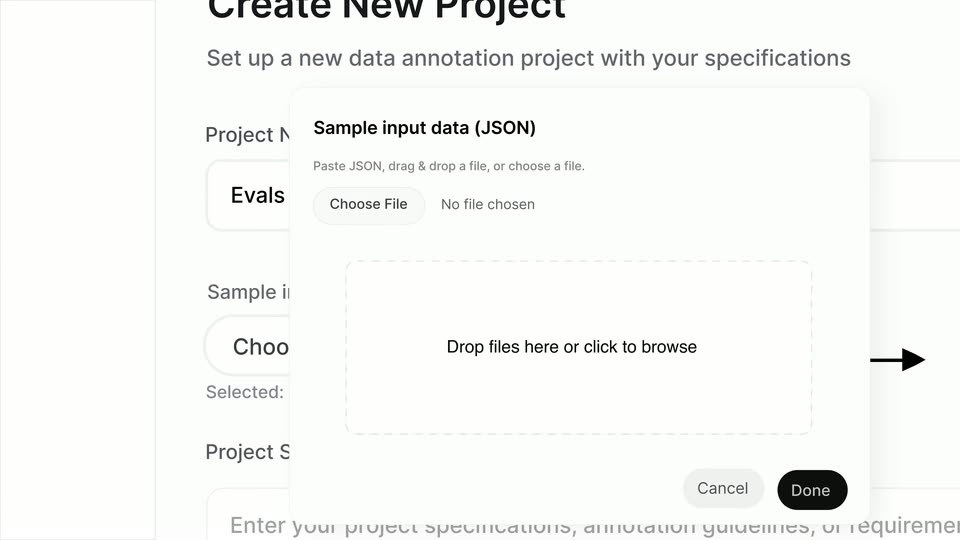
A white Create New Project form sits on a gray backdrop, then the view zooms into the fields. A cursor types Evals for law, clicks Choose JSON, and a modal opens with a dashed drop zone where a gray JSON file icon appears.
Techniques: UI zoom, Cursor demo
Camera: Push in
A white form scrolls as a cursor opens a file dialog, picks a JSON file, and clicks Done. The view then pans down past a project specification field to a teal Create Project button.
Techniques: Cursor demo
Camera: Pan
Close-up of a white interface panel with a teal pill button reading Create Project and a right arrow. A black cursor hovers over the button, which scales up as the cursor moves away to the bottom right.
Techniques: Cursor demo
Camera: Static
On a plain white field, a centered gray line reads Generating your interface beside a small gray loading arc. The arc becomes a green check circle as the line swaps to Generated your annotation project, then a Create Project label scales in at the end.
On-screen text: “Generating your interface...”, “Generated your annotation project”, “Create Project”
Techniques: Kinetic type, Morph
Camera: Static
A light project dashboard shows three columns: a tools sidebar, an AI interface builder chat, and a live preview form. The view zooms into the chat input at the bottom as a plain-English instruction is typed next to a send icon.
Techniques: UI zoom
Camera: Push in
A 3D-tilted white card holds the Evals for law interface on a plain white background. The view zooms in and reframes onto the right column, cropping the left sidebar out of frame, while the UI text fades from faint gray to solid black and the Submit button appears.
Techniques: 3D mockup, UI zoom
Camera: Push in
A cursor drags a JSONL file card into the dashed drop zone of the Upload Tasks panel, then the frame zooms in on the Browse and Upload buttons as the cursor rests on the teal Upload button.
Techniques: Cursor demo, UI zoom
Camera: Push in
A white Tasks table with ID, CREATED, STATUS, PREVIEW columns lists UUID rows, dates, Not Started status, View JSON and View on Interface buttons. It crossfades in with a brief double-exposure, then eases to a smaller centered scale.
Camera: Push in
A white card with a lightbulb icon and a teal Create Instructions button sits on a pale background. A black cursor slides in and hovers over the button, then the view cuts to a blank document page with a Published badge and Preview and Edit controls.
Techniques: Cursor demo
Camera: Push in
A white document card on a pale gray field holds a rubric evaluation set. The body text fades from faint to solid black, then the page scrolls upward, pushing the Published badge and Edit button off the top edge to reveal the objectives and annotation guidelines.
Camera: Push in
A white “Invite Users” modal dialog fades in on a plain white background, its title, three tabs and email input field sharpening from blur into place, with Cancel and Confirm buttons at the bottom right.
Camera: Push in
A white modal titled Invite Users sits centered on a plain background. A cursor clicks the Source Users tab, switching the form to a User Requirements field where text is typed, then the cursor moves to the Confirm button.
Techniques: Cursor demo
Camera: Static
A white Invite Users dialog, its Source Users tab active and a requirements line typed in, floats on a plain field with a cursor at the lower right. The card shrinks and drops to the bottom as a pale world map with circular expert headshots fades in behind it.
Techniques: UI zoom
Camera: Push in
A gray world map fills the top of the frame with six circular headshots pinned over continents. Below it, a user-management table lists names, emails, roles and dates with red Remove buttons. The camera slowly zooms in, cropping the top portraits.
Techniques: UI zoom
Camera: Push in
A centered black line on a white field cycles through three phrases. Design your pipeline dissolves into Design your review system, then Design your QA fades in letter by letter, the last letter still gray.
On-screen text: “Design your pipeline”, “Design your review system”, “Design your QA”
Techniques: Kinetic type
Camera: Static
On a plain white field, the black line 'Design your QA' holds center while a second line 'without fighting configs' fades in below it. The pair then gives way to the single word 'Evals' in the same centered position.
On-screen text: “Design your QA”, “without fighting configs”, “Evals”
Techniques: Kinetic type
Camera: Static
A plain white card holds a single centered black word that swaps in sequence: Evals, SFT, RLHF, RL, Multimodal, then All languages. Each label sits still at center before the next cuts in at the same spot.
On-screen text: “Evals”, “SFT”, “RLHF”, “RL”, “Multimodal”, “All languages”
Techniques: Kinetic type
Camera: Static
On a white background, the MangoDesk logo assembles at center: the orange fruit mark slides left as the wordmark fades in. A blue button reading Book a demo today drops in below, and a cursor glides in to hover over it.
On-screen text: “MangoDesk”, “Book a demo today”
Techniques: Cursor demo
Camera: Static