
0:55
Explore
fixa launch video.
fixa · Nov 2024 · 0:30 · Full motion · AI-annotated
- Length
- 0:30
- Scenes
- 15 · 2.0 s avg
- Product on screen
- 0:02
- Features shown
- 4
- Call to action
- 0:25 · 84%
- Voiceover
- Yes
- Views
- 600 on YouTube
as of November 24, 2026
00:00:00 / 00:30:12
- Length
- 0:30
- Scenes
- 15 · 2.0 s avg
- Product on screen
- 0:02
- Features shown
- 4
- Call to action
- 0:25 · 84%
- Voiceover
- Yes
- Views
- 600 on YouTube
as of November 24, 2026
fixa’s 0:30 launch film runs 15 scenes, about 2.0 s each. The product shows up at 0:02 and 4 features are revealed. The call to action lands at 0:25 (84% in), over a voiceover. The video is built as a numbered walkthrough: a blunt hook, a one-line product name, then four step cards (generate, run, analyze, fix) that each pair a title card with a demo, closing on a tagline and URL. Signature moves are line-by-line text fades, scale-in labels, dashed connector lines, and hard cuts between charcoal and off-white fields.
No filming indicatedEstimated needs: 2 capture groups — your screens or recordings · 1 official logo — reused across the film · 4 graphic passages — draw or supply
Is this your launch? to your site or press kit.
More like this



Similar soundtrack
Films whose music sounds like this one, voice left out
1:09

Youn Hwang - Introducing Claude Code for paid ads. Drop in your website. Playad l
Playad · Upbeat, high-energy funk-rock instrumental with Latin and punk influences.
0:21

1:27

Superserve - Computers for long-running agents
Superserve · Modern electronic
fixa launch video., scene by scene
· 15 scenes as text
01 · Hook · 0:00–0:02
On a dark charcoal background, a three-line question fades in line by line in white sans-serif, then cuts to a two-line statement that fades in the same way. Each line starts dim and brightens to full white. The frame stays locked off throughout.
On-screen text: “still calling your”, “AI voice agents”, “to find bugs?”, “don't build some”, “crappy internal tool.”
Techniques: Kinetic type
Camera: Static
02 · Product intro · 0:02–0:04
A dark charcoal background holds a single centered white line, try fixa instead., with fixa set in bold. The frame is locked off and the text stays perfectly still for the whole beat.
On-screen text: “don't build some”, “crappy internal tool.”, “try fixa instead.”
Camera: Static
03 · Feature reveal · 0:04–0:05
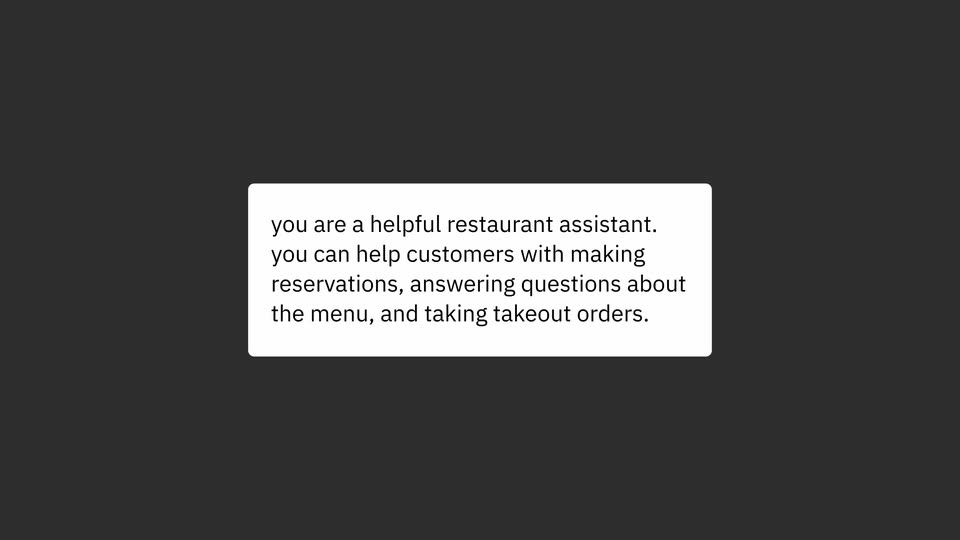
A small white rectangle on a dark gray field expands into a rounded card, and the prompt text fills it line by line: you are a helpful restaurant assistant, you can help customers with making reservations, answering questions about the menu, and taking takeout orders. Locked-off frame.
On-screen text: “you are a helpful restaurant assistant.”, “you can help customers with making reservations, answering questions about the menu, and taking takeout orders.”
Techniques: Morph, Kinetic type
Camera: Static
04 · Feature reveal · 0:05–0:08
A white prompt card dims on a dark field as the caption 'step 1. generate test cases' fades in. Three white labels, 'make reservation', 'order takeout', 'ask about menu', scale in scattered, then slide into a centered vertical stack as the card and caption fade out.
On-screen text: “step 1. generate test cases”
Techniques: Kinetic type
Camera: Static
05 · Feature reveal · 0:08–0:09
A pale off-white field holds the centered black title step 2. The type scales gently, marking the step in the sequence.
On-screen text: “step 2.”
Techniques: Kinetic type
Camera: Static
06 · Feature reveal · 0:09–0:11
On a plain white background, the headline step 2. scales in above a black rounded button labeled run test with a rocket emoji. Below, the caption our AI agents call your AI agents slides in word by word from left to right.
On-screen text: “step 2.”, “our AI agents call your AI agents”
Techniques: Kinetic type
Camera: Static
07 · Feature reveal · 0:11–0:12
A white card holds a 'step 2.' headline, a black 'run test' button with a rocket emoji, and the line 'our AI agents call your AI agents'; the headline scales and the line slides off to reveal a diagram where three customer avatars connect by dashed lines to an agent avatar on the right.
On-screen text: “step 2.”, “run test”, “our AI agents call your AI agents”, “make reservation”, “angry man who had a bad day”, “order takeout”, “young woman who says “like” a lot”, “ask about menu”, “elderly woman who loves to talk”
Techniques: Kinetic type
Camera: Pan
08 · Feature reveal · 0:12–0:15
A dark diagram links three customer portraits on the left to a waiter avatar on the right with animated dashed lines. The middle white order takeout box stands out against the gray boxes while the dashes flow toward the right.
On-screen text: “make reservation”, “angry man who had a bad day”, “order takeout”, “young woman who says “like” a lot”, “ask about menu”, “elderly woman who loves to talk”
Camera: Static
09 · Feature reveal · 0:15–0:19
A two-panel call dashboard fills the frame as the headline 'step 3. analyze calls' assembles at the top. The view zooms into the right-hand transcript; a cursor hovers the red error flag beside the agent line, while the left list of scenarios and calls stays static.
On-screen text: “step 3. analyze calls”
Techniques: Kinetic type, Cursor demo, UI zoom
Camera: Push in
10 · Feature reveal · 0:19–0:22
A close-up of a chat log shows the agent's reply boxed in red with an error banner and two hand cursors hovering over it. The view scrolls down to reveal a suggested change card with a red minus line above a green plus line.
Techniques: Cursor demo, UI zoom
Camera: Pan
11 · Feature reveal · 0:22–0:22
A white suggested-change diff card sits centered on a dark gray background, showing a red removed line and a green added line with reject and accept buttons. Below it, the caption step 4. fix bugs sits in large white type. The card and caption ease into their final positions.
On-screen text: “step 4. fix bugs”
Camera: Static
12 · Feature reveal · 0:22–0:24
A white suggested-change card with red and green diff lines and reject/accept buttons sits centered on a dark field, a hand cursor on accept. It slides left off frame as the caption step 4. fix bugs drops down and exits.
On-screen text: “step 4. fix bugs”
Techniques: Cursor demo
Camera: Static
13 · Feature reveal · 0:24–0:25
A code diff block on a dark background shows a red minus line and a green plus line, beside a circular avatar of a smiling man in a suit. A hand cursor sits at the bottom as the elements drift right.
Camera: Static
14 · CTA · 0:25–0:26
A circular photo of a smiling man in a suit and tie is centered on a dark gray background. The bold white word “fix” pops in to its left, then the rest of the headline “AI voice agents faster.” follows word by word.
On-screen text: “fix AI voice agents faster.”, “1. Get specific iter”
Techniques: Kinetic type
Camera: Static
15 · CTA · 0:26–0:30
A dark gray card holds the bold white headline “fix AI voice agents faster.” A circular headshot of a smiling man in a suit sits over the word “voice” at the start, then clears away as the gray URL “https://fixa.dev” fades in below.
On-screen text: “fix AI voice agents faster.”, “https://fixa.dev”
Techniques: Masking
Camera: Static