1:28
Explore
Aura - We're open-sourcing Autopilot. A self-improving agent that plays you
Aura · Oct 2026 · 0:52 · AI-annotated
- Length
- 0:52
- Scenes
- 45 · 1.2 s avg
- Product on screen
- 0:01
- Features shown
- 4
- Call to action
- 0:47 · 91%
- Voiceover
- No
00:00:00 / 00:52:04
Aura’s 0:52 launch film runs 45 scenes, about 1.2 s each. The product shows up at 0:01 and 4 features are revealed, with social proof. The call to action lands at 0:47 (91% in). The video is built as a rapid alternation of locked-off black title cards, each carrying one declarative line with a single orange keyword, and fast-cut 3D gameplay and Unreal Engine editor demos. Its signature moves are blur-to-focus text snaps, cycling genre words, camera pushes into tilted editor windows, and extruded 3D bar charts that rotate between benchmark stats.
No filming indicatedEstimated needs: 2 capture groups — your screens or recordings · 1 official logo — reused across the film · 6 graphic passages — draw or supply · 11 3D passages — build or supply
Is this your launch? to your site or press kit.
More like this

Aura - We're open-sourcing Autopilot. A self-improving agent that plays you, scene by scene
· 45 scenes as text
01 · Hook · 0:00–0:01
A black screen holds a single white headline, “We're open-sourcing”, centered slightly below the middle. The frame is locked off and the text remains completely still for the full duration of the shot.
On-screen text: “We're open-sourcing”
Camera: Static
02 · Product intro · 0:01–0:03
On a plain white background, the black word Autopilot. snaps from a blurred, squashed form into sharp focus, with the gray tagline The open-source AI playtester. below it. The lockup then scales up and fades out, leaving a faint ghost of the letters.
On-screen text: “We're open-sourcing”, “Autopilot.”, “The open-source AI playtester.”
Techniques: Kinetic type
Camera: Push in
03 · Feature reveal · 0:03–0:03
On a black card, the white line “an agent that plays your” sits above a bold headline whose orange keyword swaps from “Shooter” to “RPG” before white “game.”. Faint rounded game icons fade in around the text, with a gray subline below.
On-screen text: “an agent that plays your”, “Shooter game.”, “Plays your game. Finds the bugs.”, “RPG game.”
Camera: Static
04 · Feature reveal · 0:03–0:05
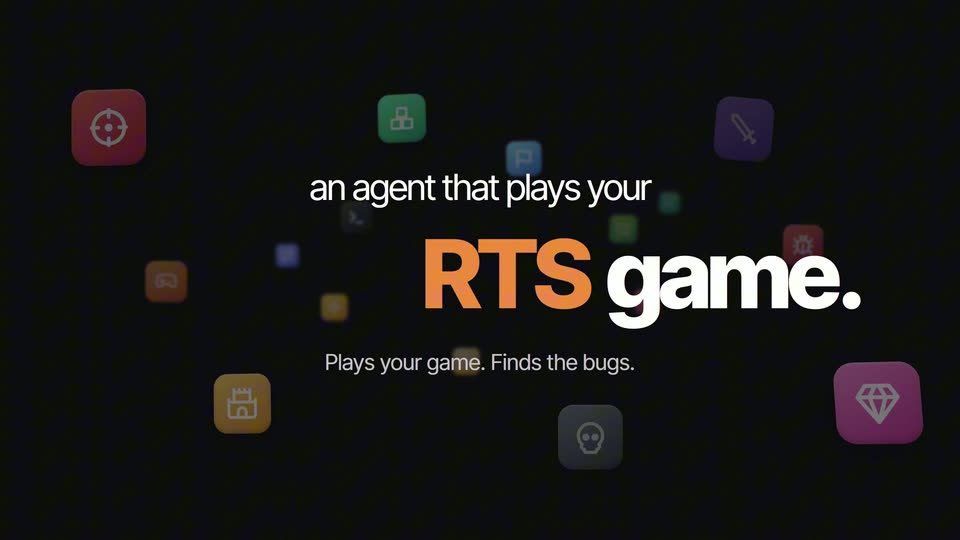
On a black field, colorful rounded app icons drift at varying depths while the white headline sits above a large orange genre word that cycles through RTS, Clicky, Soulslike and RPG, followed by game. and the subline Plays your game. Finds the bugs.
On-screen text: “an agent that plays your”, “RTS”, “game.”, “Plays your game. Finds the bugs.”, “Clicky”, “Soulslike”, “RPG”
Techniques: Kinetic type
Camera: Static
05 · Feature reveal · 0:05–0:06
Floating, depth-blurred game icons surround a centered headline, 'an agent that plays your Soulslike game.' with the subline 'Plays your game. Finds the bugs.' The shot then cuts to a first-person game view inside a glowing orange frame, with a status pill and a mission bar at the bottom.
On-screen text: “an agent that plays your”, “Soulslike game.”, “Plays your game. Finds the bugs.”
Camera: Push in
06 · Feature reveal · 0:06–0:07
A first-person shooter screen shows an AI bot aiming down sights at enemies in a warehouse, a +100 headshot pop-up flashes at center as a target falls. A top badge reads Autopilot is playing, a bottom banner states the task with a Playing pill.
On-screen text: “AUTOPILOT IS PLAYING | SHOOTER · UE5”, “Kill all enemies and capture the point while using aim down sights.”, “Playing”
Camera: Static
07 · Feature reveal · 0:07–0:08
First-person shooter view with autopilot HUD bars: the weapon aims down sights at an enemy between containers, a headshot and double-kill score pop up, then the camera pans right as the gun is dropped and a reload prompt shows.
Camera: Static
08 · Other · 0:08–0:10
On a black background, the white line “So You Can” holds at the top while a large two-tone line below swaps from “Save Time.” to “Find Bugs.”, the first word in orange and the rest in gray.
On-screen text: “So You Can”, “Save Time.”, “Find Bugs.”
Techniques: Kinetic type
Camera: Static
09 · Other · 0:10–0:11
A small white line reads So You Can, fixed above a large line that cycles through Find Bugs., Playtest. and Regression Test. in white and orange on a black field. Playtest. scales in as it swaps in, then the loop returns to Find Bugs.
On-screen text: “So You Can”, “Find Bugs.”, “Playtest.”, “Regression Test.”, “Find Bugs.”
Techniques: Kinetic type
Camera: Static
10 · Other · 0:11–0:12
A black card holds the white line “So You Can” above a bold headline “Run Golden Paths.”, the first word in orange. The pair swaps to a single gray line, “With a prompt.”
On-screen text: “So You Can”, “Run Golden Paths.”, “With a prompt.”
Techniques: Kinetic type
Camera: Static
11 · Feature reveal · 0:12–0:13
A black screen holds the centered white headline With a prompt. in a bold geometric sans, with a thin orange line underlining the word prompt. The text remains static for the full shot.
On-screen text: “With a prompt.”
Camera: Static
12 · Feature reveal · 0:13–0:14
A 3D-tilted Unreal Engine window floats on black behind a large white headline. The camera zooms into the viewport, dropping the headline to fill the frame with the orange industrial scene and editor panels.
On-screen text: “With a prompt.”
Techniques: 3D mockup, UI zoom
Camera: Push in
13 · Feature reveal · 0:14–0:16
A locked-off screen capture of the Unreal Engine 5 editor shows a first-person 3D warehouse viewport on the left and a right panel that switches from an actor list to a New run form, where a mouse cursor appears and a prompt is typed into the input box.
On-screen text: “Inside Unreal Engine 5”
Techniques: Cursor demo
Camera: Push in
14 · Feature reveal · 0:16–0:17
A dark interface panel shows a New run prompt box as the instruction text types out character by character. A white cursor glides to the orange Run button at the bottom right and hovers it, while a blurred orange panel sits at the left edge.
Techniques: Cursor demo
Camera: Static
15 · Feature reveal · 0:17–0:19
A dark overlay fades to reveal a 3D hangar with red barrels. A right-side UI panel lists agent decisions and action probabilities, with a cursor clicking a Run button.
Techniques: Cursor demo
Camera: Pan
16 · Feature reveal · 0:19–0:21
A first-person view of a dim warehouse hangar rotates across stacked crates and a held rifle, while a dark data table on the right logs the autopilot's steps and probability bars, its highlighted row shifting as the decision updates.
On-screen text: “AUTOPILOT IS PLAYING”, “MECHA HANGAR · UES”
Camera: Pull out
17 · Feature reveal · 0:21–0:22
A dark hangar interior lit by red warning lights. The camera swings to a low angle on a white and red spider robot with a glowing red eye, a green caution sign to the left. A HUD pill and a decision panel stay pinned to the frame.
On-screen text: “AUTOPILOT IS PLAYING”, “MECHA HANGAR · UES”, “DECISION START H2 #127”, “shoot_nearest_drone .77”
Techniques: 3D mockup
Camera: Static
18 · Feature reveal · 0:22–0:23
First-person 3D view inside a dim industrial hangar with a green CAUTION sign. A red laser beam fires from the lower right weapon, throwing off orange sparks, while a HUD panel reads the autopilot's decision in the corner.
Techniques: Particles
Camera: Static
19 · Demo · 0:23–0:23
A hooded knight with a sword stands in a stone archway arena lit by red torches, shifting slightly as two dark overlay pills label the autopilot task and status.
On-screen text: “SOULSLIKE · UE5”, “Beat the boss without dying.”, “Playing”
Camera: Static
20 · Demo · 0:23–0:24
A dark-armored knight turns and raises a blade in a stone arena with arches and a flaming brazier, a blue ring glowing on the floor. Two dark HUD pills sit at top and bottom, the lower one reading the task with an orange Playing tag.
On-screen text: “AUTOPILOT IS PLAYING”, “SOULSLIKE · UE5”, “Beat the boss without dying.”, “Playing”
Camera: Static
21 · Demo · 0:24–0:25
A hooded knight holding a sword turns in a torch-lit stone arena, the 3D game camera drifting to follow. Two dark pill banners overlay the footage: a top status strip and a bottom task line with a controller icon and a Playing button.
On-screen text: “SOULSLIKE · UE5”, “Beat the boss without dying.”, “Playing”
Camera: Static
22 · Demo · 0:25–0:25
A dark gothic arena with tall columns and burning torches fills the frame as a jagged black boss figure swings in the center. A top pill reads the autopilot status and a bottom pill states the task with a Playing tag, both held still over the action.
On-screen text: “AUTOPILOT IS PLAYING”, “SOULSLIKE · UE5”, “Beat the boss without dying.”, “Playing”
Camera: Pull out
23 · Feature reveal · 0:25–0:25
On a black field, the word It sits left of center in white. The word finds then materializes to its right, softening into focus with a faint glow as it locks in.
On-screen text: “It”, “finds”
Techniques: Kinetic type
Camera: Static
24 · Feature reveal · 0:25–0:27
A black field holds a centered white headline that completes in two beats: “It finds the” sits first, then “bug.” appears to finish the phrase. The frame stays locked off.
On-screen text: “It finds the bug.”
Techniques: Kinetic type
Camera: Static
25 · Feature reveal · 0:27–0:28
A locked-off wide shot of a 3D white arena with a checkered floor. A black armored character spins to dodge a flying enemy mid-combat. Static HUD pills frame the top-left and bottom, reporting autopilot status and the current task.
On-screen text: “It finds the bug.”
Camera: Static
26 · Feature reveal · 0:28–0:29
A dark armored knight trades sword strikes with a second figure in a white checkered arena under a blue sky, red slash trails arcing around them. The locked-off shot keeps a top-left status pill and a bottom caption bar framing the fight.
On-screen text: “AUTOPILOT IS PLAYING”, “ACTION · UE5”, “Dodge all the attacks.”, “Playing”
Camera: Static
27 · Feature reveal · 0:29–0:30
The word “and” in white lowercase bold sans sits centered on a black background, resolving from a soft glow into a crisp frame.
On-screen text: “and”
Camera: Static
28 · Feature reveal · 0:30–0:31
On a black field, the white lowercase line “and fixes it.” sits centered and locked off. The first two words are already set while the final word fades in, then the whole phrase holds still.
On-screen text: “and fixes it.”
Techniques: Kinetic type
Camera: Static
29 · Feature reveal · 0:31–0:31
Black background with a left-aligned tagline: white line over a large orange line that snaps from motion blur into focus, then a gray subline fades in below. On the right, two interlocking rings, one copper and one silver, rotate slowly while small orange and white cubes drift around them.
On-screen text: “It gets better”, “every run.”, “Learns. Remembers. Improves.”
Techniques: Kinetic type, 3D mockup
Camera: Static
30 · Feature reveal · 0:31–0:33
A dark frame holds the white line “It gets better”, the large orange “every run.” and the gray “Learns. Remembers. Improves.” on the left, while a copper-and-silver 3D ring with small floating cubes rotates slowly on the right.
On-screen text: “It gets better”, “every run.”, “Learns. Remembers. Improves.”
Camera: Static
31 · Other · 0:33–0:36
A dark frame with the GitHub mark and an Open source. headline at the top, and Works with fading in below it. Partner logos for Unreal Engine, Godot, Claude Code and Codex swap one by one in the center. A thin white line runs along the bottom.
On-screen text: “Open source.”, “Works with”
Camera: Static
32 · Social proof · 0:36–0:37
A dark infographic shows three extruded 3D bars, orange, salmon and gray, rising to 7/7, 5/7 and 4/7 above the labels Autopilot, Claude Code and Competitor. On the right, a large orange 28.7% and white caption more accurate than Claude Code fade in.
On-screen text: “Accuracy”, “Pass@1 · Goal or verification correct in under 1800s · 7 tasks”, “7/7”, “5/7”, “4/7”, “Autopilot”, “Claude Code”, “Competitor”, “28.7%”, “more accurate than Claude Code”
Camera: Static
33 · Social proof · 0:37–0:38
On a black background, a 3D bar chart labeled Accuracy sits left of a large orange 28.7% with the caption more accurate than Claude Code. The composition rotates in 3D, swinging the Accuracy panel away and turning a Mean time taken chart into view.
On-screen text: “Accuracy”, “Pass@1 · Goal or verification correct in under 1800s · 7 tasks”, “7/7”, “5/7”, “4/7”, “Autopilot”, “Claude Code”, “Competitor”, “28.7%”, “more accurate than Claude Code”
Camera: Pull out
34 · Social proof · 0:38–0:40
A black slide shows three 3D bars labeled Autopilot, Claude Code and Competitor under the title Mean time taken. The Competitor bar grows as its value counts up to 508s, while a large orange 2x and the line faster than our competitor. fade in on the right.
On-screen text: “Mean time taken”, “First output token → last output token. Lower is better.”, “262s”, “437s”, “508s”, “Autopilot”, “Claude Code”, “Competitor”, “2x”, “faster than our competitor.”
Techniques: Kinetic type
Camera: Static
35 · Social proof · 0:40–0:41
A black infographic holds still. On the left, a 3D bar chart shows three extruded bars in orange, red-brown and gray with time values and names beneath. A white title sits top-left. On the right, a large orange 2x sits above white text.
On-screen text: “Mean time taken”, “First output token → last output token. Lower is better.”, “262s”, “437s”, “508s”, “Autopilot”, “Claude Code”, “Competitor”, “2x”, “faster than our competitor.”
Camera: Static
36 · Social proof · 0:41–0:41
A black frame holds a large orange ~100x above a smaller white caption reading cheaper per decision. A thin orange line draws left to right along the bottom edge while both lines of text stay locked in place.
On-screen text: “~100x”, “cheaper per decision.”
Camera: Static
37 · Social proof · 0:41–0:43
A locked-off card on a black field. A large orange ~100x sits center, with white cheaper per decision. beneath it and a smaller gray caption Autopilot's policy model vs. an LLM call below, finished by a thin orange rule near the bottom.
On-screen text: “~100x”, “cheaper per decision.”, “Autopilot's policy model vs. an LLM call”
Camera: Static
38 · Social proof · 0:43–0:43
A black card holds a large headline reading ~100x above cheaper per decision., with a small caption beneath comparing Autopilot's policy model to an LLM call. The frame is locked off and the text stays still.
On-screen text: “~100x”, “cheaper per decision.”, “Autopilot's policy model vs. an LLM call”
Camera: Static
39 · Other · 0:43–0:45
On a black field, bold white sans-serif words fade in one by one to form the line “Stop being your agent's”, then a much larger gray “tester.” scales in beneath it.
On-screen text: “Stop being your agent's”, “tester.”
Techniques: Kinetic type
Camera: Pan
40 · Other · 0:45–0:45
A plain light-gray background holds two lines of black bold sans text. The smaller line 'Stop being your agent's' stays still while the huge word 'tester.' scales up, its letterforms masking shifting footage of a person and flames.
On-screen text: “Stop being your agent's”, “tester.”
Techniques: Kinetic type, Masking
Camera: Static
41 · Other · 0:45–0:46
On a plain off-white field, a black headline reads 'Stop being your agent's' above an oversized 'tester.' whose letterforms mask a clip of a person in red light. The big word scales up while the masked footage plays, ending on an orange dot.
On-screen text: “Stop being your agent's”, “tester.”
Techniques: Kinetic type, Masking
Camera: Static
42 · Other · 0:46–0:47
On a black background, a white bold headline reads “Stop being your agent's” above a huge mauve word “tester.” with an orange period. The letters of “tester” mask a short clip of a person wrapped in flames, then the word scales and the whole card blurs out.
On-screen text: “Stop being your agent's”, “tester.”
Techniques: Masking, Kinetic type
Camera: Push in
43 · CTA · 0:47–0:48
A coral hexagon badge with a white stylized A sits left of center on a near-black field, ringed by a soft radial glow that pulses and drifts. The frame holds on the mark as a quiet sign-off.
On-screen text: “Stop being your agent's”
Camera: Static
44 · CTA · 0:48–0:50
On a dark field, the coral hexagon A logo holds center as a faint Aura wordmark fades out. It shrinks and rises to the top while the URL, a GitHub line and a tagline fade in below it, ending on a locked-off sign-off card.
On-screen text: “www.tryaura.dev/autopilot”, “Open source on GitHub”, “Aura: free 2 weeks, no card.”
Camera: Static
45 · CTA · 0:50–0:52
A dark end card holds a coral hexagon logo with a white A mark centered above a large white URL, the word autopilot in orange with an underline. Below sit a GitHub icon line and a free-trial line, all static on a subtle radial glow.
On-screen text: “www.tryaura.dev/autopilot”, “Open source on GitHub”, “Aura: free 2 weeks, no card.”
Camera: Static