0:58

Stop Using Generalist AI: Meet Super Agents
ClickUp · Productivity · Mar 2026
TinyFish · Oct 2026 · 0:42 · Full motion · AI-annotated
TinyFish’s 0:42 launch film runs 27 scenes, about 1.6 s each. The product is on screen from the first frame. The call to action lands at 0:40 (94% in). The video is built as a head to head test: a brand card, a fake chat that poses the problem, then the same prompt fired at three AI agents with each result revealed one by one under a typed caption, closing on a follow CTA. Its signature moves are the letter by letter typing of captions and transition lines, the black rounded caption bar pinned to the bottom, the green and orange color coding of the two brand names, and the wipe that reveals the underwater scene.
Is this your launch? to your site or press kit.
ClickUp · Productivity · Mar 2026
Skillsync · B2B · Jan 2026
Films whose music sounds like this one, voice left out
Kosh · Upbeat electronic
Callbook · Corporate tech promotional video
Mercury Agent · Lo-fi hip-hop, chillhop, and electronic music with a brief rock interruption.
A rounded card with the TinyFish logo and a yellow X sits centered over a white field. A left-to-right wipe clears the white, revealing a dark underwater game scene behind the now translucent card as the logo darkens and sharpens.
On-screen text: “TinyFish”, “X”
Techniques: Masking
Camera: Static
An illustrated underwater scene with rocks, coral and fish fills the frame. A frosted white card fades in at center, holding the TinyFish and Qoder logos side by side with a tagline and an orange underline beneath.
On-screen text: “TinyFish”, “x”, “Qoder”, “TinyFish gives every QoderWork agent contact with reality”
Camera: Static
A black screen holds three chat bubbles that pop in one after another, each tilting slightly before settling flat. Two white bubbles sit on the left, then a green reply bubble lands on the right.
On-screen text: “yo GTA 6 just dropped, my setup can't handle this”, “need to get 5090 asap”, “let me check with my AI agents, see who can actually find me a good price”
Techniques: Kinetic type
Camera: Static
A black chat interface holds four message bubbles, white on the left and green on the right. The final green bubble enters tilted and rotates flat to settle into the list.
Camera: Static
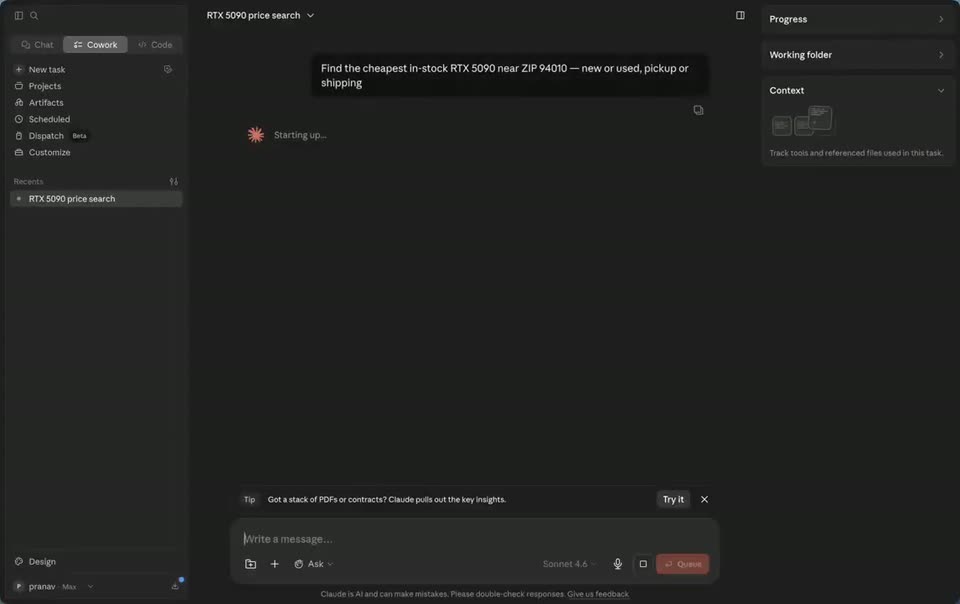
The dark Cowork screen shifts from the home prompt view to a running task layout with a right-hand panel, then a black bar slides up at the bottom and types out white text letter by letter.
On-screen text: “Same exact prompt”
Techniques: Kinetic type
Camera: Static
A dark chat interface holds a locked-off frame, with a prompt bubble at the top and a 'Working on it...' status at left. A black pill caption at the bottom types out 'Same exact prompt across all agents' character by character with a blinking cursor.
On-screen text: “Same exact prompt across all agents”
Techniques: Kinetic type
Camera: Static
A dark Genspark AI Workspace interface shows a prompt being typed into the search bar above a row of agent icons. The view then reframes right, where a result card with a price appears beside the loading prompt.
On-screen text: “Same exact prompt across all agents”
Techniques: UI zoom
Camera: Pull out
A dark agent interface with a left icon sidebar shows a white prompt bubble for an RTX 5090 search and a Thinking label. The view crossfades in from a blurred prior screen. A black caption box at the bottom right states the prompt is the same across all agents.
On-screen text: “Same exact prompt across all agents”
Camera: Static
A hand cursor taps Connectors in the left sidebar, and the view zooms into the Connectors page, which lists integrations under Market and Installed tabs. A black caption bar with white italic text slides in at the lower right.
On-screen text: “Same exact prompt across all agents”
Techniques: Cursor demo, UI zoom
Camera: Push in
A light integration list scrolls upward past Slack, Linear, Notion and TinyFish rows. A hand cursor hovers over each row, triggering gray tooltips that read out the tool's function.
Techniques: Cursor demo
Camera: Static
A white modal card sits over a blurred app window. A hand cursor taps the dark button at the bottom; the header cycles from an install prompt through a spinner to a green-checked connected state, and the button becomes a red text link.
Techniques: Cursor demo
Camera: Pan
The dimmed QoderWork interface zooms in on the task input, where a small white callout shows “use tinyfish.” A black caption bar at the bottom types out the line word by word, “QoderWork” in green and “TinyFish Connector” in orange.
On-screen text: “Same prompt. QoderWork using TinyFish Connector”
Techniques: UI zoom, Kinetic type
Camera: Push in
A brief opening blur settles into a locked-off view of the QoderWork interface, where a user prompt about a used RTX 5090 sits in the chat panel and the status line switches from reading to gathering context. A black bottom bar carries the comparison caption in green and orange.
On-screen text: “Same prompt. QoderWork using TinyFish Connector”
Camera: Pull out
On a black background, a white italic sentence types out left to right, beginning with “Let's” and a block cursor, then completing the line. The text stays centered-left while the cursor blinks at the end of the typed words.
On-screen text: “Let's see what each agent found”
Techniques: Kinetic type
Camera: Static
A dark AI cowork interface fills the frame. The main panel jumps from web search results to the agent's reply, which flags a suspicious eBay price with a warning icon and a waiting spinner. A static caption reads “Let's see what each agent found”.
On-screen text: “Let's see what each agent found”
Camera: Static
A dark chat interface holds a long white serif response about GPU pricing, with a small orange sparkle and a writing timer at the bottom left. In the final beat, a dark rounded badge slides in at the lower right, revealing the word Claude in terracotta serif.
On-screen text: “Claude”
Techniques: Masking
Camera: Static
A dark document view of a GPU pricing response holds still as a black rounded caption at the bottom types out a peach italic line word by word with a blinking cursor.
On-screen text: “Claude – didn't surface exact prices”
Techniques: Kinetic type
Camera: Static
A dark chat interface displays a map card with a red location pin. The panel scrolls vertically, sliding the map up to expose a stack of search action rows and a blinking thinking cursor.
Camera: Static
A dark browser window of the Genspark app shows a San Francisco map card scrolling up as a price table and a paragraph of search results appear below it. A black rounded caption at the bottom right types out the line about the map tool.
On-screen text: “Genspark – fast, has a map tool.”
Techniques: Kinetic type
Camera: Static
A dark chat interface shows a document and a ranked price table that scrolls up slightly. A black rounded bar at the bottom types out a white italic caption word by word, ending on a blinking cursor.
On-screen text: “but missed the cheapest option”
Techniques: Kinetic type
Camera: Static
A chat agent screen shows a thought block above a grid of live browser windows that cycle through retailer pages. A black caption bar types the equation at the bottom, then the grid reframes onto a single eBay listing.
On-screen text: “QoderWork + TinyFish = multiple agents browsing for you”
Techniques: Kinetic type, UI zoom
Camera: Static
A static agent interface shows a chat thread with a thought block and an embedded eBay results page labeled TinyFish. A black banner across the bottom holds the equation text in green, orange and white.
On-screen text: “QoderWork + TinyFish = multiple agents browsing for you”
Camera: Static
A light app window shows an agent task titled Find cheapest RTX 5090, with thought steps and a six-tile grid of retailer screenshots each marked by a green check icon. A bottom progress bar counts up from 33 to 78 seconds while the cursor rests at the right edge.
On-screen text: “QoderWork + TinyFish = multiple agents browsing for you”
Camera: Static
A light app window shows a dark browser panel with three checked screenshots above a list of GPU price deals. The view zooms steadily into the deal text, enlarging the entries, while a Reflecting status bar with an Add to the queue field stays fixed at the bottom.
Techniques: UI zoom
Camera: Push in
A white list of GPU deals and prices scrolls upward through the frame while a black rounded caption with green text stays fixed at the bottom.
On-screen text: “QoderWork - Found the best price available”
Camera: Static
On a black background, the line “Follow to watch Part 2:” types out left to right with a block cursor, while a green “Qode” word types in at the lower left.
On-screen text: “Follow to watch Part 2:”, “Qode”
Techniques: Kinetic type
Camera: Static
On a black background, a white italic line reads 'Follow to watch Part 2:' above a second line that types out character by character behind a block cursor. The names 'QoderWork' and 'TinyFish' show in green and orange, the rest in white.
On-screen text: “Follow to watch Part 2:”, “QoderWork + TinyFish actually buy the GPU for you”
Techniques: Kinetic type
Camera: Static