
1:08
Explore
Introducing Tempo V2 - AI web design tool for designers and developers
Tempo · Mar 2025 · 1:01 · Full motion · AI-annotated
- Length
- 1:01
- Scenes
- 36 · 1.7 s avg
- Product on screen
- 0:08
- Features shown
- 3
- Voiceover
- Yes
- Views
- 31K on YouTube
as of November 20, 2026
00:00:00 / 01:01:04
- Length
- 1:01
- Scenes
- 36 · 1.7 s avg
- Product on screen
- 0:08
- Features shown
- 3
- Voiceover
- Yes
- Views
- 31K on YouTube
as of November 20, 2026
Tempo’s 1:01 launch film runs 36 scenes, about 1.7 s each. The product shows up at 0:08 and 3 features are revealed. There is no explicit call to action; a voiceover carries the film. The video opens with kinetic type that types out and swaps its final word, names the product, then runs a long product-in-use demo before stacking feature reveals separated by warp-speed starfield bursts. Its signature moves are letter-by-letter typed headlines, radial light-burst transitions, 3D whip-pans of the interface, and named collaborator cursors.
No filming indicatedEstimated needs: 5 capture groups — your screens or recordings · 1 official logo — reused across the film · 4 graphic passages — draw or supply · 10 3D passages — build or supply
Is this your launch? to your site or press kit.
More like this
0:58

Introducing a new generation of Airtable - built for the AI era
Airtable · Productivity · Jun 2025
1:55
Introducing Galaxy Watch Ultra2 | Galaxy AI | Samsung
Samsung · Jul 2026
Similar soundtrack
Films whose music sounds like this one, voice left out
1:56
Introducing Galaxy S26 FE | Galaxy AI | Samsung
Samsung Galaxy S26 FE · UK Garage / Bassline House
1:19

The New Mac Studio with M5 Max and M5 Ultra
Apple · Electronic Dance Music
2:13
Aman - We’ve raised a $7.5M seed round led by Felicis so AI can read documen
Unsiloed · Electronic
Introducing Tempo V2 - AI web design tool for designers and developers, scene by scene
· 36 scenes as text
01 · Hook · 0:00–0:05
On a gray-to-purple gradient, a thin white line draws across and closes into a rounded rectangle. Inside it, a sentence types out and its ending swaps from saas app to startup to anything. The box vanishes and in seconds. types over a field of small white dots.
On-screen text: “imagine if you could build your saas app.”, “imagine if you could build your startup.”, “imagine if you could build anything.”, “in seconds.”
Techniques: Kinetic type, Particles
Camera: Static
02 · Hook · 0:05–0:08
A gray-to-purple gradient fills the frame as a radial starfield of white particles streaks outward and collapses inward around the center. Centered white text reads “in seconds.” then swaps to “what would you build?”
On-screen text: “in seconds.”, “what would you build?”
Techniques: Particles
Camera: Push in
03 · Product intro · 0:08–0:09
A dark design editor shows a website canvas with the glowing words Introducing Tempo inside a selection box and a pink Kevin handle. The frame zooms out to reveal the full tool window, its layer panel and style panel.
Techniques: UI zoom
Camera: Pull out
04 · Product intro · 0:09–0:11
A black screen holds the headline Introducing Tempo above a dimmed design tool interface. A tagline types out in a text box while green and pink named cursors drift across the canvas, then the view zooms into the box.
On-screen text: “Introducing”, “Tempo”, “Where designers and developers can collaborate on code.”
Techniques: Kinetic type, UI zoom
Camera: Static
05 · Product intro · 0:11–0:12
A dark canvas shows a blue-bordered headline typing out the word Finally. after aborate on code. A green cursor tagged Kevin points up from a speech bubble below, a magenta cursor marks the right edge, and a dark toolbar with Code and Share tabs sits at the bottom.
On-screen text: “aborate on code. Finally.”
Techniques: Kinetic type
Camera: Static
06 · Demo · 0:12–0:14
On a black background, a violet line runs across the top with a rounded left corner, framing a panel. White sans-serif text types out letter by letter behind a blinking cursor, completing the phrase. The frame stays locked off.
On-screen text: “build a personalized fitness app”
Techniques: Kinetic type
Camera: Static
07 · Demo · 0:14–0:15
A locked-off close-up of a dark interface. A purple pill button with a white lens icon and the word Generate sits center frame, a thin purple panel edge runs across the top. A white hand cursor drifts down to the button's lower edge and presses it.
Techniques: Cursor demo
Camera: Static
08 · Demo · 0:15–0:17
The flat white dashboard whips into a 3D perspective: a dark tablet shows a component library on the left and a browser preview of the dashboard on the right, a pink Peter cursor hovering over BarChart. Motion blur clears as the frame settles.
Techniques: 3D mockup, Cursor demo
Camera: Push in
09 · Demo · 0:17–0:18
A 3D-angled screen shows a design tool: a dark component panel on the left with a pink Peter tag by the cursor, and a fitness dashboard in a browser on the right. The camera pulls back and rotates to a sharper side angle.
Techniques: 3D mockup
Camera: Pan
10 · Demo · 0:18–0:20
The view pans and zooms down a flat fitness dashboard mockup inside a design tool, moving from a weekly bar chart to workout cards and an activities table, with a dark properties panel on the right. A magenta Peter cursor label slides near the chart.
Techniques: UI zoom
Camera: Pan
11 · Demo · 0:20–0:22
Close-up of a UI card: a text element with blue selection handles and size tags changes from Focus Activities to Fine Grain Design Control as green named cursors hover, then the view zooms out to reveal the session card and a right-side settings panel.
Techniques: Cursor demo, UI zoom
Camera: Static
12 · Demo · 0:22–0:24
A close-up of a design tool interface scrolls down past a class card into a list of instructors and durations. A blue You comment bubble drifts across the dark inspector panel, pointing at the Styles and Fill sections.
Camera: Pan
13 · Demo · 0:24–0:26
A Figma canvas displays a fitness app screen with workout cards and an activities table. A color picker dialog sits open as the fill hue shifts from green to blue to magenta, while a blue You cursor hovers over the controls.
Techniques: Cursor demo
Camera: Pull out
14 · Demo · 0:26–0:28
A dark rounded command bar floats on a black ribbon over a white background. A cursor types the query letter by letter while the bar widens to fit, then the text settles. Image and sparkle icons sit beside a purple up-arrow button.
Techniques: Kinetic type
Camera: Static
15 · Demo · 0:28–0:30
A design tool window on white shows a fitness dashboard; a cursor edits it as the panel flips from light to dark theme, a caption scales in, and the view zooms to 171%.
On-screen text: “Let's make it dark mode”
Techniques: Cursor demo, UI zoom
Camera: Static
16 · Feature reveal · 0:30–0:32
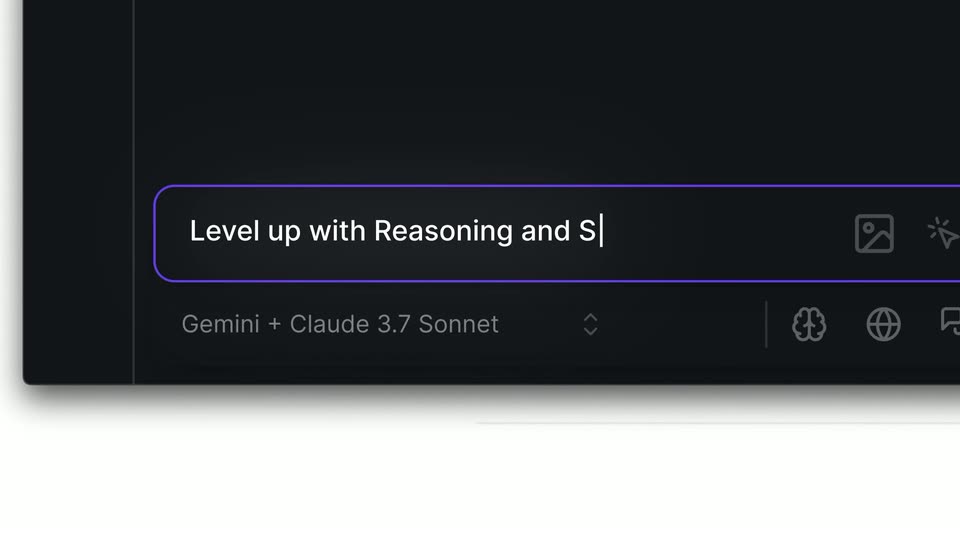
A close-up of a dark interface focuses on a purple-outlined input field. White text types out a prompt inside the field, while a model selector and icons remain static below.
On-screen text: “Level up with Reasoning and Search”
Techniques: Kinetic type
Camera: Static
17 · Feature reveal · 0:32–0:35
Close-up of a dark search bar with a row of icons. A hand cursor taps the brain and globe icons, a tooltip labels each, then an arrow cursor moves to the purple send button as the frame zooms in on it. A small headline scales in at the top.
On-screen text: “Level up with Reasoning and Search”
Techniques: Cursor demo, UI zoom
Camera: Push in
18 · Problem · 0:35–0:36
A purple field fills the frame as small white and blue dashes streak outward from the center in a radial burst. A tiny white zero sits at the focal point and scales in place.
On-screen text: “0”
Techniques: Particles
Camera: Pull out
19 · Problem · 0:36–0:37
A purple void holds a faint burst of light streaks radiating from the center, then the field turns black as the streaks lengthen into a warp-speed rush toward the viewer. The caption holds centered and still.
On-screen text: “dont waste tokens setting up payments”
Techniques: Particles, Speed ramp
Camera: Pull out
20 · Problem · 0:37–0:40
Centered white lowercase text on a black starfield reads 'dont waste tokens setting up' while the trailing word swaps from authentication to databases to payments. The stars then streak outward in a warp at the end.
On-screen text: “dont waste tokens setting up authentication”, “dont waste tokens setting up databases”, “dont waste tokens setting up payments”
Techniques: Kinetic type, Particles, Speed ramp
Camera: Push in
21 · Feature reveal · 0:40–0:44
A dark integrations setup screen shows rows of option cards. A cursor selects the Supabase card, then the Stripe card, then rests on the Setup Integrations button as the view zooms out to the full page. A glowing caption reading start with pre-built templates fades out over the center.
On-screen text: “start with pre-built templates”
Techniques: Cursor demo, UI zoom
Camera: Pull out
22 · Feature reveal · 0:44–0:45
A dark Share dialog resolves from a doubled-text offset; a cursor clicks the Deploy button and a burst of blue and white streaks radiates from the card's center over a faint grid.
Techniques: Cursor demo, Particles
Camera: Static
23 · Feature reveal · 0:45–0:46
On a black field, thin streaks of white, blue and purple light burst outward from the center in a radial warp-speed flythrough. The streaks lengthen and blur as they race to the edges, leaving the middle dark.
Techniques: Particles
Camera: Pull out
24 · Feature reveal · 0:46–0:48
On a black screen, a radial burst of thin white light streaks flares outward from the center as the phrase “one more thing.” fades in at the middle. The streaks dim and the white text settles into a soft glow.
On-screen text: “one more thing.”
Techniques: Particles
Camera: Pull out
25 · Feature reveal · 0:48–0:49
A centered white headline reads “build mobile apps with expo” over a soft, defocused gray backdrop. The type begins blurred and pulls into focus with a faint glow while the locked-off frame holds still.
On-screen text: “build mobile apps with expo”
Camera: Static
26 · Feature reveal · 0:49–0:52
A glowing white headline reads across a black background while an iPhone mockup showing a Tesla car app scales up from behind the text to the front, then the headline fades out, leaving the app screen centered.
On-screen text: “build mobile apps with expo”
Camera: Static
27 · Feature reveal · 0:52–0:52
A front-facing smartphone mockup floats on a purple gradient, its screen showing a banking app home view with a card carousel, quick-action icons and a transactions list. The frame is locked off and static.
Camera: Static
28 · Feature reveal · 0:52–0:53
A front-facing smartphone mockup sits centered on a flat orange gradient background, displaying a calendar app with a week strip, time slots and two event cards. The frame is locked off with no motion.
Camera: Static
29 · Feature reveal · 0:53–0:53
A white iPhone mockup sits centered on a flat mint green background, showing a payment screen with a dark gradient card, order details, and green Cash and gray Card buttons. The frame stays locked and static throughout.
Camera: Static
30 · Feature reveal · 0:53–0:54
A white smartphone mockup sits centered on a soft pink gradient, locked off. Its screen shows a shopping app with a pink handbag photo, color and size selectors, and a black add-to-cart button. The product title scales in.
Camera: Static
31 · Feature reveal · 0:54–0:54
A white-framed smartphone is centered on a blue gradient background, its screen showing a banking app with a blue header, a balance card, four action buttons, a row of contact avatars, and a transaction line. The frame stays locked off and static.
Camera: Static
32 · Feature reveal · 0:54–0:55
A white smartphone mockup sits centered on a flat lime green background, screen showing a dark transit map with a yellow route line and a blue car marker. A white checkout sheet at the bottom lists route details, all held static in a locked-off frame.
Camera: Static
33 · Feature reveal · 0:55–0:55
A white iPhone mockup floats centered on a purple gradient backdrop, its screen showing a finance dashboard with a total balance, line chart, and budget rows. The shot is a locked-off front view with a soft drop shadow.
Techniques: 3D mockup
Camera: Static
34 · Feature reveal · 0:55–0:56
A front-facing smartphone mockup floats centered on a pink gradient backdrop. Its screen shows a trainer list with three profiles and a fourth partially visible, all held in a locked-off frame.
Camera: Static
35 · Outro · 0:56–0:58
A white stylized T logo sits centered on a black background. The lowercase tagline just ship it. appears below it, then both hold static on a locked-off frame for the sign-off.
On-screen text: “just ship it.”
Camera: Static
36 · Outro · 0:58–1:01
A black frame holds the light gray lowercase wordmark tempo.new, centered and locked off. It holds steady for the duration, then fades out to black as a sign-off.
On-screen text: “tempo.new”
Camera: Static