
2:39
Explore
00:00:00 / 00:40:18
- Length
- 0:40
- Scenes
- 43 · 0.9 s avg
- Product on screen
- 0:17
- Features shown
- 2
- Call to action
- 0:39 · 96%
- Voiceover
- Yes
- Views
- 269 on YouTube
as of November 23, 2026
Standout’s 0:40 launch film runs 43 scenes, about 0.9 s each. The product shows up at 0:17 and 2 features are revealed. The call to action lands at 0:39 (96% in), over a voiceover. The video is built as a fast argument: archival and live footage carry a word-by-word caption that states the shift from credentials to AI skill, then a black terminal and a stack of teal score cards demo the product in short cuts. Its signature moves are the centered serif/sans caption that swaps word by word in sync with the voiceover, the green monospace terminal typing, and the glitchy counting numbers, all cut at a high tempo on a near-black palette.
Footage neededEstimated needs: 4 capture groups — your screens or recordings · 1 official logo — reused across the film · 15 filmed passages — shoot, supply or replace · 1 graphic passage — draw or supply · 2 3D passages — build or supply
Is this your launch? to your site or press kit.
More like this

Similar soundtrack
Films whose music sounds like this one, voice left out
1:47
Alliance - Introducing ALL19. Built for the unconventional builder. 20 teams,
ALL19 · Documentary montage with cinematic and electronic elements
1:11

General-Purpose, Self-Evolving Robot Scientists
Primordiant · Cinematic Electronic
0:32

Shensi Ding - We just cut AI spend by 75% across an entire workforce in one click.
Merge · Upbeat electronic
Standout (CLI) — Hiring is broken. We're fixing it, scene by scene
· 43 scenes as text
01 · Hook · 0:00–0:00
A desaturated, hazy aerial shot of a circular campus building cuts to an overhead view of a Google campus complex. The word 'we' sits in white on the left as the frame holds still.
On-screen text: “we”
Camera: Static
02 · Hook · 0:00–0:00
A rotating cylindrical machine rig fills the frame, then cuts to a man speaking at a podium against a green backdrop. White lowercase words sit centered over each shot, locked in place with no motion.
On-screen text: “we used to”, “diploma”
Camera: Static
03 · Hook · 0:00–0:01
Archival-style footage of a man in a black academic gown with a red hood speaking at a wooden podium with a microphone, overlaid with CRT scanlines. A red and white banner hangs behind him and greenery sits to the right. The white serif word “diploma” is centered over his chest as the voiceover says “we used to need diploma.”
On-screen text: “we”, “used to need”, “diploma”
Camera: Static
04 · Hook · 0:01–0:02
Outdoor campus lawn with a round beige stage and a white screen showing the Google G logo; a presenter stands center stage while seated audience members and colored umbrellas fill the background. A large white serif word sits centered over the frame, swapping from diploma to experience to match the voiceover, locked off with no motion.
On-screen text: “diploma”, “experience”
Camera: Static
05 · Hook · 0:02–0:03
A wide shot of a packed graduation crowd in red robes and caps cheers below a bannered hall, while the lowercase word credentials sits centered in white serif.
On-screen text: “experience”, “credentials”
Camera: Static
06 · Hook · 0:03–0:03
A wide static shot of a dense crowd in red and black graduation gowns seated outdoors, with crimson banners strung between trees and a stone building behind. The white word credentials sits centered over the crowd.
On-screen text: “credentials”
Camera: Static
07 · Problem · 0:03–0:04
A wide shot of a graduation crowd in red robes holds the word credentials in large white serif. It cuts to a speaker on stage raising his hand as a blue phone mockup appears beside it, captioned Now, what people care about.
On-screen text: “credentials”, “Now, what people care about”
Camera: Static
08 · Problem · 0:04–0:05
A bald bearded man in a white tee and dark blazer stands behind a podium marked AI, gesturing with both hands against a black stage. A white caption line sits across the lower third. The camera is locked off.
On-screen text: “Now, what people care about”
Camera: Static
09 · Problem · 0:05–0:06
A scanline-glitched shot of a woman walking through a bright cafe cuts to a black field of teal digits. White italic serif words type in across the center as the voiceover line builds.
On-screen text: “Now, what people care about”, “is”, “is how good you”, “AI”
Techniques: Kinetic type
Camera: Pan
10 · Problem · 0:06–0:06
A dark terminal window fills the frame, its slash-command list frozen in monospace type. White italic serif text reading 'is how good you are using' sits centered over the lower half. The shot holds still.
On-screen text: “is how good you are using”
Camera: Static
11 · Problem · 0:06–0:07
A dark terminal listing slash commands dissolves into a dimly lit shot of a person typing on a laptop at a desk. White italic serif text “is how good you are using AI.” stays centered over both images.
On-screen text: “is how good you are using AI.”
Camera: Static
12 · Problem · 0:07–0:08
Over-the-shoulder view of a person at a dim desk, holding a small object in front of a monitor showing a terminal file list. The caption 'friends' sits centered at the bottom of the frame.
On-screen text: “friends”
Camera: Static
13 · Problem · 0:08–0:08
A Node.js terminal window with npm install and webpack output sits on a dark blue background. The caption word bragging holds at the bottom center, then exits as the terminal lines shift upward and the prompt moves to npm run build.
On-screen text: “friends”, “bragging”
Camera: Static
14 · Problem · 0:08–0:09
A dark room holds a glowing laptop. The camera pulls back from a tight shot of code on the screen to a wider view of hands typing on the keyboard. A white word sits at the bottom center, swapping from 'their' to 'token' to match the voiceover.
On-screen text: “their”, “token”
Techniques: Kinetic type
Camera: Static
15 · Problem · 0:09–0:10
A dark terminal interface fills the locked-off frame, its token count ticking up from 212 to 232. A centered white bold caption reads usage, then swaps to the number 45, which scales in to match the voiceover.
On-screen text: “usage,”, “45”
Techniques: Kinetic type
Camera: Static
16 · Problem · 0:10–0:10
A hooded figure sits in profile before a wide monitor covered in green terminal text, the room lit in blue. The white number 45 scales up at the bottom center as the agent count is called out.
On-screen text: “45”
Techniques: Kinetic type
Camera: Static
17 · Problem · 0:10–0:11
A dark terminal window fills the frame, green and white command lines scrolling upward past a black void. The white word agents sits centered at the bottom while the number 45 scales in above it, both locked to the frame as the code moves.
On-screen text: “45”, “agents”
Techniques: Kinetic type
Camera: Pan
18 · Problem · 0:11–0:12
In a dim, green-lit room, three young men sit at a table as a translucent code editor window floats over them, its JavaScript lines typing in. A white caption at the bottom swaps word by word.
On-screen text: “agents”, “running”, “simultaneously,”
Techniques: Kinetic type
Camera: Static
19 · Problem · 0:12–0:13
A glowing white timecode sits centered on black; its digits roll into a new value with a vertical blur while the word “simultaneously,” holds still beneath it.
On-screen text: “0:00:03”, “simultaneously,”, “0:03:04”
Techniques: Kinetic type
Camera: Static
20 · Problem · 0:13–0:13
Hands type on a laptop while Python code lines slide in over the footage, then the shot cuts to the same code on a plain cream background as more lines appear. A white caption at the bottom switches from “simultaneously,” to “feature”.
On-screen text: “simultaneously,”, “import pandas as pd”, “# Load the data into a pandas DataFrame”, “data = pd.read_csv('purchases.csv')”, “# Convert the 'date' column to a pandas Datetime object”, “data['date'] = pd.to_datetime(data['date'])”, “feature”, “# Create a new column with the month of the purchase”, “data['month'] = data['date'].apply(lambda x : x.month)”, “# Group the data by month and calculate the total spent”
Techniques: Kinetic type
Camera: Static
21 · Problem · 0:13–0:14
A dark HTML/CSS code editor and a light Python notebook cut back to back, each holding a single white caption word at the lower center that matches the spoken line.
On-screen text: “feature”, “they”
Techniques: Kinetic type
Camera: Static
22 · Problem · 0:14–0:14
Bold white text 'one-shot' sits over angled green code on a dark screen, then the frame blurs and crossfades into a close-up of a chat thread where a blue question bubble and an answer with a PowerShell command appear out of focus.
On-screen text: “one-shot”
Camera: Static
23 · Problem · 0:14–0:17
On black, “Now,” scales in in bold white sans left of center, then “it's time to” fades in below in white serif. The pair is replaced by a large centered serif line, “to prove it.”, which spans the frame width.
On-screen text: “Now,”, “it's time to”, “to prove it.”
Techniques: Kinetic type
Camera: Static
24 · Product intro · 0:17–0:18
A dark terminal window with three red, yellow and green dots sits on a black background, its right edge cut off by the frame. A small green square with a white dollar sign fades in inside the window as the command prompt.
Camera: Static
25 · Product intro · 0:18–0:19
A dark teal terminal window sits centered on black, typing the command $ standout score, while large white words We then build pop in below.
On-screen text: “We”, “build”
Techniques: Kinetic type
Camera: Static
26 · Product intro · 0:19–0:20
A dark terminal window sits centered on black, showing the command $ standout score with a green cursor. Below it, large white bold text reads Standout, then changes to CLI.
On-screen text: “Standout”, “CLI”
Techniques: Kinetic type
Camera: Static
27 · Product intro · 0:20–0:21
A dark terminal window, tilted in 3D perspective, fills the frame on black. Green monospace lines appear one by one below the prompt, and a bold white word at the bottom center scales and changes.
On-screen text: “CLI”, “AI”, “All”
Techniques: 3D mockup, Kinetic type
Camera: Pan
28 · Product intro · 0:21–0:22
A dark VS Code window with an Explorer file list and a terminal panel sits in the background as the word “score” scales up in bold white type at center, then two prompt lines appear: “→ Reading Claude usage data...” and “→ Scanning Cursor activity...”.
On-screen text: “$ standout score”, “→ Reading Claude usage data...”, “→ Scanning Cursor activity...”
Techniques: Kinetic type
Camera: Static
29 · Product intro · 0:22–0:22
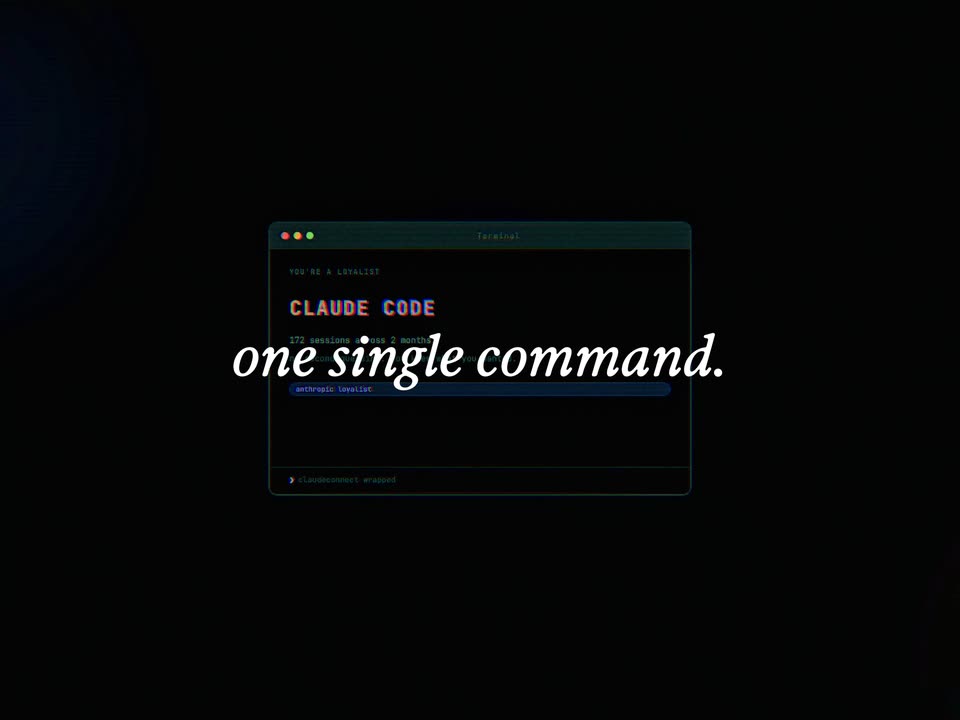
A terminal window on a black background lists AI models with progress bars filling, while a large white serif line reads one single command. centered over it. The frame stays locked off.
On-screen text: “one single command.”
Camera: Static
30 · Product intro · 0:22–0:23
A dark terminal window sits centered on black while a white italic serif headline, “one single command.”, holds still across it. Inside, model progress bars fill and status lines type in, ending with a rocket emoji at the prompt.
On-screen text: “one single command.”
Camera: Static
31 · Feature reveal · 0:23–0:23
A flat terminal mockup showing CLAUDE CODE on a black background flips to a browser window with a sidebar list, while a large white italic serif caption stays locked over the center. A white sans word pops in at the bottom.
On-screen text: “one single command.”, “Based”
Camera: Static
32 · Feature reveal · 0:23–0:24
Hands type on a laptop showing a chat window, then a glitch cut swaps to a cream code screen where pandas lines slide in and a white oval wipes across. The white word 'Based' stays locked at the bottom through the cut.
On-screen text: “Based”, “one single command.”
Techniques: Masking
Camera: Static
33 · Feature reveal · 0:24–0:24
A dark code editor and a light Jupyter notebook flash by as a white card holding three black ovals hovers at right. Bold white caption words read 'on' then 'usage' in the center while code lines slide past on a locked-off frame.
On-screen text: “on”, “usage”
Techniques: Kinetic type
Camera: Static
34 · Feature reveal · 0:24–0:26
A flat terminal window sits centered on black, its green monospace lines listing scan steps while a large green number counts up from 36 to 72 as the AI proficiency score. The white bold word 'analyze' holds still at the bottom.
On-screen text: “analyze”
Camera: Static
35 · Feature reveal · 0:26–0:26
A dark green scanline screen holds a large glitchy number counting up from 80 to 87 above the label AI proficiency score. White words analyze and data pop in at the center, cut to the voiceover.
On-screen text: “analyze”, “data”
Techniques: Kinetic type
Camera: Static
36 · Feature reveal · 0:26–0:27
A dark terminal window mockup sits centered, showing a bar chart with blue, purple and orange bars and a peak time line. Below it, large white words cycle one by one, matching the voiceover, while the camera stays locked off.
On-screen text: “data”, “give”
Techniques: Kinetic type
Camera: Static
37 · Feature reveal · 0:27–0:29
A stack of rounded UI cards rotates in 3D on a black background, flipping through activity, streak and peer-review views. A white word at the bottom swaps from personal to flex, while the cards tilt to reveal their edges.
On-screen text: “personal”, “flex,”
Techniques: 3D mockup
Camera: Static
38 · Feature reveal · 0:29–0:31
A dark teal score card with a green serif number counting up to 91 sits centered on black and slowly scales up. Below it, a white caption swaps from “flex,” to “worth”.
On-screen text: “flex,”, “worth”
Techniques: Kinetic type, UI zoom
Camera: Static
39 · Feature reveal · 0:31–0:32
A grainy dark frame holds a blue score card at the top left, its large number and stat bars slowly panned into view, while a cursor rests on a Share to X pill button. The word opportunities sits static in white at the bottom center.
On-screen text: “opportunities”
Techniques: Cursor demo
Camera: Static
40 · Feature reveal · 0:32–0:34
A flat X draft window on a dark teal field types a tweet with diamond-bulleted stats, a cursor hovers the toolbar, and a large white caption at the bottom switches from Send to friends.
On-screen text: “Send”, “friends”
Techniques: Kinetic type, Cursor demo
Camera: Static
41 · Feature reveal · 0:34–0:35
A dark leaderboard screen populates row by row with developer names, avatars and score bars. At the bottom center, large white words 'friends' then 'discover' appear one after another in sync with the voiceover.
On-screen text: “friends”, “discover”
Techniques: Kinetic type
Camera: Static
42 · Feature reveal · 0:35–0:39
On a black background, the word Who in bold sans sits left of center. is really in serif and standing out. in italic serif cascade in below it, each line offset to the right, building the sentence phrase by phrase before the block dims.
On-screen text: “Who”, “is really”, “standing out.”
Techniques: Kinetic type
Camera: Static
43 · CTA · 0:39–0:40
White serif text reading “run npx standout” sits centered on a solid black background. The frame is locked off and the line stays fully static for the whole shot.
On-screen text: “run npx standout”
Camera: Static