1:03

Launch Video for LandAtlas
LandAtlas · Nov 2026
Kelvin · Nov 2026 · 1:45 · AI-annotated
Kelvin’s 1:45 launch film runs 28 scenes, about 3.8 s each. The product shows up at 0:16 and 3 features are revealed, with social proof. The call to action lands at 1:38 (93% in), over a voiceover. The video opens with a moody live-action problem hook, then moves into a pale blue and white grid world where a product intro card presents three modules, each later announced with a small blue label and demoed inside flat or 3D app mockups, closing on counting-up stats and a demo request. Signature moves are the word-by-word headline builds, the persistent dark caption pill that types the voiceover, the zooming and scrolling UI panels, and document pages that rise into 3D perspective.
Is this your launch? to your site or press kit.
LandAtlas · Nov 2026
Clean · B2B · Nov 2026
ObsessionDB · B2B · Oct 2026
Locked-off close-up of a bearded man in a black leather jacket writing in a notebook with a red pen, against a blurred green outdoor background. A white headline builds word by word at the top left while bottom captions swap in sync with the voiceover.
On-screen text: “Où trouver le prochain client ?”, “Trouver des chantiers coûte de plus en plus cher.”, “Les contacts achetés déçoivent,”, “et l'agenda ne se remplit pas tout seul.”
Techniques: Kinetic type
Camera: Static
A dark close-up follows a hand in a black sleeve writing with a red pen in an open notebook against blurred foliage, the headline fading out, then a cut to a woman in a blue blazer standing in a doorway holding a tablet and bag.
On-screen text: “Où trouver le prochain client ?”
Camera: Static
A woman in a blue blazer holds a tablet in an unfinished room, framed in a doorway. The image blurs as three rounded speech bubbles pop in on the right, reading DPE ?, Budget ? and Aides ?, with subtitles at the bottom.
On-screen text: “Et en visite, il faut tout comprendre de la maison,”, “DPE ?”, “chiffrer les travaux, et calculer”, “Budget ?”, “Aides?”, “des aides qui changent sans arrêt.”
Camera: Pull out
A blurred woman in a blue blazer stands in a doorway holding a tablet, with three pill labels (DPE, Budget, Aides) on the right. The labels hold still, then the focus racks sharp on her and the Keller logo fades in at the top.
On-screen text: “DPE ?”, “Budget ?”, “Aides ?”
Camera: Static
The kelvin logo tops a white card as a black headline reveals left to right, the word 'commerciale' in blue. A flat app mockup with a map and list fades in at left under a gray caption; a dark pill caption slides up at the bottom.
On-screen text: “La plateforme commerciale de la rénovation énergétique”, “Le ciblage terrain”, “kelvin° vous accompagne à chaque étape,”
Techniques: Kinetic type, Masking
Camera: Static
A white card holds the kelvin wordmark, a French headline and three labeled product screenshots; the third fades in while a dark pill swaps two lines of white caption. The frame then opens on the full app window, cursor resting on the address search field.
On-screen text: “kelvin°”, “La plateforme commerciale de la rénovation énergétique”, “Le ciblage terrain”, “Le simulateur”, “L'outil d'aide à la vente”, “kelvin° vous accompagne à chaque étape,”, “de l'adresse jusqu'au chantier signé.”, “app.go-kelvin.com”
Techniques: Cursor demo
Camera: Static
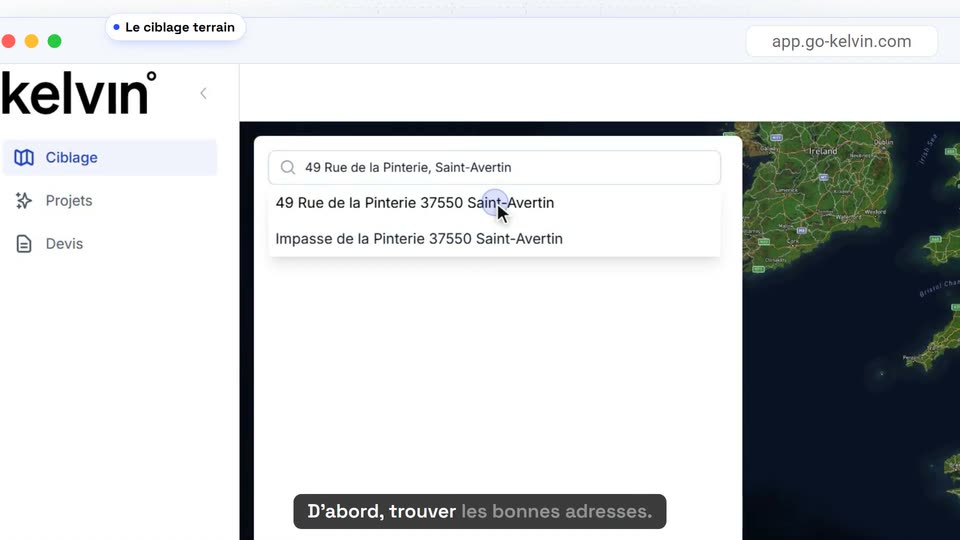
A macOS browser window shows the kelvin app with a left sidebar, a right-side map, and a search field holding a typed address over a two-line dropdown. A cursor hovers the suggestions. A dark bottom caption bar highlights its words in sequence.
On-screen text: “app.go-kelvin.com”, “D'abord, trouver les bonnes adresses.”
Techniques: Cursor demo
Camera: Static
A browser window opens on the Kelvin app, a satellite map with a blue circle over a neighborhood beside a data panel. The shot zooms into the panel and scrolls past housing counts, DPE bars and energy types as a cursor moves, while French captions run along the bottom.
On-screen text: “app.go-kelvin.com”, “D'abord, trouver les bonnes adresses.”, “Le ciblage terrain analyse toutes”, “les maisons d'un quartier ;”, “leur étiquette énergétique, leur chauffage,”, “leur année de construction.”
Techniques: UI zoom, Cursor demo
Camera: Pull out
A white filter panel sits over a dark map. The performance buttons G, F and E fill with red, orange and yellow, then the panel scrolls down to reveal more rows and a blue Filtrer button. A dark caption pill at the bottom updates with subtitle phrases.
On-screen text: “Vous gardez celles auxquelles”, “vous pouvez proposer vos travaux,”, “et vous organisez vos tournées,”
Camera: Pull out
A kelvin web app shows a targeting panel with address search, stat cards and a DPE bar chart over a satellite map circled in dashed blue. The shot zooms in on the panel while black caption pills appear at the bottom.
On-screen text: “app.go-kelvin.com”, “et vous organisez vos tournées,”, “votre boîtage ou vos courriers.”
Techniques: UI zoom
Camera: Push in
A flat browser window of the kelvin app pairs a 13-address list with a satellite map marked by yellow and red pins. The view zooms into the list panel while two pill captions hold still in frame: a white pill top left and a dark pill at the bottom.
On-screen text: “Les adresses à cibler”, “app.go-kelvin.com”, “votre boîtage ou vos courriers.”
Techniques: UI zoom
Camera: Push in
A light grid background holds a blue label and a dark headline on the left, fading in, while a tilted phone mockup on the right displays a French renovation app with a map of France; a dark caption pill sits at the bottom.
On-screen text: “LE SIMULATEUR”, “Des réponses claires pour le particulier, à partir”, “Ensuite, obtenir des demandes,”
Techniques: 3D mockup
Camera: Static
A tilted phone mockup on a dotted grid types an address into a search field, then its map zooms to a blue pin. Left, a black headline with a blue word fades in word by word; a dark caption pill at the bottom updates with the voiceover.
On-screen text: “LE SIMULATEUR”, “Des réponses claires pour le particulier, à partir de son adresse.”, “Ensuite, obtenir des demandes.”, “Votre simulateur donne au”, “particulier des réponses claires,”
Techniques: 3D mockup, Kinetic type, UI zoom
Camera: Static
A 3D phone mockup on the right cycles through the simulator app, from a blue data list to a white energy report. On the left, a static headline and a dark caption pill sit over a dotted grid, then a tilted browser window slides in beside the phone.
On-screen text: “LE SIMULATEUR”, “Des réponses claires pour le particulier, à partir de son adresse.”, “particulier des réponses claires,”, “à partir de sa simple adresse.”
Techniques: 3D mockup
Camera: Static
On a light dashed-grid background, a flat browser mockup of a site appears top left with the label “Sur votre site”. A sponsored ad card with a map fades in on the right under “Dans vos publicités”, then fades out; a dark pill caption stays at the bottom.
On-screen text: “Sur votre site”, “Sur votre site, dans vos publicités,”, “Dans vos publicités”
Techniques: Split screen
Camera: Static
A 2x2 grid of mockups fills a light dashed-grid background: a browser window, a social ad, a QR mailer, and a tablet on a desk, each labeled below. The cards populate one by one while a dark caption bar at the bottom rolls through matching lines.
On-screen text: “Sur votre site, dans vos publicités,”, “Sur votre site”, “Dans vos publicités”, “Sur un courrier”, “sur un courrier ou sur une tablette en salon :”, “Sur une tablette en salon”, “partout où vous croisez un particulier.”
Techniques: 3D mockup, Split screen
Camera: Static
A white 'Nouvelle demande' card on a dashed grid fills with address and DPE tags, then a green 'travaux possibles' row slides in. A dark caption pill types the voiceover at the bottom. At the end the card shrinks into a kelvin browser window with a map behind it.
On-screen text: “Quand il laisse ses coordonnées, vous recevez sa demande, avec son adresse et les travaux possibles. Vous savez qui rappeler, et pour quoi.”, “Qui rappeler. Pour quels travaux.”
Techniques: Kinetic type
Camera: Static
A web browser displays the Kelvin app. A cursor types a street address into a search field, then a two-line dropdown of matching addresses appears beneath it. A dark caption bar sits at the bottom of the frame.
On-screen text: “Enfin, gagner du temps en rendez-vous.”
Techniques: Cursor demo
Camera: Static
A flat browser mockup of the Kelvin app shows a card with an address field and a blue button. A cursor hovers the button as it darkens, and the satellite map behind the card fades in. A dark caption pill at the bottom builds its sentence word by word.
On-screen text: “L'outil d'aide à la vente retrouve les informations de la maison,”
Techniques: Cursor demo, Kinetic type
Camera: Static
A property app screen shows a data table beside a 3D map of the house, framed by two top label pills. The view zooms into the data table while a bottom caption updates.
On-screen text: “L'outil d'aide à la vente”, “app.go-kelvin.com”, “les informations de la maison,”, “avant même que vous vous déplaciez.”
Techniques: UI zoom
Camera: Push in
A French property dashboard shows the 'Logement' tab with house details. A dark caption bar at the bottom reads 'avant même que vous vous déplacez.' The page then scrolls down to reveal the 'Aides par geste' and 'Systèmes' sections with euro amounts.
On-screen text: “avant même que vous vous déplacez.”
Camera: Pan
A browser window shows the Scénarios view of the app with three scenario cards side by side, each listing energy ratings and work costs. A cursor hovers the tab and the first card while a caption builds at the bottom.
On-screen text: “Travaux, budget et aides”, “Avec le client, vous construisez vos scénarios,”
Techniques: Cursor demo
Camera: Static
A web app screen scrolls down through scenario cards showing work costs and subsidies, then pans right to a third card. A label pill at the top and a caption bar at the bottom swap text with each step, and a cursor hovers the download button.
On-screen text: “Travaux, budget et aides”, “app.go-kelvin.com”, “à vos prix.”, “Les primes CEE et MaPrimeRénov'”, “sont calculées automatiquement.”, “Un document à lui envoyer”, “Et vous lui laissez un document clair,”
Techniques: Cursor demo
Camera: Push in
A white side panel listing document export options overlays a darkened dashboard. The panel closes, revealing the full view of the project scenario cards and a top-left label.
On-screen text: “Un document à lui envoyer”, “Et vous lui laissez un document clair,”, “qui montre votre sérieux.”
Camera: Static
The product interface fades to white as two project-summary document pages rise into 3D perspective, stacked diagonally with a soft reflection on a pale background. A white pill label reading “Un document à lui envoyer” holds at the top left.
On-screen text: “Un document à lui envoyer”
Techniques: 3D mockup
Camera: Static
Four French energy-audit report pages float in 3D perspective on a pale background, slightly tilted with soft reflections below. A white pill caption with a blue dot sits at the top. The frame stays locked-off.
On-screen text: “Un document à lui envoyer”
Techniques: 3D mockup
Camera: Static
Three white cards on a pale blue grid show big blue numbers counting up to 200+, 3 500 and +30 000, each with a black label below. A dark pill caption at the bottom shows the sentence in two parts, then the grid crossfades to an aerial satellite view.
On-screen text: “200+ entreprises de rénovation”, “3 500 professionnels”, “+30 000 nouveaux projets par mois”, “Plus de 200 entreprises de rénovation”, “Chiffres kelvin°, octobre 2026”, “travaillent déjà avec kelvin°.”, “Images Google Earth”
Techniques: Kinetic type
Camera: Static
A white rounded card shows the kelvin° logo and tagline “De la bonne adresse au chantier signé.” over a drifting blurred aerial map. A bottom caption types the line word by word, then a blue “Demander une démo” button and go-kelvin.com appear.
On-screen text: “De la bonne adresse au chantier signé.”, “De la bonne adresse au chantier signé.”, “Demander une démo →”, “go-kelvin.com”
Techniques: Kinetic type
Camera: Static