1:38

The Pika x ChatGPT Plugin Extension is here
Pika · AI · Oct 2026
Spline · Dec 2025 · 1:08 · Full motion · AI-annotated
Spline’s 1:08 launch film runs 35 scenes, about 2.0 s each. The product is on screen from the first frame and 6 features are revealed. The call to action lands at 1:00 (89% in). The video is built as a rapid alternation of editor screen captures and isolated 3D renders, with cursor moves, slider drags, and lens distortions driving each reveal. Cuts stay tight and rhythmic, moving from feature names to polished 3D type and icon demos before closing on a brand card.
Is this your launch? to your site or press kit.
Films whose music sounds like this one, voice left out
Tesla · Electronic dance music, dubstep, electro house
DJI · Electronic dance music
Rive · Electronic dance music, synthwave, trance
A 3D iridescent glass ring spins and scales up behind the static black headline, then morphs into the Hana editor, where the ring becomes a 3D button on a white canvas flanked by tool panels.
On-screen text: “Introducing 3D in Hana”
Techniques: 3D mockup, Morph
Camera: Static
A design tool interface: a layers panel on the left, a properties panel on the right. On a white canvas, a black pill button with white Start Now text and an orange 3D plus icon sits centered. A cursor drifts across the canvas and hovers over the button.
Techniques: Cursor demo
Camera: Static
Two glossy black 12-petal asterisk shapes with red rim light rotate slowly behind a large flat red LOVE on a black field. Small white text reads Conference Room top left and The New Love bottom right, all held on a locked-off frame.
On-screen text: “Conference Room”, “LOVE”, “The New Love”
Camera: Static
A flat design-tool interface shows three poster canvases. The center black poster displays red LOVE type and a glossy black-red 3D flower, while a mouse cursor drifts across the selected object.
Techniques: Cursor demo
Camera: Static
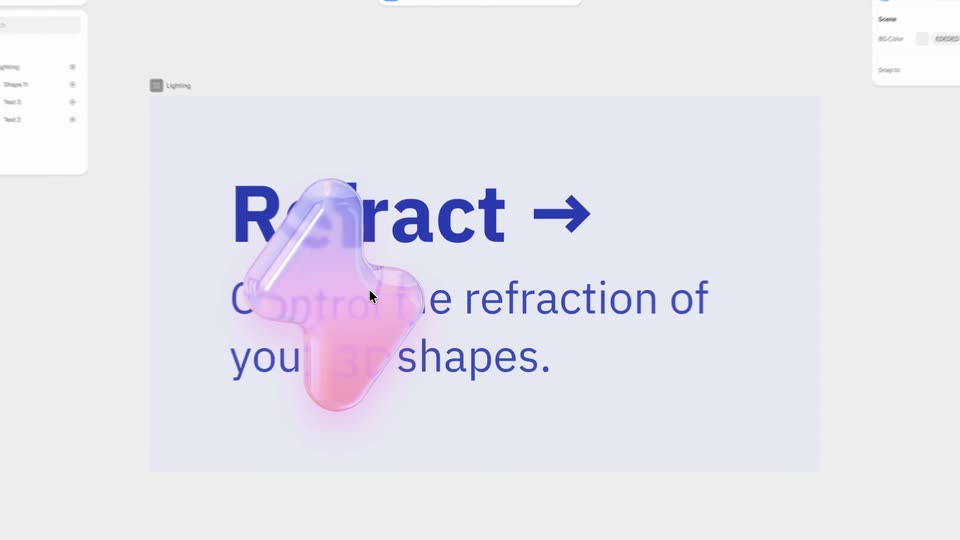
A design-tool canvas shows a blue headline with an arrow. A cursor drags a translucent pink-and-purple 3D blob across the letters, and the blob bends the text it overlaps like a lens, while side panels list layers and scene settings.
Techniques: Cursor demo, Morph
Camera: Push in
A glossy pink-purple 3D blob slides right across a light lavender frame, passing in front of still blue text. A small black cursor hovers beside the blob as it moves.
On-screen text: “Refract →”, “Control the refraction of your 3D shapes.”
Camera: Static
Zoomed into a blue hero canvas reading The Wind, the view pulls back to a full design-tool editor. The cursor clicks Presets in the Boolean Modifier panel while a glass flower shape behind the headline refracts into a taller form; captions about refraction of 3D shapes overlay the scene.
On-screen text: “your 3D shapes.”, “Refract”, “Control the”, “ction of”
Techniques: UI zoom, Cursor demo, Morph
Camera: Static
A cream website hero with a rotating iridescent 3D crystal cube and the serif word massive zooms out to reveal a design tool interface, the artboard selected and side panels for layers and properties.
Techniques: UI zoom, 3D mockup
Camera: Static
A flat design-tool workspace stays static while a 3D iridescent glass cube rotates behind the serif word “massive” on the central canvas. A small pointer cursor drifts down across the canvas, and the left layers panel and right properties panel remain fixed.
Techniques: Cursor demo
Camera: Static
A 3D design tool interface zooms from 68% to 115% onto a canvas showing a stack of frosted glass slabs under the heading The Depth. A cursor drags the Depth slider in the right panel, stretching the top slab, then hovers the rotation field.
Techniques: UI zoom, Cursor demo
Camera: Static
A city map in 3D perspective tilts downward as a glossy red pin drops onto a green park patch, casting a soft pink glow. Street labels and a purple museum marker sit on the tilted surface. The pin settles with a slight bounce.
Techniques: 3D mockup
Camera: Pan
A design-tool canvas reframes from a wide view of a map and image frames to a close-up of a red location pin, its selection box tightening. A cursor grabs the pin's rotation handle as the right panel switches to the Boolean modifier.
Techniques: UI zoom, Cursor demo
Camera: Static
A design tool canvas shows a 3D lightning bolt icon on a white rounded tile. A material presets panel opens on the right, and the cursor selects presets one by one, recoloring the icon from orange to purple, blue, then green.
Techniques: 3D mockup, Cursor demo
Camera: Static
A design tool interface fills the frame, its center canvas holding a 3D icon of frosted glass cubes stacked on blue blocks. The cubes rotate slowly on their axis while the side panels and top toolbar stay fixed.
Techniques: 3D mockup
Camera: Static
A 3D mockup of stacked blue and iridescent glass cubes sits in a light viewport with a blue bounding box, while a settings panel on the right switches from environment thumbnails to material sliders. A cursor drags a rotation handle on the cubes, showing a -110° readout.
Techniques: 3D mockup, Cursor demo
Camera: Static
A design-tool screen shows a frame holding three glossy 3D star shapes with price labels. The selected frame tilts into 3D perspective, then the cursor hovers over the blue, green, and orange shapes in turn as the canvas zooms slightly.
Techniques: 3D mockup, Cursor demo, UI zoom
Camera: Static
A white onboarding card sits centered on a dark field. A chrome-and-amber 3D loop rotates and twists in the upper half while the title, body copy, tan button and pagination dots stay fixed below it.
Camera: Static
Locked-off view of a design tool: layers panel left, toolbar top, scene panel right. The canvas holds a white card with the labels Music, Home, Mail paired with glossy 3D icons, a pink note, an orange house, a blue envelope. A cursor drifts from Home to Mail.
Techniques: Cursor demo
Camera: Static
A design-tool canvas shows the word “chromatic” in large black type with “Just In” above and a caption below. A colorful iridescent blob with a chromatic-aberration effect slides left to right across the word, passing in front of the letters.
Camera: Static
A design-tool interface shows three square artboards side by side, each with bold Korean lettering on a colored background. A cursor glides up from the empty canvas and drops a selection box around the left blue artboard.
On-screen text: “Chromatie”, “Enable chromatic aberration for”, “more realistic results.”
Techniques: Cursor demo
Camera: Static
A design-tool canvas holding three colored panels zooms into the blue one, where bold black Korean characters sit over a glossy 3D flower, while the top toolbar and side panels stay pinned at the edges.
Techniques: UI zoom
Camera: Push in
A design tool workspace shows two artboards side by side: a blue frame with a yellow 3D flower and black Korean text, and a pink frame with red 3D Korean text. The view zooms in on the blue frame as a cursor hovers nearby.
Techniques: UI zoom
Camera: Static
A screen capture of a design tool shows a pink artboard holding 3D Korean text. A cursor drags the Bevel Size slider in the right panel; the value falls from 41.80 to 8.60 and the letterforms' bevel updates live.
Techniques: Cursor demo
Camera: Static
A design app workspace: layers panel left, properties panel right. The central artboard shows 3D Korean lettering on a coral background; the right artboard shows white 3D lettering on blue. The cursor hovers over the Korean Text layer. The frame is locked.
Camera: Static
A cursor hovers over the canvas of a design tool as the word hello sits in 3D on teal water. The view tilts from isometric to top-down, then the background turns green and the letters flatten to white while the side panel shows text settings.
Techniques: 3D mockup, Cursor demo
Camera: Static
Inside a design app, a metallic gold hello sits on an orange canvas. A cursor selects the word and drags a rotation handle, tilting the 3D letters through perspective while the blue selection frame and angle readout track the move.
Techniques: 3D mockup, Cursor demo
Camera: Static
A dark design-tool canvas shows the 3D word LOOP in pink and purple, with a small caption Hover the letters below. A white cursor glides across the canvas and the letters tilt toward it.
Techniques: Cursor demo, 3D mockup
Camera: Static
A design editor shows a canvas of glossy purple 3D letters morphing from LOOP to LABS. Side panels collapse, a cursor drifts, and a black pill with an up arrow and a letter key slides up at the bottom.
Techniques: Cursor demo, Morph
Camera: Static
A design tool window shows a 3D gradient word LABS on a canvas with a gray caption below. The cursor moves onto the letters and they tilt and twist in 3D as the view zooms into the canvas, then the word swaps to a white and purple play jam on a peach field.
Techniques: Cursor demo, UI zoom, Kinetic type
Camera: Pull out
A yellow square card holds the 3D wordmark “play jam” on a black field. The extruded letters start skewed and rotating, then settle flat, with “play” in white and “jam” in black.
On-screen text: “Hover the letters”
Techniques: Kinetic type
Camera: Static
A light gray card on a black field holds a 3D cluster of glossy orange and white keycaps that rotate and settle into two grids, while the title and caption stay fixed. The keys spin continuously, turning translucent mid-rotation.
On-screen text: “The Keyboard Journey”, “→ Type to interact”
Techniques: 3D mockup, Morph
Camera: Static
A design tool interface with a left layers panel and right properties panel frames a light canvas holding the black headline The new dimension and a gray New Feature caption. A circular magnifier lens sweeps left to right across the headline, distorting the letters inside it as it passes.
On-screen text: “The new”, “dimension”, “New Feature”
Techniques: UI zoom
Camera: Static
A title card with the headline “The new dimension” and a “Start Now” pill sits over the editor canvas, warped by a circular lens distortion at its center. The card fades out to reveal a bento grid of pastel 3D icons and text tiles as the cursor drifts over them.
On-screen text: “The new dimension”, “New Feature”, “Start Now”, “Build with style today”
Techniques: Kinetic type, Cursor demo
Camera: Static
A masonry grid of 3D typography template cards scrolls vertically, each panel showing a different extruded, ribbon or inflated text effect set over photos or solid color backgrounds.
Techniques: 3D mockup
Camera: Pan
On a black background, a multicolored circular logo fades in at center, then gives way to the white text Hana by Spline, which is replaced by the URL spline.design.
On-screen text: “Hana by Spline”, “spline.design”
Camera: Static