1:17


Introducing ClickUp Chat
ClickUp · Productivity · Sep 2024
SimBlox · 0:34 · AI-annotated
SimBlox’s 0:34 launch film runs 10 scenes, about 3.4 s each. The product shows up at 0:04 and 3 features are revealed. The call to action lands at 0:29 (85% in), over a voiceover. The video opens on a live action pain point, then hands off to one continuous dark 3D world where floating glass panels, a night globe, and a QR code carry each feature through slow push ins and pull backs at a moderate pace of about 3.5 cuts per minute. Its signature moves are glowing blue light beams, particle fields, and neon outlined cards that tie every beat back to the SimBlox logo and URL close.
Is this your launch? to your site or press kit.
ClickUp · Productivity · Sep 2024
Chord · Oct 2026
A man slumps over a laptop at a cluttered desk, hands over his face, while translucent blue charts, red X checklists and yellow sticky notes drift around him. The camera slowly pushes in from wide to close-up.
Techniques: Parallax
Camera: Push in
A dark 3D dashboard floats in perspective with small metric cards orbiting it. A white caption box reads ONE PLATFORM, then a second box adds Everything. Connected. The view cuts to a glowing globe with data arcs flanked by two phone mockups.
On-screen text: “ONE PLATFORM”, “Everything. Connected.”
Techniques: 3D mockup
Camera: Push in
A tablet and a phone stand angled on a dark reflective surface, both showing the SIMBLOX interface in 3D. The tablet displays a rotating globe and destination cards; the phone lists Thailand data plans. The camera drifts slowly forward.
Techniques: 3D mockup
Camera: Static
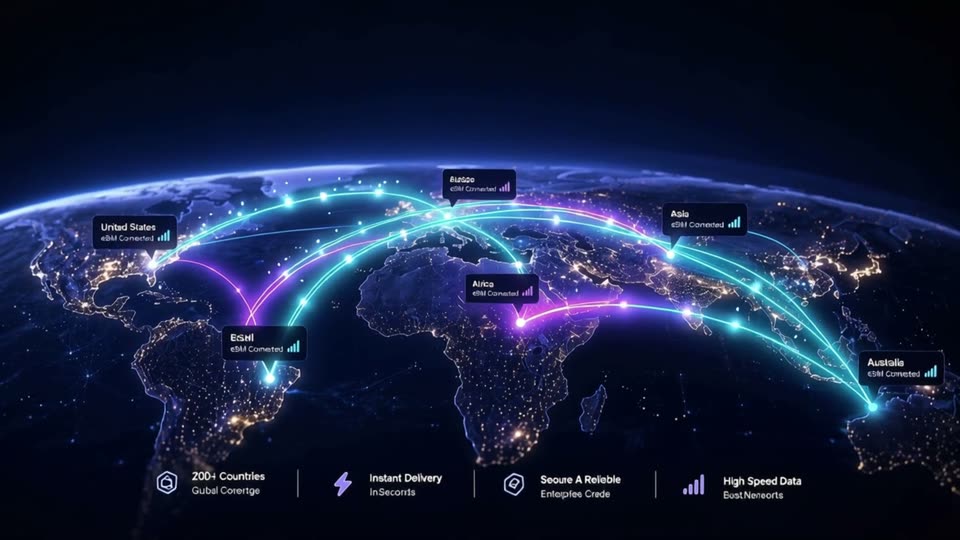
A 3D night globe sits in perspective as glowing cyan and magenta arcs pulse between labeled regions, while a top headline and a bottom feature bar overlay the frame. The camera slowly pulls back, fading the headline and centering the globe.
On-screen text: “Sell eSIMs.”, “Anywhere in the world.”, “Global coverage. Instant connection.”, “200+ Countries”, “Global Coverage”, “Instant Delivery”, “In Seconds”, “Secure & Reliable”, “Enterprise Grade”, “High Speed Data”
Techniques: Light sweep, Parallax
Camera: Static
A night globe in 3D rotates as glowing cyan and magenta arcs link city lights across continents. Four feature captions with icons sit along the bottom, then vanish as the camera tilts to a low horizon view of the sphere.
On-screen text: “200+ Countries”, “Global Coverage”, “Instant Delivery”, “In Seconds”, “Secure & Reliable”, “Enterprise Grade”, “High Speed Data”, “Fast Networks”
Techniques: 3D mockup, Parallax
Camera: Static
A smartphone lies flat on a dark surface, projecting a glowing blue QR code with vertical light beams and rising particles. Two icon callouts sit at left and a confirmation card floats at right.
On-screen text: “Instant Delivery”, “eSIM activated in seconds”, “Secure & Reliable”, “Enterprise grade security”
Techniques: 3D mockup, Particles
Camera: Static
A flat phone rests on a dark surface as a glowing blue QR code hovers above it, casting light beams and pulsing rings. Feature callouts flank the sides; the camera slowly pushes in and arcs, cropping the callouts until the QR code fills the frame.
On-screen text: “Instant Delivery”, “eSIM activated in seconds”, “Secure & Reliable”, “Enterprise-grade security”, “Your eSIM is ready!”, “Scan the QR code to activate your eSIM”, “Works on all compatible devices”
Techniques: 3D mockup, Particles
Camera: Push in
Three glowing glass panels titled Templates, Builder and Widgets float in 3D on a dark reflective floor under a neon headline. A cursor hovers the Builder panel while the camera pushes in toward the center, the side panels sliding out of frame.
On-screen text: “3 Ways to Launch.”, “Built Your Way.”, “Choose the perfect way to bring your eSIM business to Web.”, “1. TEMPLATES”, “Launch in minutes”, “2. BUILDER”, “Design without limits”, “3. WIDGETS”, “Embed anywhere”, “Launch Fast, Fully Branded, Flexible & Scalable, Sell Everywhere”
Techniques: 3D mockup, Cursor demo, Parallax, Light sweep, UI zoom
Camera: Push in
A blurred 3D eSIM dashboard dissolves into the SimBlox logo lockup on a dark stage. The wordmark and tagline sit above a glowing horizon and a particle grid, with four feature icons and captions lined up along the bottom.
On-screen text: “ESIM PLATFORM-AS-A-SERVICE”, “SIMBLOX”, “THE INFRASTRUCTURE TO POWER YOUR ESIM BUSINESS.”, “GLOBAL REACH”, “Sell eSIMs anywhere.”, “INSTANT DELIVERY”, “Activate in seconds.”, “TRUSTED & SECURE”, “Built for reliability.”, “BUILT FOR GROWTH Scale your business.”
Techniques: 3D mockup, Particles
Camera: Push in
The SIMBLOX logo and tagline hold centered over a dark field of undulating blue particles. Four icon captions line the bottom, then fade out as a rounded outline pill draws in and the URL appears beside a cursor icon.
On-screen text: “ESIM PLATFORM-AS-A-SERVICE”, “THE INFRASTRUCTURE TO POWER YOUR ESIM BUSINESS.”, “GLOBAL REACH”, “Sell eSIMs anywhere.”, “INSTANT ORUVERY”, “Activate in seconds.”, “TRUSTED & SECURE”, “Built for reliability.”, “BUILT FOR GROWTH”, “Scales your business. Scales your business.”
Techniques: Particles, Light sweep
Camera: Static