2:37
Giga - Introducing Scout. Tell it the KPI you care about, like funded depos
Giga (Scout) · Jun 2026
OpusClip · Aug 2024 · 0:57 · AI-annotated
OpusClip’s 0:57 launch film runs 33 scenes, about 1.7 s each. The product is on screen from the first frame and 4 features are revealed. The call to action lands at 0:52 (93% in), over a voiceover. Structure runs brand open, color-coded capability montages (emotions, characters, actions, sounds), then typed search demos, and a logo-plus-URL close. Signature moves are heavy all-caps type slams, one accent color per capability, the outlined cursor and search pill as recurring devices, and glitch and particle logo transitions, cut fast at about eight cuts per minute.
Is this your launch? to your site or press kit.
Giga (Scout) · Jun 2026
On a black background, a white outlined cursor arrow rises from the bottom edge to the center. The white OpusClip logo mark then forms above it while the wordmark slides in, and the cursor settles at the lower right corner.
Camera: Static
On a black background, the white OpusClip logo slides off the left edge as a bold headline builds line by line: “WE MAKE” in white, “SHORT CLIPS” in green, then “FROM” in white, each line dropping in with motion blur.
On-screen text: “WE MAKE SHORT CLIPS FROM”
Techniques: Kinetic type
Camera: Static
On a black field, three stacked lines of bold all-caps text read WE MAKE in white, SHORT CLIPS in green, and FROM... in white. The text block and the OpusClip logo slide across a locked-off frame.
On-screen text: “WE MAKE”, “SHORT CLIPS”, “FROM...”, “OpusClip”
Techniques: Kinetic type
Camera: Static
A heavy three-line headline on black slides up and out, revealing a centered search field. A cursor hovers it as Genres fills in and a dropdown list opens, then the element slides up and exits.
On-screen text: “WE MAKE”, “SHORT CLIPS”, “FROM...”
Techniques: Kinetic type, Cursor demo
Camera: Pull out
A dark Genres dropdown lists video formats on black. A large outlined cursor glides down the rows, flashing a white pill on Interview and Webinar. The view zooms in and the list scrolls, ending on a padlock that flips open beside a gold infinity symbol.
Techniques: Cursor demo, UI zoom
Camera: Push in
A dark interface card with a rounded white border fills the right side. White labels scroll upward as a large outlined cursor hovers over a gold infinity icon beside a gray padlock. The frame zooms in, scaling the text.
Techniques: Cursor demo, UI zoom
Camera: Push in
A dark shaft of light brightens into a split gray and black backdrop as the words Webinar and Video Podcast scale in, then the OpusClip mark assembles from rising white particles, the wordmark sliding under the P.
On-screen text: “Webinar”, “Video Podcast”
Techniques: Particles
Camera: Static
The OpusClip logo lockup, a dark cloud-shaped O beside a white film-strip C, sits over a vertical split of light and dark backgrounds. A mask wipes down the center while the two offset halves tear apart into an RGB glitch.
Techniques: Masking
Camera: Static
On a black field, a bold white INTRODUCING sits centered, then yields to the ClipAnything wordmark, its Anything half filled with a blue-to-orange gradient, set under a white infinity mark. The wordmark slides in and holds still for the rest of the clip.
On-screen text: “INTRODUCING”
Techniques: Kinetic type
Camera: Static
On a black background, bold white uppercase text appears. The line “NO DIALOGUE?” scales in from a blurred, distorted state, then “NO PROBLEM” sits below it on a second line.
On-screen text: “NO DIALOGUE?”, “NO PROBLEM”
Techniques: Kinetic type
Camera: Static
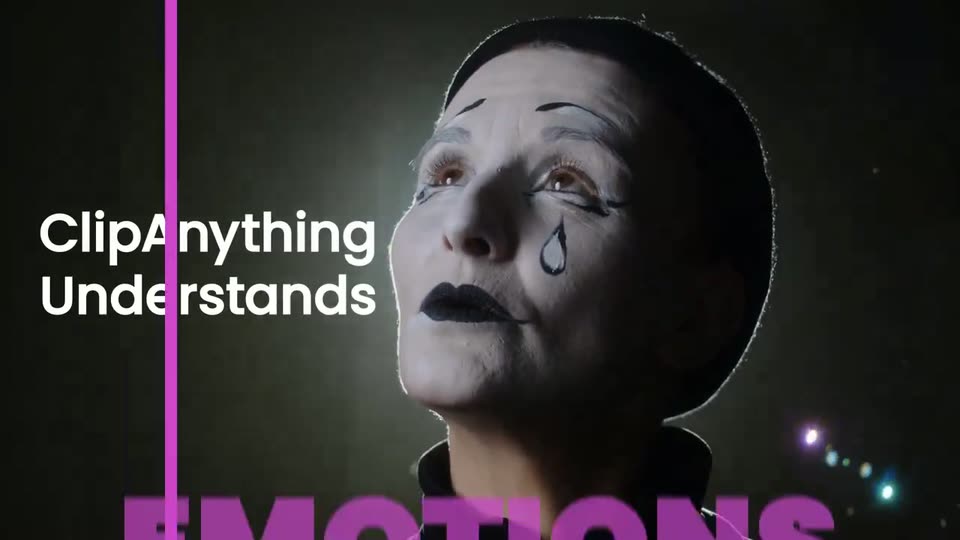
Close-up of a performer in white face paint with black lips and teardrop marks, gazing up against a dark background with soft bokeh lights. A magenta detection frame with a small AWE tag snaps around the face while huge magenta EMOTIONS letters rise across the bottom, beside the white ClipAnything Understands headline.
On-screen text: “ClipAnything”, “Understands”, “EMOTIONS”, “NO DIALOGUE?”, “NO PROBLEM”
Camera: Pull out
A person with white face paint looks up inside a pink bounding box. White text reads ClipAnything Understands above large pink text reading EMOTIONS. The shot cuts to a woman with green hair in a green box.
On-screen text: “ClipAnything”, “Understands”, “EMOTIONS”
Techniques: Kinetic type
Camera: Pull out
Two men stand at a table against a light gray wall. Green face-detection boxes frame their heads, with black name labels marking each. A large green headline CHARACTERS snaps in across the top. The man on the left gestures.
On-screen text: “CHARACTERS”
Techniques: Kinetic type
Camera: Pull out
Two men face each other against a white wall, green tracking boxes lock onto their faces with black name labels beside them, a large green CHARACTERS headline spans the top, then the shot blurs and zooms as a white frame closes in.
On-screen text: “CHARACTERS”, “Mr. Beast”, “Jon Youshaei”
Camera: Pull out
A blurred close-up resolves into a black grid of small video clips: cooking, running, swimming, a boat, a dog, a kiss. Orange bounding boxes with small labels frame several tiles and slide in. Bold orange ACTIONS holds the center.
On-screen text: “ACTIONS”
Techniques: Split screen
Camera: Pull out
A black frame holds a collage of rounded video clips: cooking, swimming, a car crash, eating, blackjack, golf, football, a dog in water, a kiss. Large orange ACTIONS fills the center as orange boxes with small labels track each action.
On-screen text: “ACTIONS”, “Putt”, “Eating”, “Touchdown”, “Kiss”
Camera: Static
A black canvas holds a collage of short clips: cooking, running, golf, swimming, eating, cards, football, a dog in water, and a kiss. The orange word ACTIONS sits centered. Orange boxes labeled Putt, Eating, Touchdown, Kiss frame the actions; the last two slide in.
On-screen text: “ACTIONS”
Techniques: Split screen
Camera: Pull out
On a black field, the purple word SOUNDS scales from a huge blurred shape to a sharp centered lockup as video clips pop into the corners, each with a purple audio waveform. An ACTIONS heading and a small Eating label accompany the text.
On-screen text: “SOUNDS”, “ACTIONS”, “Eating”
Techniques: Kinetic type
Camera: Pull out
Purple bold SOUNDS scales up at the center of a black screen as rounded video clips of a storm, a stadium crowd, a dog and a laughing woman drift around it, each carrying a purple audio waveform.
On-screen text: “SOUNDS”
Techniques: Kinetic type
Camera: Pull out
On a black background, the purple word SOUNDS holds center as rounded video clips of a laughing woman, stadium crowd, and howling dog drift around it, each with a purple waveform at its base. The tiles blur and a magenta beam sweeps across before fading out.
On-screen text: “SOUNDS”
Techniques: Kinetic type, Parallax, Light sweep
Camera: Pull out
Colorful prompt chips settle from a 3D angle into a flat two-row strip along the bottom of a black frame. A white headline reads WHAT CAN YOU DO, then WITH UNDERSTANDING? scales in beneath it.
On-screen text: “WHAT CAN YOU DO”, “WITH UNDERSTANDING?”
Techniques: 3D mockup, Kinetic type
Camera: Pan
A basketball game plays inside a rounded rectangle on a black field. A pill-shaped bar types “Compile all the dunks” letter by letter across the center, then disappears, leaving the footage.
On-screen text: “WHAT CAN YOU DO”, “WITH UNDERSTANDING?”, “Compile all the dunks”
Techniques: Kinetic type
Camera: Static
A dark search bar with the prompt 'Compile all the dunks' anchors the top of a black screen. Labels Pass, Steal, Drive, Dunk slide in above a row of basketball thumbnails, a wide filmstrip plays below, and a vertical clip slides in on the right.
On-screen text: “Compile all the dunks”
Camera: Push in
A dark rounded search bar with a thin white outline sits centered on black as white query labels slide through it one after another. Blurred video thumbnails flash behind the bar, then a single clip of a man in sunglasses on an airplane fills the frame as the bar reads a new query.
Techniques: Kinetic type
Camera: Pan
A man in a white cap and sunglasses rests his chin on his hand in an airplane cabin, shown in a rounded video card centered on black. A dark pill-shaped banner with a white outline types out the caption letter by letter across the middle of the frame.
On-screen text: “Find Casey's airplane shower”
Techniques: Kinetic type
Camera: Static
A search bar with the query 'Find Casey's airplane shower' slides across a blurred video of a man in sunglasses, shown in a rounded card on a black background.
Camera: Static
On black, a white-outlined headline banner pulses in scale above a UI timeline that builds left to right: chapter labels and a green bracket appear, a filmstrip of thumbnails fills in, and the last clip grows into a vertical preview card at right.
On-screen text: “Find Casey's airplane shower”
Techniques: Kinetic type
Camera: Static
A black screen holds a rounded title bar reading Find Casey's airplane shower over a row of chapter labels and four video thumbnails. A green bracket spans the thumbnails above a striped filmstrip. On the right, a vertical video pane plays a man standing under a running shower.
On-screen text: “Find Casey's airplane shower”
Camera: Static
A blurred search interface showing 'Find Casey's airplane shower' defocuses, then a rounded search bar types 'Find all the craziest moments' word by word while video thumbnails pop in scattered across the black frame.
On-screen text: “Find Casey's airplane shower”, “Find all the craziest moments”
Techniques: Kinetic type
Camera: Pull out
On black, a centered dark search bar types out the query letter by letter as dozens of rounded penguin photos and illustrations pop in around it, denser down the left edge. The frame stays locked and the typing finishes by the end.
On-screen text: “Find all the penguins”
Techniques: Kinetic type
Camera: Static
A centered search bar types the query Find all the applause on a black field. As the text completes, a scatter of small video clips showing clapping crowds and faces brightens into view around it, beside a thin left column of tiny colored blocks. The frame stays locked.
On-screen text: “Find all the applause”
Techniques: Kinetic type
Camera: Static
A dark gray pill on black types out “Find all the applause” beside “Clip Anything.”; it cuts to centered white lines “All in one place...” then “Any moment.” on black.
On-screen text: “Find all the applause”, “Clip Anything.”, “All in one place...”, “Any moment.”
Techniques: Kinetic type
Camera: Static
On a light gray field, an extreme close-up of the black p logo mark fills the frame with the white caption All in one place... at center. The view pulls back to black, where the white logo sits above a white pill holding the URL.
On-screen text: “All in one place...”, “www.opus.pro”
Camera: Static