
0:50
Explore
Sierra: introduction to video
Sierra · Dec 2025 · 2:12 · AI-annotated
- Length
- 2:12
- Scenes
- 52 · 2.5 s avg
- Product on screen
- 0:00
- Features shown
- 5
- Voiceover
- Yes
00:00:00 / 02:12:13
- Length
- 2:12
- Scenes
- 52 · 2.5 s avg
- Product on screen
- 0:00
- Features shown
- 5
- Voiceover
- Yes
Sierra’s 2:12 launch film runs 52 scenes, about 2.5 s each. The product is on screen from the first frame and 5 features are revealed, with social proof. There is no explicit call to action; a voiceover carries the film. The video opens with a typed title card, stacks a problem montage of drifting support UI, then tours the product feature by feature: a type-on headline names each capability and rounded cards demo it over flat fields, closing on metrics, a tagline and the logo. Signature moves are word-by-word typing, morphing circular badges, halftone dot-grid transitions, and live-action clips framed in rounded tiles with sliding blue toasts.
Footage neededEstimated needs: 7 capture groups — your screens or recordings · 1 official logo — reused across the film · 8 filmed passages — shoot, supply or replace · 6 graphic passages — draw or supply · 2 3D passages — build or supply
Is this your launch? to your site or press kit.
More like this
Similar soundtrack
Films whose music sounds like this one, voice left out
1:24

Introducing Screen Cleaner in the Files app
Google · Upbeat, modern electronic pop
1:09
Slack - Slack CRM is here for small businesses. 👋 Manage every customer re
Slack CRM · Modern corporate electronic
2:52
Meet Vortek: Our Answer to Zero Purge Waste Multi-Material Printing
Bambu Lab · Modern electronic
Sierra: introduction to video, scene by scene
· 52 scenes as text
01 · Product intro · 0:00–0:01
On a plain off-white background, the words Meet and Sierra fade in on either side of a small blue flower logo that scales up to full size, the text deepening from gray to black.
On-screen text: “Meet”, “Sierra”
Techniques: Kinetic type
Camera: Static
02 · Product intro · 0:01–0:04
On a plain cream background, the line “The conversational AI platform” types in letter by letter at center, a brief blue flash on one word, then the line is replaced by “for businesses” which scales up. Locked-off frame, no camera move.
On-screen text: “The conversational AI platform”, “for businesses”
Techniques: Kinetic type
Camera: Static
03 · Problem · 0:04–0:05
A white message card pops in on a plain off-white background, showing a new customer message about an order, as a blue envelope icon with a red badge slides down toward it and the caption “for businesses” scales out.
On-screen text: “for businesses”
Techniques: Kinetic type
Camera: Static
04 · Problem · 0:05–0:10
A white email card types out a customer complaint in the center, a red badge on the mail icon counting up. More white cards for FAQs, a rating scale and a multiple-choice prompt slide in from the edges and pile around it as the camera pans across the cluster.
Techniques: Parallax
Camera: Push in
05 · Problem · 0:10–0:12
A collage of support interface cards floats on a light gray field: an FAQ accordion, a New Message panel with a Calling overlay, a survey, and a multiple-choice form. A red badge counts down from 194 to 26 as list items toggle and option A fills blue.
Camera: Push in
06 · Problem · 0:12–0:14
A layered collage of support-app screens drifts over a white background: a central call card reads ON HOLD with red and green buttons, surrounded by an inbox, sentiment pills and a selection form, each panel sliding at its own pace.
Techniques: Parallax
Camera: Push in
07 · Problem · 0:14–0:16
A layered collage of customer-service UI fragments, chat bubbles, an on-hold bar, a calendar and red buttons floats in 3D perspective. A red notification badge counts up from 476 to 574 while the panels drift slowly.
Techniques: 3D mockup
Camera: Static
08 · Other · 0:16–0:17
A plain light gray card. The lowercase phrase but now fades in centered in dark gray, then conversational AI fades in beneath it in light blue. The frame stays locked and static.
On-screen text: “but now”, “conversational AI”
Techniques: Kinetic type
Camera: Static
09 · Other · 0:17–0:18
On a soft white-to-blue gradient, the lowercase blue phrase “conversational AI” with a small sparkle icon sits centered. A dark gray line, “is ushering in a new era,” slides in below it word by word.
On-screen text: “conversational AI”, “is ushering in a new era”
Techniques: Kinetic type
Camera: Static
10 · Other · 0:18–0:20
On a plain off-white background, the lowercase phrase is ushering in a new era slides across the center and exits, then of delightful customer experiences slides in as a staggered block with delightful in blue. The frame stays locked off.
On-screen text: “is ushering in a new era”, “of delightful customer experiences”
Techniques: Kinetic type
Camera: Static
11 · Other · 0:20–0:22
A soft blue gradient background holds the dark gray words customer and experiences, which fade out as the white line of delightful customer experiences slides in and settles at center.
On-screen text: “customer”, “experiences”, “of delightful customer experiences”
Techniques: Kinetic type
Camera: Static
12 · Other · 0:22–0:23
A white rounded-square badge holding two blue four-pointed sparkles sits on a soft blue gradient. The badge morphs into a circle, the sparkles drift apart, then the whole mark shrinks to a small dot as the inner blue ring fades.
Techniques: Morph
Camera: Static
13 · Feature reveal · 0:23–0:26
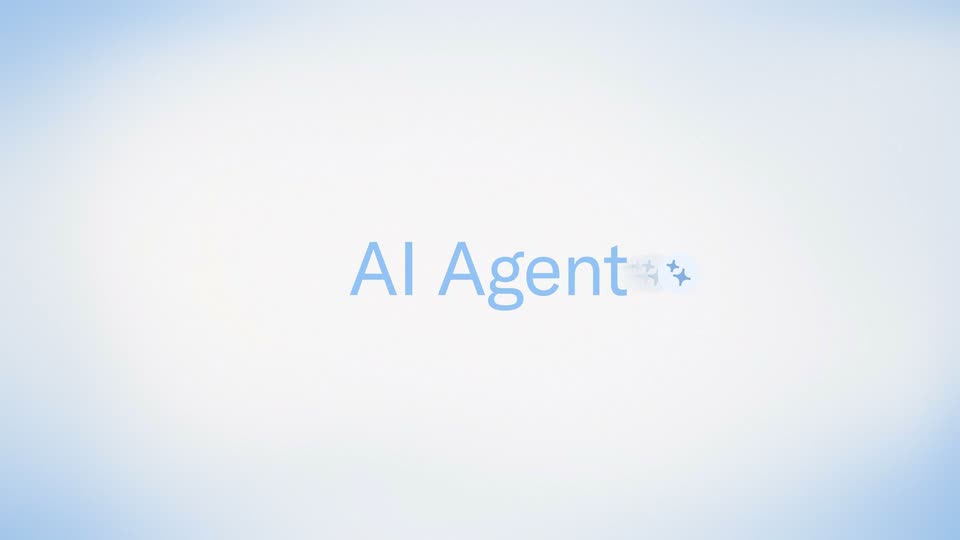
Three small blue sparkles drift on a soft blue-white gradient, then the light-blue text “AI Agent” assembles letter by letter to their left. The line holds for a beat, then a large pale-blue disc with a notched edge expands to cover the frame.
On-screen text: “AI Agent”
Techniques: Kinetic type, Masking
Camera: Static
14 · Feature reveal · 0:26–0:27
A light gray field of small blue rounded squares drifts and reorganizes. Scattered clusters slide into a loose grid as the squares pulse between large and tiny, filling the frame edge to edge.
Techniques: Particles
Camera: Pull out
15 · Feature reveal · 0:27–0:30
A grid of light-blue rounded squares on a cream background pulses and resizes in a slow wave, the dots swelling and shrinking across the frame to form shifting halftone bands.
Techniques: Particles
Camera: Pull out
16 · Feature reveal · 0:30–0:31
A grid of small blue squares on a cream background shrinks and fades, collapsing into a single rounded square held at the center of the frame.
Camera: Static
17 · Feature reveal · 0:31–0:33
A blue circle with a white Sierra mark sits centered on a plain off-white field. The circle scales up from a small dot to a larger badge while the white mark sharpens into view.
Camera: Static
18 · Feature reveal · 0:33–0:34
A light blue circle with three white dots holds the center of a plain off-white frame. A live-action shot of a person in a denim shirt holding a tablet fades in behind it, the indicator staying fixed in the middle.
Camera: Pull out
19 · Feature reveal · 0:34–0:38
A person in a denim shirt sits holding a phone, fingers tapping the screen. A blue three-dot indicator expands into a frosted chat bubble as the question types out letter by letter, ending with a blue send arrow on the right.
On-screen text: “Can you help me track my order?”
Techniques: Morph, Kinetic type
Camera: Pull out
20 · Feature reveal · 0:38–0:39
A person in a blue shirt sits holding a phone, tapping the screen. A frosted chat bubble with a question and a blue send button floats over the frame, then fades out and is replaced by a white circular button with a black sparkle icon.
On-screen text: “Can you help me track my order?”
Camera: Static
21 · Feature reveal · 0:39–0:46
A white AI Agent chat bubble on a pale blue gradient shows a loading bar, then types its reply word by word, ending with a package emoji. A second card pops up below with a sneaker photo, an In transit badge, and the arrival date.
Techniques: Kinetic type
Camera: Static
22 · Feature reveal · 0:46–0:47
Two white chat cards float on a soft blue gradient. The top card shows an AI Agent message with a box emoji; the bottom card pairs a sneaker photo with an order status and arrival date. The view then zooms into the order card until it fills the frame.
Techniques: UI zoom
Camera: Push in
23 · Feature reveal · 0:47–0:48
A hand lifts an orange and yellow running shoe with blue laces from an open box lined with white tissue. The fingers grip the toe as the shoe tilts to reveal its side profile and sole.
Camera: Push in
24 · Feature reveal · 0:48–0:49
A white rounded chat bubble labeled “AI Agent” with the line “Happy trails!” and a small shoe emoji stays locked in the center. Behind it, a runner's orange shoes and green track rush past in heavy horizontal motion blur, the background shifting frame to frame while the card remains still.
Camera: Static
25 · Feature reveal · 0:49–0:52
On a soft blue gradient, the white word on-brand holds on the left while on-topic scales in on the right. The frame then cuts to a pale gray field with a small gray circle containing a white up arrow, centered.
On-screen text: “on-brand”, “on-topic”
Techniques: Kinetic type
Camera: Static
26 · Feature reveal · 0:52–0:56
A rounded chat input pill centered on a cream background. 'Graet, ty' is typed with a red squiggle, then deleted and retyped as 'I mean great, sorry' while the pill widens and the send button slides right; it turns blue and a cursor arrow clicks it.
On-screen text: “Graet, ty”, “I mean great, sorry”
Techniques: Kinetic type, Cursor demo
Camera: Static
27 · Feature reveal · 0:56–1:00
A white chat bubble labeled AI Agent floats on a beige background. The message types out in English, then the bubble shrinks and the text swaps to Spanish, Chinese, and Arabic, the bubble resizing to fit each line.
On-screen text: “No worries, I understand!”, “Puedo adaptar mi idioma”, “我还可以应用各种语言”, “يمكنني تعديل لغتي”
Techniques: Kinetic type, Morph
Camera: Static
28 · Feature reveal · 1:00–1:04
On a soft blue gradient background, the phrase 'Always on' holds center, then 'on' is replaced by 'ready', then 'friendly', each incoming word fading in light blue before settling to black. The final phrase fades out at the end.
On-screen text: “Always on”, “Always ready”, “Always friendly”
Techniques: Kinetic type
Camera: Static
29 · Feature reveal · 1:04–1:05
Four rounded-corner video tiles arranged in a 2x2 grid on a cream background snap from a blurred, offset state into sharp focus. The clips show a man talking, an airplane in the sky, a blurred figure by the sea, and a person holding a phone to their ear.
Camera: Pull out
30 · Feature reveal · 1:05–1:10
Four rounded video tiles on a pale background show a man talking, an airplane in the sky, a desk, and a woman on a phone. The tiles drift, swap positions, and resize while blue notification pills pop in over them; finally only the phone call tile remains.
On-screen text: “Room booked”, “Flight rearranged”, “Subscription updated”
Techniques: Split screen
Camera: Pull out
31 · Feature reveal · 1:10–1:12
A rounded card holds a live-action clip of a woman in a red sweater smiling at her phone against a blurred green background. A blue notification pill reading “Troubleshooting complete” sits at the right edge of the card, and the card gently scales up over the shot.
Camera: Pull out
32 · Feature reveal · 1:12–1:14
A rounded-rectangle screen mockup tilts and rotates in 3D on a pale gray field, playing live footage of a woman on a sunlit balcony. A blue pill with a bookmark icon and the text Room booked slides in from the left at the lower edge, holds, then slides out.
On-screen text: “Room booked”
Techniques: 3D mockup
Camera: Pull out
33 · Feature reveal · 1:14–1:15
A row of rounded video cards slides left across a pale gray field, each playing a clip of two people moving in a living room. A blue pill button with a bookmark icon rides on the right card's edge.
Camera: Pull out
34 · Feature reveal · 1:15–1:16
A rounded video card on a cream background shows a bearded man and a child high-fiving. The footage sharpens from blur to focus as the man smiles. A blue toast with a check icon and the words Subscription updated slides in at the top left.
On-screen text: “Subscription updated”
Techniques: Masking
Camera: Static
35 · Feature reveal · 1:16–1:18
A white chat card marked AI Agent fades in on a soft blue gradient, its message typing out to a green checkmark. The view then pans up, sliding the card off the top as a second card titled Conversations rises to the center.
Camera: Static
36 · Feature reveal · 1:18–1:25
A white conversations table with filter chips slides in, its rows scroll upward, then the text collapses into gray skeleton bars as the panel fades out. A summarized list fades in: three rows with green check and orange bell icons, timestamps, message counts, and tag chips.
Camera: Pan
37 · Feature reveal · 1:25–1:26
A light-gray conversations list with three rows of status pills slides left, the pills exiting off the left edge. A Resolutions heading and a large 555 figure with a small bar fade in on the right.
Techniques: UI zoom
Camera: Static
38 · Feature reveal · 1:26–1:31
A light dashboard card shows a Resolutions counter ticking from 634 to 815 beside a blue line chart that draws itself across dashed grid lines. An orange Connection issue pill fades into a white Subscription change pill, then the card tilts and slides up out of frame.
Camera: Pull out
39 · Feature reveal · 1:31–1:32
On a dark field of evenly spaced white dots, a small hexagon logo and the word Sierra sit above a rounded card. Inside the card a spinner turns and a progress bar fills left to right as the card scales up.
Camera: Push in
40 · Feature reveal · 1:32–1:33
On a near-black dot-grid field, the small Sierra wordmark and a dark rounded status card drift right. Inside the card, a blue circular up-arrow icon and the label Up-to-date slide in from the left, the text emerging behind a thin underline bar.
Techniques: Kinetic type
Camera: Static
41 · Feature reveal · 1:33–1:41
A blue square connects to a green node on a dark dot grid; thin gradient lines branch right to three orange pills labeled Knowledge, Policies, and Systems, each with a document icon, popping in one by one.
On-screen text: “Knowledge”, “Policies”, “Systems”
Camera: Push in
42 · Feature reveal · 1:41–1:42
On a dark dot-grid canvas, a node diagram draws itself: a blue node links to a green node, and gradient lines branch out to orange pills labeled Knowledge and Policies. The view then reframes to a close-up of the two nodes, with a green progress ring spinning below.
On-screen text: “Knowledge”, “Policies”, “0”
Techniques: UI zoom
Camera: Pan
43 · Feature reveal · 1:42–1:43
A dark chat bubble from Diego settles into place and types out the message while a green lock icon's outline draws itself into a closed pill shape below.
Techniques: Kinetic type
Camera: Static
44 · Feature reveal · 1:43–1:45
On a black background, a dark message bubble shows a sender avatar and the line 'My address is 412 Oak Lane'. The avatar and name fade out, the address text is masked by a row of green dots, and the green 'Encrypted' pill fills from outline to solid.
Camera: Static
45 · Feature reveal · 1:45–1:48
A flat green field holds a small white padlock icon beside a centered white word. The word swaps in place from Security to Privacy to Compliance, each term held for about a second while the icon stays fixed.
On-screen text: “Security”, “Privacy”, “Compliance”
Techniques: Kinetic type
Camera: Static
46 · Feature reveal · 1:48–1:48
A green card shows a white padlock icon beside the word Compliance. The card then scales down into nested rounded squares, the text vanishing, until only the small centered padlock remains.
On-screen text: “Compliance”
Camera: Static
47 · Feature reveal · 1:48–1:55
A green padlock badge and a “Sensitive data” label reorganize into a white card. Gray placeholder lines fill in as the padlock slides down the left edge. The card fades and a “CSAT” chip with a smiley icon slides in from the left.
On-screen text: “Sensitive data”, “CSAT”
Camera: Static
48 · Social proof · 1:55–2:05
Two stacked dashboard cards on a beige field: a CSAT card with gray and green bars and a score counting to 4.8, then a Case resolutions card rises in front with a blue line graph drawing itself and a percentage counter ticking, ending in a zoom into the line.
Techniques: UI zoom
Camera: Push in
49 · Other · 2:05–2:07
On a plain white background, a centered dark-gray headline builds word by word, starting with “Elevate your” and completing to the full line, then holds. A faint thin blue line sits in the top-left corner.
On-screen text: “Elevate your customer experience”
Techniques: Kinetic type
Camera: Static
50 · Other · 2:07–2:08
A soft blue-to-white radial gradient fills the frame. The word with sits centered in dark gray, then the word AI fades in beside it in light blue, completing the tagline.
On-screen text: “Elevate your customer experience”, “with AI”
Techniques: Kinetic type
Camera: Static
51 · Outro · 2:08–2:09
Dark blue words 'with AI' sit centered on a soft blue gradient, a small orange dot near the first letter. The frame then settles on the white Sierra flower mark and serif wordmark, centered on a flat blue field.
On-screen text: “with AI”, “SIERRA”
Camera: Static
52 · Outro · 2:09–2:12
A white six-petal flower mark and the word SIERRA in white serif capitals sit centered on a flat light blue background. The frame is locked off and holds without motion for the full duration.
On-screen text: “SIERRA”
Camera: Static