0:36
Explore
Elie Steinbock - Introducing Inbox Zero Mail. The open-source Superhuman alternative.
Inbox Zero · Oct 2026 · 0:37 · AI-annotated
- Length
- 0:37
- Scenes
- 19 · 2.0 s avg
- Product on screen
- 0:00
- Features shown
- 8
- Call to action
- 0:32 · 85%
- Voiceover
- Yes
00:00:00 / 00:37:48
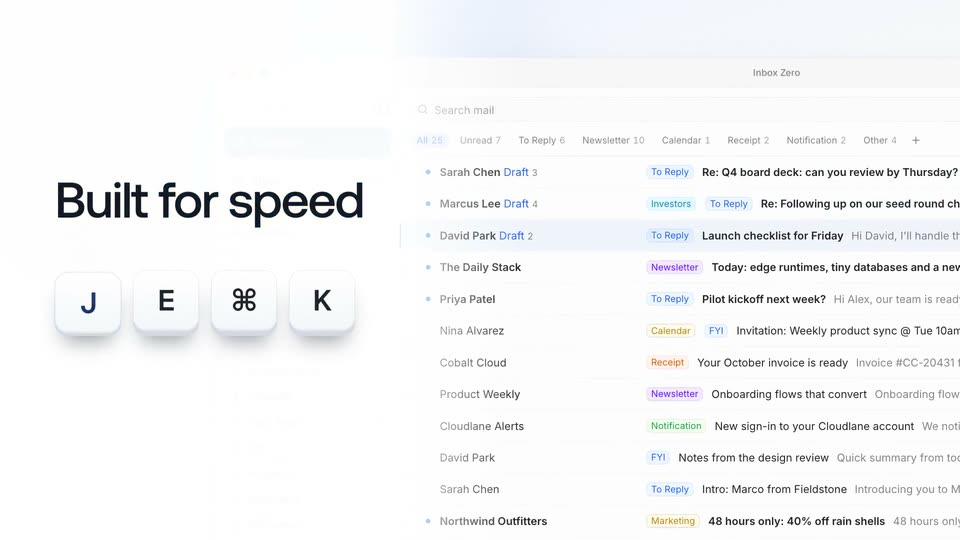
Inbox Zero’s 0:37 launch film runs 19 scenes, about 2.0 s each. The product is on screen from the first frame and 8 features are revealed. The call to action lands at 0:32 (85% in), over a voiceover. The video opens with the product name and tagline, then fires a rapid run of single-feature title cards, each paired with a tight UI demo on the right. Signature moves include headlines that scale or slide in with one accent word in blue, interfaces that blur and sharpen between beats, and 3D tilts on the dashboard and phone reveals.
No filming indicatedEstimated needs: 7 capture groups — your screens or recordings · 1 official logo — reused across the film · 2 3D passages — build or supply
Is this your launch? to your site or press kit.
More like this
3:10

Windsurf Wave 12: Devin features in Windsurf!
Windsurf · Developer tools · Aug 2025
0:40

SaaS Explainer Video for Eduface (Motion Graphics)
Eduface · Jan 2026
Elie Steinbock - Introducing Inbox Zero Mail. The open-source Superhuman alternative., scene by scene
· 19 scenes as text
01 · Product intro · 0:00–0:01
On a plain light background, the blue word Meet sits centered. It shifts to gray as a blue rounded-square inbox icon and the blue words INBOX ZERO fade in to its right, forming the product title.
On-screen text: “Meet”, “INBOX ZERO”
Techniques: Kinetic type
Camera: Static
02 · Product intro · 0:01–0:02
A centered title lockup holds on a pale gray field: the black word 'Meet', a blue rounded-square icon with a white envelope and zero, and the blue text 'INBOX ZERO'. The frame is static with no motion.
On-screen text: “Meet INBOX ZERO”
Camera: Static
03 · Product intro · 0:02–0:04
The headline scales up from the center of a plain light background, the word 'client' set in blue. As the type settles at full size, a blurred inbox interface fades in behind it as a soft backdrop.
On-screen text: “Open-source email client”
Techniques: Kinetic type
Camera: Pan
04 · Feature reveal · 0:04–0:08
The black headline 'Open-source email client' fades as the Inbox Zero window scales up and slides to the top. 'Built for speed' enters on the left, 'speed' in blue, with four keycaps (J, E, ⌘, K) popping in below while the email list drifts down.
On-screen text: “Open-source email client”, “Built for speed”, “J E ⌘ K”
Techniques: UI zoom, Kinetic type
Camera: Push in
05 · Feature reveal · 0:08–0:08
A blurred inbox list fills the background while a sharp command palette on the right lists actions such as Archive and Forward, each tagged with a letter shortcut. On the left, the headline “Built for speed” sits above four keycaps reading J, E, ⌘, K. The shot holds still.
On-screen text: “Built for speed”, “J E ⌘ K”
Camera: Static
06 · Feature reveal · 0:08–0:10
A bold “Built for speed” headline and a row of letter tiles, one holding a logo mark, overlay an email inbox list, then fade out. A cursor moves to the To Reply tab while the labeled message rows hold steady.
On-screen text: “Built for speed”
Techniques: Kinetic type, Cursor demo
Camera: Pan
07 · Feature reveal · 0:10–0:16
A split layout pairs a large kinetic headline on the left with an email thread and a highlighted draft reply on the right. The headline cycles from “Replies, already written” to “Calendar and tools” as app icons pop in beneath it, then the frame blurs out.
On-screen text: “Replies, already written”, “Calendar and tools”
Techniques: Kinetic type
Camera: Pull out
08 · Feature reveal · 0:16–0:17
A plain white left panel holds the headline “Decide together,” in navy and blue, beside a right panel showing an email thread UI with a draft reply and a teammate comment.
On-screen text: “Decide together,”
Camera: Static
09 · Feature reveal · 0:17–0:20
A white screen splits into a left headline and a right product view. The headline “Decide together,” sits in black, then “privately” fades in blue below it. On the right, an email draft and a comment thread scroll into view, ending on a short team exchange.
On-screen text: “Decide together,”, “privately”
Techniques: Kinetic type
Camera: Static
10 · Feature reveal · 0:20–0:22
A blurred email list sits behind a focused account dropdown on the left, where a cursor moves between two listed accounts. On the right, the word Gmail in blue expands into the headline Gmail and Outlook, with Outlook in blue.
On-screen text: “Gmail and Outlook”
Techniques: Cursor demo, Kinetic type
Camera: Static
11 · Feature reveal · 0:22–0:23
A light email inbox list fills the frame as its rows fade in from the bottom. On the right, the bold headline changes from “Gmail and Outlook” to “One inbox”, the word inbox in blue. A small cursor rests at the lower left.
On-screen text: “Gmail and Outlook”, “One inbox”
Techniques: Kinetic type
Camera: Static
12 · Feature reveal · 0:23–0:24
A desktop email inbox fills the frame, rows of sender names, colored category labels and subject lines. The list widens to reveal preview text and timestamps while the headline “One inbox” holds at right.
On-screen text: “One inbox”
Camera: Static
13 · Feature reveal · 0:24–0:25
A blurred close-up of an email inbox list pulls back to reveal an iPhone mockup in 3D perspective, centered on a pale blue background. The phone displays a message list with colored labels and a bottom tab bar.
Techniques: UI zoom, 3D mockup
Camera: Pull out
14 · Feature reveal · 0:25–0:27
A front-facing iPhone on the right shows an email inbox list. On the left, the blue word Native slides in, turns black, and iPhone app slides in beside it. The view then zooms into the screen, blurring the headline.
On-screen text: “Native”, “iPhone app”
Techniques: Kinetic type, UI zoom
Camera: Push in
15 · Feature reveal · 0:27–0:28
A product screen lists email senders with email counts and read-rate bars under the headline Bulk Unsubscribe. The frame sharpens out of a blur, then a cursor glides right to the Select 5 suggested button.
On-screen text: “Bulk Unsubscribe”
Techniques: Cursor demo
Camera: Static
16 · Feature reveal · 0:28–0:29
A white interface under the heading Bulk Unsubscribe lists five checked email senders with counts and read-percentage bars. A cursor taps the Showing 5 suggested pill, leaving a click ring, then glides down to the Read column header.
On-screen text: “Bulk Unsubscribe”
Techniques: Cursor demo
Camera: Static
17 · Feature reveal · 0:29–0:30
A white analytics dashboard, tilted in 3D perspective, drifts right across the frame while the blue word Analytics sharpens into focus on the left. The dashboard shows stat cards, a weekly bar chart, and two ranked lists of domains and email addresses.
On-screen text: “Analytics”
Techniques: Kinetic type, 3D mockup
Camera: Static
18 · Feature reveal · 0:30–0:32
A flat email-notification window titled Inbox Zero sits on the right against a pale gradient, while the label Slack alerts settles from a blue offset into centered dark gray on the left.
On-screen text: “Slack alerts”
Techniques: Kinetic type
Camera: Static
19 · CTA · 0:32–0:37
A blue envelope app icon and the INBOX ZERO wordmark sit centered on a plain off-white field. The tagline fades in word by word beneath them, then a blue Try free for 7 days line and two small service icons drop in below. Locked-off frame, slow pace.
On-screen text: “INBOX ZERO”, “Never miss an important email again.”, “Try free for 7 days”
Techniques: Kinetic type
Camera: Static