3:29


Bolt.new V2 Is Here: The Future of Building
StackBlitz · Developer tools · Sep 2025
Eduface · Jan 2026 · 0:40 · AI-annotated
production MAW Motion Studios · studio MAW Motion Studios
Built as a problem-to-solution arc: a 3D dolly through assignment cards sets the time pressure, then the logo, two feature reveals, a stat and a CTA close on dark teal. Signature moves are the camera push-ins through card grids, flat icon drifts with the green four-point star, and snap or blur text reveals at a steady 123 bpm.
StackBlitz · Developer tools · Sep 2025
Juicebox · Oct 2026
Ramp · Finance · Oct 2026
A white assignment card with bullet lines sits in a 3D field of identical cards and a line-drawn clock. The camera dollies through the cross-shaped layout, then pushes in on the front card while the others blur out of focus.
Techniques: 3D mockup, Parallax
Camera: Push in
Flat white cards and line icons, a clock, a smiley in a speech bubble and document lists, drift across a white background with a soft green glow. The camera pans down and right through the cluster, the cards carrying drop shadows.
Camera: Push in
A green pill labeled Feedback slides down to the center of a soft mint gradient. Small emoji faces and white cursor arrows drift at the edges, and faint card outlines fade in along the bottom.
On-screen text: “Feedback”
Techniques: Kinetic type
Camera: Pan
A green gradient pill bearing the word Feedback sits center on a soft mint background, flanked by blurred emoji spheres with speech-bubble tails. Black line-art document icons slide up from the bottom edge while the pill and spheres drift, giving layered depth.
On-screen text: “Feedback”
Techniques: Kinetic type, Parallax
Camera: Pull out
A green pill badge labeled Feedback slides across the top of a grid of outlined document icons on a pale background, while small green and yellow dots drift near the top edge.
On-screen text: “Feedback”
Techniques: Kinetic type, Particles
Camera: Pull out
A flat grid of outlined document icons fills a light background that shifts to pink. A green Feedback pill hovers at the top while a green dot marks one page and the number 10.47 fades in and out at the center.
On-screen text: “Feedback”, “10.47”
Techniques: Kinetic type
Camera: Push in
A red field darkens at the edges around a grid of black document icons, as a glowing red alarm clock in the center ticks from 19:58 to 20:00. Pale blue lightning bolts flick around the clock beneath a small Feedback pill.
On-screen text: “Feedback”, “20:00”
Techniques: Kinetic type
Camera: Push in
A glowing white 20:00 clock icon pulses at the center of a red radial glow, ringed by flickering white lightning bolts. Faint dark file icons sit in the black background while the digits scale in place.
On-screen text: “20:00”
Techniques: Kinetic type
Camera: Static
A green graduation cap scales down from a large centered shape to a small icon above the letter f, while the dark navy wordmark Eduface appears on white. A gray bar rises along the bottom edge.
Camera: Static
The Eduface wordmark with a green leaf accent sits on a white field, then shrinks and slides up into the header of a screen as a breadcrumb line fades in on the left.
Techniques: UI zoom
Camera: Pull out
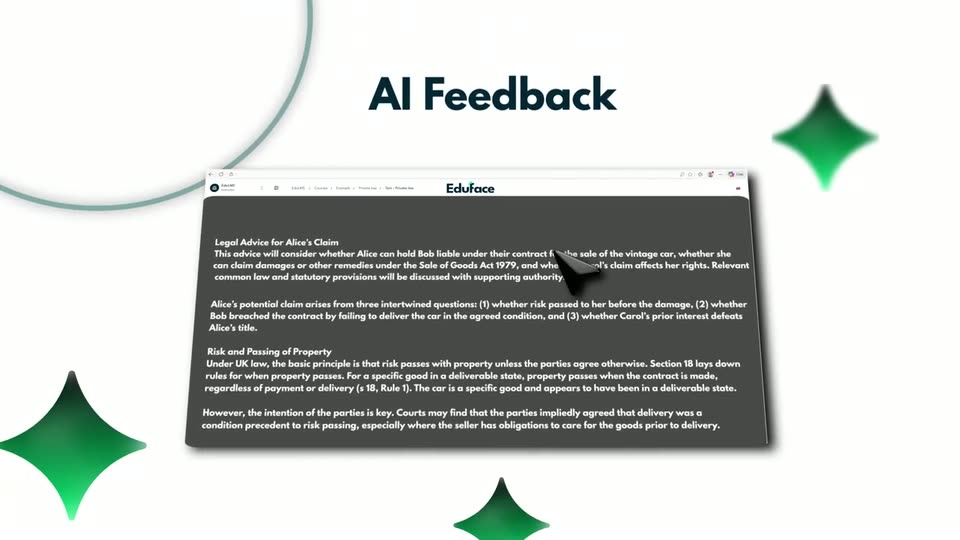
The Eduface browser window, first seen as a close-up of white legal text, pulls back into a tilted 3D perspective under the bold “AI Feedback” headline. A green curve and a green cone frame it on a white background.
On-screen text: “AI Feedback”
Techniques: UI zoom, 3D mockup
Camera: Pull out
A dark blue AI Feedback title sits above a tilted 3D browser mockup of the Eduface editor, its legal document text overlapping mid-transition. A white AI feedback card slides in from the right over a white background dotted with green stars.
On-screen text: “AI Feedback”
Techniques: 3D mockup
Camera: Push in
A browser window showing a document and an AI chat panel slide down and left into the center. The large text 'AI Feedback' moves up and fades out. Green four-pointed stars float in the background.
On-screen text: “AI Feedback”
Techniques: Kinetic type, 3D mockup
Camera: Pull out
A blurred grading document sits center while white question and feedback cards slide right at different speeds, green four-point sparkles drifting with them. The bold dark navy AI Grading headline holds still top-left.
On-screen text: “AI Grading”
Techniques: Parallax
Camera: Pull out
A 3D stack of grading cards sits under a navy “AI Grading” headline. The camera pushes in to reframe on the student answer and AI feedback cards as a cursor and thumbs-up, thinking, thumbs-down emoji pop in.
On-screen text: “AI Grading”
Techniques: 3D mockup, Parallax, UI zoom, Cursor demo
Camera: Push in
White feedback cards glide across the left edge, one bearing a dark tag and gray text lines. A flat clock icon with a black rim sits center-right, its hand sweeping from the top toward the lower right as a green wedge fills the dial.
Camera: Push in
A white rounded card titled Student Answer with placeholder lines and a black cursor arrow sits beside a black-rimmed clock with a green face. The pair drifts slowly right past blurred green diamonds on a white background.
On-screen text: “Student Answer”
Techniques: Parallax
Camera: Pan
A white card labeled Student Answer with placeholder lines floats in the center, overlaid by a black cursor arrow. Blurred green and black shapes drift in the background as the card and cursor shift right.
Techniques: 3D mockup
Camera: Pan
A white document card with gray lines and a folded corner sits at the top beside a black dial, with blurred green sparkles at the edges. A large 86% stat appears at center as a green progress arc draws in from the bottom left, capped by a glowing dot.
On-screen text: “Student Answer”, “86%”
Techniques: Kinetic type
Camera: Static
A large dark navy 86% holds center on a white field while a green wavy line draws in beneath it, ending in a glowing dot. Teal sparkle shapes and a dotted teal blob drift slowly across the corners.
On-screen text: “86%”
Techniques: Parallax
Camera: Static
On a white background, the words Clear, Helpful and Actionable take turns in the center, each scaling or sliding in. Teal circle outlines and green sparkles drift at the corners, and a gray play-shaped triangle fades in at the end.
On-screen text: “Clear”, “Helpful”, “Actionable”
Techniques: Kinetic type
Camera: Static
The word Actionable sits centered in dark navy on a white field, framed by thin teal circle outlines and a green four-point sparkle at the lower right. A black cursor arrow glides up from the bottom edge toward the text.
On-screen text: “Actionable”
Camera: Static
The Eduface wordmark, white bold sans with a small green leaf accent above the letters, sits centered on a dark teal field. It eases in with a soft reveal, then holds still on a locked-off frame.
On-screen text: “Eduface”
Camera: Static
On a dark teal field, the white Eduface wordmark, capped with a green mortarboard, scales down and glides to the top. A green pill button reading START FOR FREE scales in below, then the URL eduface.me snaps in with a short blur.
On-screen text: “START FOR FREE”, “eduface.me”
Techniques: Kinetic type
Camera: Static